Better Business Bureau Reviews: How To Find & Leave One
Categories: Legal Marketing Strategies
 Abram Ninoyan
Founder & Senior Performance Marketer
Credentials: Google Partner, Google Ads Search Certified, Google Ads Display Certified, Google Ads Measurement Certified, Google Analytics (IQ) Certified, HubSpot Inbound Certified, HubSpot Social Media Marketing Certified, Conversion Optimization Certified
Expertise: Google Ads, Meta Ads, Conversion Rate Optimization, GA4 & Google Tag Manager, Lead Generation, Marketing Funnel Optimization, PPC Management
LinkedIn Profile
Before a potential client ever picks up the phone to call a law firm, they search for proof that the firm can be trusted. One of the oldest and most recognized sources of that proof is Better Business...
Key Takeaways
- Better Business Bureau Reviews: How To Find & Leave One
- What BBB reviews are and how they work
- Step 1. Find a business on BBB and open its profile
- Step 2. Evaluate the rating, reviews, and complaint history
Better Business Bureau Reviews: How To Find & Leave One
Before a potential client ever picks up the phone to call a law firm, they search for proof that the firm can be trusted. One of the oldest and most recognized sources of that proof is Better Business Bureau reviews. BBB profiles show ratings, customer complaints, and real feedback, all of which can shape whether someone chooses your firm or moves on to a competitor.
For attorneys, managing your BBB presence is a real part of reputation management, not just a formality. At GavelGrow, we help law firms build trust at every digital touchpoint, and your BBB profile is one of them. A strong review profile supports the credibility that drives consultations and signed cases.
This guide walks you through how to find BBB reviews on any business, how to leave a review yourself, and what makes the BBB review system different from Google or Yelp. Whether you're checking a vendor's reputation or making sure your own firm looks its best, you'll have a clear process by the end.
What BBB reviews are and how they work
The Better Business Bureau is a nonprofit organization that has tracked business conduct since 1912. It lets consumers submit star-rated reviews and formal complaints, and it grades businesses on an A+ to F scale. Unlike Google or Yelp, the BBB doesn't just aggregate opinions. It factors in complaint history, transparency, and how a business responds to problems.
A BBB profile isn't just a review page. It's a public record of how a business handles disputes, which carries more weight with cautious buyers.
The difference between reviews and complaints
Better business bureau reviews and BBB complaints are two separate things on the same profile, and knowing which is which helps you use the platform correctly. A review is a voluntary star rating (1 to 5 stars) that any customer can submit, similar to what you'd leave on Google. A complaint is a formal dispute that the BBB routes directly to the business and expects a response within a set time window. Both show up on the same profile, but complaints carry more formal weight because the business is required to address them.
How BBB ratings are calculated
The BBB assigns letter grades from A+ to F based on a point system that looks at multiple factors. Your grade as a business reflects things like how long you've been operating, whether you're BBB-accredited, the volume and severity of complaints filed, how many complaints remain unresolved, and whether any government action has been taken against the business. Customer reviews don't directly affect the letter grade, but they do shape how your full profile looks to someone visiting it for the first time.
Step 1. Find a business on BBB and open its profile
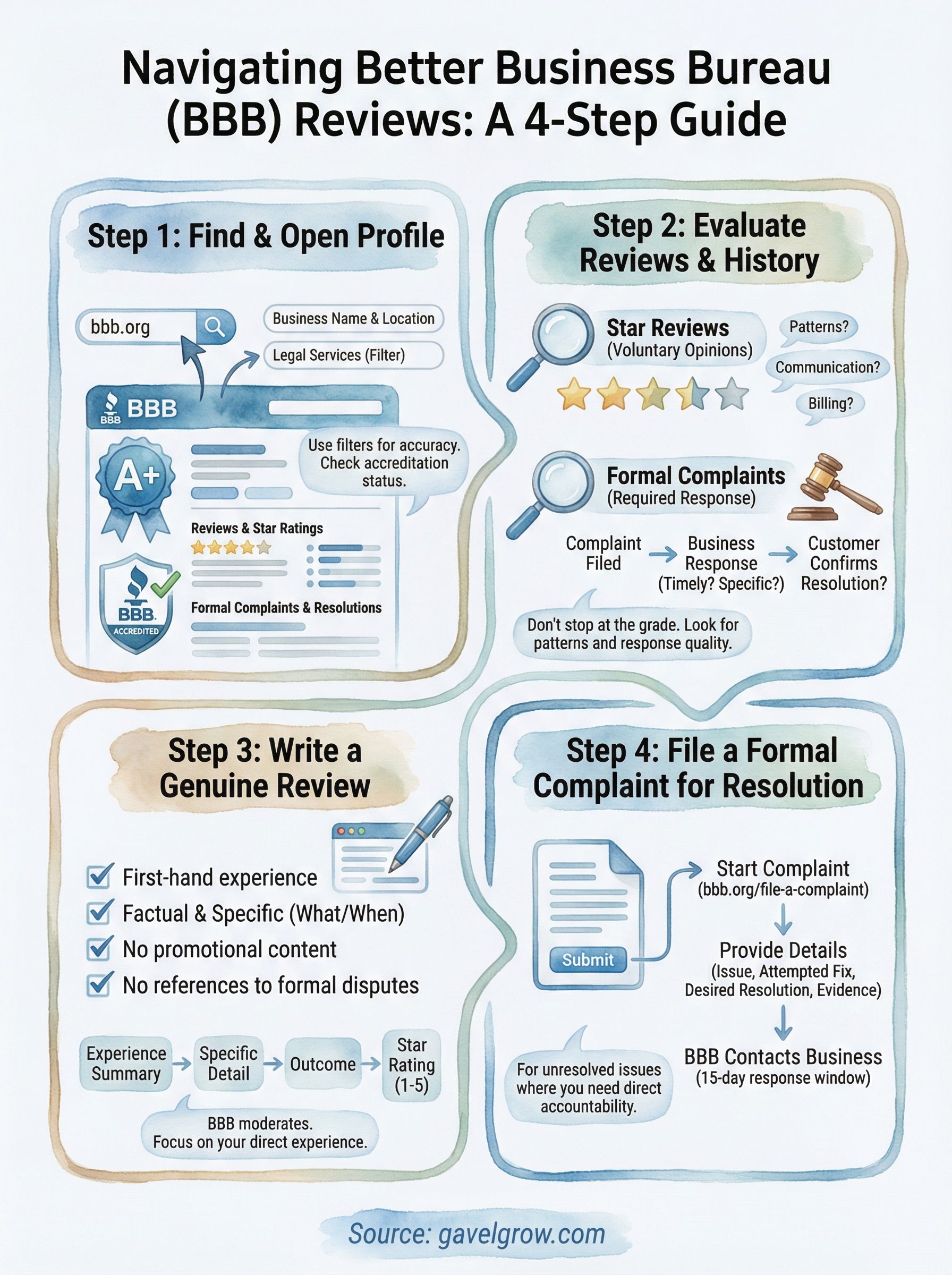
Finding a business on the BBB takes less than a minute. Go to bbb.org and use the search bar at the top of the page. Type the business name and location (city, state, or ZIP code) to narrow results, then click the correct listing from the results page.
Use the right search filters
The BBB search gives you filter options to refine results by distance, accreditation status, and category. If you're looking for a law firm specifically, use "Legal Services" as the category filter. This helps you pull up the correct profile when multiple businesses share a similar name in the same region.
Accredited businesses display a BBB seal on their profile, which means they've agreed to the BBB's standards for trust and paid an accreditation fee.
What you'll see on the profile page
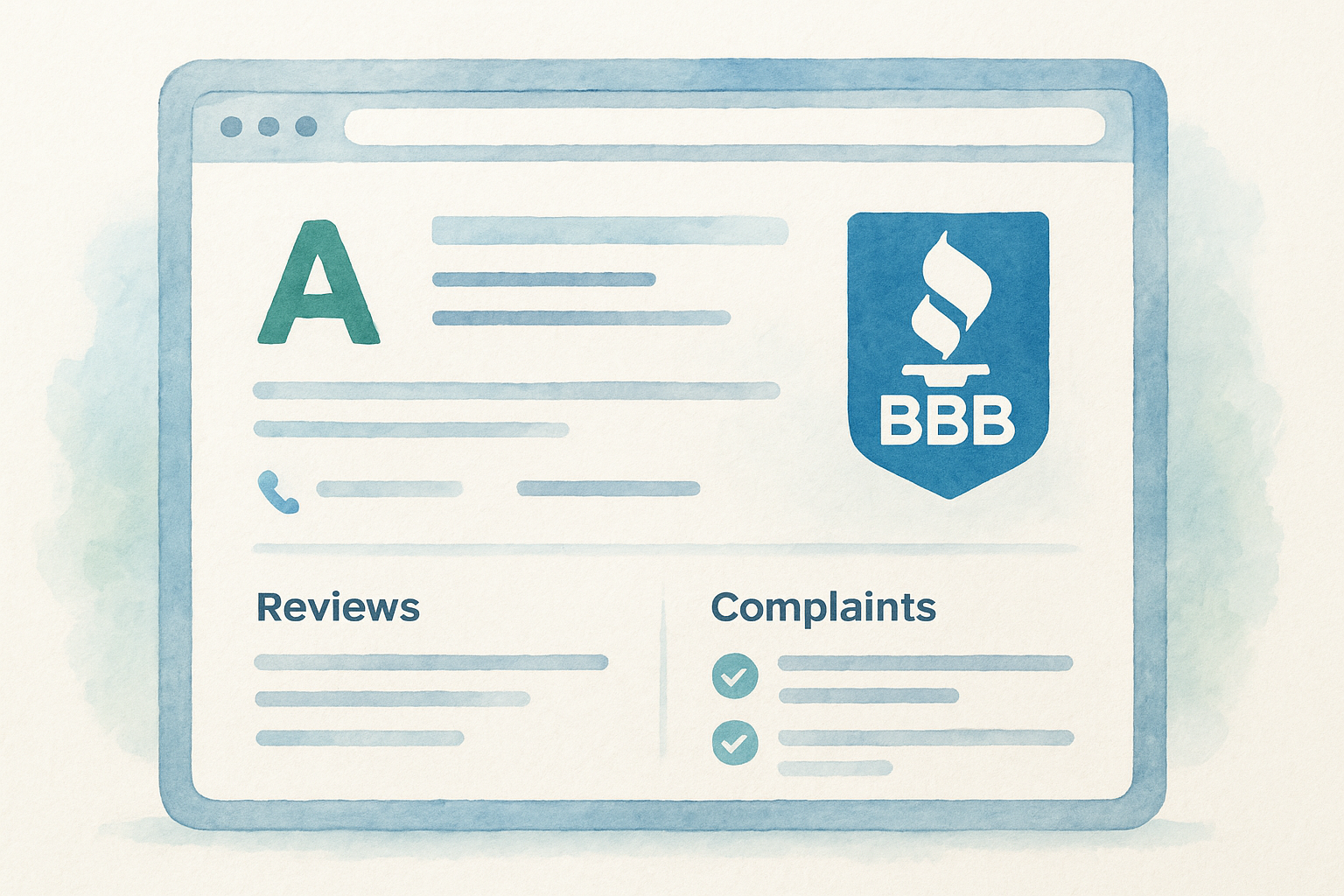
Once you open a profile, you'll find the letter grade, accreditation status, and contact details at the top. Scroll down to see better business bureau reviews, formal complaints, and the business's response history. Each complaint entry shows whether it was resolved, giving you a clear picture of how the firm actually handles client disputes.
Step 2. Evaluate the rating, reviews, and complaint history
Once you open a profile, don't stop at the letter grade. The grade gives you a starting point, but the full picture comes from reading the reviews and complaint history together. A business can hold an A+ rating while still having several unresolved complaints or a pattern of defensive responses to negative feedback.
Read the reviews in order
Sort the better business bureau reviews by most recent first. Look for patterns across multiple entries, not just individual opinions. If several reviewers mention the same issue, such as poor communication or billing disputes, that repetition is a signal worth taking seriously rather than dismissing as a one-off complaint.
One bad review rarely defines a business, but three reviewers describing the same problem usually does.
Check the complaint response pattern
Pay attention to how the business responded to formal complaints, not just whether it responded at all. A firm that resolves complaints quickly and professionally signals strong client service. Use this quick checklist when reviewing a profile:
- Did the business respond within the BBB's required timeframe?
- Was the response specific to the complaint or generic?
- Did the customer confirm the complaint was resolved?
Step 3. Leave a BBB review that gets approved
To leave a BBB review, go to bbb.org, search for the business, and open its profile. Scroll to the reviews section and click "Write a Review." You'll need to create a free BBB account before submitting. The BBB requires a real transaction with the business to screen out fake or incentivized reviews.
The BBB will reject reviews that contain offensive language, promotional content, or references to legal disputes already filed as formal complaints.
What the BBB requires from your review
Your review must describe a direct personal experience with the business. Keep your language factual and specific. Avoid vague statements and instead describe what happened and when. The BBB moderates all submissions, so detailed and genuine reviews are far more likely to get approved.
Before you submit, confirm your review meets these requirements:
- Written from first-hand experience
- Free of promotional language or competitor mentions
- Specific about dates, services, and outcomes
- No references to pending legal or formal complaints
A simple review template
Use this structure to write better business bureau reviews that pass moderation:
- Experience summary: What service did you receive and when?
- Specific detail: One or two facts about what worked or did not
- Outcome: How did the business handle your situation?
- Star rating: Match it directly to your actual experience
Step 4. File a BBB complaint when you need a resolution
A BBB complaint is the right move when you want direct accountability from a business, not just a public record of your experience. Unlike better business bureau reviews, which inform other consumers, a formal complaint triggers a structured process where the BBB contacts the business and requires a written response within a set window, typically 15 business days.
File a complaint only when you have a specific, unresolved issue that the business has failed to address on its own.
How to submit your complaint
Go to bbb.org/file-a-complaint and click "Start Your Complaint." You'll need to provide your contact information, a detailed description of the issue, the amount of money involved, and what resolution you're seeking. Be specific. Vague submissions are harder for the BBB to act on and less likely to produce results.
Follow this structure when writing your complaint:
- What happened: Describe the service, transaction date, and exact problem
- What you tried: Summarize any contact attempts you made with the business
- What you want: State a clear, reasonable resolution (refund, correction, response)
- Supporting documents: Attach receipts, contracts, or email records where available
Your complaint becomes part of the public profile once the BBB processes it.
Wrap up and keep your reputation accurate
Your BBB profile works as a living record of how your business treats clients. By searching profiles before engaging a vendor, reading better business bureau reviews alongside complaint histories, and knowing how to submit your own review correctly, you give yourself a clear advantage when making business decisions. Each step in this guide moves you from a passive observer to someone who uses the BBB as an actual decision-making tool.
For law firms, reputation carries even more weight. A potential client who finds unresolved complaints or thin review history on your profile will simply call another attorney. Keeping your BBB profile accurate, your responses timely, and your reviews current is a direct line to more consultations. Your online presence extends well beyond one platform, and every touchpoint either builds or costs trust. If you want a team that treats your reputation as a growth asset, talk to a legal marketing specialist at GavelGrow.
Frequently Asked Questions
What are Better Business Bureau (BBB) reviews?
BBB reviews are voluntary star ratings from 1 to 5 that customers submit on a business's Better Business Bureau profile, similar to a Google review. What sets the BBB apart is that its profiles combine those reviews with formal complaint history and an A+ to F letter grade, so a profile is less an opinion aggregator and more a public record of how a business handles disputes. The BBB has tracked business conduct since 1912.
What is the difference between a BBB review and a BBB complaint?
A BBB review is a voluntary star rating any customer can submit, while a BBB complaint is a formal dispute the BBB routes directly to the business and expects a response to within a set window, typically 15 business days. Both appear on the same profile, but complaints carry more formal weight because the business is required to address them. Reviews inform other consumers; complaints are meant to produce a resolution.
How are BBB letter grades calculated?
The BBB assigns grades from A+ to F using a point system that weighs factors like how long a business has operated, whether it's BBB-accredited, the volume and severity of complaints, how many remain unresolved, and whether any government action has been taken. Customer reviews don't directly change the letter grade, but they do shape how the overall profile looks to someone visiting it for the first time.
How do you leave a BBB review that gets approved?
To get a BBB review approved, write from first-hand experience, keep the language factual and specific about dates and services, and avoid promotional content or competitor mentions. You'll need a free BBB account, and the BBB requires a real transaction with the business. It rejects reviews with offensive language, promotional material, or references to disputes already filed as formal complaints, since it moderates every submission.
Why do BBB reviews matter for a law firm's reputation?
BBB reviews matter because prospective clients look for proof a firm can be trusted before they ever call, and a BBB profile shows ratings, complaints, and how a firm responds to problems. If someone finds unresolved complaints or a thin review history, they may simply call another attorney. Keeping your profile accurate, your responses timely, and your reviews current supports the credibility that drives consultations and signed cases.
Frequently Asked Questions
What are Better Business Bureau (BBB) reviews?
BBB reviews are voluntary star ratings from 1 to 5 that customers submit on a business's Better Business Bureau profile, similar to a Google review. What sets the BBB apart is that its profiles combine those reviews with formal complaint history and an A+ to F letter grade, so a profile is less an opinion aggregator and more a public record of how a business handles disputes. The BBB has tracked business conduct since 1912.
What is the difference between a BBB review and a BBB complaint?
A BBB review is a voluntary star rating any customer can submit, while a BBB complaint is a formal dispute the BBB routes directly to the business and expects a response to within a set window, typically 15 business days. Both appear on the same profile, but complaints carry more formal weight because the business is required to address them. Reviews inform other consumers; complaints are meant to produce a resolution.
How are BBB letter grades calculated?
The BBB assigns grades from A+ to F using a point system that weighs factors like how long a business has operated, whether it's BBB-accredited, the volume and severity of complaints, how many remain unresolved, and whether any government action has been taken. Customer reviews don't directly change the letter grade, but they do shape how the overall profile looks to someone visiting it for the first time.
How do you leave a BBB review that gets approved?
To get a BBB review approved, write from first-hand experience, keep the language factual and specific about dates and services, and avoid promotional content or competitor mentions. You'll need a free BBB account, and the BBB requires a real transaction with the business. It rejects reviews with offensive language, promotional material, or references to disputes already filed as formal complaints, since it moderates every submission.
Why do BBB reviews matter for a law firm's reputation?
BBB reviews matter because prospective clients look for proof a firm can be trusted before they ever call, and a BBB profile shows ratings, complaints, and how a firm responds to problems. If someone finds unresolved complaints or a thin review history, they may simply call another attorney. Keeping your profile accurate, your responses timely, and your reviews current supports the credibility that drives consultations and signed cases.