KeywordTool.io: Pricing, Reviews & Free Alternatives
Categories: Legal Marketing Strategies
 Abram Ninoyan
Founder & Senior Performance Marketer
Credentials: Google Partner, Google Ads Search Certified, Google Ads Display Certified, Google Ads Measurement Certified, Google Analytics (IQ) Certified, HubSpot Inbound Certified, HubSpot Social Media Marketing Certified, Conversion Optimization Certified
Expertise: Google Ads, Meta Ads, Conversion Rate Optimization, GA4 & Google Tag Manager, Lead Generation, Marketing Funnel Optimization, PPC Management
LinkedIn Profile
Keyword research sits at the foundation of every successful legal marketing campaign. Whether you're trying to rank for "car accident lawyer in Dallas" or "how to file for divorce in Fl...
Key Takeaways
- KeywordTool.io: Pricing, Reviews & Free Alternatives (2026)
- What KeywordTool.io is and how it works
- What you get in free vs Pro
- KeywordTool.io pricing in 2026
KeywordTool.io: Pricing, Reviews & Free Alternatives (2026)
Keyword research sits at the foundation of every successful legal marketing campaign. Whether you're trying to rank for "car accident lawyer in Dallas" or "how to file for divorce in Florida," the tools you use to find and validate those search terms directly affect your results. KeywordTool.io is one of the more popular options on the market, and if you've landed here, you're probably trying to figure out whether it's worth paying for, or whether a free alternative gets the job done.
At GavelGrow, we've tested dozens of keyword research platforms while building SEO and content strategies for over 500 U.S. law firms. We've used KeywordTool.io alongside competitors like Ahrefs, SEMrush, and Ubersuggest to pull search data across every major practice area. That hands-on experience gives us a clear picture of where this tool delivers and where it falls short, especially for legal professionals who need accurate, location-specific keyword data.
This article breaks down KeywordTool.io's current pricing tiers, walks through real user reviews, and covers the strongest free alternatives available in 2026. If you're a law firm owner or marketing manager evaluating your toolkit, this guide will help you make a decision based on facts rather than sales pages.
What KeywordTool.io is and how it works
KeywordTool.io is a keyword research platform that pulls autocomplete suggestions directly from search engines, including Google, Bing, YouTube, and Amazon. Unlike tools that rely on clickstream data or proprietary databases, keywordtool.io works by scraping the autocomplete API of each platform, meaning the suggestions you see reflect real user search behavior rather than estimated data. That makes it particularly useful for finding long-tail keyword variations that other tools miss.
The autocomplete method surfaces keyword ideas based on what people actually type, not just what a dataset predicts they type.
Where the data comes from
The tool sends automated queries to search engines and collects the dropdown suggestions that appear when users start typing. Google autocomplete, for example, generates hundreds of variations for any seed keyword by appending letters, numbers, and prepositions. KeywordTool.io cycles through these combinations and compiles the results into a searchable list. For law firms, you can type "personal injury lawyer" and get back dozens of location-based, question-based, and comparison-based variations that real people are actively searching for.
Each result in the free version shows the keyword suggestion itself, but search volume, CPC (cost per click), and competition data stay locked behind a paid plan. That limitation matters before you commit any budget to the tool.
What search platforms it covers
KeywordTool.io pulls data from eight major platforms: Google, YouTube, Bing, Amazon, eBay, App Store, Play Store, and Instagram. For legal marketing, Google is the only platform that significantly moves the needle, since that's where potential clients search for attorneys. Here's a quick breakdown of which platforms are worth your attention:
- Google: Primary channel for legal keyword research
- YouTube: Useful for video content strategy if you publish attorney guides
- Bing: Worth checking for older demographics in certain practice areas
- Amazon/eBay/App stores: Largely irrelevant for law firm marketing
What you get in free vs Pro
The free version of keywordtool.io gives you unlimited keyword suggestions, but it deliberately withholds the data that drives actual decisions. You can generate a long list of keyword ideas from any seed term, but without search volume or CPC figures, you're essentially guessing which terms are worth targeting.
The free tier works well for brainstorming, but it won't tell you whether 50 people or 5,000 people search for a given term each month.
Free plan limitations
On the free plan, every metric column shows a locked icon. You see the keyword text itself, along with trend indicators in some cases, but no hard numbers. For law firm marketing, where the difference between 10 monthly searches and 1,000 monthly searches changes your entire content strategy, that gap matters significantly.
What Pro unlocks
Upgrading to a paid plan removes the locks on search volume, CPC, and competition scores for every keyword suggestion. You also get access to bulk export, which lets you pull keyword lists directly into a spreadsheet for analysis. The Pro plans additionally unlock keyword data for all supported platforms, not just Google, which becomes relevant if you're building a YouTube content strategy around practice-area explainer videos. For most law firms, the Google-specific data alone justifies the cost evaluation.
KeywordTool.io pricing in 2026
Keywordtool.io runs on three paid tiers: Pro Basic, Pro Plus, and Pro Business. Each plan unlocks search volume and CPC data, but higher tiers add features like larger result sets, API access, and additional user seats. Pricing is available on a monthly or annual billing cycle, with annual billing offering a noticeable discount.
Paying annually cuts your effective monthly cost by roughly 20% compared to month-to-month billing.
Plan breakdown
The three plans scale primarily on results volume and API access. Here's how they compare at current pricing:
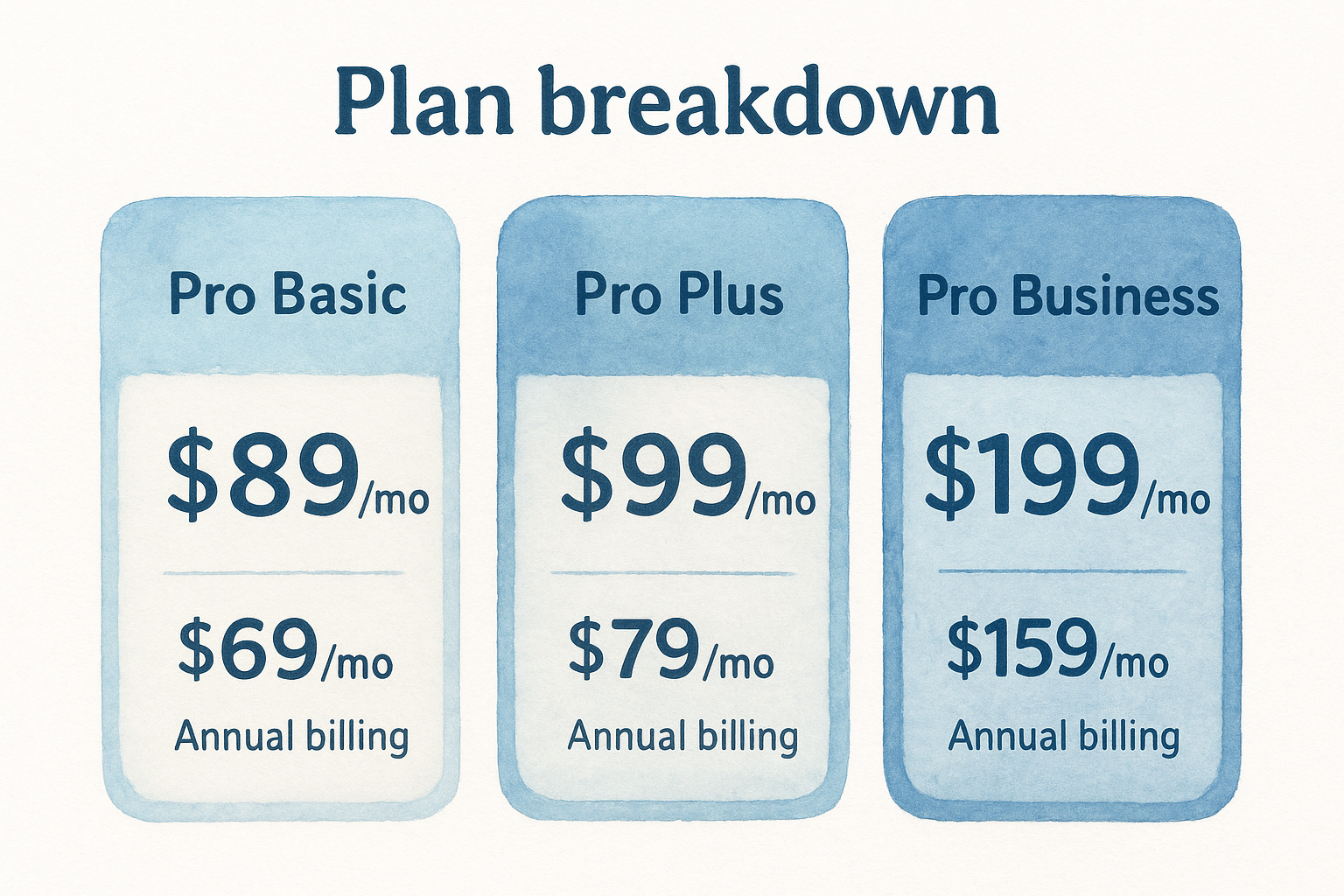
These figures reflect 2026 pricing and may change, so confirm the current rates directly on the keywordtool.io website before purchasing.
What you actually pay for
For most law firm marketing teams, Pro Basic covers the practical requirements: keyword suggestions, search volume, CPC, and competition scores across all supported platforms. The jump to Pro Plus primarily increases the number of results returned per search, which matters less for single-practice-area firms.
The Pro Business tier makes the most sense for agencies or larger firms managing multiple campaigns simultaneously and needing API connectivity to push keyword data into their own reporting systems.
KeywordTool.io reviews and common complaints
Keywordtool.io holds solid ratings across major software review platforms, with users generally praising the volume of keyword suggestions it generates from a single seed term. That said, consistent complaints appear across multiple review sources, and they cluster around the same two or three issues.
What users say they like
Most positive feedback focuses on the interface and suggestion depth. Users find the platform easy to navigate without any learning curve, and the autocomplete-based approach reliably surfaces long-tail variations that database-driven tools skip. Law firm teams specifically mention the question-based keyword filters as a practical shortcut for building FAQ content.
The autocomplete method tends to outperform traditional databases for hyper-local and niche search terms.
Where users push back
The recurring complaints fall into clear patterns. Here are the issues you'll see flagged most frequently:
- Accuracy of search volume data: Multiple reviewers note that the volume figures don't always align with what Google Search Console or Google Ads show for the same terms
- Cost relative to competitors: At $69 to $89 per month, users regularly compare keywordtool.io unfavorably against tools like Ubersuggest that offer similar data at lower price points
- Limited competitive analysis: The tool surfaces keywords but provides no backlink data, no SERP analysis, and no content gap features, which forces you to run a second tool alongside it
Free alternatives and when to choose them
Before paying for any keyword tool, you should know what free options can realistically replace it. For most small law firms with tight budgets, two free tools from Google cover the majority of what keywordtool.io charges for, especially if your focus stays on Google search rankings.
Free tools work well for firms just starting keyword research, but they require more manual effort to produce the same output.
Google Keyword Planner and Search Console
Google Keyword Planner, available through a Google Ads account, provides search volume ranges, CPC estimates, and keyword suggestions at no cost. It pulls directly from Google's own data, making it the most reliable free source for volume accuracy. Pair it with Google Search Console to see the exact queries already driving traffic to your site.

These two tools cover the core research tasks:
- Keyword Planner: New keyword discovery and volume estimates
- Search Console: Expanding and tracking existing search rankings
When keywordtool.io still wins
Keywordtool.io generates far more autocomplete-based suggestions per seed term than Keyword Planner typically returns. For a law firm building a large content library across multiple practice areas, the paid tool saves significant research time compared to running manual queries.
Free tools require considerably more effort to match that output volume. If you're publishing one or two pieces per month, Google's free options handle the workload without any subscription cost.
Next steps
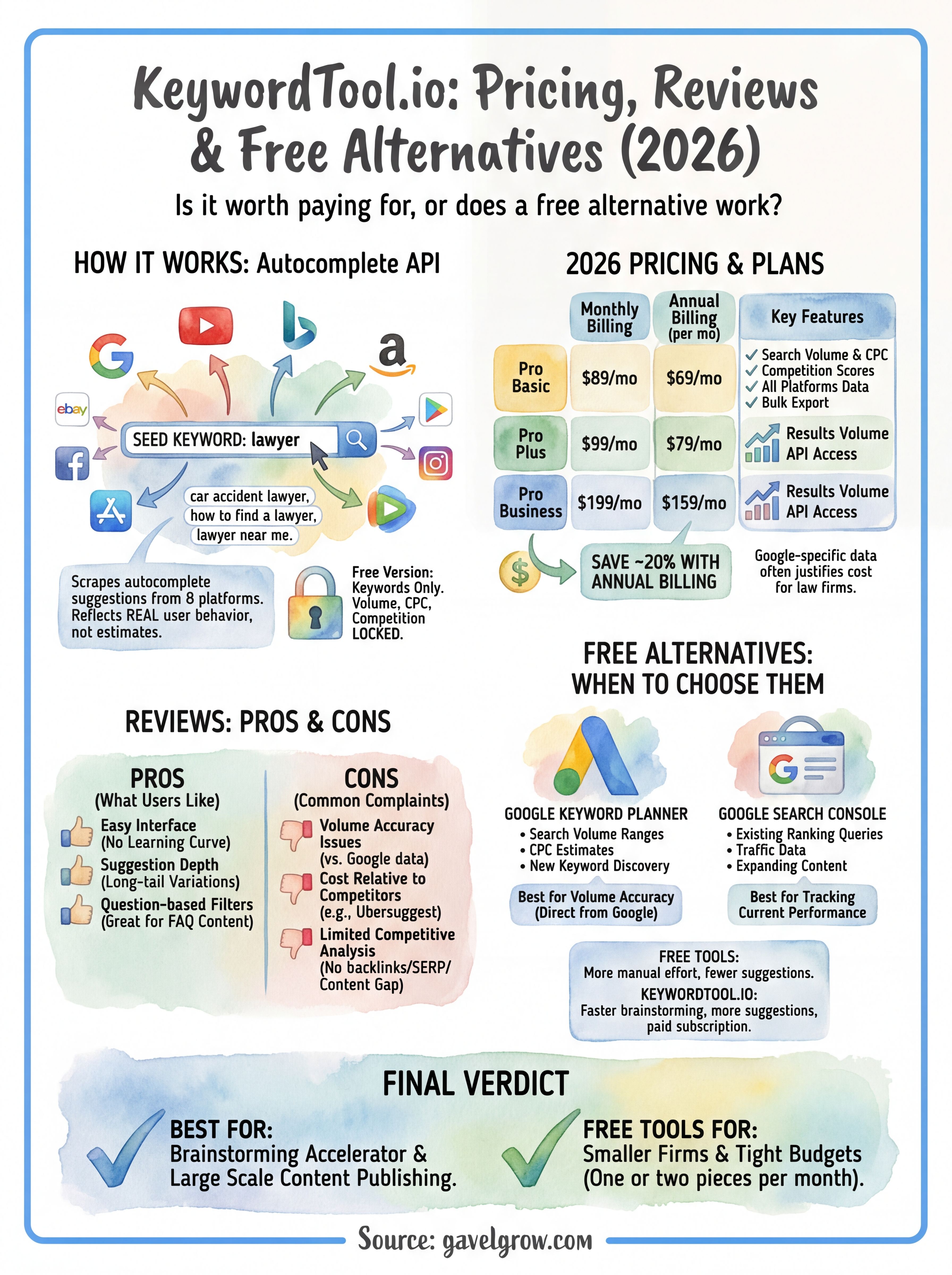
Keywordtool.io works best as a brainstorming accelerator for law firms that publish content at scale and need large keyword lists fast. If you're just starting out or operating on a tight budget, Google Keyword Planner and Search Console cover the research fundamentals without a monthly subscription. If you're publishing regularly across multiple practice areas, the paid plans save enough manual research time to justify the cost.
The bigger question isn't which keyword tool you pick. It's whether your firm has a clear strategy for turning keyword data into signed cases. The right tool only matters if the content and campaigns built around it convert visitors into consultations. That requires more than a good keyword list.
If you want a practice-area-specific marketing plan built around real search data for your market, the team at GavelGrow offers a free 45-minute strategy consultation that includes a competitive analysis and a custom roadmap for your firm.
Frequently Asked Questions
What is KeywordTool.io and how does it work?
KeywordTool.io is a keyword research platform that pulls autocomplete suggestions directly from search engines, including Google, Bing, YouTube, and Amazon. Instead of relying only on a proprietary database, it scrapes each platform's autocomplete API, so the suggestions reflect what people actually type. That makes it useful for finding long-tail, location-based, and question-based keyword variations other tools may miss.
What do you get with the free version of KeywordTool.io?
The free plan provides unlimited keyword suggestions from any seed term but keeps the data that drives decisions, search volume, CPC, and competition, locked behind a paid plan. It works well for brainstorming and generating long lists of ideas, but it won't tell you whether a term gets 50 or 5,000 searches a month, which limits how confidently you can prioritize.
What are the main complaints about KeywordTool.io?
Reviews cluster around a few recurring issues: search-volume figures that don't always match what Google Search Console or Google Ads report for the same terms, pricing that users compare unfavorably to lower-cost alternatives, and limited competitive analysis with no backlink data, SERP analysis, or content-gap features. Many users end up running a second tool alongside it.
What are the best free alternatives to KeywordTool.io?
For firms focused on Google, two free Google tools cover most of the need. Google Keyword Planner (via a Google Ads account) gives search-volume ranges, CPC estimates, and keyword ideas drawn from Google's own data, while Google Search Console shows the exact queries already sending traffic to your site. Together they handle new keyword discovery plus tracking and expanding existing rankings.
When is a paid keyword tool worth it for a law firm?
A paid tool makes the most sense when you publish content at scale across multiple practice areas and need large keyword lists quickly, since it can generate far more autocomplete-based suggestions per seed term than free options and save meaningful research time. If you publish only one or two pieces a month or run on a tight budget, Google's free tools usually cover the fundamentals.
Frequently Asked Questions
What is KeywordTool.io and how does it work?
KeywordTool.io is a keyword research platform that pulls autocomplete suggestions directly from search engines, including Google, Bing, YouTube, and Amazon. Instead of relying only on a proprietary database, it scrapes each platform's autocomplete API, so the suggestions reflect what people actually type. That makes it useful for finding long-tail, location-based, and question-based keyword variations other tools may miss.
What do you get with the free version of KeywordTool.io?
The free plan provides unlimited keyword suggestions from any seed term but keeps the data that drives decisions, search volume, CPC, and competition, locked behind a paid plan. It works well for brainstorming and generating long lists of ideas, but it won't tell you whether a term gets 50 or 5,000 searches a month, which limits how confidently you can prioritize.
What are the main complaints about KeywordTool.io?
Reviews cluster around a few recurring issues: search-volume figures that don't always match what Google Search Console or Google Ads report for the same terms, pricing that users compare unfavorably to lower-cost alternatives, and limited competitive analysis with no backlink data, SERP analysis, or content-gap features. Many users end up running a second tool alongside it.
What are the best free alternatives to KeywordTool.io?
For firms focused on Google, two free Google tools cover most of the need. Google Keyword Planner (via a Google Ads account) gives search-volume ranges, CPC estimates, and keyword ideas drawn from Google's own data, while Google Search Console shows the exact queries already sending traffic to your site. Together they handle new keyword discovery plus tracking and expanding existing rankings.
When is a paid keyword tool worth it for a law firm?
A paid tool makes the most sense when you publish content at scale across multiple practice areas and need large keyword lists quickly, since it can generate far more autocomplete-based suggestions per seed term than free options and save meaningful research time. If you publish only one or two pieces a month or run on a tight budget, Google's free tools usually cover the fundamentals.