Unbounce Landing Page Builder: Features, Pricing, And Pros
Categories: Legal Marketing Strategies
 Abram Ninoyan
Founder & Senior Performance Marketer
Credentials: Google Partner, Google Ads Search Certified, Google Ads Display Certified, Google Ads Measurement Certified, Google Analytics (IQ) Certified, HubSpot Inbound Certified, HubSpot Social Media Marketing Certified, Conversion Optimization Certified
Expertise: Google Ads, Meta Ads, Conversion Rate Optimization, GA4 & Google Tag Manager, Lead Generation, Marketing Funnel Optimization, PPC Management
LinkedIn Profile
Landing pages can make or break a law firm's paid advertising campaigns. Send traffic from Google Ads to your homepage, and you'll watch cost-per-case climb while conversions drop. That's why tools li...
Key Takeaways
- Unbounce Landing Page Builder: Features, Pricing, And Pros
- What Unbounce is and how it works
- Why dedicated landing pages matter
- Key Unbounce features that impact conversions
Unbounce Landing Page Builder: Features, Pricing, And Pros
Landing pages can make or break a law firm's paid advertising campaigns. Send traffic from Google Ads to your homepage, and you'll watch cost-per-case climb while conversions drop. That's why tools like the Unbounce landing page builder have become go-to solutions for marketers who need dedicated, conversion-focused pages, without waiting on a developer. But choosing the right builder matters, especially when your ad spend runs into five or six figures a month.
Unbounce has been around since 2009, offering drag-and-drop page creation, A/B testing, and AI-powered optimization features. It serves a broad range of industries, from e-commerce to SaaS to professional services. For law firms specifically, though, the question isn't just whether Unbounce works, it's whether a general-purpose builder meets the compliance, intake, and attribution demands that legal marketing requires. At GavelGrow, we've helped over 500 U.S. law firms optimize every step from ad click to signed retainer, so we understand what actually moves the needle on conversion rates for legal landing pages.
This article breaks down Unbounce's core features, current pricing tiers, and real strengths and weaknesses so you can decide whether it belongs in your marketing stack. We'll cover what it does well, where it falls short, and what to look for if your firm needs something more specialized than a one-size-fits-all page builder, including legal-specific alternatives worth considering.
What Unbounce is and how it works
Unbounce is a cloud-based landing page platform that lets marketers build, publish, and test standalone web pages without writing code. You design pages using a visual editor, publish them to a custom domain, and then run experiments to improve conversion rates over time. The platform launched in 2009 and has since expanded well beyond basic page creation, adding AI-powered traffic optimization, pop-ups, sticky bars, and integrations with most major marketing tools. It sits in the category of dedicated conversion platforms rather than general website builders like Wix or Squarespace, because its entire feature set is oriented toward turning ad traffic into leads or sales.
The drag-and-drop editor and template library
The core of the unbounce landing page builder is its Classic Builder, a drag-and-drop editor that gives you pixel-level control over page layout. You can place any element anywhere on the canvas, which is more flexible than grid-based editors but also means pages can break on mobile if you aren't careful. Unbounce provides over 100 pre-built templates organized by industry and goal, so you can start from something functional rather than a blank canvas. Each template is designed with conversion best practices baked in, including clear headline placement, visible call-to-action buttons, and minimal navigation.
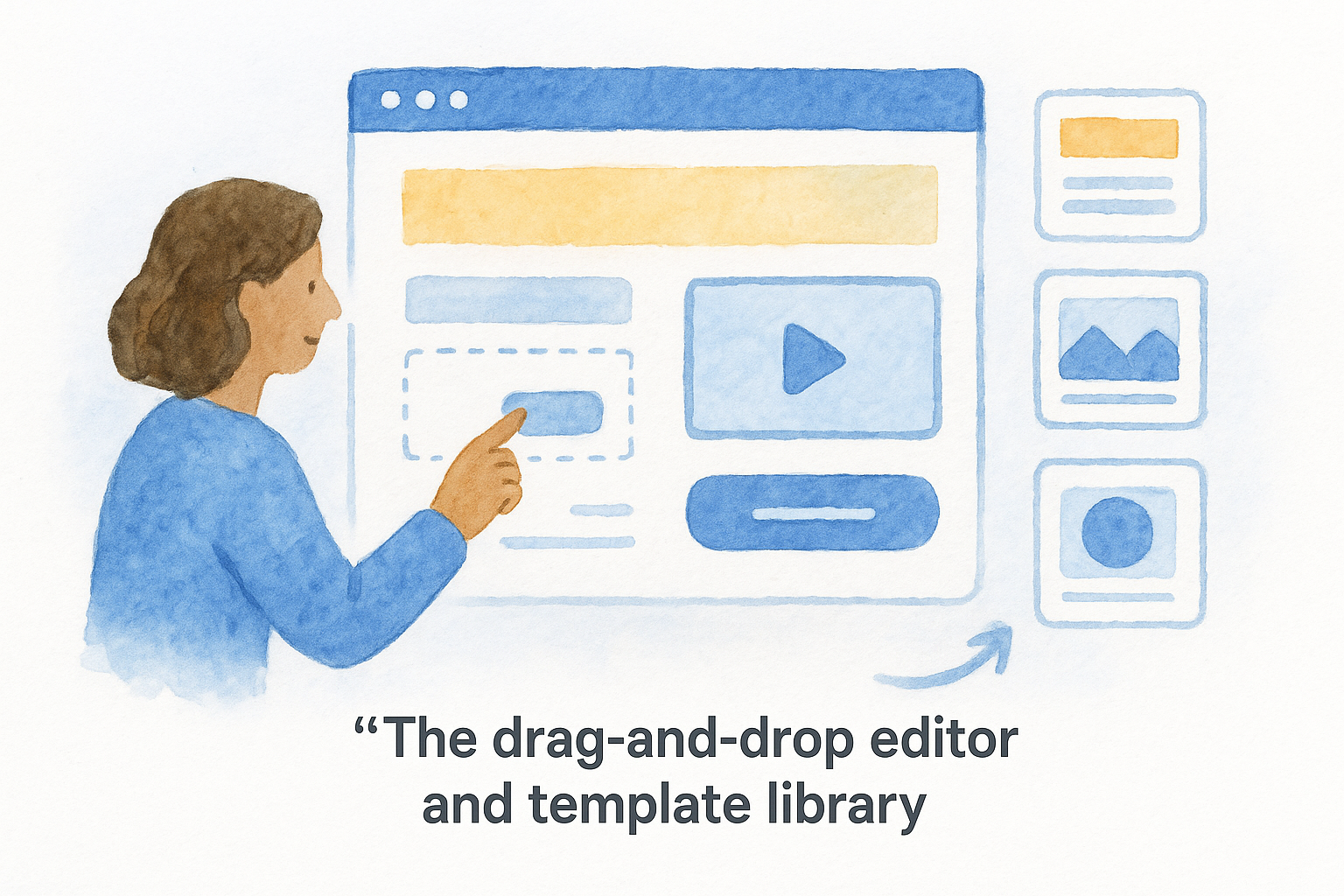
Unbounce also offers a newer Smart Builder, which uses AI to generate a page layout and copy based on a brief you provide about your business and goals. The Smart Builder is faster for getting a first draft live, but it gives you less control over fine design details compared to the Classic Builder. Most professional marketers still default to the Classic Builder when precision matters.
Smart Traffic and A/B testing
One of Unbounce's most-cited features is Smart Traffic, an AI-powered routing system that automatically sends each visitor to the page variant most likely to convert based on their attributes, including device type, browser, location, and time of day. Unlike traditional A/B testing, which splits traffic evenly between variants until statistical significance, Smart Traffic continuously adjusts the split as it learns. Unbounce claims Smart Traffic can improve conversions by an average of 30% compared to sending all traffic to a single page.
Smart Traffic works best once it has collected at least 50 conversions per variant, so new campaigns with low volume will see limited benefit until traffic builds up.
You can still run standard A/B tests if you prefer full control over traffic splits and want to let tests run to statistical completion. Both methods require you to define a conversion goal, typically a form submission or button click, which Unbounce tracks natively without requiring external tag setup for basic reporting.
How Unbounce connects to your marketing stack
Unbounce integrates with most common marketing tools through native connections and Zapier. You can push lead data to CRMs like Salesforce or HubSpot, trigger email sequences in Mailchimp or ActiveCampaign, and fire conversion events to Google Ads or the Meta Pixel. The platform also supports direct Google Analytics 4 integration so you can track page performance alongside the rest of your site data.
One important note: Unbounce handles page publishing and lead capture, but it does not provide built-in call tracking, case management, or attribution beyond the landing page itself. If you need to track a lead from the original ad click through to a signed client, you will need to connect Unbounce to additional tools that handle those downstream steps in your intake and sales process.
Why dedicated landing pages matter
When you send paid traffic to a generic homepage, you hand visitors a menu of choices when they need a single clear path. Homepages serve many audiences simultaneously, covering practice areas, attorney bios, contact pages, and firm history. That breadth works fine for someone browsing organically, but it kills conversion for someone who just clicked an ad for a specific service. Dedicated landing pages remove that friction by matching the message on the ad to the message on the page, which keeps visitors oriented and moving toward one action.
The conversion gap between homepages and landing pages
Research consistently shows that dedicated landing pages convert paid traffic at significantly higher rates than homepages. A homepage might convert ad visitors at 1-2%, while a purpose-built landing page targeting the same audience can reach 5-10% or higher when built and tested properly. For law firms spending $10,000 or more per month on Google Ads, that difference translates directly into cost-per-lead figures that either make or break campaign profitability.
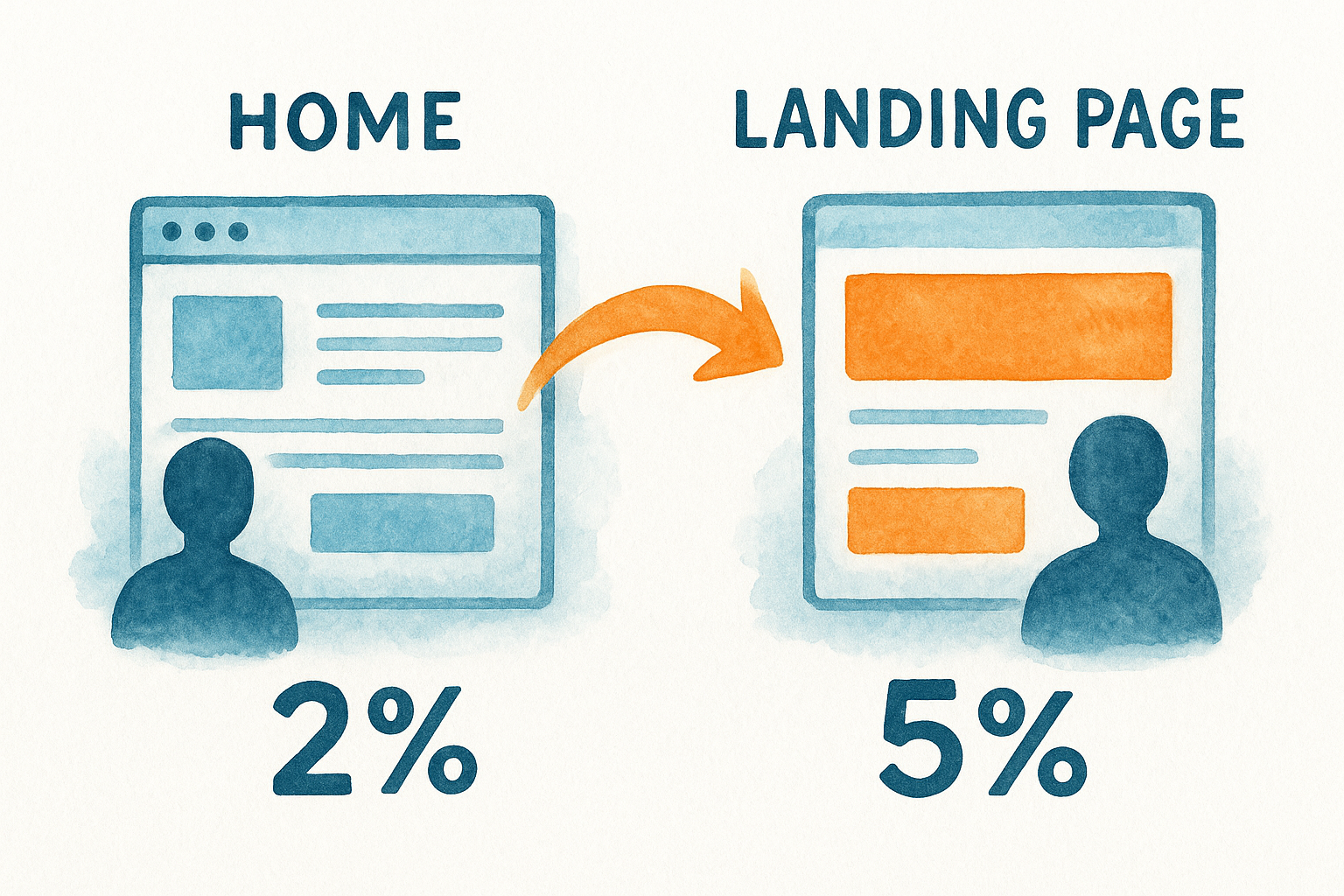
If your homepage converts ad traffic at 2% and a dedicated landing page converts at 6%, you get three times the leads from the same ad spend without adding a dollar to your budget.
The gap exists because homepages ask visitors to self-navigate through multiple competing options. Landing pages, by contrast, use a single headline, one offer, and one call to action to guide every visitor toward the same outcome. That focused structure eliminates the decision fatigue that pushes most paid visitors to leave without converting.
Why testing requires a controlled environment
You cannot run meaningful A/B tests on a homepage because too many variables change at once and too many traffic sources land there simultaneously. A dedicated landing page gives you a controlled environment where every visitor arrives from the same campaign and sees the same starting point. Tools like the unbounce landing page builder are built specifically for this kind of structured experimentation, letting you isolate one variable at a time and measure its actual impact on your conversion rate.
Running tests without that controlled environment produces noisy, inconclusive data that you cannot act on with confidence. Clean attribution and controlled testing are two core reasons dedicated landing pages exist, not just as a design preference, but as a measurement discipline that protects your ad budget.
Key Unbounce features that impact conversions
The unbounce landing page builder packages several specific features designed to increase the percentage of visitors who take action on your page. Understanding which features actually drive conversion results, rather than just looking impressive in a demo, helps you decide whether the platform fits how your firm runs paid campaigns.
Form builder and lead capture
Unbounce includes a built-in form builder that lets you add contact forms directly to any landing page without relying on a third-party tool. You can configure fields, set required inputs, and define the confirmation action after submission, either showing a confirmation message or redirecting to a thank-you page. The forms connect to your CRM or email platform through native integrations or Zapier, so lead data moves automatically without manual exports.
Form submissions are the most common conversion goal Unbounce tracks, and the quality of your form setup directly determines whether your attribution data is reliable downstream.
One limitation to understand: Unbounce's forms handle basic field validation and routing, but they do not include carrier-level phone verification, duplicate detection, or TCPA-compliant consent logging out of the box. For firms with compliance requirements or high spam-lead volume, that gap matters.
Dynamic text replacement
Dynamic text replacement (DTR) lets Unbounce swap specific words on your landing page to match the search query or ad that brought a visitor there. If someone clicks an ad for "car accident lawyer in Dallas," DTR can automatically update your headline to include that phrase, creating a tighter match between the ad and the page. Message match is one of the strongest predictors of landing page conversion rate, and DTR automates it without requiring you to build a separate page for every keyword variant.
Setting up DTR requires passing URL parameters from your ad campaigns, which takes some technical setup in Google Ads but no coding on the page itself.
Pop-ups and sticky bars
Beyond full landing pages, Unbounce lets you add pop-ups and sticky bars to any page on your existing website, including pages you did not build in Unbounce. These overlays can trigger based on exit intent, time on page, or scroll depth, giving you a way to capture leads from organic traffic without rebuilding your entire site. They follow the same conversion tracking and integration rules as standard landing pages.
Pricing, limits, and what affects total cost
Unbounce uses a tiered subscription model where the plan you choose determines how many conversions, visitors, and domains you get each month. Understanding those limits before you commit matters because overages or forced upgrades can push your actual monthly cost well above the base plan price, especially for firms running high-volume paid campaigns.
Plan tiers and what each includes
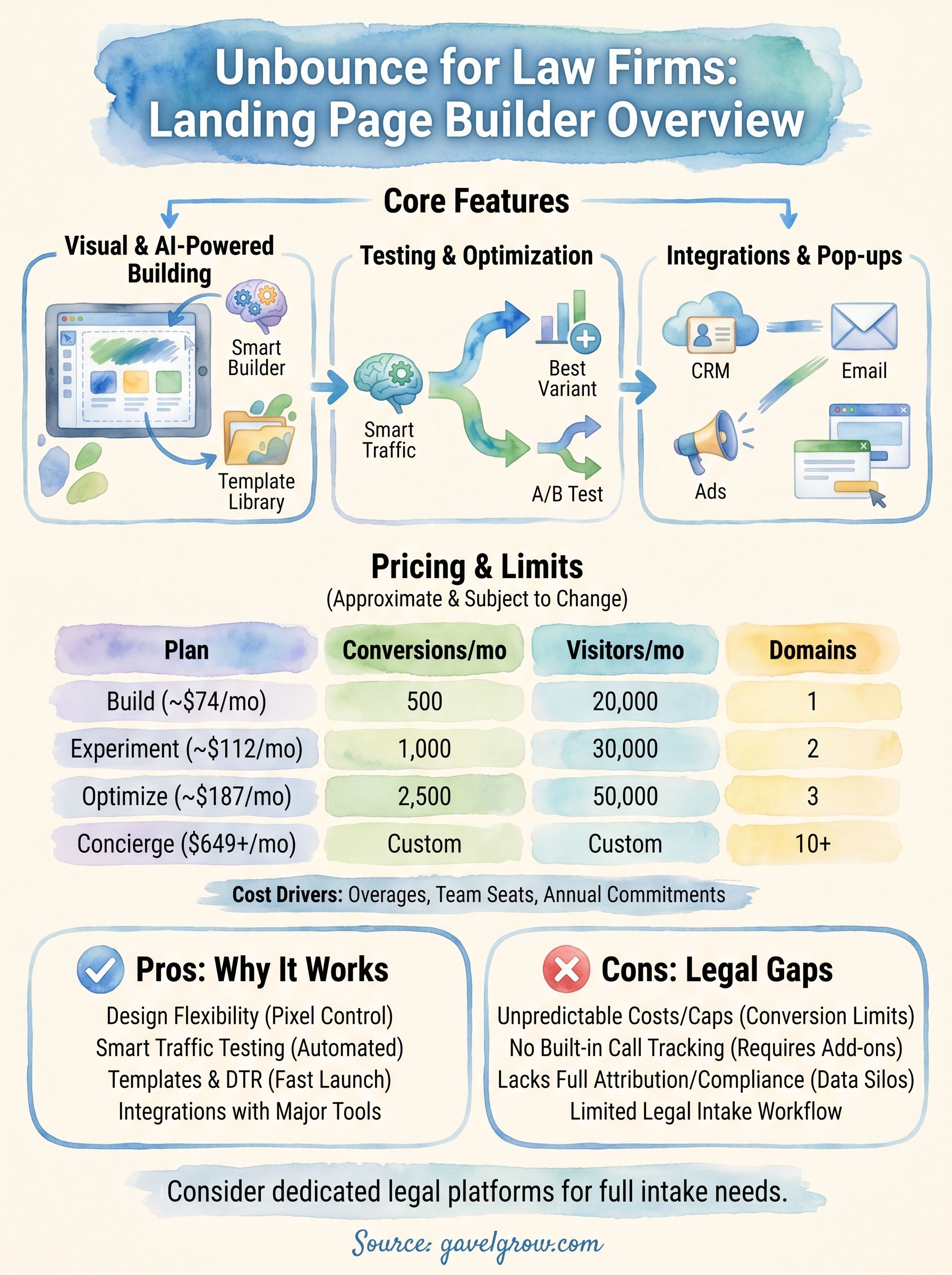
The unbounce landing page builder currently offers four main plans, ranging from entry-level to enterprise. Each plan caps both monthly conversions and monthly visitors, which means you can hit a ceiling on either metric and trigger an upgrade regardless of how many pages you have active.
Always verify current pricing directly on Unbounce's website before purchasing, since these figures reflect published rates and are subject to change.
Monthly billing runs higher than the annual rates shown above, typically by 25-35% depending on the plan. If your firm wants flexibility to cancel without a commitment, factor that premium into your budget decision.
What drives your actual monthly cost higher
Two factors push total cost beyond the base subscription: exceeding your conversion or visitor limits and adding team members who need account access. Unbounce counts every form submission as a conversion, so firms with active paid campaigns on multiple practice areas can reach their monthly cap faster than expected if they are running high-traffic pages during aggressive ad pushes.
Team seat costs and domain limits also add up quickly for mid-size firms. The entry-level plan only covers one domain, which means separate campaign microsites or practice-area-specific pages sitting on different domains require an immediate plan upgrade. For firms managing intake across personal injury, family law, and criminal defense simultaneously with distinct domains for each practice, the Optimize or Concierge tier becomes necessary rather than optional, pushing monthly spend well past the advertised base price.
Pros, cons, and who should use Unbounce
The unbounce landing page builder has real strengths, but it also has clear gaps depending on what your firm needs from a conversion platform. Knowing both sides helps you make a purchase decision based on actual fit rather than marketing claims.
Where Unbounce delivers real value
Unbounce gives you genuine design flexibility that most website builders cannot match. The Classic Builder's pixel-level control lets you place elements exactly where conversion research says they perform best, without compromising to fit a rigid grid. The Smart Traffic and A/B testing tools also give non-developers a way to run real experiments on paid traffic without hiring a data analyst or digging into complex statistics.
If you manage paid campaigns across multiple audiences and want to test different page angles simultaneously, Smart Traffic handles that routing automatically once it collects enough conversion data to learn from.
The template library accelerates launches when you need a new page live quickly, and dynamic text replacement handles keyword-level personalization at scale without forcing you to build one page per ad group.
Where Unbounce falls short
Unbounce's conversion and visitor caps create real cost unpredictability for firms running aggressive paid campaigns. Hitting your monthly limit mid-campaign forces an immediate plan upgrade or risks losing tracking on conversions you already paid for through ad spend. That billing structure puts budget pressure in the wrong place at the worst possible time.
The platform also lacks built-in call tracking, intake automation, and attribution beyond the landing page itself. For law firms that need to trace a lead from the first ad click through to a signed retainer, Unbounce only covers the first step. You still need separate tools for call recording, SMS follow-up, case attribution, and compliance logging, which adds monthly cost and creates data gaps between systems that are difficult to reconcile.
Who gets the most out of Unbounce
Unbounce fits general marketers and smaller businesses that run moderate ad volumes and need a polished, testable landing page without developer involvement. If your firm runs a few campaigns per practice area and you have someone on staff comfortable with SaaS dashboards, Unbounce provides a workable foundation for conversion testing and page iteration.
Law firms with high ad spend, TCPA compliance requirements, or multi-step intake processes will find that Unbounce requires too many additional tools to cover the gaps it leaves. At that level, a platform built specifically for legal intake and full-funnel attribution gives you the complete picture without stitching together five separate subscriptions.
Next steps
The unbounce landing page builder gives you solid tools for building and testing conversion-focused pages, especially if you run moderate paid traffic and need design flexibility without developer help. But for law firms managing high ad spend, compliance requirements, and multi-step intake, the platform leaves critical gaps that require additional subscriptions to fill.
Before committing to any landing page tool, map out your full intake workflow from ad click to signed retainer. Identify every step where lead data changes hands or where attribution breaks down, then choose tools that cover that entire path rather than just the first page a visitor lands on.
If you run a law firm and want a platform built specifically for legal marketing, GavelGrow covers intake forms, call tracking, attribution, and compliance in one place, so you stop paying for five separate tools that never quite connect to each other.
Frequently Asked Questions
What is the Unbounce landing page builder?
Unbounce is a cloud-based landing page platform that lets marketers build, publish, and test standalone, conversion-focused web pages without writing code. Launched in 2009, it offers a drag-and-drop editor, over 100 templates, A/B testing, and AI-powered features. It sits in the category of dedicated conversion platforms rather than general website builders, because its entire feature set is oriented toward turning ad traffic into leads or sales.
Why use a dedicated landing page instead of your homepage for ads?
A dedicated landing page converts paid traffic far better than a homepage because it matches the ad's message and guides every visitor toward one action, instead of offering a menu of competing choices. Homepages serve many audiences at once, which creates decision fatigue for someone who clicked an ad for a specific service. A focused page with one headline, one offer, and one call to action removes that friction and typically lifts conversion meaningfully.
What is Unbounce Smart Traffic and how does it differ from A/B testing?
Smart Traffic is Unbounce's AI-powered routing system that sends each visitor to the page variant most likely to convert based on attributes like device, browser, location, and time of day. Unlike traditional A/B testing, which splits traffic evenly until it reaches statistical significance, Smart Traffic continuously adjusts the split as it learns. It works best once it has collected a meaningful number of conversions per variant, so very low-volume campaigns see limited benefit at first.
What are the main limitations of Unbounce for law firms?
Unbounce's biggest gaps for law firms are cost unpredictability and coverage. Its plans cap monthly conversions and visitors, so hitting a limit mid-campaign forces an immediate upgrade at the worst time. It also lacks built-in call tracking, intake automation, TCPA-compliant consent logging, and attribution beyond the landing page itself, meaning you still need separate tools to trace a lead from ad click to signed retainer, which adds cost and data gaps.
Who should use Unbounce, and when should a law firm consider an alternative?
Unbounce fits general marketers and smaller businesses running moderate ad volumes that need a polished, testable page without developer help. Law firms with high ad spend, compliance requirements, or multi-step intake often find it requires too many add-on tools to fill its gaps. At that level, a platform built specifically for legal intake and full-funnel attribution can cover forms, call tracking, attribution, and compliance in one place instead of several subscriptions.
Frequently Asked Questions
What is the Unbounce landing page builder?
Unbounce is a cloud-based landing page platform that lets marketers build, publish, and test standalone, conversion-focused web pages without writing code. Launched in 2009, it offers a drag-and-drop editor, over 100 templates, A/B testing, and AI-powered features. It sits in the category of dedicated conversion platforms rather than general website builders, because its entire feature set is oriented toward turning ad traffic into leads or sales.
Why use a dedicated landing page instead of your homepage for ads?
A dedicated landing page converts paid traffic far better than a homepage because it matches the ad's message and guides every visitor toward one action, instead of offering a menu of competing choices. Homepages serve many audiences at once, which creates decision fatigue for someone who clicked an ad for a specific service. A focused page with one headline, one offer, and one call to action removes that friction and typically lifts conversion meaningfully.
What is Unbounce Smart Traffic and how does it differ from A/B testing?
Smart Traffic is Unbounce's AI-powered routing system that sends each visitor to the page variant most likely to convert based on attributes like device, browser, location, and time of day. Unlike traditional A/B testing, which splits traffic evenly until it reaches statistical significance, Smart Traffic continuously adjusts the split as it learns. It works best once it has collected a meaningful number of conversions per variant, so very low-volume campaigns see limited benefit at first.
What are the main limitations of Unbounce for law firms?
Unbounce's biggest gaps for law firms are cost unpredictability and coverage. Its plans cap monthly conversions and visitors, so hitting a limit mid-campaign forces an immediate upgrade at the worst time. It also lacks built-in call tracking, intake automation, TCPA-compliant consent logging, and attribution beyond the landing page itself, meaning you still need separate tools to trace a lead from ad click to signed retainer, which adds cost and data gaps.
Who should use Unbounce, and when should a law firm consider an alternative?
Unbounce fits general marketers and smaller businesses running moderate ad volumes that need a polished, testable page without developer help. Law firms with high ad spend, compliance requirements, or multi-step intake often find it requires too many add-on tools to fill its gaps. At that level, a platform built specifically for legal intake and full-funnel attribution can cover forms, call tracking, attribution, and compliance in one place instead of several subscriptions.