Best Keyword Research Tools: 16 Picks for SEO & PPC
Categories: Legal Marketing Strategies
 Abram Ninoyan
Founder & Senior Performance Marketer
Credentials: Google Partner, Google Ads Search Certified, Google Ads Display Certified, Google Ads Measurement Certified, Google Analytics (IQ) Certified, HubSpot Inbound Certified, HubSpot Social Media Marketing Certified, Conversion Optimization Certified
Expertise: Google Ads, Meta Ads, Conversion Rate Optimization, GA4 & Google Tag Manager, Lead Generation, Marketing Funnel Optimization, PPC Management
LinkedIn Profile
The best keyword research tools give you more than search volume, they show you which terms actually drive clicks, cases, and revenue. Whether you're building out a Google Ads campaign or planning a l...
Key Takeaways
- Best Keyword Research Tools: 16 Picks for SEO & PPC (2026)
- 1. GavelGrow
- 2. Google Keyword Planner
- 3. Semrush
Best Keyword Research Tools: 16 Picks for SEO & PPC (2026)
The best keyword research tools give you more than search volume, they show you which terms actually drive clicks, cases, and revenue. Whether you're building out a Google Ads campaign or planning a long-term SEO strategy for your firm, picking the right tool determines whether you're bidding on high-intent queries or burning budget on keywords that never convert.
Every dollar a law firm spends on paid search or organic content starts with a keyword decision. Get it right, and you attract prospective clients actively searching for representation. Get it wrong, and you're paying for traffic that bounces before it ever reaches your intake form. At GavelGrow, we've watched firms waste thousands on broad, generic terms when practice-area-specific long-tail keywords outperform them at a fraction of the cost, something our platform's full-funnel attribution makes painfully obvious once you connect ad spend to signed retainers.
This guide breaks down 16 keyword research tools, free and paid, ranked by the features that matter most for SEO and PPC campaigns in 2026. For each tool, you'll get an honest look at pricing, strengths, and limitations, along with notes on which use case it fits best. Whether you run campaigns in-house or hand them off to a managed team, this list will help you pick the tool that matches your workflow and budget without overpaying for features you'll never touch.
1. GavelGrow
GavelGrow is built exclusively for U.S. law firms, and while most of the best keyword research tools on this list show you search volume and competition scores, GavelGrow shows you something more useful: which keywords actually produce signed retainers. By connecting Google Ads campaigns directly to your intake pipeline and case management, GavelGrow turns raw keyword data into campaign-level cost-per-signed-case, not just clicks.
Best use cases
Law firms running paid search campaigns need more than a keyword list. GavelGrow fits best when you want to close the loop between keyword spend and signed cases, rather than optimizing for traffic that never converts. It works especially well for personal injury, mass tort, and criminal defense firms where cost-per-case calculations drive every budget decision.
- Firms tracking Google Ads spend against signed retainers
- Practices comparing keyword performance across campaigns and intake sources
- Teams who need conversion data flowing natively into their Google Ads account
Standout features
GavelGrow's campaign-level attribution tracks every lead from the original ad click through the signed retainer, so you can see exactly which search terms generate cases. The modelled practice-area benchmarks lets you compare your cost-per-lead and close rate against firms in your practice area and market size, turning abstract keyword performance into a competitive metric you can act on.
If you're spending $10,000 a month on paid search, knowing which keywords produce signed cases is worth more than any volume estimate.
Built-in call tracking replaces CallRail with per-campaign Twilio tracking numbers, recordings, and outcome tagging, so you tie phone calls back to specific search terms without stitching together three separate tools.
Limits and watch-outs
GavelGrow does not function as a standalone keyword discovery tool. You won't use it to generate new keyword ideas from scratch or run a competitor gap analysis on your own. It works best alongside a dedicated keyword research tool from this list, not as a replacement for one. Think of it as the measurement layer that tells you whether the keywords you chose are actually working.
Pricing
GavelGrow offers four tiers with a 7-day free trial and no credit card required on any plan.
Annual billing saves 20% across all plans.
2. Google Keyword Planner
Google Keyword Planner is the most direct source of Google search data available, and it costs nothing to use if you have a Google Ads account. Among the best keyword research tools on the market, it holds a unique position because the data comes straight from Google itself, making it the baseline most other tools build their estimates from.
Best use cases
Keyword Planner fits best when you want to plan paid search campaigns or validate that search demand exists before investing in content. It works especially well for law firms in competitive practice areas who need to see bid range estimates before committing budget to a term.
- Forecasting monthly search volume for new campaigns
- Identifying bid estimates for high-intent legal keywords
- Discovering keyword ideas grouped by topic or ad group
Standout features
The tool generates keyword ideas from a seed term or landing page URL, which speeds up the research process when you're launching a new campaign. You also get historical monthly search volume trends broken out by device and location, so you can see whether a term spikes seasonally or holds steady throughout the year.
Google Keyword Planner is the only tool that pulls bid estimates directly from active Google Ads auction data, which makes it indispensable for PPC planning regardless of what other tools you use.
Limits and watch-outs
Google Keyword Planner rounds and groups search volumes unless your account has active spend, which means free users often see ranges like "1K-10K" instead of a precise monthly figure. It also does not provide keyword difficulty scores, so you need a separate tool to assess organic competition.
Pricing
Google Keyword Planner is completely free with a Google Ads account. No paid tier exists.
3. Semrush
Semrush ranks among the most widely used of the best keyword research tools available for both SEO and PPC research. It combines keyword discovery, competitor analysis, and site auditing in a single platform, which makes it appealing for firms that want to consolidate multiple research workflows without switching tabs.
Best use cases
Semrush fits best when you need to research competitor keyword strategies alongside your own. It works well for law firms producing content at scale or managing Google Ads campaigns where competitive intelligence on rival firms would sharpen targeting decisions.
- Identifying which keywords competitors rank for organically
- Running paid search keyword gap analysis against competing firms
- Tracking keyword ranking changes week over week
Standout features
Semrush's Keyword Magic Tool generates thousands of keyword variations from a single seed term, organized by topic clusters and intent filters. You also get Keyword Difficulty scores that estimate how hard it would be to rank organically, alongside volume and CPC data in the same view.
Semrush's paid keyword gap report is one of the fastest ways to find terms your competitors bid on that you're currently missing from your campaigns.
Limits and watch-outs
Semrush pulls data from its own crawl index rather than directly from Google, so volume and competition figures are estimates, not exact numbers. The platform also has a steep learning curve, and its lower-tier plans cap daily keyword searches, which limits research speed on active campaign builds.
Pricing
Semrush offers a 7-day free trial on paid plans, and annual billing reduces costs by roughly 17%.
4. Ahrefs Keywords Explorer
Ahrefs Keywords Explorer earns its spot among the best keyword research tools by combining one of the largest keyword databases available with click-through data that most competitors don't report. It pulls from clickstream panels across 200+ countries and covers multiple search engines, including Google, YouTube, and Bing.
Best use cases
This tool fits best when organic search growth is your primary focus rather than paid campaign planning. Law firms producing content around practice-area questions, local guides, or comparison pages benefit most from its depth of research data.
- Researching informational keywords for blog content and FAQ pages
- Analyzing which pages drive organic traffic to competitor sites
- Building topic clusters around high-intent legal terms
Standout features
The platform reports a "Clicks" metric alongside raw search volume, showing how many searches actually result in a click rather than a zero-click SERP result. This distinction matters for law firms because many legal queries now trigger featured snippets or AI-generated answers that absorb traffic before users reach your site.
Knowing actual click volume on a keyword, not just search volume, prevents you from building content around terms Google answers directly in the results page.
Limits and watch-outs
Ahrefs does not offer a free plan, and its entry-level tier limits monthly keyword reports. The platform concentrates primarily on organic data, making it a weaker fit if paid search keyword planning is your main priority.
Pricing
Annual billing saves 20% across all plans, and Ahrefs offers a $7 seven-day trial on Lite and Standard plans.
5. LowFruits
LowFruits takes a different approach than most of the best keyword research tools on this list. Instead of just reporting search volume and difficulty scores, it analyzes the actual weakness of competing pages in the top results, flagging terms where thin content, low-authority sites, or forum posts are currently ranking. That approach helps you find ranking opportunities competitors have overlooked.
Best use cases
LowFruits fits best when organic content production is your primary growth strategy and you want to rank faster without waiting for domain authority to build. Law firms publishing practice-area guides, local FAQ pages, or comparison content benefit most from its SERP-weakness analysis.
- Finding low-competition blog topics in niche practice areas
- Identifying gaps where forum threads or thin pages currently outrank real content
- Prioritizing a content calendar based on realistic ranking potential
Standout features
The tool crawls live SERPs and marks results with weak-spot indicators, including flags for user-generated content, low word count, and thin domain authority on the ranking pages. You get a visual map of opportunity rather than a raw difficulty number, which makes it easier to spot terms worth targeting quickly.
Seeing that a forum post with 200 words ranks on page one for a keyword tells you far more than a difficulty score of 15 ever could.
Limits and watch-outs
LowFruits does not provide PPC data, making it a poor fit for paid search planning. Its keyword database is smaller than Semrush or Ahrefs, so broad discovery campaigns may miss high-volume terms that matter for competitive legal markets.
Pricing
6. KWFinder
KWFinder by Mangools focuses specifically on keyword difficulty scoring and long-tail keyword discovery, making it one of the more approachable options among the best keyword research tools for teams that don't need a full SEO suite. Its clean interface surfaces ranking difficulty in a way that's easy to act on without requiring advanced training.
Best use cases
KWFinder suits firms and marketers who prioritize finding low-competition keywords quickly without navigating a tool built for enterprise-scale campaigns. It's a strong fit for solo practitioners or small law firms building out their first content strategy.
- Finding long-tail keyword variations around practice-area terms
- Comparing keyword difficulty scores across a short target list
- Validating niche content ideas before committing to production
Standout features
The tool displays a color-coded difficulty scale alongside monthly search volume, local search data, and a live SERP preview showing who currently ranks for each term. That SERP snapshot lets you gauge real competition strength without opening a separate browser tab to check manually.
Seeing actual ranking pages alongside difficulty scores in one view cuts keyword evaluation time significantly compared to switching between tools.
Limits and watch-outs
KWFinder's keyword database is smaller than Semrush or Ahrefs, which means some niche legal terms may return limited data. It also lacks a native PPC planning workflow, making it better suited to organic content research than paid search campaign builds. If Google Ads keyword strategy is your primary use case, you'll need to pair it with another tool on this list.
Pricing
Mangools prices KWFinder through a tiered subscription model designed to fit individual researchers and small teams. All plans include a 10-day free trial without requiring a credit card.
Annual billing reduces costs by roughly 35% across all plans.
7. Moz Keyword Explorer
Moz Keyword Explorer offers a focused, clean approach to keyword research that places it among the best keyword research tools for teams already using the Moz ecosystem. Its Priority Score combines search volume, difficulty, and organic click-through rate into a single 0-100 metric, which cuts down the time you spend manually weighing competing factors before committing to a target keyword.
Best use cases
Moz fits best when you want a streamlined research experience without juggling multiple data layers. It works well for law firms building out practice-area content strategies and monitoring how pages move in organic rankings over time.
- Researching organic keyword targets for service pages and blog content
- Comparing difficulty and opportunity scores across a focused keyword list
- Tracking ranking progress through Moz's built-in campaign tools
Standout features
The Priority Score is Moz's clearest differentiator from comparable platforms. Rather than asking you to balance volume against difficulty on your own, it rolls both into a single actionable number. You also get a SERP analysis panel that surfaces the domain authority and page authority of each currently ranking page, giving you a direct read on how competitive a target keyword actually is.
A composite score that factors click-through rate into difficulty saves more research time than most users expect before they try it.
Limits and watch-outs
Moz's keyword database is smaller than Ahrefs or Semrush, so niche legal terms in less competitive markets may return limited data. The free tier restricts you to 10 queries per month, which is not enough volume for active campaign research.
Pricing
Moz structures pricing across four tiers, and all paid plans include a 30-day free trial with no commitment required upfront.
Annual billing saves roughly 20% across all plans.
8. SpyFu
SpyFu specializes in competitive intelligence for paid search, making it one of the more unique entries among the best keyword research tools for law firms running Google Ads campaigns. Its core strength is revealing exactly which keywords your competitors bid on, how much they spend, and which ad copy they've tested over time.
Best use cases
SpyFu fits best when competitor paid search strategy is your primary research goal. It works well for law firms entering a competitive market who want to understand where rival firms allocate budget before committing their own spend.
- Analyzing competitor Google Ads keyword lists and ad history
- Finding profitable terms competitors have bid on consistently for months or years
- Comparing paid search overlap between your firm and direct competitors in the same market
Standout features
The tool's competitor ad history goes back over 15 years in some cases, which lets you identify which keywords competitors tested and abandoned versus which ones they've bid on continuously. Sustained bidding on a keyword over a long period signals consistent profitability, saving you the cost of learning that yourself through trial-and-error spend.
A keyword a competitor has bid on for three straight years is almost always worth evaluating for your own campaigns before you dismiss it.
Limits and watch-outs
Its organic SEO data is thinner than Semrush or Ahrefs, so SpyFu functions primarily as a paid search intelligence tool rather than a full SEO platform. The volume estimates are modeled rather than pulled directly from Google, meaning you should cross-reference critical keywords against Google Keyword Planner before making major budget decisions.
Pricing
SpyFu structures pricing across two core plans with significant annual savings available.
Annual billing reduces costs by roughly 40% across all plans, and SpyFu offers a 30-day money-back guarantee on paid subscriptions.
9. Ubersuggest
Ubersuggest, built by Neil Patel, positions itself as one of the more accessible entries among the best keyword research tools available today. It packages keyword discovery, domain analysis, and content ideas into a single dashboard at a price point lower than most competitors, making it appealing for smaller firms and solo practitioners starting their first SEO or PPC push.
Best use cases
This tool works best when you need a broad starting point for keyword research without committing to a premium subscription. It suits law firms and individual marketers who are early in building their keyword strategy and need volume estimates, competition scores, and content ideas in one place.
- Getting keyword ideas for practice-area blog content
- Running a quick domain overview on a competitor's organic traffic
- Identifying content gaps between your site and direct competitors
Standout features
Ubersuggest surfaces keyword suggestions, search volume, SEO difficulty, and paid difficulty scores on a single results page, which reduces the number of clicks needed to evaluate a term. The platform also includes a content ideas panel that shows top-performing articles for any keyword, giving you a benchmark before you write.
Seeing which articles already rank and how many backlinks they carry helps you set realistic expectations before committing resources to a content piece.
Limits and watch-outs
Ubersuggest's data accuracy trails behind Semrush and Ahrefs, particularly for niche or low-volume legal keywords. The free version limits you to three searches per day, which is too restrictive during an active campaign build.
Pricing
Ubersuggest offers three paid tiers with monthly billing, and each tier is also available as a one-time lifetime purchase, which appeals to budget-conscious firms that want to avoid recurring fees.
10. Keywords Everywhere
Keywords Everywhere is a browser extension that sits in a different category from most of the best keyword research tools on this list. Rather than requiring you to visit a dedicated platform, it overlays keyword data directly onto Google search results, Amazon, YouTube, and other sites as you browse, turning your regular research workflow into a continuous data-gathering session.
Best use cases
Keywords Everywhere fits best when you want passive keyword data without switching tabs or logging into a separate tool. It suits law firms and marketing teams who do significant manual competitor research directly in Google and want volume and CPC figures available on every search without breaking their workflow.
- Surfacing related keyword suggestions inside Google search results
- Checking search volume and CPC while browsing competitor landing pages
- Quick volume validation without opening a separate keyword platform
Standout features
The extension overlays monthly search volume, CPC estimates, and competition scores directly inside Google as you search, alongside a "People Also Search For" panel that generates related keyword ideas automatically. Each keyword also carries a trend sparkline so you get a quick seasonality read without pulling up a separate chart.
Seeing volume and CPC inline on every Google search page removes a significant friction point from day-to-day research.
Limits and watch-outs
Keywords Everywhere does not replace a full keyword research platform for deep discovery or competitor gap analysis. Its credit-based pricing can get expensive if your team runs high search volume daily.
Pricing
Keywords Everywhere runs on a pay-as-you-go credit system with no monthly subscription required.
11. Google Search Console
Google Search Console stands apart from every other tool on this list because it shows you real search data from your own site, not estimates or models. While most of the best keyword research tools tell you what keywords could drive traffic, Search Console tells you exactly which queries already bring visitors to your pages and how those pages perform in Google's results.
Best use cases
Search Console works best when you want to optimize pages that already rank rather than discover entirely new keyword targets. It gives law firms a direct line to Google's own data on how their existing content performs.
- Finding keywords where your pages rank on page two and need a push to reach page one
- Identifying high-impression, low-click-through-rate queries where title tags need revision
- Monitoring ranking fluctuations after site changes or algorithm updates
Standout features
The Performance Report breaks down clicks, impressions, average position, and click-through rate by query, page, device, and country. You can filter by date range to compare ranking changes before and after a content update, which makes it one of the most direct feedback loops available for organic search optimization.
Spotting a query with 2,000 monthly impressions and a 1% click-through rate tells you a title tag fix alone could double your organic traffic from that page.
Limits and watch-outs
Search Console only shows data for your own domain, so competitor research is completely off the table. It also limits query data to the past 16 months, which prevents longer trend analysis without exporting historical data manually.
Pricing
Google Search Console is completely free for any verified site owner. No paid tier exists.
12. Google Trends
Google Trends sits in a unique supporting role among the best keyword research tools because it does not report absolute search volume. Instead, it shows relative search interest over time, indexed from 0 to 100, which makes it one of the most reliable ways to spot whether a keyword is gaining momentum, fading, or tied to a seasonal pattern before you build content or commit ad budget around it.
Best use cases
Law firms use Google Trends to validate the timing of content releases and paid campaigns before spending. It works especially well for practice areas that spike predictably, such as DUI/DWI searches around major holidays or personal injury queries that correlate with specific seasonal events in your region.
- Comparing relative interest between two or more keyword variations side by side
- Identifying seasonal peaks to time campaign launches around actual demand
- Spotting geographic demand differences across states and metro areas
Standout features
The geographic breakdown is Google Trends' most underused feature for law firms. You can filter search interest by state, metro area, or city, which tells you whether a keyword drives real demand in your actual target market before you allocate any resources toward it.
Seeing that "car accident lawyer" spikes 40% in your metro area every January is more actionable than any annual average volume figure.
Limits and watch-outs
One critical gap to understand: Google Trends does not report actual search volume numbers, only relative interest, so you always need to pair it with a tool like Google Keyword Planner to get real demand estimates. It also lacks keyword difficulty data entirely, making it a research supplement rather than a standalone platform.
Pricing
Accessing Google Trends costs nothing at all, and the tool requires no account to view data for any topic or keyword.
13. AnswerThePublic
AnswerThePublic generates keyword ideas by pulling real autocomplete queries from Google and Bing, then organizing them into question-based categories: who, what, where, when, why, and how. Among the best keyword research tools built specifically for content ideation, it excels at mapping out every angle a searcher might take when looking up a topic, making it particularly useful when you're planning FAQ pages or blog content for your law firm.
Best use cases
This tool fits best when you need to build question-driven content around a practice area rather than target a specific high-volume keyword. Law firms producing client education content benefit most because AnswerThePublic surfaces the exact phrasing real people use when they search, which aligns naturally with how Google evaluates helpful, people-first content.
- Building FAQ sections on practice-area service pages
- Finding long-tail question keywords for blog posts and resource guides
- Mapping out every informational angle around a legal topic before writing
Standout features
AnswerThePublic organizes its output into a visual radial map of questions and prepositions, which you can also export as a CSV for easier sorting. The platform recently added search volume data to paid plans, bridging the gap between question discovery and demand validation without requiring a second tool.
Seeing "how long does a personal injury lawsuit take" surfaced as a real user query tells you exactly what a prospective client worries about before hiring an attorney.
Limits and watch-outs
The free tier limits you to three searches per day, and the tool does not provide keyword difficulty scores or competitor data, so you need a separate platform to evaluate whether a discovered term is realistically winnable in organic search.
Pricing
Annual billing reduces costs by roughly 40% across all plans.
14. AlsoAsked
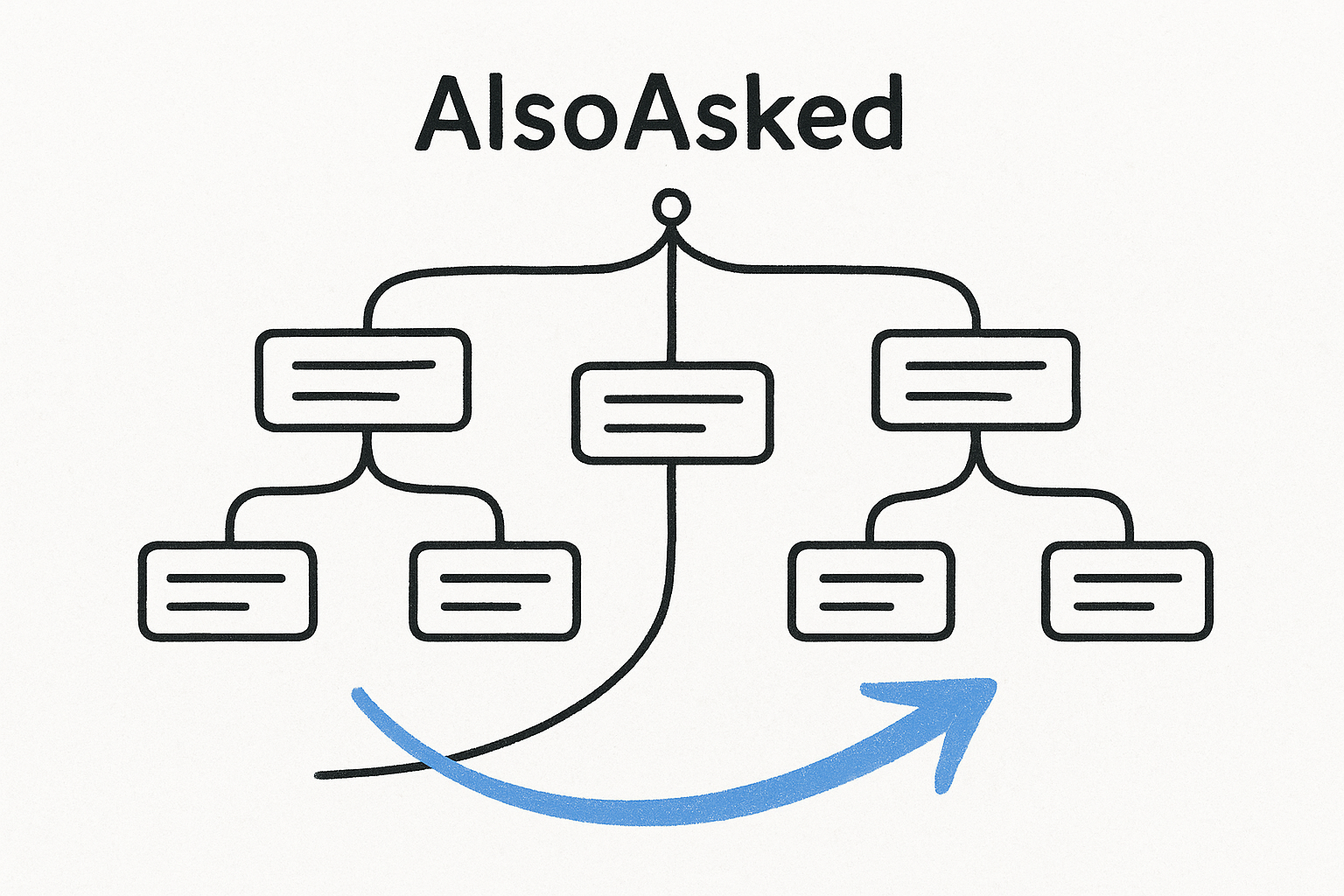
AlsoAsked maps the "People Also Ask" questions that Google surfaces in its search results, organizing them into a branching tree that shows how search queries connect and flow from one question to the next. Among the best keyword research tools built for content planning, it gives you a visual picture of the logical path a searcher follows from a broad question down to increasingly specific sub-questions.
Best use cases
AlsoAsked fits best when you want to build content that mirrors how real users think about a topic rather than targeting a single keyword. Law firms building out practice-area resource pages or FAQ sections can use it to structure entire content hierarchies before writing a single word.
- Mapping question relationships for long-form legal guides
- Finding sub-questions to address within a single blog post or service page
- Identifying content gaps your competitors haven't covered in their FAQ sections
Standout features
The tool pulls live "People Also Ask" data directly from Google and organizes each question into a branching tree structure you can expand by clicking any node. You can export the full tree as a CSV or image, making it easy to hand off to a content writer or use directly inside a content brief.
Seeing that "how much does a personal injury lawyer cost" branches into "do lawyers charge if you lose" shows you exactly which follow-up concerns a prospective client carries before calling your firm.
Limits and watch-outs
AlsoAsked provides no search volume data on its own, so you always need a second tool to validate whether a surfaced question actually drives meaningful traffic. It also covers no PPC data whatsoever.
Pricing
Annual billing reduces costs by roughly 25% across all plans.
15. Bing Webmaster Tools
Bing Webmaster Tools sits at the edge of most keyword research conversations, but if your firm's clients include users on Microsoft Edge or older Windows devices, you're missing real search data by ignoring Bing entirely. While it doesn't compete with the best keyword research tools for volume of data, it offers free, first-party search performance insights that complement your Google-focused research.
Best use cases
Bing Webmaster Tools works best when you want to capture the portion of search traffic that never shows up in Google Search Console. It suits law firms in practice areas where older demographics dominate the client base, since Bing's user base skews toward older, desktop-heavy searchers who often match the profile of estate planning or elder law clients.
- Validating keyword rankings and click-through data on Bing's results pages
- Finding keyword queries your content receives on Bing that don't appear in Google's data
- Auditing site crawl errors and indexing gaps across both major search engines
Standout features
The built-in Keyword Research tool inside Bing Webmaster Tools surfaces search volume estimates, impressions, and clicks for queries relevant to your pages, with geographic filtering by country. You also get a site performance report that breaks down clicks and impressions by query, similar in structure to Google Search Console's Performance Report.
Bing Webmaster Tools is the only free tool that gives you direct search performance data from Microsoft's index, which no third-party platform can replicate.
Limits and watch-outs
Bing's market share trails Google significantly, so volume figures for most legal keywords will be a fraction of what Google Keyword Planner reports. The platform also lacks keyword difficulty scoring entirely.
Pricing
Bing Webmaster Tools is completely free for any verified site owner with no paid tier available.
16. WordStream Free Keyword Tool
WordStream's Free Keyword Tool rounds out this list of the best keyword research tools by offering a quick, no-login option for pulling keyword ideas with industry and country filters applied upfront. It's built primarily to push users toward WordStream's paid advertising software, but the free layer delivers enough data to be genuinely useful for a first-pass keyword discovery session.
Best use cases
WordStream's free tool fits best when you need a rapid keyword list for a specific practice area without committing to a subscription. It works well for firms that want to validate a short list of target terms before investing in a more capable platform.
- Generating keyword ideas filtered by industry vertical (legal included)
- Running a quick competitive keyword scan before a client meeting
- Getting a baseline CPC estimate on new practice-area terms
Standout features
The tool surfaces keyword suggestions alongside relative competition scores and estimated CPC ranges, all filtered through the industry selector you choose at the start. That industry filter meaningfully narrows results compared to tools that return every tangentially related term regardless of context.
Filtering by industry before running a search saves you the manual work of stripping out irrelevant keyword suggestions that have nothing to do with your practice.
Limits and watch-outs
WordStream limits full data access behind an email capture, and the free tier does not provide search volume numbers, only directional competition signals. You will need a dedicated platform for any serious campaign research.
Pricing
The core keyword tool is free to use with an email signup. WordStream's paid advertising management software starts at $49/mo, though the keyword tool itself remains accessible without a paid plan.
Next Steps
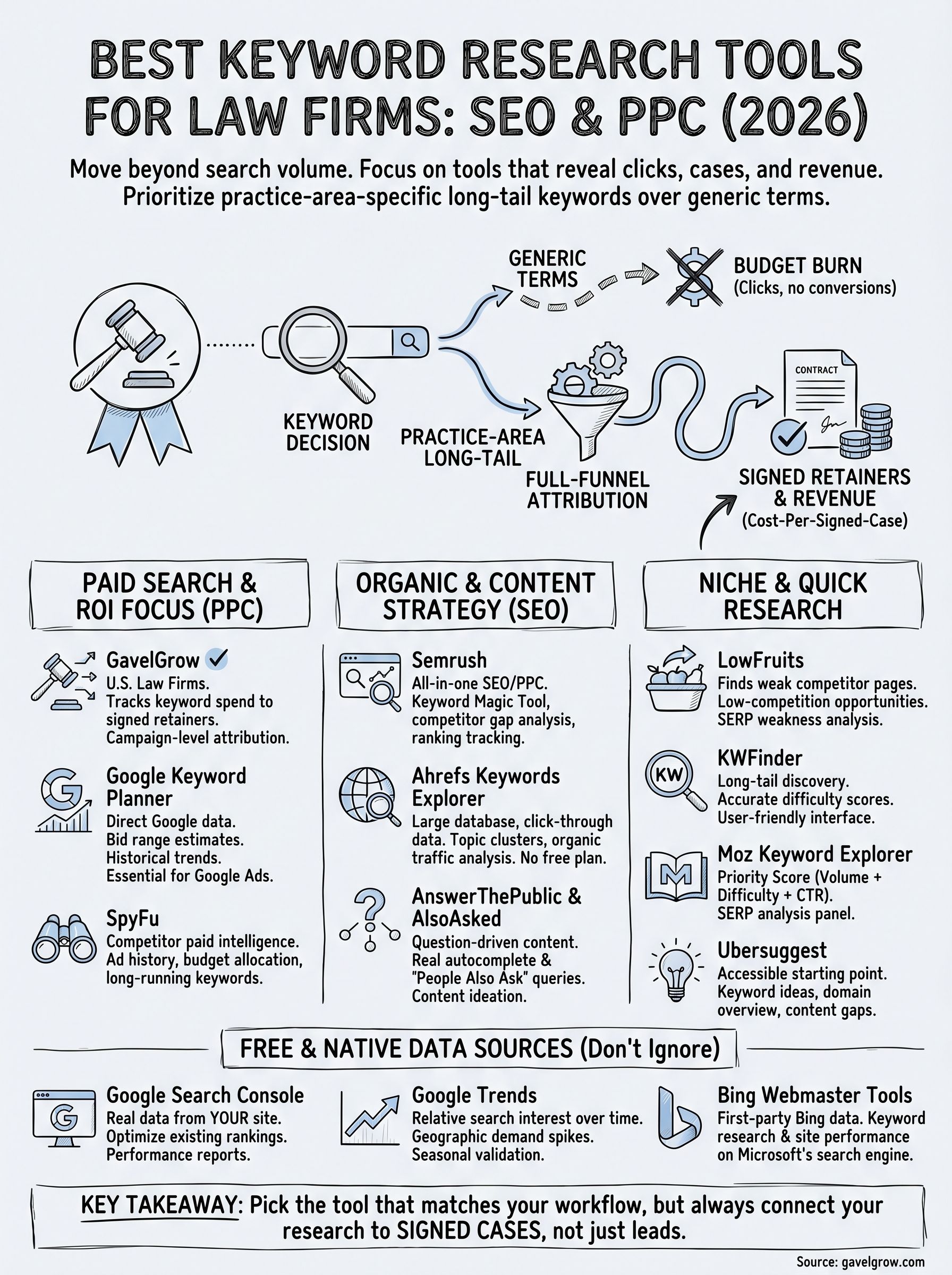
The best keyword research tools give you the raw material for smarter campaigns, but the tool itself never determines whether a keyword produces a signed case. Your research only pays off when it connects to a system that tracks performance from the first ad click through the signed retainer, not just to the contact form submission.
Pick the tool that matches your workflow today. Firms focused on paid search should start with Google Keyword Planner alongside SpyFu for competitor intelligence. Firms building out organic content can get more mileage from Ahrefs or LowFruits paired with AlsoAsked for question-driven topics. Whatever combination you choose, make sure your measurement layer keeps pace with your research so you know which keywords actually generate revenue.
If you want to see how your current marketing performance stacks up against 500+ peer firms, run your numbers through the GavelGrow free marketing scorecard before your next campaign build.
Frequently Asked Questions
What is the best free keyword research tool for law firms?
Google Keyword Planner is the most direct free option, since its data comes straight from Google and it pulls bid estimates directly from active Google Ads auction data. It's ideal for forecasting search demand and planning paid campaigns. Note that it rounds search volumes into ranges like "1K-10K" unless your Google Ads account has active spend.
Do keyword research tools show which keywords produce signed cases?
Most keyword tools show search volume, competition, and bid estimates, but not signed cases. GavelGrow closes that gap by connecting Google Ads campaigns to your intake pipeline, turning raw keyword data into campaign-level cost-per-signed-case. It works best alongside a dedicated keyword tool as the measurement layer, not as a standalone keyword-discovery tool.
How much does GavelGrow cost for keyword and campaign tracking?
GavelGrow platform plans run from $199 per month (Track) to $599 per month (Optimize), with Optimize suited to firms with intake staff. Annual billing includes two months free, and every plan includes a 7-day free trial with no credit card required, giving you full access to Optimize-tier features before you commit.
Should law firms target long-tail or broad keywords?
Practice-area-specific long-tail keywords often outperform broad, generic terms at a fraction of the cost, because they capture prospective clients with clear intent rather than researchers who bounce before reaching your intake form. Full-funnel attribution makes this obvious once you connect ad spend to signed retainers, so prioritize high-intent local phrases over high-volume generic ones.
Why does keyword research matter before running Google Ads for a law firm?
Every dollar a firm spends on paid search or content starts with a keyword decision. Get it right and you attract prospective clients actively searching for representation; get it wrong and you pay for traffic that bounces before converting. Choosing high-intent, practice-area-specific terms is what separates budget that produces consultations from budget that produces clicks.
Frequently Asked Questions
What is the best free keyword research tool for law firms?
Google Keyword Planner is the most direct free option, since its data comes straight from Google and it pulls bid estimates directly from active Google Ads auction data. It's ideal for forecasting search demand and planning paid campaigns. Note that it rounds search volumes into ranges like "1K-10K" unless your Google Ads account has active spend.
Do keyword research tools show which keywords produce signed cases?
Most keyword tools show search volume, competition, and bid estimates, but not signed cases. GavelGrow closes that gap by connecting Google Ads campaigns to your intake pipeline, turning raw keyword data into campaign-level cost-per-signed-case. It works best alongside a dedicated keyword tool as the measurement layer, not as a standalone keyword-discovery tool.
How much does GavelGrow cost for keyword and campaign tracking?
GavelGrow platform plans run from $199 per month (Track) to $599 per month (Optimize), with Optimize suited to firms with intake staff. Annual billing includes two months free, and every plan includes a 7-day free trial with no credit card required, giving you full access to Optimize-tier features before you commit.
Should law firms target long-tail or broad keywords?
Practice-area-specific long-tail keywords often outperform broad, generic terms at a fraction of the cost, because they capture prospective clients with clear intent rather than researchers who bounce before reaching your intake form. Full-funnel attribution makes this obvious once you connect ad spend to signed retainers, so prioritize high-intent local phrases over high-volume generic ones.
Why does keyword research matter before running Google Ads for a law firm?
Every dollar a firm spends on paid search or content starts with a keyword decision. Get it right and you attract prospective clients actively searching for representation; get it wrong and you pay for traffic that bounces before converting. Choosing high-intent, practice-area-specific terms is what separates budget that produces consultations from budget that produces clicks.