Semrush Keyword Magic Tool: Find SEO & PPC Keywords Quickly
Categories: Legal Marketing Strategies
 Abram Ninoyan
Founder & Senior Performance Marketer
Credentials: Google Partner, Google Ads Search Certified, Google Ads Display Certified, Google Ads Measurement Certified, Google Analytics (IQ) Certified, HubSpot Inbound Certified, HubSpot Social Media Marketing Certified, Conversion Optimization Certified
Expertise: Google Ads, Meta Ads, Conversion Rate Optimization, GA4 & Google Tag Manager, Lead Generation, Marketing Funnel Optimization, PPC Management
LinkedIn Profile
The Semrush Keyword Magic Tool gives you access to over 26 billion keywords from a single seed term, making it one of the fastest ways to build targeted keyword lists for SEO and PPC campaigns. Whethe...
Key Takeaways
- Semrush Keyword Magic Tool: Find SEO & PPC Keywords Quickly
- What is the Semrush Keyword Magic Tool?
- Step 1. Access the tool and set your target market
- Step 2. Generate keyword ideas from a seed term
Semrush Keyword Magic Tool: Find SEO & PPC Keywords Quickly
The Semrush Keyword Magic Tool gives you access to over 26 billion keywords from a single seed term, making it one of the fastest ways to build targeted keyword lists for SEO and PPC campaigns. Whether you're bidding on "car accident lawyer Dallas" or optimizing a practice area page for organic search, this is where solid keyword research starts.
At GavelGrow, we use Semrush's keyword data daily when building and managing Google Ads and SEO strategies for law firms across the U.S. The tool is central to how we identify high-intent search terms that actually lead to signed cases, not just clicks. So we're not writing about it from the outside, we're writing from the dashboard.
This guide walks you through how to access the Keyword Magic Tool, how each filter and feature works, and how to extract keywords worth targeting for your next campaign. No fluff, just the steps, with context on what matters and what to skip.
What is the Semrush Keyword Magic Tool?
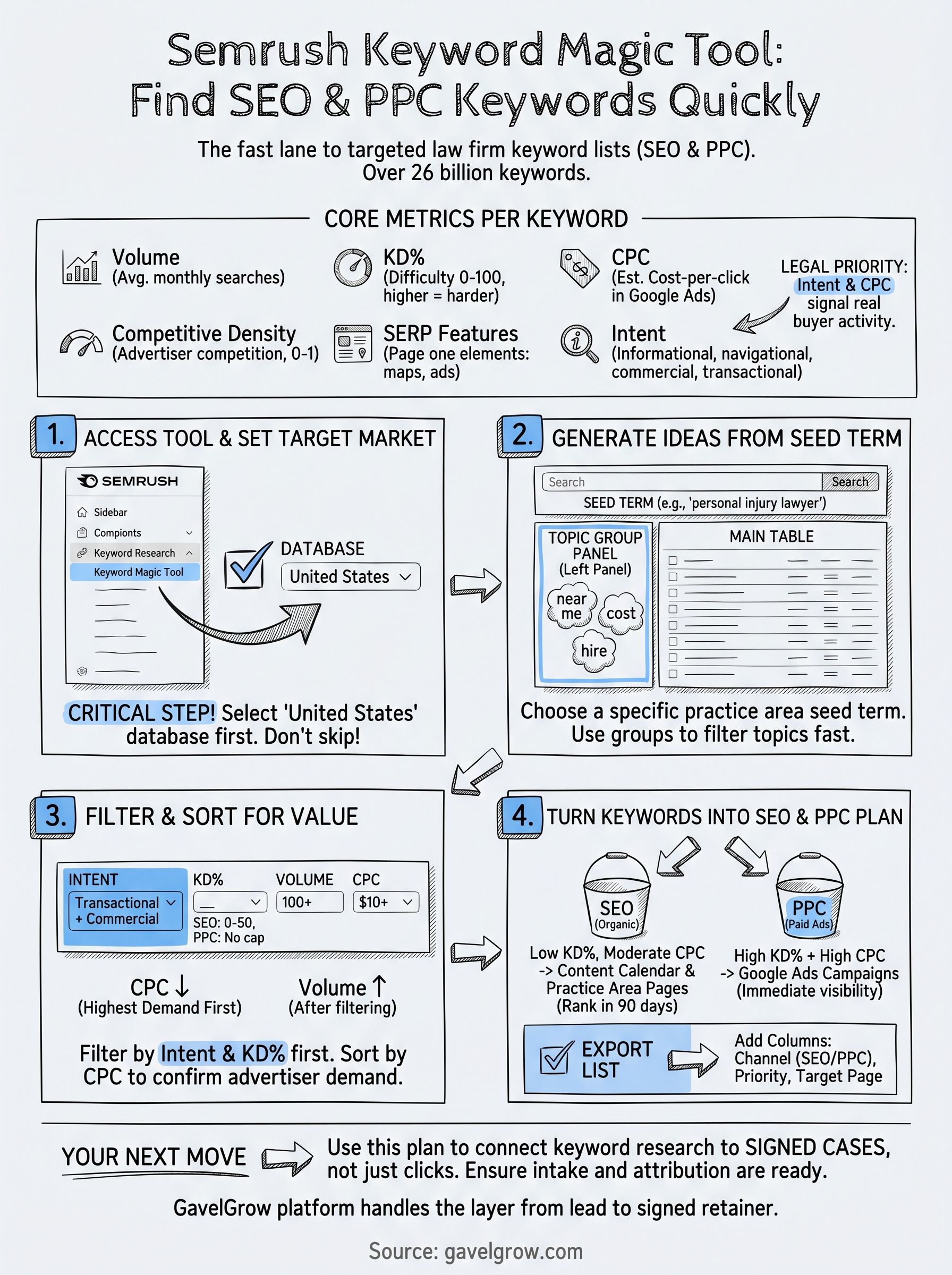
The Semrush Keyword Magic Tool is a keyword research feature inside the Semrush platform that pulls from a database of over 26 billion keywords across 142 countries. You type in a seed term, and the tool returns thousands of keyword variations grouped by topic, along with data points like monthly search volume, keyword difficulty, cost-per-click, and competitive density. It's built for both SEO and PPC work, so you can use the same research session to inform your content calendar and your Google Ads bid strategy.
What data you actually get per keyword
Every keyword row in the tool includes six core metrics you need to make informed targeting decisions. Here's what each one tells you:
For law firms specifically, intent and CPC are the two metrics worth prioritizing first. A high-volume keyword with informational intent rarely converts to a consultation. A lower-volume term with transactional intent and a $60+ CPC signals real buyer activity.
Why it matters for legal keyword research
Most generic keyword tools treat all industries the same. The Keyword Magic Tool lets you filter by intent and group terms by semantic clusters, which makes it practical for legal marketers who need to separate "what is personal injury law" from "hire personal injury lawyer near me."
The intent filter alone can cut your keyword list from 5,000 irrelevant terms down to 200 worth bidding on.
You're not just collecting keywords, you're building a list that maps directly to client acquisition goals.
Step 1. Access the tool and set your target market
Log into your Semrush account and locate the left sidebar navigation. Under the "Keyword Research" section, click "Keyword Magic Tool." Free plans allow 10 searches per day. A paid plan removes that cap and unlocks full filter and export functionality.
How to navigate to the Keyword Magic Tool
Finding the tool takes three clicks from anywhere inside Semrush. Follow this exact path:
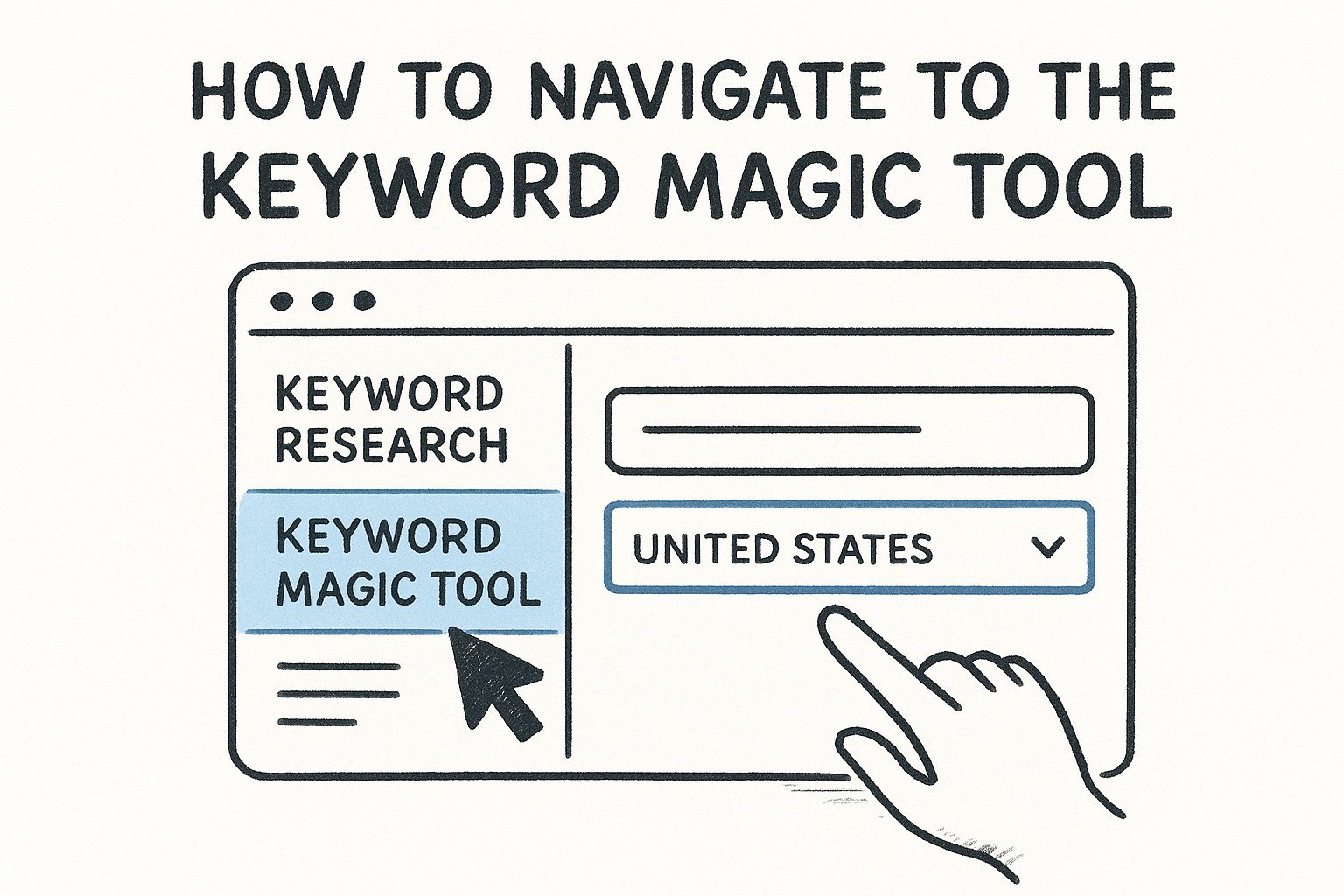
- Click "Keyword Research" in the left sidebar
- Select "Keyword Magic Tool" from the submenu
- You'll land on the main interface with a seed-term input field and a database selector on the left
Most users skip straight to typing a seed term and ignore that database selector entirely. That one oversight produces volume and CPC data from the wrong market, which throws off every targeting decision that follows.
Setting your target database
Selecting the correct country database before you type anything is the most critical setup step in this entire workflow. Click the database dropdown to the left of the search bar and select "United States" if your clients are in the U.S. The Semrush Keyword Magic Tool does not offer state-level filtering here, so national U.S. data is the right starting point for local and regional law firm campaigns alike.
Setting the wrong database at this step skews every volume and CPC figure you'll review for the rest of your research session.
Step 2. Generate keyword ideas from a seed term
With your database set to United States, type your seed term into the search bar and press Enter. The Semrush Keyword Magic Tool returns results in seconds, organized into a main keyword table on the right and a topic group panel on the left. That left panel is where most users miss value, so read the next section before you scroll past it.
How to choose the right seed term
Your seed term anchors the entire research session, so pick something specific but not overly narrow. A term like "personal injury lawyer" returns broad coverage for a PI firm. A term like "workers comp attorney" targets a tighter practice area. Start with one practice area at a time rather than a generic phrase like "lawyer," which dilutes the results with irrelevant intent clusters.
One focused seed term per session produces cleaner groups than running three vague terms at once.
Reading the keyword groups panel
The left panel organizes every returned keyword into semantic clusters based on shared modifiers. Click any group label, such as "near me" or "cost," to filter the main table to only those keywords. This is faster than manual filtering and immediately shows you which sub-topics carry the most search volume within your practice area.
Step 3. Filter and sort to find high-value keywords
The raw results from the Semrush Keyword Magic Tool will likely return hundreds or thousands of terms. Without filtering, you're staring at noise. Use the filter bar at the top of the results table to narrow that list to only the keywords worth your time and budget.
Which filters to apply first
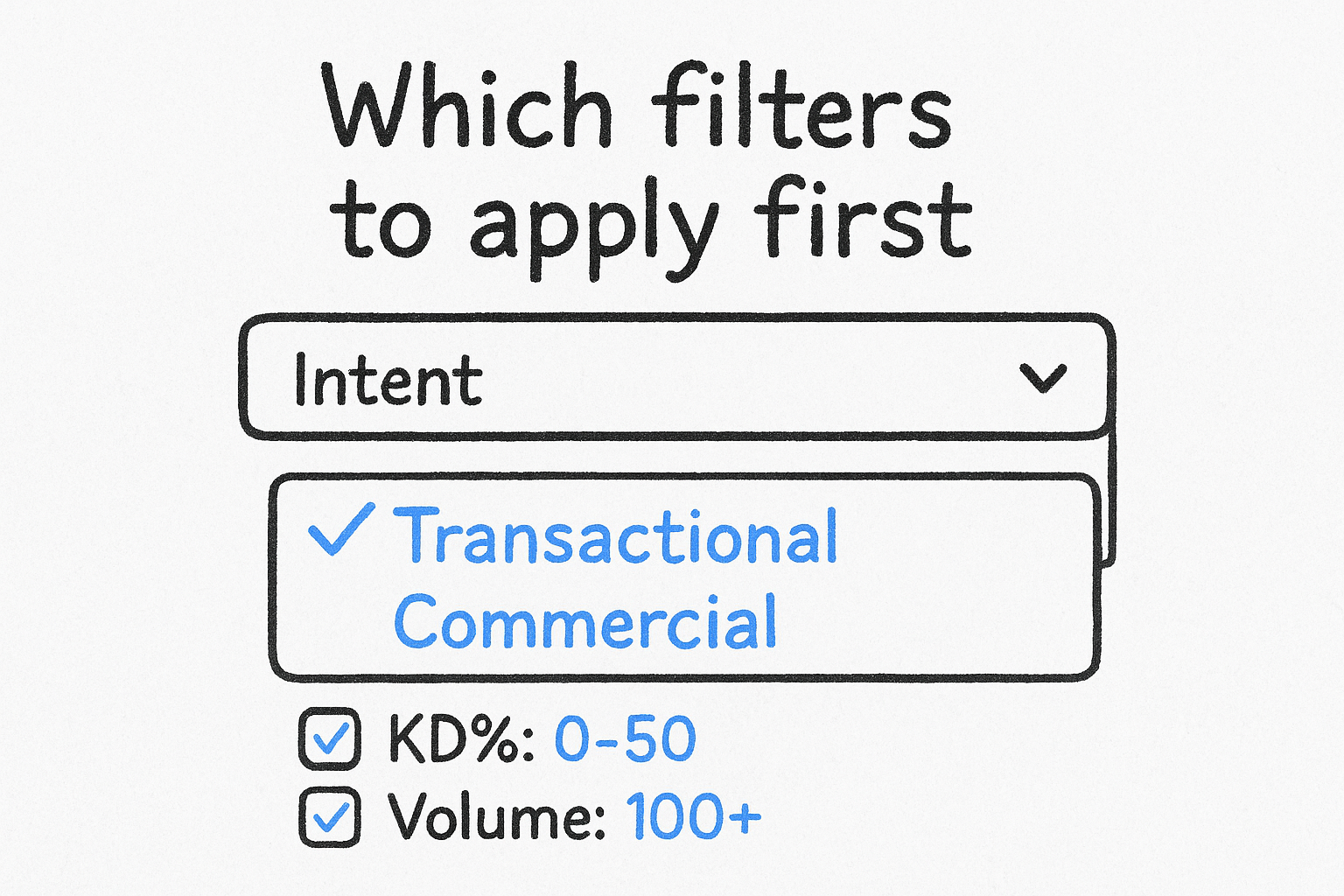
Start with intent and keyword difficulty before touching anything else. Set intent to "Transactional" or "Commercial" to isolate terms where users are ready to hire, not just browsing. Then cap KD% at 50 if you're targeting organic rankings, or leave it open if you're running paid ads since difficulty doesn't affect your ability to bid.
Filtering by transactional intent alone can cut a 3,000-term list down to fewer than 300 actionable targets.
Apply these filters in this order:
- Intent: Transactional + Commercial
- KD%: 0-50 for SEO; no cap for PPC
- Volume: 100+ monthly searches minimum
- CPC: $10+ to confirm advertiser demand
How to sort results by value
After filtering, sort by CPC descending to surface terms with the highest advertiser competition at the top. High CPC confirms real commercial intent because advertisers only bid aggressively on terms that convert. For SEO, re-sort by Volume after your CPC filter pass to balance reach against acquisition difficulty.
Step 4. Turn keywords into an SEO and PPC plan
Once you've filtered your list inside the Semrush Keyword Magic Tool, your next job is to split those keywords into two distinct buckets: one for organic content targets and one for paid ad campaigns. Running both from the same research session keeps your strategy internally consistent and prevents you from bidding on terms you can already rank for without spending a dollar.
How to split keywords between SEO and PPC
Separate your keywords by KD% and CPC together, not individually. High KD% combined with high CPC signals strong commercial intent but steep organic competition, which makes those terms better suited for immediate Google Ads bidding while your SEO authority builds. Low KD% with moderate CPC terms belong on your content calendar as practice area pages you can realistically rank within 90 days.
Avoid bidding on terms where you already hold a top-three organic ranking. That ad spend converts leads you would have captured for free.
How to export and organize your final list
Select all filtered keywords using the checkbox at the top of the results table, then click "Export" to download a CSV. Open it in a spreadsheet and add these three columns to build an actionable brief:
This structure gives your team a clear execution plan tied directly to your research.
Your Next Move
You now have a repeatable workflow for using the Semrush Keyword Magic Tool to build keyword lists that actually connect to signed cases, not just search impressions. Setting the right database, choosing a focused seed term, filtering by intent and CPC, and splitting results between SEO and PPC gives you a research process you can run in under an hour for any practice area.
Keyword research is only valuable if the traffic it generates turns into consultations. That means your intake process, call tracking, and attribution need to be in place before you spend a dollar on ads or publish a new practice area page. If any of those pieces are missing or disconnected, you're leaving data on the table.
GavelGrow's platform handles exactly that layer, from the moment a lead lands on your form to the signed retainer. See how the full platform works or book a free 45-minute strategy call to map out your next campaign.
Frequently Asked Questions
What is the Semrush Keyword Magic Tool?
The Semrush Keyword Magic Tool is a keyword research feature inside the Semrush platform that pulls from a database of over 26 billion keywords across 142 countries. You enter a seed term and it returns thousands of keyword variations grouped by topic, along with data like monthly search volume, keyword difficulty, cost-per-click, and competitive density. It's built for both SEO and PPC, so one research session can inform your content calendar and your ad bidding.
How do you find the Semrush Keyword Magic Tool?
You reach the tool in three clicks from anywhere inside Semrush: click "Keyword Research" in the left sidebar, select "Keyword Magic Tool" from the submenu, and you land on the main interface with a seed-term field and a database selector. Free plans allow 10 searches per day; a paid plan removes that cap and unlocks full filtering and export. Do not skip the database selector, or you'll pull data from the wrong market.
Which metrics matter most for legal keyword research in the tool?
For law firms, search intent and cost-per-click are the two metrics worth prioritizing first. A high-volume keyword with informational intent rarely converts to a consultation, while a lower-volume term with transactional intent and a higher CPC signals real buyer activity. The tool's intent filter alone can cut a list of thousands of irrelevant terms down to a few hundred worth actually bidding on or building pages around.
How do you filter Semrush results to find high-value legal keywords?
Start with intent and keyword difficulty before touching anything else. Set intent to transactional or commercial to isolate people ready to hire, then cap difficulty around 50 if you're targeting organic rankings, or leave it open for paid ads since difficulty doesn't affect bidding. Adding a minimum monthly search volume and a CPC floor further confirms advertiser demand and narrows the list to actionable targets.
How do you split Semrush keywords between SEO and PPC?
Split keywords by looking at difficulty and CPC together, not individually. High difficulty combined with high CPC signals strong commercial intent but steep organic competition, so those terms suit immediate Google Ads bidding while your SEO authority builds. Lower-difficulty, moderate-CPC terms belong on your content calendar as practice-area pages. Avoid bidding on terms where you already hold a top-three organic ranking, since that spend buys clicks you'd get for free.
Frequently Asked Questions
What is the Semrush Keyword Magic Tool?
The Semrush Keyword Magic Tool is a keyword research feature inside the Semrush platform that pulls from a database of over 26 billion keywords across 142 countries. You enter a seed term and it returns thousands of keyword variations grouped by topic, along with data like monthly search volume, keyword difficulty, cost-per-click, and competitive density. It's built for both SEO and PPC, so one research session can inform your content calendar and your ad bidding.
How do you find the Semrush Keyword Magic Tool?
You reach the tool in three clicks from anywhere inside Semrush: click "Keyword Research" in the left sidebar, select "Keyword Magic Tool" from the submenu, and you land on the main interface with a seed-term field and a database selector. Free plans allow 10 searches per day; a paid plan removes that cap and unlocks full filtering and export. Do not skip the database selector, or you'll pull data from the wrong market.
Which metrics matter most for legal keyword research in the tool?
For law firms, search intent and cost-per-click are the two metrics worth prioritizing first. A high-volume keyword with informational intent rarely converts to a consultation, while a lower-volume term with transactional intent and a higher CPC signals real buyer activity. The tool's intent filter alone can cut a list of thousands of irrelevant terms down to a few hundred worth actually bidding on or building pages around.
How do you filter Semrush results to find high-value legal keywords?
Start with intent and keyword difficulty before touching anything else. Set intent to transactional or commercial to isolate people ready to hire, then cap difficulty around 50 if you're targeting organic rankings, or leave it open for paid ads since difficulty doesn't affect bidding. Adding a minimum monthly search volume and a CPC floor further confirms advertiser demand and narrows the list to actionable targets.
How do you split Semrush keywords between SEO and PPC?
Split keywords by looking at difficulty and CPC together, not individually. High difficulty combined with high CPC signals strong commercial intent but steep organic competition, so those terms suit immediate Google Ads bidding while your SEO authority builds. Lower-difficulty, moderate-CPC terms belong on your content calendar as practice-area pages. Avoid bidding on terms where you already hold a top-three organic ranking, since that spend buys clicks you'd get for free.