7 Ways to Boost Law Firm Productivity With AI and Tools
Categories: Legal Marketing Strategies
 Abram Ninoyan
Founder & Senior Performance Marketer
Credentials: Google Partner, Google Ads Search Certified, Google Ads Display Certified, Google Ads Measurement Certified, Google Analytics (IQ) Certified, HubSpot Inbound Certified, HubSpot Social Media Marketing Certified, Conversion Optimization Certified
Expertise: Google Ads, Meta Ads, Conversion Rate Optimization, GA4 & Google Tag Manager, Lead Generation, Marketing Funnel Optimization, PPC Management
LinkedIn Profile
Your associates bill only a fraction of the hours they work, as Clio's Legal Trends Reports have tracked for years, and the rest disappears into intake paperwork, phone tag, and manual data entry. If you're searchi...
Key Takeaways
- 7 Ways to Boost Law Firm Productivity With AI and Tools
- 1. Automate lead intake and speed-to-lead response
- 2. Use AI for legal research and document review
- 3. Automate time tracking, billing, and invoicing
7 Ways to Boost Law Firm Productivity With AI and Tools
Your associates bill only a fraction of the hours they work, as Clio's Legal Trends Reports have tracked for years, and the rest disappears into intake paperwork, phone tag, and manual data entry. If you're searching for law firm productivity fixes, you already know the problem isn't effort. It's the number of disconnected tools and manual steps standing between a new lead and a signed retainer.
The fastest gains come from automating repetitive intake and follow-up work rather than asking staff to simply move faster. AI-driven document review, automated SMS and email sequences, and centralized call tracking can cut hours of admin work per week without adding headcount. The firms pulling ahead in 2026 aren't working harder, they've replaced manual busywork with purpose-built legal tools that handle it automatically.
Below are seven proven ways to reclaim those lost hours, from AI-assisted drafting to unified lead pipelines that eliminate the spreadsheet-and-sticky-note chaos most firms still run on. Each one includes specific tools, expected time savings, and how to measure whether it's actually working. If you're comparing platforms, GavelGrow's marketing dashboard and intake automation show up more than once here, since they were built specifically to close the gaps generic software leaves behind.
1. Automate lead intake and speed-to-lead response
Most firms still let leads sit in a shared inbox until someone gets to them. That's the single most expensive habit in legal marketing. The Lead Response Management Study found that leads contacted within 5 minutes were 21 times more likely to qualify than those first reached at 30 minutes, and the odds keep dropping after that. If your intake process depends on a paralegal checking email between other tasks, you're losing signed cases you already paid to generate.

How it works
Automated intake replaces manual triage with instant SMS and email sequences that fire the moment a lead submits a form or misses a call. GavelGrow's intake automation sends the first message within minutes, logs TCPA consent automatically, and routes the lead into a pipeline view where staff see last-activity aging and per-campaign cost-per-lead on every row. Paired with built-in call tracking, every inbound call gets a recording, an outcome tag (qualified, callback, unqualified, spam), and attribution back to the ad or campaign that generated it, so you're not guessing which channels actually produce signed retainers.
Speed-to-lead isn't a nice-to-have metric, it's the difference between a signed case and a wasted ad dollar.
Who it's for
This fix matters most for firms running any kind of paid or organic lead generation, personal injury and mass tort shops especially, since those leads often shop three or four firms in the same afternoon. Solo practitioners juggling intake themselves benefit just as much as 15-attorney firms with a dedicated intake team, because the automation removes the human bottleneck either way.
Pricing
Firms can test the automated workflow with GavelGrow's 7-day free trial, no credit card required, before deciding which tier fits their lead volume.
2. Use AI for legal research and document review
Research and document review eat entire afternoons that could go toward billable work. AI legal research tools now scan case law, statutes, and prior filings in minutes instead of hours, and they flag the passages that actually matter instead of returning a stack of tangentially related cases.
How it works
Tools like Westlaw's CoPilot or Lexis+ AI use large language models trained on legal databases to summarize case law, draft research memos, and flag relevant precedent based on a plain-language prompt. Document review platforms apply the same technology to discovery, scanning thousands of pages for privileged material, key terms, or contract risks that would take a paralegal days to find manually. According to the American Bar Association's 2024 Legal Technology Survey, 26% of firms reported using AI tools for legal research, up sharply from prior years.
The firms saving the most hours aren't replacing lawyers with AI, they're using it to cut research time before a human ever reviews the output.
Who it's for
Mid-size firms handling litigation, mass torts, or high-volume contract review see the fastest payback, since research volume scales with case load. Solo practitioners benefit too, particularly for quick precedent checks that would otherwise mean an hour in a database at $300 an hour of opportunity cost.
Pricing
Most AI legal research tools run $99 to $400 per user per month, with enterprise document review platforms pricing per gigabyte reviewed or per matter, often starting around $1,500 monthly for mid-size caseloads.
3. Automate time tracking, billing, and invoicing
Unbilled hours vanish when attorneys reconstruct their day from memory at 6 PM on a Friday. Automated time tracking captures billable minutes as they happen instead of relying on end-of-day guesswork that consistently undercounts real work.
How it works
Modern billing tools like TimeSolv, Bill4Time, or the billing modules inside Clio run in the background, logging time spent in email, document editors, and phone calls, then let attorneys tag and approve entries instead of typing them from scratch. Passive time capture alone recovers hours that used to evaporate between tasks, and invoices generate automatically from approved entries instead of a bookkeeper assembling them line by line at month's end.
Every unrecorded six minutes is revenue you already earned and chose not to collect.
Who it's for
Firms billing hourly, especially in family law, business law, and estate planning, see the clearest return since every missed increment is direct lost revenue. Flat-fee and contingency firms still benefit from automated invoicing and trust accounting, even without granular time capture.
Pricing
Most platforms offer free trials, so test one against a real week of billable work before committing.
4. Standardize workflows with legal practice management software
Every firm running on a mix of email, spreadsheets, and sticky notes eventually loses something: a filing deadline, a client callback, a signed document buried in someone's inbox. Practice management software gives every matter a single home, so nothing depends on one person's memory or personal system.
How it works
Platforms like Clio, MyCase, and PracticePanther centralize case files, deadlines, court dates, and client records into one searchable system that every team member can access. Staff work from standardized templates and checklists for common matter types, so a new hire follows the same intake-to-close process a senior partner would, instead of improvising. Calendar syncing pushes court dates and deadlines to Google, Apple, or Outlook automatically, cutting the missed-deadline risk that malpractice insurers flag every year in their claims data.
A missed deadline is rarely a competence problem, it's usually a system that never caught it.
Who it's for
Firms with three or more attorneys handling overlapping caseloads see the biggest gains, since inconsistent workflows compound fast once more than one person touches a file. Solo practitioners still benefit from the deadline tracking and document organization alone.
Pricing
Expect $39 to $89 per user per month for core practice management software, with add-ons for e-signature, client portals, or advanced reporting pushing larger firms toward $100 or more per seat monthly.
5. Draft faster with AI-powered document automation
Drafting a standard demand letter or retainer agreement from a blank page wastes billable time on work that's identical to something you drafted last month. Document automation turns your best templates into repeatable, fillable workflows instead of files you copy and retype by hand.
How it works
Tools like Documate, Gavel (the legal document automation company, unrelated to GavelGrow), or the drafting assistants inside Clio Draft let you build a questionnaire once, then generate a fully formatted document in minutes by answering a short intake form. Pair that with generative AI drafting, like the tools inside Lexis+ AI or Westlaw CoPilot, and attorneys can produce a first-draft pleading or contract clause from a plain-language prompt, then edit instead of starting from zero. The time savings compound fastest on high-volume, low-variation documents: settlement letters, discovery requests, engagement agreements.
The best use of AI drafting isn't writing your brief, it's eliminating the blank page every time the document is 80% the same as the last one.
Who it's for
Firms handling repetitive document types, personal injury demand packages, immigration filings, or standard contracts, get the fastest payback. Litigation boutiques drafting novel briefs see smaller gains, since less of that work repeats.
Pricing
Document automation platforms typically run $200 to $600 per month for a small team, while AI drafting add-ons inside existing research platforms often cost $99 to $250 per user monthly on top of the base subscription.
6. Centralize client communication in one client portal
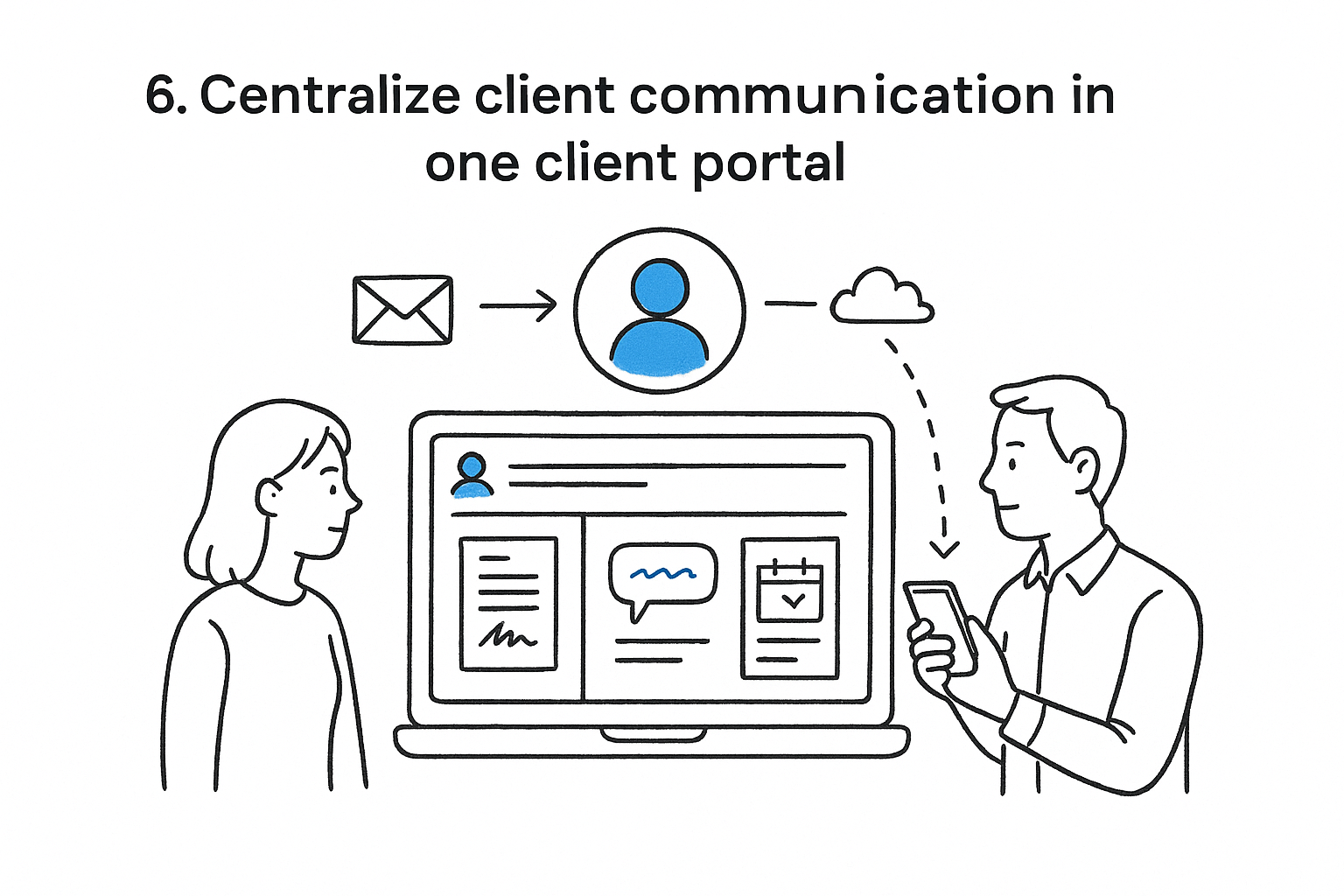
Clients calling to ask "what's happening with my case" cost you billable hours every single week, and most of those calls happen because nobody gave them a place to check status themselves. Client portals fix that by putting documents, messages, and case updates in one login instead of scattered emails, texts, and voicemails.
How it works
A portal gives clients secure access to their file: signed documents, upcoming court dates, and a message thread that doesn't get buried in a personal inbox. GavelGrow's unified inbox does the reverse job for staff, pulling every SMS, email, and voicemail tied to a lead or client into one conversation view, so nobody has to hunt across three apps to answer a simple question. Combine both and you cut the status-check calls that eat front-desk time without adding any new hires.
Every status-check call you eliminate is time you get back for work that actually bills.
Who it's for
Firms with high client-touch practice areas, personal injury, family law, immigration, benefit most, since those clients call constantly during long case timelines. Smaller firms without a dedicated intake team also gain, since a portal absorbs questions that would otherwise land on an attorney's desk.
Pricing
Standalone client portal software runs $30 to $75 per user monthly, while portals bundled inside practice management suites like Clio or MyCase are typically included in the $49 to $99 per-user tier already covering case management.
7. Outsource non-billable administrative work
Answering phones, scheduling, data entry, and chasing signatures fill hours that never touch a billable matter, yet someone still has to do them. Outsourcing administrative work to a virtual assistant or answering service frees your staff to spend their day on tasks that actually generate revenue.
How it works
Firms typically hand off call answering, appointment scheduling, basic data entry, and document formatting to a virtual receptionist service or a part-time remote assistant. Many pair this with automated intake tools like GavelGrow's hosted forms and unified inbox, so the outsourced team works from the same lead pipeline your attorneys see, instead of a separate spreadsheet nobody updates. That combination keeps outsourced staff accountable without adding a management layer.
Every hour a paralegal spends on data entry is an hour they didn't spend on a task only a paralegal can do.
Who it's for
Solo and small firms without the volume to justify a full-time hire benefit most, since outsourcing scales up or down with caseload. Larger firms use it too, typically for after-hours call answering or overflow during intake surges when marketing campaigns spike lead volume beyond staff capacity.
Pricing
Virtual receptionist and answering services generally run $200 to $600 per month depending on call volume, while a part-time virtual legal assistant costs $15 to $35 per hour, usually 10 to 20 hours weekly.
Where to start building a more productive firm
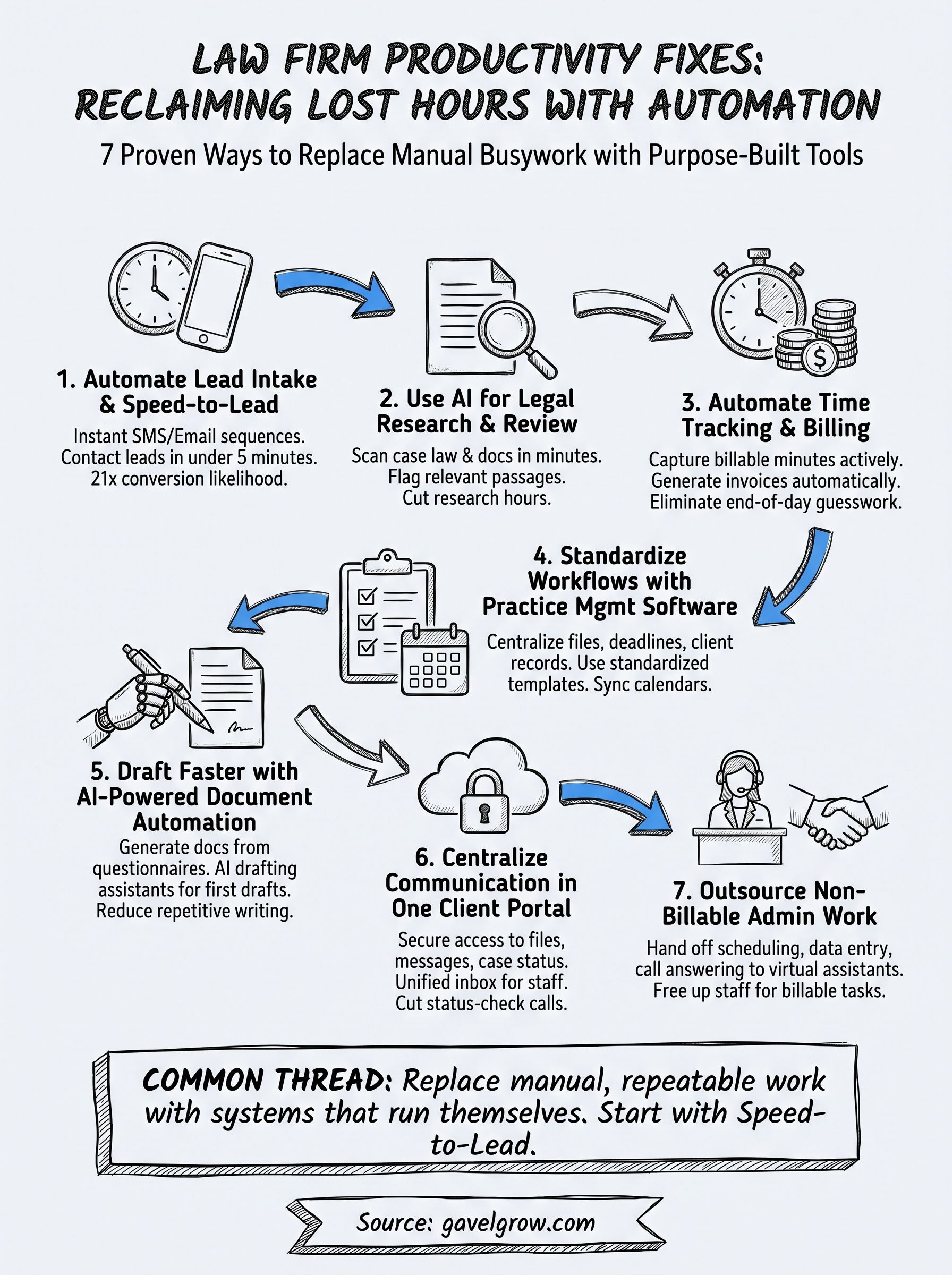
You don't need to tackle all seven fixes at once. Start with speed-to-lead automation, since it directly protects the marketing dollars you're already spending, then layer in practice management, billing automation, and AI drafting as bandwidth allows. Most firms that stall out try to overhaul everything in a single quarter and burn out staff on new software instead of gaining hours back.
The common thread across every item on this list is the same: replace manual, repeatable work with a system that runs itself, whether that's a call tracking number, a billing rule, or an intake sequence. Productivity gains stick when the tool fits how your firm already operates, not the other way around.
If you're not sure where your intake and lead response actually stand today, book a free 45-minute strategy call with GavelGrow and we'll walk through what's costing you signed cases right now.
Frequently Asked Questions
How can law firms improve productivity?
The biggest productivity gains come from automating the low-value work that eats billable hours — lead intake and follow-up, time tracking and billing, document drafting, and routine client communication — so lawyers spend more time on legal work. AI tools for research and document review, a fast intake system, and clear standard operating procedures let a firm handle more matters without adding headcount.
What is a good utilization rate for a law firm?
Industry reports have long shown lawyers bill only a fraction of the workday, with much of it lost to administrative work. Rather than fixate on a target number, the goal is to raise utilization by removing non-billable drag — automating intake, billing, and routine tasks so more of each day converts to billable, client-facing work.
What tools boost law firm productivity?
The highest-impact categories are intake and speed-to-lead automation, AI-assisted legal research and document review, automated time tracking and billing, document automation, secure client portals, and virtual reception. The trap is stitching together too many disconnected tools; firms tend to gain the most by consolidating around a few platforms that eliminate manual re-entry and hand-offs.
How does AI improve law firm productivity?
AI speeds up the research- and document-heavy work that traditionally consumed hours — surfacing relevant precedent, reviewing large document sets, and drafting first versions of routine filings and correspondence — leaving lawyers to verify and refine rather than start from scratch. Used carefully and with human review, it can meaningfully increase how many matters a firm handles without lowering quality.
How do you reduce non-billable time at a law firm?
Automate or delegate it. Intake automation captures and follows up with leads so lawyers are not playing phone tag, automated time tracking and billing cut administrative hours, and document automation removes repetitive drafting. Whatever cannot be automated should be delegated to paralegals or staff against clear procedures, so attorneys spend their time on the billable work only they can do.
How does slow lead response hurt law firm productivity?
It wastes both marketing spend and staff time. Leads that are not answered fast go cold, so the firm pays to generate them and then loses them, and staff burn hours chasing prospects who have already hired elsewhere. Automating speed-to-lead response converts more of the leads you already have, which lifts both productivity and profitability without extra effort.
Can productivity tools replace hiring at a law firm?
Often they can delay or reduce it. Automating intake, billing, and document work lets existing staff handle more without dropping quality, and AI can absorb research and drafting load. Most firms should exhaust process improvement and automation before adding headcount — you frequently get more capacity from fixing workflows than from hiring, and at a fraction of the cost.
Third-party pricing reflects category estimates based on publicly available information as of July 2026, not official quotes — verify current pricing directly with each vendor. Company names and trademarks (e.g., Clio, MyCase) are the property of their respective owners.
Frequently Asked Questions
How can law firms improve productivity?
The biggest productivity gains come from automating the low-value work that eats billable hours — lead intake and follow-up, time tracking and billing, document drafting, and routine client communication — so lawyers spend more time on legal work. AI tools for research and document review, a fast intake system, and clear standard operating procedures let a firm handle more matters without adding headcount.
What is a good utilization rate for a law firm?
Industry reports have long shown lawyers bill only a fraction of the workday, with much of it lost to administrative work. Rather than fixate on a target number, the goal is to raise utilization by removing non-billable drag — automating intake, billing, and routine tasks so more of each day converts to billable, client-facing work.
What tools boost law firm productivity?
The highest-impact categories are intake and speed-to-lead automation, AI-assisted legal research and document review, automated time tracking and billing, document automation, secure client portals, and virtual reception. The trap is stitching together too many disconnected tools; firms tend to gain the most by consolidating around a few platforms that eliminate manual re-entry and hand-offs.
How does AI improve law firm productivity?
AI speeds up the research- and document-heavy work that traditionally consumed hours — surfacing relevant precedent, reviewing large document sets, and drafting first versions of routine filings and correspondence — leaving lawyers to verify and refine rather than start from scratch. Used carefully and with human review, it can meaningfully increase how many matters a firm handles without lowering quality.
How do you reduce non-billable time at a law firm?
Automate or delegate it. Intake automation captures and follows up with leads so lawyers are not playing phone tag, automated time tracking and billing cut administrative hours, and document automation removes repetitive drafting. Whatever cannot be automated should be delegated to paralegals or staff against clear procedures, so attorneys spend their time on the billable work only they can do.
How does slow lead response hurt law firm productivity?
It wastes both marketing spend and staff time. Leads that are not answered fast go cold, so the firm pays to generate them and then loses them, and staff burn hours chasing prospects who have already hired elsewhere. Automating speed-to-lead response converts more of the leads you already have, which lifts both productivity and profitability without extra effort.
Can productivity tools replace hiring at a law firm?
Often they can delay or reduce it. Automating intake, billing, and document work lets existing staff handle more without dropping quality, and AI can absorb research and drafting load. Most firms should exhaust process improvement and automation before adding headcount — you frequently get more capacity from fixing workflows than from hiring, and at a fraction of the cost. Third-party pricing reflects category estimates based on publicly available information as of July 2026, not official quotes — verify current pricing directly with each vendor. Company names and trademarks (e.g., Clio, MyCase) are the property of their respective owners.