10 Canva Social Media Templates for Law Firm Marketing
Categories: Legal Marketing Strategies
 Abram Ninoyan
Founder & Senior Performance Marketer
Credentials: Google Partner, Google Ads Search Certified, Google Ads Display Certified, Google Ads Measurement Certified, Google Analytics (IQ) Certified, HubSpot Inbound Certified, HubSpot Social Media Marketing Certified, Conversion Optimization Certified
Expertise: Google Ads, Meta Ads, Conversion Rate Optimization, GA4 & Google Tag Manager, Lead Generation, Marketing Funnel Optimization, PPC Management
LinkedIn Profile
Most law firms know they should be posting on social media. Fewer know how to make those posts actually look professional without hiring a designer or spending hours fumbling through design software....
Key Takeaways
- 10 Canva Social Media Templates for Law Firm Marketing
- 1. Intake-ready consultation offer template
- 2. Practice area explainer carousel template
- 3. FAQ and myths vs facts post template
10 Canva Social Media Templates for Law Firm Marketing
Most law firms know they should be posting on social media. Fewer know how to make those posts actually look professional without hiring a designer or spending hours fumbling through design software. That's where Canva social media templates come in, they give attorneys and their teams a shortcut to polished, on-brand graphics that attract potential clients instead of blending into the feed.
At GavelGrow, we build marketing systems for law firms that turn attention into signed cases. Social media is one piece of that puzzle, and we've seen firsthand how consistent, well-designed posts build trust with prospective clients before they ever pick up the phone. A strong template library makes that consistency realistic, even for firms with limited time and no in-house creative team.
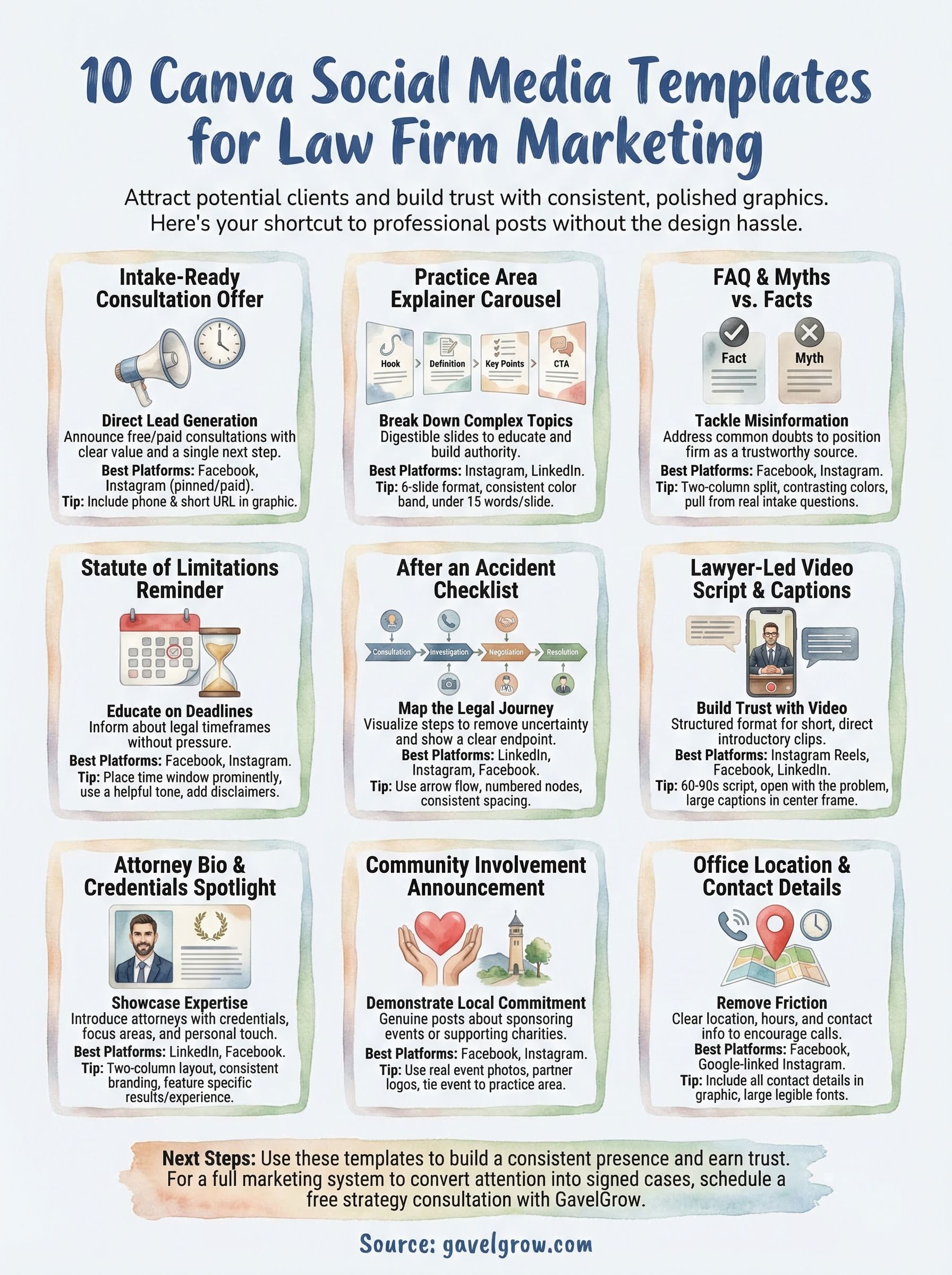
Below, we've pulled together 10 Canva social media templates built specifically for law firm marketing. Each one is customizable, practical, and designed to help your firm show up with authority across platforms like Instagram, Facebook, and LinkedIn. We'll cover what makes each template useful and how to get the most out of it for your practice area.
1. Intake-ready consultation offer template
The consultation offer template is one of the most direct lead-generation tools a law firm can post. It announces your free or paid consultation, communicates the value clearly, and gives prospective clients a single, obvious next step to take. When you use Canva social media templates for this purpose, you can build a polished graphic in under 30 minutes and deploy it across multiple platforms without redesigning from scratch each time.
Best use cases and ideal platforms
This template works best as a pinned post or paid promotion on Facebook and Instagram, where you can target by location and life event. LinkedIn works well for business law and employment law firms targeting decision-makers. Here is where each practice area tends to get the most traction:
- Personal injury and family law: Facebook, where target demographics spend the most time
- Business and employment law: LinkedIn, for reaching executives and HR decision-makers
- Criminal defense and immigration: Instagram and Facebook for broad local reach
What to include so it drives qualified calls
Your consultation offer graphic needs to answer three questions fast: who you help, what they get, and how they reach you. Keep the offer language specific. "Free 30-minute consultation for injury victims in Dallas" outperforms "Free consultation" because it filters for qualified leads before they ever call.
Specificity in your offer language is the fastest way to raise call quality without increasing your ad spend.
Include your phone number and a short URL directly inside the graphic, not just the caption. Many viewers screenshot posts rather than click links, so placing contact details in the image ensures they have what they need even when they are offline.
Canva layout tips for clarity and scannability
Place your offer headline in the top third of the graphic where the eye lands first. Use no more than two font sizes: one for the headline and one for supporting details. High contrast between background and text is non-negotiable. White text on a dark brand color, or dark text on a light background, both read cleanly. Avoid centering every text line since left-aligned body copy reads faster at a glance.
Ethics and compliance checks before you post
Before you publish, confirm your state bar's rules on advertising and solicitation. Most states require a disclaimer such as "Attorney Advertising" on paid promotional content. Never guarantee outcomes, and avoid superlative language like "best" or "top-rated" unless a recognized rating organization has substantiated that claim independently.
2. Practice area explainer carousel template
A carousel post lets you break down a complex legal topic into digestible slides that prospective clients can actually understand. This format builds authority while educating your audience, and it consistently outperforms single-image posts for saves and shares across most platforms.

Best use cases and ideal platforms
Carousels perform strongest on Instagram and LinkedIn, where the swipe mechanic rewards educational content. Use this template when you want to explain what a practice area covers, who qualifies for help, or what the process looks like at a high level.
Slide-by-slide structure that educates fast
Structure your carousel so each slide answers one specific question. A reliable six-slide format works like this: Slide 1 hooks with a bold problem statement, Slide 2 defines the practice area briefly, Slides 3 through 5 each cover one key point, and Slide 6 ends with a clear call to action. Keeping each slide to under 15 words forces clarity and holds attention through the full sequence.
Viewers who reach your final slide are already engaged, so your call to action on that last slide converts at a significantly higher rate.
Canva layout tips for readable carousels
When you build canva social media templates for carousels, use a consistent color band or icon in the same position on every slide so viewers recognize they are still in your sequence. Limit body text to two lines per slide and increase font size to at least 24pt for mobile readability.
Ethics and compliance checks before you post
Include a brief disclaimer slide at the end stating that the content is general information and not legal advice. Confirm that no slide language implies a guaranteed result or creates an implied attorney-client relationship with the viewer.
3. FAQ and myths vs facts post template
An FAQ or myths vs. facts graphic tackles the misinformation that costs you consultations. Prospective clients regularly talk themselves out of calling an attorney because they believe something incorrect about costs, eligibility, or process. This template puts the correction directly in their feed and positions your firm as the trustworthy source of straight answers.
Best use cases and ideal platforms
This format performs consistently well on Facebook and Instagram for consumer-facing practice areas like personal injury, family law, and immigration. LinkedIn works for business law audiences who respond to factual, professional content. Post these organically to build credibility over time, or run them as low-budget boosted posts to extend reach into your local area.
Prompt ideas to pull from real intake questions
Your best content comes from questions your intake team already hears every week. Pull directly from call logs, intake forms, and client emails to find what your audience is actually asking. Strong prompts include: "Do I owe anything if I lose my case?" or "Does filing for divorce mean going to court?"
The questions your intake team fields most often are the exact questions your next client is typing into Google right now.
Canva layout tips for contrast and hierarchy
When building canva social media templates for this format, use a two-column split with the myth on one side and the fact on the other. Bold the corrected fact and use contrasting background colors to make the distinction immediate at a glance.
Ethics and compliance checks before you post
Confirm that your "fact" statements are accurate for your jurisdiction, since legal rules vary by state. Add a line clarifying that the post is general information and does not constitute legal advice for any specific situation.
4. Statute of limitations reminder template
A statute of limitations reminder post addresses one of the most common reasons injured people wait too long to contact an attorney. It informs your audience that legal deadlines exist without overwhelming them with legal jargon, and it creates a reason to act now without resorting to pressure tactics.
Best use cases and ideal platforms
This template fits personal injury, medical malpractice, and employment law practices especially well, since these areas carry strict filing windows that most people are unaware of. Post it on Facebook and Instagram where prospective clients who suffered recent injuries are most likely to encounter it organically.
What to say without creating undue urgency
Frame the post around education rather than alarm. A line like "Most injury claims in Texas must be filed within two years" informs without pressuring. Pair that with a sentence directing readers to schedule a consultation to review their specific situation so the call to action feels helpful rather than aggressive.
Informing someone of a deadline they did not know existed is a genuine service, and that tone comes through in the copy.
Canva layout tips for date and disclaimer placement
When building canva social media templates for deadline reminders, place the time window prominently in large type at the center of the graphic. Put your disclaimer in smaller text at the bottom but keep it legible at mobile screen size, which means at least 12pt font.
Ethics and compliance checks before you post
State that the deadline mentioned applies generally and that individual cases may differ. Avoid language that implies the viewer has already lost their right to file, and confirm your state bar rules on advertising specific legal timeframes.
5. What to do after an accident checklist template
A step-by-step checklist post gives prospective clients immediate, practical value the moment they see it. People who have just been in an accident are overwhelmed and unsure what to do, and a clear numbered graphic from your firm puts your name in front of them exactly when they need guidance most.
Best use cases and ideal platforms
This template performs best on Facebook and Instagram, where personal injury audiences are most active. Pin it to your profile or run it as a boosted post in your local area to ensure it reaches people who may be dealing with a recent accident right now.
What to include for different practice areas
Tailor the checklist steps to the specific situation your practice handles. For personal injury and auto accidents, cover steps like calling 911, documenting the scene with photos, getting witness contact information, seeking medical care, and contacting an attorney before speaking with insurance adjusters. For workers' compensation, focus on reporting the injury to a supervisor, getting a medical evaluation, and preserving documentation.
The moment someone saves your checklist graphic, they have your firm's name stored on their phone as a trusted resource.
Canva layout tips for icons and step formatting
When designing canva social media templates for checklist content, number each step and pair it with a simple icon to the left. Use consistent icon sizing and adequate white space between steps so the list feels organized rather than crowded at mobile scale.
Ethics and compliance checks before you post
Label the checklist as general guidance only, not legal advice. Avoid instructing readers to take any action that could compromise their legal position, and confirm that every step you recommend aligns with your state's rules and regulations.
6. Case timeline and process infographic template
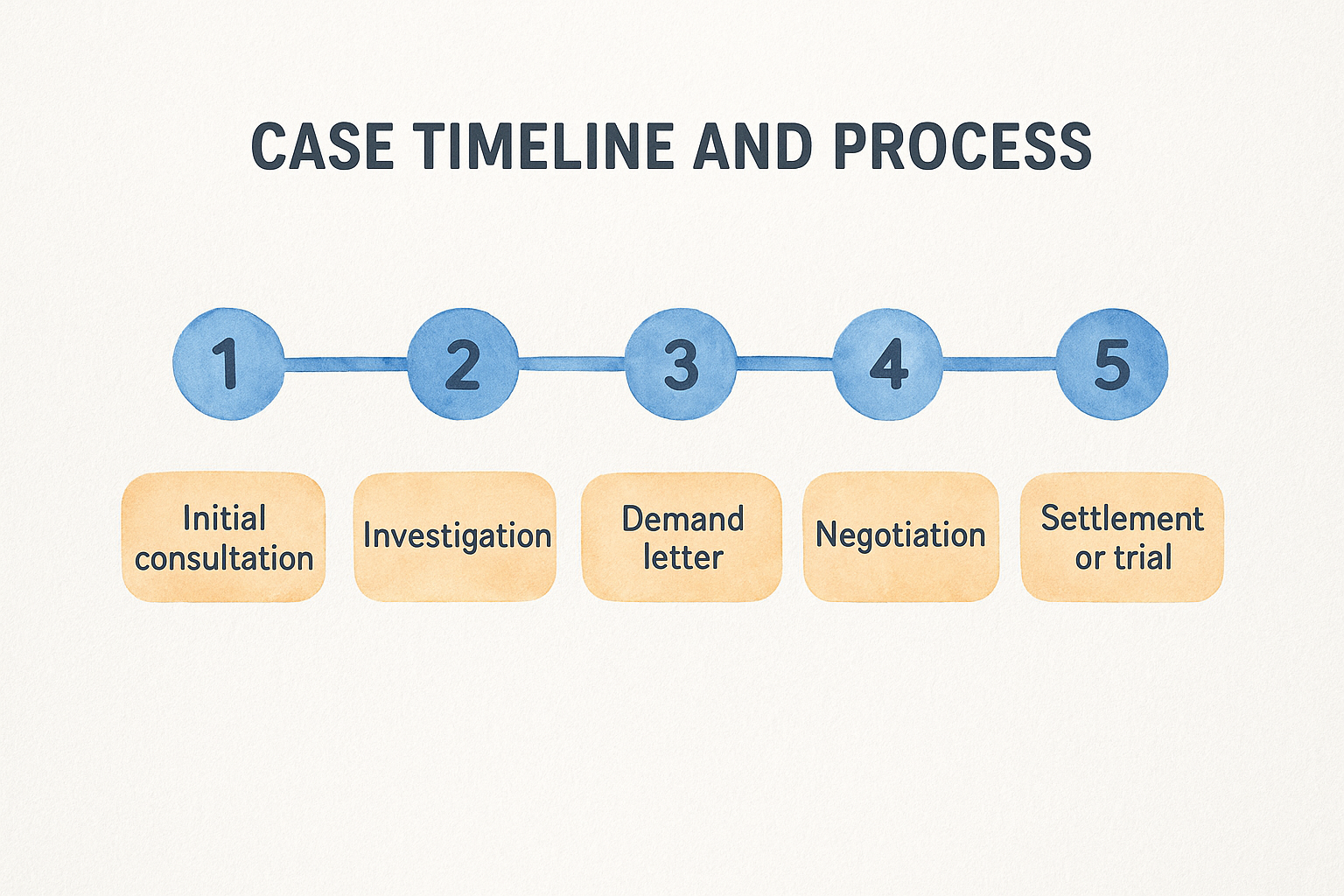
A case timeline infographic takes the uncertainty out of the legal process for prospective clients who have no idea what hiring an attorney actually involves. Most people hesitate to call because they fear a long, confusing ordeal they cannot picture. Showing the process as a clear visual sequence removes that barrier before they ever speak with your intake team.
Best use cases and ideal platforms
This template works well on LinkedIn, Instagram, and Facebook for practice areas where clients face lengthy or multi-stage processes. Personal injury, immigration, and family law all involve steps that confuse prospective clients and delay their decision to reach out.
Common timelines to map for law firm clients
Focus on the stages your clients ask about most during consultations. A reliable structure covers four to six milestones from first contact through resolution. For personal injury, that might look like: initial consultation, investigation, demand letter, negotiation, and settlement or trial. For immigration cases, map out petition filing, document collection, interview preparation, and approval.
When clients can see a clear endpoint to the process, they are far more likely to take the first step and call.
Canva layout tips for flow and spacing
When building canva social media templates for timelines, use a horizontal or vertical arrow flow with numbered nodes for each stage. Keep each label to three to five words and use consistent spacing between nodes so the sequence reads in one direction without the eye jumping around.
Ethics and compliance checks before you post
Note that timelines vary by case and that the infographic reflects a general process only. Avoid stating specific timeframes as guarantees, and confirm the content meets your state bar's advertising guidelines.
7. Lawyer-led video script and captions template
A lawyer-led video template gives your firm a structured starting point for filming short, direct clips that introduce you to prospective clients before they ever call. When you pair a simple script with a branded Canva caption graphic, you create a consistent format that makes video production repeatable rather than a one-off effort.
Best use cases and ideal platforms
Short attorney-led videos work best on Instagram Reels, Facebook, and LinkedIn, where the algorithm actively pushes video content to new audiences. Use this template for introductory "who I am" clips, quick legal tips, or brief answers to questions your intake team hears every day.
Simple on-camera formats that build trust
Keep your video scripts to 60 to 90 seconds and open with the problem your viewer is facing, not with your credentials. A personal injury attorney might open with: "If you were just in a car accident and you do not know what to do next, here is where to start." That framing centers the client immediately and earns the next 60 seconds of their attention.
Attorneys who speak directly to a problem build more credibility in 90 seconds than a polished firm bio page builds in five minutes.
Canva layout tips for subtitles and safe margins
When building canva social media templates for video overlays, place caption text within the center 80% of the frame to avoid platform UI elements cutting off your words. Use bold sans-serif fonts at 28pt or larger so subtitles remain readable on a small mobile screen.
Ethics and compliance checks before you post
State clearly in your caption that the video is general information and not legal advice. Confirm your state bar rules on attorney advertising disclosures for video content specifically, since several states require on-screen text disclaimers in addition to caption language.
8. Attorney bio and credentials spotlight template
An attorney bio post gives prospective clients a direct look at who will handle their case before they commit to a consultation. People hire attorneys they feel they can trust, and a well-designed bio graphic puts your credentials, personality, and focus area in front of your audience in a format that scrollers actually stop to read.
Best use cases and ideal platforms
This template fits LinkedIn and Facebook best, where professional credibility carries the most weight. Use it when onboarding a new associate, celebrating a career milestone, or simply introducing yourself to a local audience that may not yet know your name.
What to feature beyond a headshot
Go beyond your name and bar number. Feature your practice focus, years of experience, and one specific result or case type you handle regularly. A short personal detail, such as a community tie or language you speak, helps prospects connect with you as a person rather than a title.
Clients who feel they already know you before the first call arrive more prepared and convert at a higher rate.
Canva layout tips for consistent branding
When you build canva social media templates for attorney bios, anchor your headshot to one side and credentials to the other in a clean two-column layout. Use your firm's exact brand colors and the same font pairing you use across all other graphics to maintain visual consistency across your entire feed.
Ethics and compliance checks before you post
Confirm that any credential or award you list is verifiable and independently granted. Avoid language that implies superiority over other attorneys, and check your state bar rules on permissible self-promotional language in advertising materials.
9. Community involvement announcement template
A community involvement post shows prospective clients that your firm invests in the same neighborhoods it serves. Sponsoring a local event, hosting a legal clinic, or supporting a charity drive gives you a reason to post content that feels genuine rather than promotional, which is why this template consistently earns strong organic engagement without requiring ad spend.

Best use cases and ideal platforms
This template fits Facebook and Instagram best, where community-focused content tends to generate comments and shares from local audiences. LinkedIn works well when your firm is sponsoring a business community event or partnering with a chamber of commerce.
How to connect the event to your practice area
Tie the event back to the people your practice serves. A personal injury firm sponsoring a road safety awareness walk makes the connection immediately clear. An immigration attorney supporting a community resource fair does the same. This connection keeps the post relevant to your target audience rather than feeling like a generic goodwill announcement.
Community posts that link directly to your practice area attract the right audience and reinforce why your firm is the right choice.
Canva layout tips for photos and partner logos
When building canva social media templates for announcements, place a real photo from the event as the background and overlay your firm logo and event name in the upper third. If you are co-sponsoring, include partner logos in a consistent row along the bottom so all parties get visible recognition without cluttering the design.
Ethics and compliance checks before you post
Confirm that any partner organization logos you feature are used with permission. Avoid language that implies the event constitutes legal advice or creates a client relationship with attendees.
10. Office location and how to reach us template
An office location post removes the final barrier between a prospective client and your intake team. Many people who want to call an attorney simply do not know how to find you, what your hours are, or whether you serve their area. A clear, well-designed location graphic answers all three questions before they have to search anywhere else.
Best use cases and ideal platforms
This template fits Facebook and Google-linked Instagram posts best, where local audiences actively search for nearby services. Pin it to your profile or refresh it seasonally to keep your contact details visible at the top of your page for anyone who lands there for the first time.
What to include to reduce friction for callers
Include your phone number, office address, and business hours directly in the graphic, not just the caption. Add a note about whether you offer remote or virtual consultations, since many prospective clients will not contact a firm they assume requires an in-person visit.
Every piece of contact information you remove from the graphic is one more reason a hesitant prospect does not call.
Canva layout tips for maps and contact blocks
When designing canva social media templates for location posts, place a simple map screenshot or landmark photo as the background and overlay your contact details in a clean block on the lower half of the image. Use large, legible font sizes and leave enough padding around the text so nothing reads as crowded on a small screen.
Ethics and compliance checks before you post
Confirm that your listed hours are accurate and current so prospective clients do not call and reach a closed office. Include your state of licensure if your ads run beyond your immediate local area to meet state bar geographic advertising requirements.
Next steps
These ten canva social media templates give your firm a practical starting point for building a consistent, professional presence on every major platform. Each template serves a different stage of the client journey, from introducing your team to walking someone through a legal deadline they did not know existed. When you use them together, you build a feed that earns trust before a prospective client ever picks up the phone.
Designing strong graphics is only one piece of the puzzle. Converting that attention into signed cases requires a full marketing system behind it, including the right ad strategy, a fast intake process, and content that speaks directly to your practice area and local market. If you want help building that system from the ground up, schedule a free strategy consultation with GavelGrow and get a custom roadmap built around your firm's specific goals and competitive landscape.
Frequently Asked Questions
Best use cases and ideal platforms
This format performs consistently well on Facebook and Instagram for consumer-facing practice areas like personal injury, family law, and immigration. LinkedIn works for business law audiences who respond to factual, professional content. Post these organically to build credibility over time, or run them as low-budget boosted posts to extend reach into your local area.
Prompt ideas to pull from real intake questions
Your best content comes from questions your intake team already hears every week. Pull directly from call logs, intake forms, and client emails to find what your audience is actually asking. Strong prompts include: "Do I owe anything if I lose my case?" or "Does filing for divorce mean going to court?" The questions your intake team fields most often are the exact questions your next client is typing into Google right now.
Canva layout tips for contrast and hierarchy
When building canva social media templates for this format, use a two-column split with the myth on one side and the fact on the other. Bold the corrected fact and use contrasting background colors to make the distinction immediate at a glance.
Ethics and compliance checks before you post
Confirm that your "fact" statements are accurate for your jurisdiction , since legal rules vary by state. Add a line clarifying that the post is general information and does not constitute legal advice for any specific situation .