11 Best Conversion Rate Optimization Tools for Law Firms
Categories: Legal Marketing Strategies
 Abram Ninoyan
Founder & Senior Performance Marketer
Credentials: Google Partner, Google Ads Search Certified, Google Ads Display Certified, Google Ads Measurement Certified, Google Analytics (IQ) Certified, HubSpot Inbound Certified, HubSpot Social Media Marketing Certified, Conversion Optimization Certified
Expertise: Google Ads, Meta Ads, Conversion Rate Optimization, GA4 & Google Tag Manager, Lead Generation, Marketing Funnel Optimization, PPC Management
LinkedIn Profile
A conversion rate optimization tool for law firms tracks what happens after someone lands on your site or fills out your intake form, then shows you exactly where leads drop off before they ever becom...
Key Takeaways
- 11 Best Conversion Rate Optimization Tools for Law Firms
- 1. What should law firms look for in a CRO tool?
- 2. GavelGrow
- 3. Unbounce
11 Best Conversion Rate Optimization Tools for Law Firms
A conversion rate optimization tool for law firms tracks what happens after someone lands on your site or fills out your intake form, then shows you exactly where leads drop off before they ever become a signed case. If your Google Ads spend is climbing but your signed retainers aren't keeping pace, the problem usually lives in that gap between click and consult, not in the ad itself.
This guide answers the real question managing partners ask: which conversion rate optimization software actually moves the needle for legal marketing, versus generic tools built for ecommerce or SaaS. Legal has its own constraints, TCPA consent, state-bar rules, and a 6-12 month sales cycle, and most mainstream platforms weren't built with any of that in mind.
Below you'll find 11 tools worth evaluating in 2026, including full-funnel platforms like GavelGrow's built-in intake and attribution tracking, alongside specialized options for A/B testing, heatmaps, and call tracking. Each entry covers pricing, best-fit firm size, and what it actually optimizes.
1. What should law firms look for in a CRO tool?
Most conversion rate optimization software gets built for ecommerce checkouts, not legal intake. Before you buy anything, run every candidate through legal-specific filters, or you'll end up with a tool that optimizes for the wrong outcome. TCPA compliance has to be baked into the platform, not patched on later with a third-party plugin, because a single missed consent checkbox can turn into a lawsuit. State-bar advertising rules also vary by jurisdiction, and a generic tool won't flag language or claims that could get your firm in trouble.
Beyond compliance, focus on what the tool actually measures. A platform that reports form fills or button clicks tells you almost nothing about revenue. What you need is cost-per-signed-case, not cost-per-lead, tracked from the original ad click through to a retainer agreement. Firms lose qualified leads when nobody connects the marketing spend to the case outcome. If your CRO tool stops at "lead captured," you're still guessing at ROI.
The best CRO tool for a law firm isn't the one with the most features, it's the one that tells you which leads became paying clients.
Speed matters more in legal than in almost any other industry. The Lead Response Management Study found that leads contacted within five minutes were 21 times more likely to qualify than those first reached at 30 minutes. So look for intake automation that fires instantly, not a tool that just logs the lead for someone to follow up with hours later. Mobile performance deserves the same scrutiny. Generic contact forms convert far worse on mobile than on desktop, and if your CRO stack can't diagnose why mobile visitors bail, you're leaving a big chunk of your traffic on the table.
Use this quick checklist when comparing tools:
- Does it track leads through to signed case, not just form submission?
- Does it handle TCPA consent logging automatically?
- Can it isolate mobile conversion problems separately from desktop?
- Does it integrate with call tracking, since most legal leads still call in?
- Will it benchmark your numbers against other firms in your practice area?
That last point separates specialized platforms from generic ones. Knowing your conversion rate is 8% means little without context. GavelGrow's modelled benchmark shows you how your conversion rate and cost-per-signed-case stack up against comparable firms by practice area and market size, something Optimizely or VWO simply can't offer because they're not built for legal.
Weigh pricing against your marketing spend, not just the subscription fee. A $199/month tool that saves you from mismanaging a $10,000/month ad budget is a bargain. A $500/month enterprise platform is wasted money if you're a solo practitioner running a single Google Ads campaign. Match the tool to your firm's size, practice area, and how much of the process you want to manage yourself versus hand off. If you're weighing self-serve against fully managed, our platform page breaks down which approach fits which type of firm.
2. GavelGrow
GavelGrow was built specifically for legal intake, not retrofitted from an ecommerce checkout tool. It combines call tracking, hosted intake forms, and full-funnel attribution in one dashboard, so you're not stitching together CallRail, a form builder, and a spreadsheet just to see which campaign actually produced a signed case.
How it works
Every lead, whether it comes from a call, a web form, or SMS, gets tagged at the source with campaign data and carried through the pipeline to case outcome. The intake automation fires SMS (once US carriers approve your number) and email sequences within minutes of capture, which matters given how steeply conversion drops after the first five minutes. Per-campaign tracking numbers log call recordings and outcome tags (qualified, callback, unqualified, spam), so you see conversion friction at the call level, not just the form level.
Why it fits law firms
Compliance sits at the foundation rather than bolted on. TCPA consent logging, CTIA opt-out handling, and two-party call recording rules are built into every form and workflow by default. Firms also get modelled practice-area benchmarks, letting you compare your cost-per-signed-case with ranges for your firm size and specialty rather than generic industry averages.
A CRO tool only earns its cost if it can show you which lead sources produce signed retainers, not just clicks.
Pricing
Annual billing includes two months free, and every tier includes a 7-day free trial with no credit card required. Full pricing details are on the site if you want to compare tiers against your seat count and call volume.
Limitations
GavelGrow doesn't run traditional multivariate landing-page split tests the way Unbounce or VWO does. If your priority is testing five headline variants on a marketing page, you'll want to pair it with a dedicated A/B testing tool rather than expect that from the intake platform alone.
3. Unbounce
Unbounce built its reputation on landing page building and split testing, and it remains one of the more polished conversion rate optimization platform options for firms that want to run serious experiments on their intake pages without hiring a developer. It's not legal-specific, but the testing engine underneath is strong enough that many firms pair it with a dedicated call tracking or attribution tool to fill the compliance gap.
How it works
Builders drag and drop page elements, then Unbounce's Smart Traffic feature routes visitors to whichever page variant its AI predicts will convert best for that visitor's device and source. You can run classic A/B tests or let the algorithm optimize traffic allocation automatically. Sticky bars and popups layer on top of existing pages for exit-intent offers, which some firms use to capture visitors before they bounce off a practice-area page.
Why it fits law firms
Firms running heavy Google Ads spend on personal injury or mass tort campaigns benefit most, since Unbounce lets you build dozens of geo-targeted landing pages fast and test headlines, CTAs, and form length against each other. Page speed and mobile rendering are handled well out of the box, which matters given how much legal traffic arrives on phones.
Testing page variants only pays off if you also know which variant produced signed cases, not just form fills.
Pricing
Limitations
Unbounce has no native TCPA consent logging, no call tracking, and no case-outcome attribution, so you're testing pages in isolation from what actually happens after the lead converts. Firms end up needing a second tool, often a CRM or a platform like GavelGrow, just to know whether the winning page variant produced retained clients or just cheap leads.
4. Hotjar
Hotjar shows you what visitors actually do on your intake pages, not just what they submit. Where Unbounce tests page variants, Hotjar records the behavior behind those numbers through heatmaps, session recordings, and on-page surveys. It's one of the more widely used conversion rate optimization tools for diagnosing why a page underperforms before you rebuild it.

How it works
Once you drop a tracking script on your intake or contact page, Hotjar generates click and scroll heatmaps showing exactly where visitors engage and where they stall. Session recordings let you watch anonymized playback of real visits, so you can see someone hovering over a phone field, abandoning it, then leaving the page entirely. Rage-click detection flags spots where frustrated users click repeatedly, often a sign of a broken form field or confusing button.
Why it fits law firms
Firms struggling with the mobile conversion cliff, where contact forms convert far worse on phones than on desktop, find Hotjar useful for pinpointing the exact field or step causing the drop-off. On-page surveys also let you ask visitors directly why they didn't submit a form, which surfaces objections a heatmap alone can't show.
A heatmap tells you where visitors struggle, but only case-level attribution tells you whether fixing it produced signed clients.
Pricing
Limitations
Hotjar tells you nothing about what happens after a lead submits. It has no call tracking, no TCPA consent logging, and no way to connect a session recording to a signed retainer. Firms treating Hotjar as their entire conversion rate optimization software stack will diagnose page problems accurately while remaining completely blind to which fixed pages actually produced paying clients. Pair it with an attribution layer if you want the full picture from click to case.
5. VWO
VWO (Visual Website Optimizer) has been running A/B tests since 2010, and it's grown into one of the more complete conversion rate optimization platforms on the market, covering testing, heatmaps, and session recordings under one roof. Firms that outgrow Unbounce's page-builder focus or Hotjar's diagnostic-only approach often land on VWO because it combines both functions without forcing you to run two separate subscriptions.
How it works
Teams build experiments using VWO's visual editor, which lets you swap headlines, CTAs, or form fields without touching code, then the platform splits traffic and reports statistical significance once a test reaches enough visitors. Server-side testing is also available for firms that want to test backend logic, like which intake form version loads for which traffic source. Built-in heatmaps and recordings run alongside your tests, so you can see behavior data without adding a second tool.
Why it fits law firms
Multi-location firms running different landing pages per city benefit from VWO's ability to segment tests by geography, device, or traffic source, which matters when a personal injury page in one metro converts differently than the same page in another. The combined testing-and-heatmap setup also cuts down on tool sprawl for firms trying to avoid paying for three disconnected platforms.
Combining A/B testing with behavior analytics only helps if you can still trace a winning variant back to a signed case, not just a form fill.
Pricing
Pricing scales with monthly tracked visitors, so a high-traffic mass tort campaign costs meaningfully more than a solo practice site.
Limitations
VWO has no legal-specific compliance features, no TCPA consent logging, and no call tracking, so phone leads, which make up most legal intake, stay invisible to the platform entirely. Firms also report a steeper learning curve than Unbounce for non-technical marketing staff setting up their first test.
6. CallRail
CallRail built its name on call tracking, and it's still the tool most firms mention first when they talk about attributing phone leads to specific ad campaigns. Since most legal intake still happens over the phone rather than through a form, CallRail fills a gap that landing-page builders and heatmap tools can't touch. It's one of the more established conversion rate optimization tools for firms whose main conversion bottleneck sits in the phone call itself, not the webpage.
How it works
CallRail assigns dynamic tracking numbers to each marketing source, so a visitor from a Google Ads campaign sees a different number than one from organic search or a referral link. Every call gets recorded, transcribed, and tagged with keyword-level attribution, showing which search terms and campaigns actually generated the phone call. Conversation intelligence scores calls automatically, flagging which ones sound like qualified leads based on the words used, so staff can prioritize follow-up.
Why it fits law firms
Firms running Google Ads or Local Services Ads campaigns benefit most, since CallRail closes the loop between ad spend and phone conversions that form-only tracking tools miss entirely. Call recording and transcription also give managing partners a way to audit intake staff performance, catching missed opportunities or scripts that aren't converting callers into consultations.
Tracking which ad produced a call means nothing if you can't also confirm whether that call became a signed case.
Pricing
Pricing climbs quickly with additional tracking numbers, users, and minutes, so a busy personal injury firm can end up paying far more than the base tier suggests.
Limitations
CallRail has no TCPA consent logging, no state-bar compliance features, and no visibility into whether a tracked call ever turned into a signed retainer. It answers which campaign produced the call, not which campaign produced the client, leaving firms to build that final attribution link themselves.
7. Google Analytics 4
Google Analytics 4 is the free measurement backbone most law firms already have installed, even if nobody on staff has configured it beyond the default setup. It's not a dedicated conversion rate optimization tool in the way Unbounce or VWO is, but it's the data layer that tells you whether your other CRO tools are actually working, and most firms underuse it badly.
How it works
GA4 tracks visitor behavior across your site using an event-based model rather than the old session-based reporting in Universal Analytics. Firms configure custom events, like generate_lead, to fire when someone submits an intake form or clicks to call, then GA4 attributes that event back to the campaign, keyword, or referral source that brought the visitor in. Funnel exploration reports let you see exactly where visitors drop off between landing on a practice-area page and submitting a form, step by step.
Why it fits law firms
Every firm running Google Ads needs GA4 connected properly, since Google's own bidding algorithms use conversion signals from GA4 to optimize ad delivery. Firms that skip this setup end up feeding Google's algorithm garbage data, which drives up cost-per-lead over time. GavelGrow's platform fires GA4 events automatically with value and transaction ID attached, so firms don't have to build custom tagging themselves just to get accurate conversion data flowing.
Free analytics only helps if someone actually configures the conversion events correctly, most law firm GA4 accounts track nothing useful by default.
Pricing
Limitations
GA4 has no built-in call tracking, no TCPA consent logging, and no way to know whether a tracked lead ever became a signed case. Its interface also has a real learning curve, and without proper event configuration, most firms end up staring at pageview counts instead of the conversion data that actually matters.
8. Microsoft Clarity
Microsoft Clarity is a free heatmap and session recording tool that competes directly with Hotjar, minus the paywall. Firms running tight marketing budgets often start here before ever paying for a dedicated conversion rate optimization software subscription, since Clarity gives you most of the same diagnostic power at no cost.
How it works
Installing Clarity means adding a script tag to your site, then the tool starts recording click maps, scroll maps, and full session replays automatically. Rage-click and dead-click tracking flag spots where visitors click repeatedly without response, often a broken button or a form field that isn't registering input. Clarity also integrates natively with Google Analytics and Microsoft Advertising, pulling session data alongside your existing GA4 setup so you're not managing tracking scripts in isolation.
Why it fits law firms
Solo practitioners and small firms testing whether behavior analytics are worth the investment get real value here before committing budget elsewhere. Clarity's session recordings show exactly where mobile visitors abandon an intake form, which matters given how often legal traffic converts worse on phones than desktop. Because it costs nothing, firms can run it alongside GavelGrow or another attribution platform without adding a line item to the marketing budget.
Free behavior analytics remove the excuse for not knowing why your intake form underperforms on mobile.
Pricing
Microsoft doesn't gate any feature behind a paywall or cap session volume, according to Microsoft's own Clarity documentation. That makes it one of the easiest additions to any firm's stack.
Limitations
Clarity has no call tracking, no TCPA consent logging, and no way to connect a session recording to a signed case. It also lacks A/B testing entirely, so once you've diagnosed a problem with a heatmap, you'll need Unbounce, VWO, or a similar tool to actually test the fix. Treat Clarity as a free diagnostic layer, not a complete conversion rate optimization platform.
9. OptinMonster
OptinMonster built its name on popups, exit-intent overlays, and slide-in forms designed to catch visitors before they leave a page for good. It's one of the more recognizable conversion rate optimization tools for firms that want to layer lead capture on top of an existing site without rebuilding pages from scratch. Where Unbounce focuses on the page itself, OptinMonster focuses on interrupting the visitor at the right moment with an offer or a form.
How it works
Campaigns get built through a drag-and-drop editor, then triggered by rules like exit intent, scroll depth, time on page, or referral source. A visitor reading a car accident blog post might see a different popup than one browsing your estate planning page, since targeting rules let you match the offer to the content. Built-in A/B testing lets you run two popup variants against each other and see which one pulls more submissions before you commit to one permanently.
Why it fits law firms
Firms with high blog traffic or informational content that doesn't convert well on its own benefit most, since OptinMonster gives you a way to capture a visitor's contact info before they bounce off an article page. Exit-intent popups work particularly well on practice-area pages where visitors research heavily before calling, catching hesitant readers with a scheduling offer or a free case evaluation form.
Capturing more emails at the popup stage means nothing if none of those leads ever turn into a signed case.
Pricing
Prices reflect annual billing; monthly billing costs more per tier.
Limitations
OptinMonster has no TCPA consent logging, no call tracking, and no case-outcome attribution, so a popup that captures a phone number tells you nothing about whether that lead ever became a client. It also adds another script to your site's load time, which can hurt the mobile performance firms are already fighting to protect.
10. Leadpages
Leadpages competes directly with Unbounce on landing page building, but it leans cheaper and simpler, which makes it a common pick for solo attorneys who want a working intake page without a steep learning curve. It's one of the more budget-friendly conversion rate optimization tools on this list, though that lower price comes with fewer testing features than Unbounce or VWO offer.
How it works
Firms pick from a library of templates, then customize text, images, and forms through a drag-and-drop builder without touching code. Leadpages includes basic A/B split testing on page variants, plus built-in payment collection for firms that want to take a consultation deposit directly on the page. Real-time analytics show conversion rate per page, though the reporting stops at form submission rather than tracking what happens to the lead afterward.
Why it fits law firms
Solo practitioners and small firms launching their first dedicated landing pages for a practice area, like DUI defense or estate planning, get a fast, low-cost way to test messaging without hiring a designer. Unlimited landing pages on every paid tier means firms running several geo-targeted campaigns don't pay more as they add pages, unlike some competitors that charge per page.
A cheap landing page builder still needs a way to prove which page produced signed clients, not just submitted forms.
Pricing
Annual billing lowers each tier meaningfully compared to paying month to month.
Limitations
Leadpages has no call tracking, no TCPA consent logging, and no attribution beyond the form submission itself. Its A/B testing engine is also more basic than Unbounce's Smart Traffic or VWO's statistical modeling, so firms running high-volume mass tort campaigns often outgrow it quickly. Pair it with a call tracking and attribution layer if you want to know whether a winning page variant actually produced retained clients.
11. HubSpot
HubSpot started as inbound marketing software and has grown into a full CRM and marketing platform that plenty of larger firms already run for email and pipeline management. It's not built for legal, but its depth on the marketing side makes it one of the more capable conversion rate optimization software options for firms with a marketing team big enough to actually use everything it offers.
How it works
Marketing Hub bundles landing pages, forms, email workflows, and A/B testing into one system, all tied to contact records in HubSpot's CRM. Once a lead submits a form, workflow automation can trigger follow-up emails, assign the lead to an intake staffer, and log every touchpoint on that contact's timeline. Built-in reporting dashboards show conversion rate by page, source, and campaign, and firms can build custom properties to track case type or practice area alongside standard contact fields.
Why it fits law firms
Firms already running their CRM through HubSpot benefit from having marketing, forms, and follow-up in one system rather than syncing three separate tools. Larger firms with a dedicated marketing manager can build multi-step nurture sequences for leads who aren't ready to sign, which matters given legal's long sales cycle.
A CRM with marketing tools built in only helps if someone on staff has the time to configure it properly.
Pricing
Pricing jumps sharply between tiers, and most legal-relevant automation features sit behind Professional or higher.
Limitations
HubSpot has no TCPA consent logging, no call tracking, and no state-bar compliance features, so legal-specific risk falls entirely on the firm to manage manually. The platform's cost also scales fast once you add contacts and users, making it a tough fit for solo practitioners or small firms without a marketing budget to match.
12. Crazy Egg
Crazy Egg has been in the heatmap and A/B testing space since 2005, making it one of the longest-running conversion rate optimization tools on this list. It sits somewhere between Hotjar's diagnostic focus and Unbounce's testing engine, offering both under one subscription, which appeals to firms that want a single tool rather than stitching two together.
How it works
A snippet on your intake or practice-area page generates heatmaps, scrollmaps, and confetti reports that segment clicks by traffic source, so you can see whether visitors from Google Ads behave differently than those from organic search. Snapshot recordings capture individual visitor sessions, and the built-in A/B testing tool lets you swap headlines, images, or form layouts and measure which version converts better. Crazy Egg also runs a survey tool for collecting direct visitor feedback on why a page didn't convert.
Why it fits law firms
Small firms wanting behavior analytics and basic split testing without paying for two separate subscriptions get decent value here. The traffic-source segmentation helps identify whether a specific ad campaign sends visitors who behave differently on your intake form, a useful diagnostic before you blame the form itself.
Combining heatmaps and A/B testing in one tool still won't tell you which visitors turned into signed clients.
Pricing
Annual billing reduces each tier's effective monthly cost.
Limitations
Crazy Egg has no call tracking, no TCPA consent logging, and no case-outcome attribution, so like most tools on this list, it stops at the form submission. Its A/B testing engine is also less sophisticated than VWO's, lacking multivariate testing and advanced statistical modeling, which limits its usefulness for firms running large-scale mass tort campaigns.
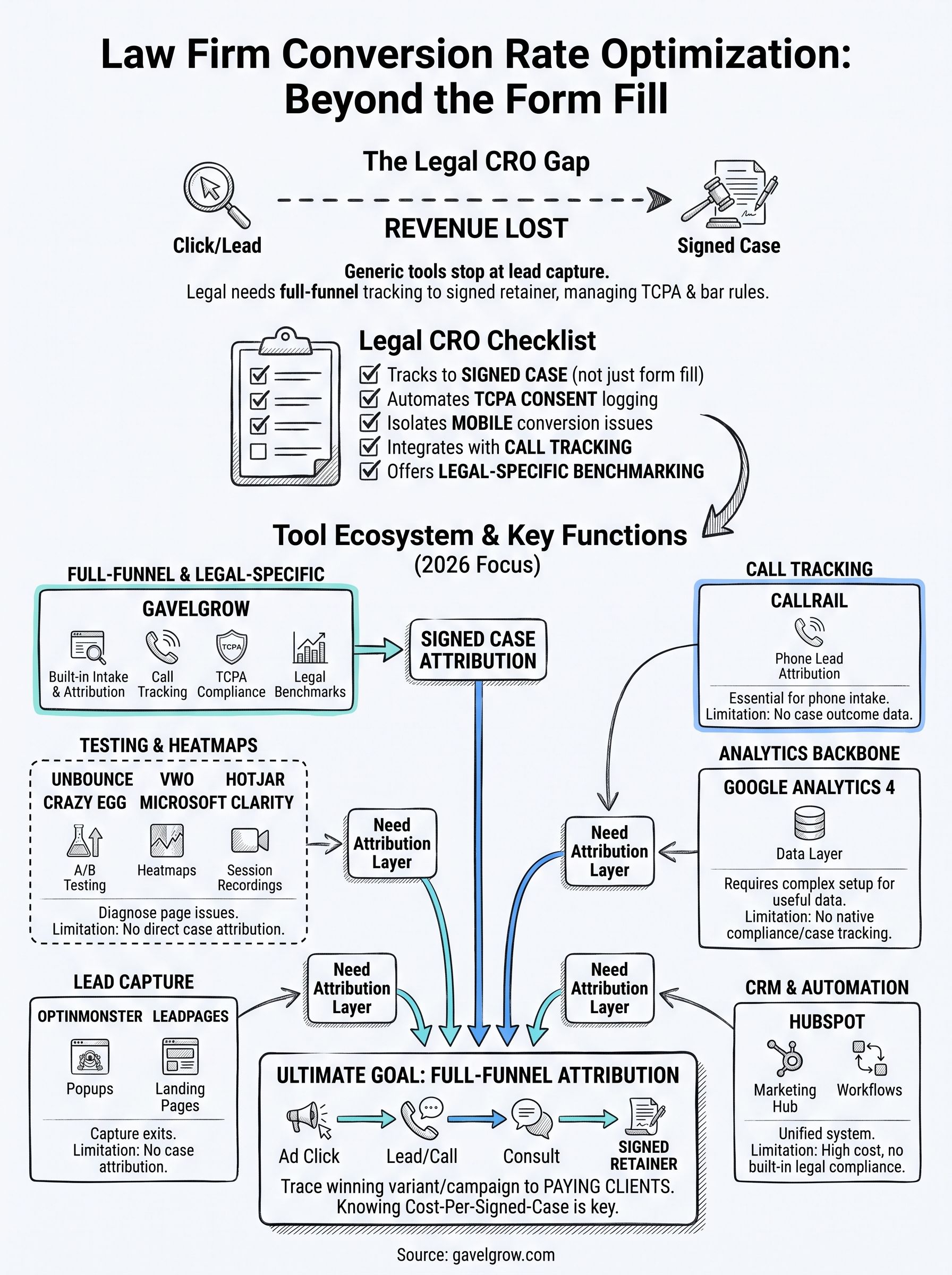
Building your firm's conversion toolkit
No single tool on this list solves every conversion problem. Heatmap tools like Hotjar and Clarity show you where visitors stall, testing platforms like Unbounce and VWO help you fix it, and call tracking closes the gap that form-only analytics miss. But behavior data and split tests only matter if you can trace the winning variant all the way to a signed retainer, not just a submitted form.
That's the gap most firms leave open. Stitching together three or four point solutions works until nobody can answer a simple question: which campaign actually produced paying clients this month. Full-funnel attribution built for legal, not bolted on afterward, is what turns diagnostic data into a real answer.
If you're tired of guessing at cost-per-signed-case, start a 7-day free trial and see what your intake funnel actually looks like end to end.
Frequently Asked Questions
What is a conversion rate optimization (CRO) tool?
A CRO tool helps you turn more of your existing website visitors into leads and signed cases, rather than paying for more traffic. Depending on the tool, that means landing-page builders and A/B testing, heatmaps and session recordings to see where visitors drop off, form and intake optimization, and analytics that show what is actually converting. For law firms, the goal is more signed cases from the same ad spend.
Why do law firms need CRO tools?
Because most legal ad budgets are wasted on the last step, not the first. Firms pay premium prices for clicks, then lose them to slow-loading pages, confusing forms, and poor intake follow-up. CRO tools reveal and fix those leaks, so a bigger share of expensive clicks becomes consultations and signed cases — often a cheaper way to grow than simply buying more traffic.
What should a law firm look for in a CRO tool?
Match the tool to your biggest leak. If pages convert poorly, prioritize A/B testing and landing-page tools; if you do not know where visitors drop off, start with heatmaps and session recordings; if leads do not become clients, focus on form and intake optimization with fast follow-up. For most firms, connecting CRO data to signed cases matters more than any single feature.
How much do CRO tools cost for law firms?
It ranges widely — from around $50 a month for a single-purpose tool like heatmaps to several hundred or more for full testing and personalization platforms, with enterprise suites costing more. Rather than compare monthly fees alone, weigh the cost against your ad budget: a modest tool that lifts conversion on a large ad spend usually pays for itself many times over.
Is CRO better than buying more traffic for law firms?
Often, yes — especially in expensive verticals like personal injury. Doubling conversion on your current traffic has the same effect as doubling your ad budget, but without the added spend, and it compounds across every channel. Most firms should fix conversion and intake before scaling ad spend, since pouring more budget into a leaky funnel just wastes money faster.
How do you measure the impact of CRO for a law firm?
Track conversion at each funnel step, not just overall traffic: visitor-to-lead rate, lead-to-consultation, consultation-to-retainer, and ultimately cost per signed case. Run controlled tests so you can attribute lifts to specific changes. The number that matters is whether a change lowered your cost per signed case or raised your case volume from the same spend.
What is the difference between CRO tools and a marketing platform?
CRO tools are usually point solutions — testing, heatmaps, or form optimization — that improve one part of the funnel. A marketing platform ties the whole funnel together, from ad spend through intake to signed cases, so you can see which changes actually produce revenue. Many firms use CRO tools alongside a platform, or a platform that includes conversion tracking, to avoid blind spots.
Third-party pricing reflects estimates based on publicly available information as of August 2026, not official quotes — verify current pricing directly with each vendor. All company names and trademarks are the property of their respective owners, and the tools named here are not affiliated with GavelGrow, which is included among the tools above.
Frequently Asked Questions
What is a conversion rate optimization (CRO) tool?
A CRO tool helps you turn more of your existing website visitors into leads and signed cases, rather than paying for more traffic. Depending on the tool, that means landing-page builders and A/B testing, heatmaps and session recordings to see where visitors drop off, form and intake optimization, and analytics that show what is actually converting. For law firms, the goal is more signed cases from the same ad spend.
Why do law firms need CRO tools?
Because most legal ad budgets are wasted on the last step, not the first. Firms pay premium prices for clicks, then lose them to slow-loading pages, confusing forms, and poor intake follow-up. CRO tools reveal and fix those leaks, so a bigger share of expensive clicks becomes consultations and signed cases — often a cheaper way to grow than simply buying more traffic.
What should a law firm look for in a CRO tool?
Match the tool to your biggest leak. If pages convert poorly, prioritize A/B testing and landing-page tools; if you do not know where visitors drop off, start with heatmaps and session recordings; if leads do not become clients, focus on form and intake optimization with fast follow-up. For most firms, connecting CRO data to signed cases matters more than any single feature.
How much do CRO tools cost for law firms?
It ranges widely — from around $50 a month for a single-purpose tool like heatmaps to several hundred or more for full testing and personalization platforms, with enterprise suites costing more. Rather than compare monthly fees alone, weigh the cost against your ad budget: a modest tool that lifts conversion on a large ad spend usually pays for itself many times over.
Is CRO better than buying more traffic for law firms?
Often, yes — especially in expensive verticals like personal injury. Doubling conversion on your current traffic has the same effect as doubling your ad budget, but without the added spend, and it compounds across every channel. Most firms should fix conversion and intake before scaling ad spend, since pouring more budget into a leaky funnel just wastes money faster.
How do you measure the impact of CRO for a law firm?
Track conversion at each funnel step, not just overall traffic: visitor-to-lead rate, lead-to-consultation, consultation-to-retainer, and ultimately cost per signed case. Run controlled tests so you can attribute lifts to specific changes. The number that matters is whether a change lowered your cost per signed case or raised your case volume from the same spend.
What is the difference between CRO tools and a marketing platform?
CRO tools are usually point solutions — testing, heatmaps, or form optimization — that improve one part of the funnel. A marketing platform ties the whole funnel together, from ad spend through intake to signed cases, so you can see which changes actually produce revenue. Many firms use CRO tools alongside a platform, or a platform that includes conversion tracking, to avoid blind spots. Third-party pricing reflects estimates based on publicly available information as of August 2026, not official quotes — verify current pricing directly with each vendor. All company names and trademarks are the property of their respective owners, and the tools named here are not affiliated with GavelGrow, which is included among the tools above.