How to Set Up Google Local Services Ads for a Law Firm
Categories: Legal Marketing Strategies
 Abram Ninoyan
Founder & Senior Performance Marketer
Credentials: Google Partner, Google Ads Search Certified, Google Ads Display Certified, Google Ads Measurement Certified, Google Analytics (IQ) Certified, HubSpot Inbound Certified, HubSpot Social Media Marketing Certified, Conversion Optimization Certified
Expertise: Google Ads, Meta Ads, Conversion Rate Optimization, GA4 & Google Tag Manager, Lead Generation, Marketing Funnel Optimization, PPC Management
LinkedIn Profile
Google Local Services Ads (LSAs) show up above regular search ads with a green checkmark, your firm's rating, and a "Google Screened" badge, and you pay only when someone calls or messages y...
Key Takeaways
- How to Set Up Google Local Services Ads for a Law Firm
- Why should law firms use Google Local Services Ads?
- How to set up Google Local Services Ads for your firm
- How does the Google Local Services Ads dashboard work?
How to Set Up Google Local Services Ads for a Law Firm
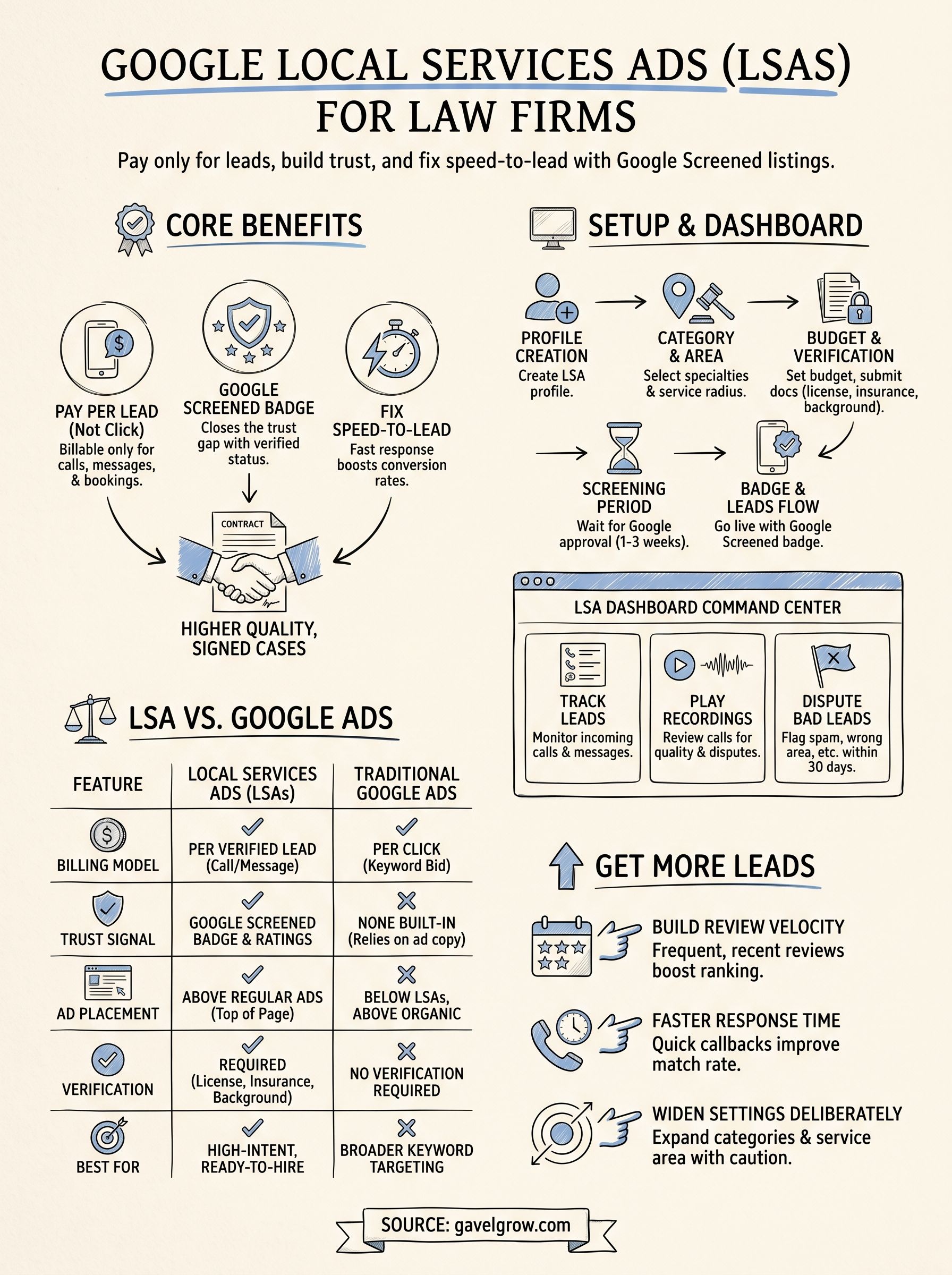
Google Local Services Ads (LSAs) show up above regular search ads with a green checkmark, your firm's rating, and a "Google Screened" badge, and you pay only when someone calls or messages you through the ad, not per click. For law firms, that's a meaningful shift from traditional PPC: you're bidding on intent-driven leads who already see a review score and a compliance signal before they ever reach your intake form.
If you're searching for ads google local services or trying to figure out how to set up google local services ads, the short answer is this: create a Local Services profile, pass Google's screening (license, insurance, background check), set your budget and service categories, and Google matches you with nearby searchers ready to hire. The google local services ads dashboard then tracks calls, messages, and disputes in one place.
This article walks through what LSAs are, how the ad auction and billing actually work, the step-by-step google local services ads sign up process for attorneys, and how to read your dashboard once leads start coming in. We'll also cover where LSAs fit alongside your broader Google Ads strategy and how firms track those calls through to signed retainers, not just answered phones.
Why should law firms use Google Local Services Ads?
Pay only for leads, not clicks
Law firms burn through PPC budgets fast when searchers click an ad, bounce, and never call. Local Services Ads flip that model: you pay only when a real lead calls, messages, or books through your listing, and Google lets you dispute leads that are clearly spam, wrong practice area, or outside your service radius. That single change matters more for legal than almost any other industry, because a single signed personal injury or mass tort case can be worth tens of thousands of dollars, and wasted click spend on tire-kickers adds up fast when cost per click on competitive legal keywords already runs $50 to $150.
The Google Screened badge closes the trust gap
Every LSA listing carries a "Google Screened" badge once your firm passes license verification, insurance checks, and a background check on any attorney tied to the profile, per Google's own Local Services Ads eligibility requirements. That badge sits next to your star rating directly in the search results, before a searcher ever lands on your website. For a stressed-out prospect comparing five personal injury firms at 11pm, a verified badge and visible review score does more to earn a call than another generic "free consultation" headline buried in a paid search ad.
A Google Screened badge answers the "can I trust this firm" question before the phone even rings.
LSAs fix the speed-to-lead problem
Speed decides who signs the case. A widely cited lead-response study by James Oldroyd (2011, published via the Kellogg School of Management) found that leads contacted within five minutes are up to 21 times more likely to qualify than leads contacted after 30 minutes. Legal searchers clicking google ads local services listings are almost always in-market and often calling several firms back to back, so a missed call or a slow callback hands the case to whoever answers first. Firms running LSAs alongside GavelGrow's built-in call tracking can see which calls originated from LSA versus paid search, tag outcomes as qualified or spam, and route unanswered calls before they turn into a lost signed retainer.
LSAs vs. traditional search ads at a glance
Here's how the two channels stack up for a typical firm:
Firms in personal injury, family law, and immigration tend to see the fastest payoff because those searches carry high urgency and high case value, which is exactly the combination LSAs are built to reward.
How to set up Google Local Services Ads for your firm
Setting up an LSA profile takes longer than launching a standard Google Ads campaign because Google verifies your firm before any ad goes live. Budget a week or two for the background check and license verification to clear, especially if your state bar requires notarized documentation. Here's the exact path from account creation to your first billable lead.
What you need before you start
Gather these items before you open the sign-up form, since a missing document is the most common reason firms stall out mid-application:
- Active bar license number and state of licensure for every attorney tied to the profile
- Certificate of insurance showing malpractice coverage limits
- Business address, phone number, and service radius (county or metro area)
- Google Business Profile, ideally already verified
- A payment method for weekly lead billing
The step-by-step sign-up process
Once you have those documents ready, the google local services ads sign up flow runs through five stages:
- Go to ads.google.com/local and create a Local Services profile for your firm
- Select your practice areas as service categories, since Google matches ads to specific legal specialties, not a generic "lawyer" tag
- Set your weekly budget and confirm the geographic area you want to serve
- Submit license, insurance, and background-check authorization for every named attorney
- Wait for the Google Screened badge to post to your live profile
Google's own Local Services Ads help center walks through category-specific requirements, since immigration and criminal defense firms sometimes face additional documentation compared to personal injury.
How long screening takes
Most solo and small firms clear screening in 5 to 10 business days, though larger firms adding multiple attorneys to one profile should expect closer to two to three weeks. Nothing about your ad spend, budget, or category selection can speed up the background check itself, so submit paperwork early rather than waiting until you want ads live.
Your ad can't run a single day earlier than your slowest attorney's background check clears.
Once approved, leads start flowing immediately, and that's when tracking what happens after the phone rings becomes the real work.
How does the Google Local Services Ads dashboard work?
Once your firm goes live, the Google Local Services Ads dashboard becomes your daily command center for every call and message the ads generate. Open it at ads.google.com/local and you land on a lead feed that logs each contact with a timestamp, phone number or message thread, and a running weekly charge tally. Firms managing several attorneys or practice categories will want to check this dashboard as often as they check email, since disputed leads have a limited window before Google stops accepting a challenge.
Reading your lead list
Every entry in the google local services ads dashboard shows whether the contact came in as a phone call, a text message, or a booking request, along with the service category it matched to. You can play back call recordings directly in the dashboard, which matters when you're deciding whether a lead qualifies for a dispute. Google groups leads into charged and disputed states, so a quick glance tells you which ones already hit your card and which ones you flagged as spam or wrong practice area.
If you're not reviewing your lead list weekly, you're paying for calls you never actually vetted.
Disputing bad leads
Google lets you dispute leads within 30 days for reasons that include wrong service area, wrong practice type, spam or telemarketing calls, and duplicate contacts, per Google's own dispute policy documentation. Each dispute needs a short written explanation, and Google typically responds within a few business days. Firms that skip this step routinely overpay, since a five-minute robocall or a wrong-number dial still counts as a billable lead until you flag it.
Budget and performance controls
Beyond leads, the dashboard tracks your weekly spend against budget, average lead cost by category, and your response rate to incoming calls. Managing partners running LSAs alongside GavelGrow's marketing dashboard often pull LSA lead data into a broader view that ties each call to case status, so a $180 personal injury lead that turns into a signed retainer gets weighed against one that never answers the phone. That distinction, cost per lead versus cost per signed case, is where most firms find the real ROI conversation starts.
How do Local Services Ads differ from Google Ads?
Both channels put your firm in front of someone searching Google, but the mechanics underneath couldn't be more different. Local Services Ads run on a lead-based auction where Google matches your profile to a searcher based on category, service area, and review score, while traditional Google Ads run on a keyword-based auction where you bid on exact phrases like "personal injury lawyer near me." That distinction matters because keyword bidding gives you control over exact match types, negative keywords, and ad copy testing, while LSAs hand that control to Google's matching algorithm in exchange for a Google Screened badge and pay-per-lead billing.
Targeting and creative control
Google Ads lets you write your own headlines, test landing pages, and layer in audience signals like remarketing lists or in-market segments. Google local services ads lsa listings skip all of that: Google auto-generates your listing from your profile, star rating, and service categories, so there's no headline testing or ad copy to optimize. Firms that want granular experimentation, split-testing intake forms against different offers for example, usually need traditional search campaigns running in parallel.
Budget flexibility and scaling
Traditional Google Ads scales with budget almost linearly. Add more budget, and you can chase more keywords across a wider geographic footprint. LSAs cap out faster because Google limits how many leads it sends based on your service area size and category demand, so a solo-attorney immigration practice in a mid-size metro will hit a lead ceiling that no amount of extra budget breaks through.
LSAs reward trust signals, Google Ads rewards bidding strategy, and most firms need both to cover the full search results page.
When firms typically run both
Many firms treat LSAs and Google Ads as complementary rather than competing:
- LSAs capture high-urgency, ready-to-hire calls at the top of the results page
- Google Ads captures broader research-stage searches with keyword and remarketing control
- Running both means your firm's name appears twice on the same results page for high-value practice areas like mass torts and personal injury
Firms managing both channels need attribution that separates the two, since lumping LSA leads and Google Ads leads into one bucket makes it impossible to see which channel actually produces signed cases.
How can your firm get more leads from LSAs?
Ranking higher in the LSA auction comes down to three levers Google actually publishes: review volume and rating, response rate to leads, and profile completeness. Firms that treat their LSA profile as a set-and-forget listing usually plateau at a handful of leads a week, while firms that actively manage those levers see lead volume climb without touching their budget at all.
Build review velocity, not just review count
Google weighs both your star rating and how recently reviews came in, so a firm with 40 reviews from three years ago loses ground to a competitor adding five fresh reviews a month. Ask every client for a review within a week of case resolution, when the outcome is still top of mind, and make the request specific to the platform tied to your Google Business Profile since that's what feeds your LSA rating.
Answer faster than your competitors
Google tracks your response rate to leads and factors it into how often your listing gets shown. A firm that answers or replies within minutes gets more matches over time than one that lets calls roll to voicemail. This is exactly where google local services ads lsa performance overlaps with intake process, since a missed call doesn't just lose that one lead, it can throttle how many future leads Google sends you.
Every unanswered LSA call costs you more than that one lead, it quietly lowers how many future leads Google sends.
Widen categories and service area deliberately
Check these three settings monthly rather than assuming they're locked in:
- Confirm every relevant practice-area category is selected, not just your primary specialty
- Expand service radius incrementally and watch lead quality before committing to a wider area
- Raise weekly budget caps during high-demand periods like post-holiday DUI season or tax deadline weeks
Firms running LSAs through GavelGrow's lead pipeline can see response-time metrics next to each LSA lead, which makes it obvious whether a slow callback, not a Google algorithm change, explains a dip in weekly volume.
Making LSAs part of your intake strategy
Google Local Services Ads work because they front-load trust: a screened badge and a star rating do the convincing before your intake team ever picks up the phone. But the badge only earns you the call. What happens in the next five minutes, whether someone answers, texts back, or lets it ring to voicemail, decides whether that lead turns into a signed retainer or a wasted dispute. Speed and tracking matter as much as the ad itself.
Treat LSAs as one input into a bigger intake system, not a standalone lead source you check once a week. Firms that pair LSA leads with real call tracking and attribution consistently outperform firms running ads in isolation, because they can see which categories, service areas, and response times actually produce signed cases rather than answered phones.
If you want to see how your firm's leads convert once they hit intake, book a free strategy call and we'll walk through your numbers together.
Frequently Asked Questions
What are Google Local Services Ads (LSAs)?
Google Local Services Ads are pay-per-lead ads that appear at the very top of Google — above regular search ads — for local service searches like "personal injury lawyer near me." Instead of paying per click, you pay only when a qualified lead contacts you, and eligible firms display a Google Screened badge that signals trust. For law firms, LSAs are one of the fastest ways to generate high-intent local leads.
How much do Google Local Services Ads cost for lawyers?
LSAs charge per lead rather than per click, and legal lead prices vary widely by practice area and market — personal injury leads in competitive metros cost far more than less contested areas. You set a weekly budget and Google delivers leads against it. What matters most is cost per signed case: because you pay per lead, disputing invalid leads and converting the valid ones quickly keeps that number in check.
What is the Google Screened badge?
The Google Screened badge is a verification mark Google gives law firms that pass its screening — including license checks and, in many cases, background checks. It appears on your LSA listing and signals that Google has vetted your firm, which closes the trust gap and tends to lift contact rates. Maintaining it requires keeping your license, insurance, and reviews in good standing.
How do you qualify for Google Local Services Ads as a law firm?
You apply through Google, verify your law license and business details, and pass Google’s screening, which can include background and insurance checks for the firm and attorneys. Approval and screening can take a few weeks. Once approved, you set your services, service area, weekly budget, and hours — and your firm becomes eligible to show with the Google Screened badge.
Are Local Services Ads better than Google Search Ads for law firms?
They solve different problems. LSAs charge per lead, sit above search ads, and carry the Screened badge — great for high-intent local leads with less setup. Search Ads charge per click and give you more control over keywords, copy, and landing pages. Most firms run both: LSAs for cost-efficient local leads and Search for broader, controllable reach — and track each to signed cases.
How do you get more leads from Google Local Services Ads?
Respond fast — LSA leads often call, and the firm that answers first usually wins the case — keep a strong review profile since reviews influence ranking, set an accurate service area and hours, and dispute invalid or spam leads so Google refines your targeting. Consistent responsiveness and reviews matter more than budget alone for ranking well in the LSA unit.
How do you track ROI on Google Local Services Ads?
Because LSAs bill per lead, track lead-to-consultation and consultation-to-retainer conversion and, above all, cost per signed case — not just cost per lead. Connect your LSA leads, including calls, to your intake system so each signed case ties back to the ad that produced it. Disputing invalid leads and measuring signed cases is what tells you whether LSAs are actually profitable.
Frequently Asked Questions
What are Google Local Services Ads (LSAs)?
Google Local Services Ads are pay-per-lead ads that appear at the very top of Google — above regular search ads — for local service searches like "personal injury lawyer near me." Instead of paying per click, you pay only when a qualified lead contacts you, and eligible firms display a Google Screened badge that signals trust. For law firms, LSAs are one of the fastest ways to generate high-intent local leads.
How much do Google Local Services Ads cost for lawyers?
LSAs charge per lead rather than per click, and legal lead prices vary widely by practice area and market — personal injury leads in competitive metros cost far more than less contested areas. You set a weekly budget and Google delivers leads against it. What matters most is cost per signed case: because you pay per lead, disputing invalid leads and converting the valid ones quickly keeps that number in check.
What is the Google Screened badge?
The Google Screened badge is a verification mark Google gives law firms that pass its screening — including license checks and, in many cases, background checks. It appears on your LSA listing and signals that Google has vetted your firm, which closes the trust gap and tends to lift contact rates. Maintaining it requires keeping your license, insurance, and reviews in good standing.
How do you qualify for Google Local Services Ads as a law firm?
You apply through Google, verify your law license and business details, and pass Google’s screening, which can include background and insurance checks for the firm and attorneys. Approval and screening can take a few weeks. Once approved, you set your services, service area, weekly budget, and hours — and your firm becomes eligible to show with the Google Screened badge.
Are Local Services Ads better than Google Search Ads for law firms?
They solve different problems. LSAs charge per lead, sit above search ads, and carry the Screened badge — great for high-intent local leads with less setup. Search Ads charge per click and give you more control over keywords, copy, and landing pages. Most firms run both: LSAs for cost-efficient local leads and Search for broader, controllable reach — and track each to signed cases.
How do you get more leads from Google Local Services Ads?
Respond fast — LSA leads often call, and the firm that answers first usually wins the case — keep a strong review profile since reviews influence ranking, set an accurate service area and hours, and dispute invalid or spam leads so Google refines your targeting. Consistent responsiveness and reviews matter more than budget alone for ranking well in the LSA unit.
How do you track ROI on Google Local Services Ads?
Because LSAs bill per lead, track lead-to-consultation and consultation-to-retainer conversion and, above all, cost per signed case — not just cost per lead. Connect your LSA leads, including calls, to your intake system so each signed case ties back to the ad that produced it. Disputing invalid leads and measuring signed cases is what tells you whether LSAs are actually profitable.