11 Law Firm Intake Process Mistakes You're Making Right Now (And How to Fix Them)
Categories: Legal Marketing Strategies
 Abram Ninoyan
Founder & Senior Performance Marketer
Credentials: Google Partner, Google Ads Search Certified, Google Ads Display Certified, Google Ads Measurement Certified, Google Analytics (IQ) Certified, HubSpot Inbound Certified, HubSpot Social Media Marketing Certified, Conversion Optimization Certified
Expertise: Google Ads, Meta Ads, Conversion Rate Optimization, GA4 & Google Tag Manager, Lead Generation, Marketing Funnel Optimization, PPC Management
LinkedIn Profile
52% of legal firms never call back prospects who requested a callback. That single breakdown in your law firm intake process represents thousands in lost revenue monthly. Research shows if you don't respond to a lead within five minutes,…
Key Takeaways
- 11 Law Firm Intake Process Mistakes You're Making Right Now (And How to Fix Them)
- Mistake #1: Delayed Response Time Killing Your Lead Conversions
- Mistake #1: Delayed Response Time Killing Your Lead Conversions
- Mistake #2: No Standardized Client Intake Process Law Firm Flow
11 Law Firm Intake Process Mistakes You're Making Right Now (And How to Fix Them)
A large share of law firms never call back prospects who requested a callback. That single breakdown in your law firm intake process represents thousands in lost revenue monthly. Research shows if you don't respond to a lead within five minutes, your conversion drops by 72%. Most firms believe they handle intake well, however, preventable mistakes in the client intake process law firm teams make daily are killing conversions. We've identified 11 critical errors in your law firm client intake process and, particularly important, the specific fixes that can recover lost revenue.
Mistake #1: Delayed Response Time Killing Your Lead Conversions
Image Source: Law Firm Marketing Pros
Mistake #1: Delayed Response Time Killing Your Lead Conversions
Hours, sometimes days. That's how long many law firms take to respond to a web form submission. In that time, your prospect has already hired a competitor who answered their call within five minutes.
Why This Mistake Happens
Your law firm intake process breaks down because form submissions land in email inboxes checked sporadically throughout the day. After-hours leads sit untouched until Monday morning when they've gone cold. Nobody owns intake responsibility, so everyone assumes someone else will respond. Manual processes requiring staff to look up information and prepare responses add delays at every step.
Specifically, 35% of calls to law firms go unanswered even during regular business hours. When these calls hit voicemail, 80% of callers hang up without leaving a message. Of those who don't reach you on the first attempt, 85% will not call back.
The Real Cost: Lost Cases and Wasted Marketing Spend
Leads contacted within five minutes were 21 times more likely to qualify than those first reached at 30 minutes, according to the Lead Response Management Study. Being first matters, because many clients hire whichever firm reaches them first.
Missed calls alone can cost a busy firm a significant share of annual revenue, and the losses add up quickly for solo practitioners too. If you're spending $25,000 monthly on personal injury Google Ads, delayed response time turns that investment into wasted marketing spend. In fact, 30% of prospects immediately contact a competitor when they don't receive a quick response.
Only 7% of companies respond within the optimal five-minute window. This means beating your competition requires systems, not heroics.
The Fix: Implement 24/7 Call Routing
Sub-60-second speed-to-lead requires automated call routing that operates outside business hours when 42% of legal inquiries arrive. Virtual receptionist services or AI voice agents can answer calls around the clock, ensuring no prospect reaches voicemail during evenings or weekends.
Track your average response time from submission to first human contact. Measure what percentage hit the five-minute target and review performance weekly.
Recommended Tool: CallRail + Twilio Integration
CallRail integrates with legal CRM systems to automatically capture call data, marketing source attribution, and UTM tracking parameters. When a lead already exists in your system, CallRail appends new call information based on duplicate checking rules. The integration links call recordings and caller timelines directly in your intake dashboard. CallRail matches inbound calls, texts, and form submissions with existing contacts while populating marketing source details.
Twilio SMS combined with CallRail enables click-to-call functionality and text message follow-up for prospects who prefer texting over phone calls.
Mistake #2: No Standardized Client Intake Process Law Firm Flow
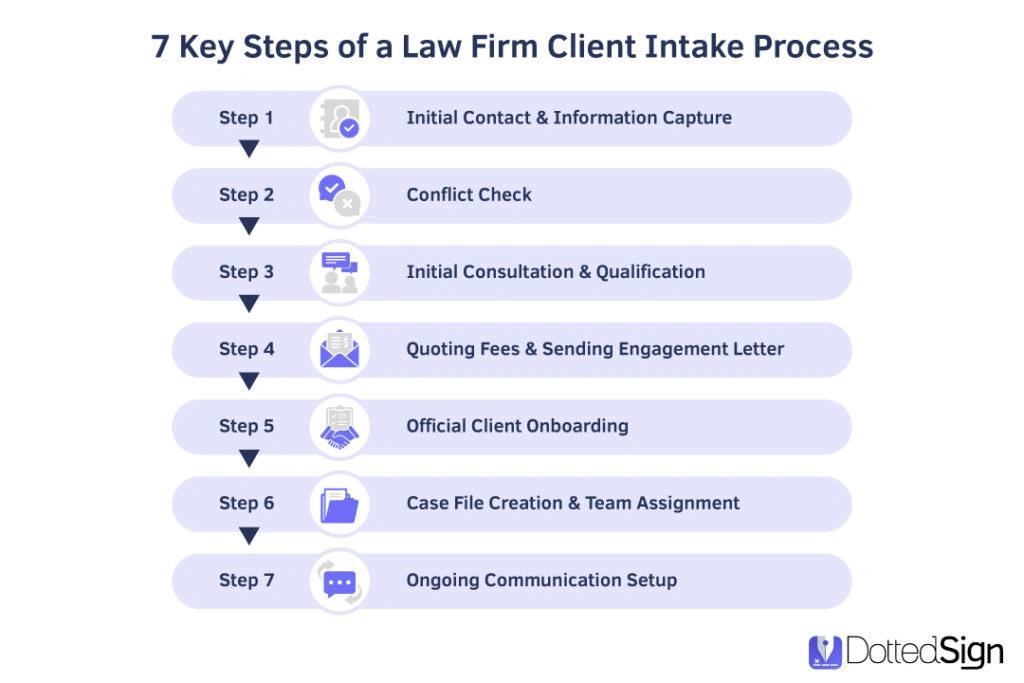
Image Source: DottedSign
Different staff members handle intake calls differently. One collects basic contact information. Another asks detailed case questions. A third forgets the conflict check entirely. Without standardized procedures, your law firm client intake process operates on individual memory rather than documented systems.
Why This Mistake Happens
Few law firms have invested energy into optimizing their client intake process. Teams rely on tribal knowledge passed down informally. Post-it notes and spreadsheets track leads instead of centralized systems. When intake depends on a single receptionist or attorney, any absence creates immediate disruptions. Different practice areas require different information, so staff create manual workarounds for each case type. In effect, every intake becomes a custom process rather than a repeatable workflow.
The Real Cost: Inconsistent Data and Missed Opportunities
Incomplete or inaccurate data exposes your firm to malpractice claims. Conflict checks fail when staff members collect different information each time. A conflict check prevents your firm from representing clients whose interests oppose current or former clients, and failure triggers disqualification from cases, disciplinary action, and malpractice exposure. Poor intake processes result in disorganization, wasted time, and lost revenue as potential clients slip through the cracks. Inconsistent information collection complicates case evaluations and decision-making.
The Fix: Create a Law Firm Client Intake Process Flow Chart
Visualizing your intake workflow provides clarity for your entire team. Map every step from initial contact to signed fee agreement. Specifically, document lead acquisition and nurturing, scheduling and conducting consultations, collecting and storing information, and drafting and signing agreements. Create a universal intake form with document logic so specific practice area selections generate unique question pathways. Point often overlooked: a single standardized form ensures you collect identical data from every lead, which improves reporting accuracy. Standardization reduces errors, ensures consistent client experiences, and simplifies training new staff.
Recommended Tool: Lawmatics Automation
Lawmatics combines client intake, CRM, marketing automation, and performance analytics into one platform. The software uses customizable intake forms with automated follow-ups and integration with existing case management systems. Lawmatics captures client details through online forms, automates follow-up sequences, and organizes information centrally so nothing slips through. The platform tracks each lead's stage in the intake process and integrates directly with practice management software to eliminate duplicate data entry.
Mistake #3: Allowing Reschedules Without Consequences
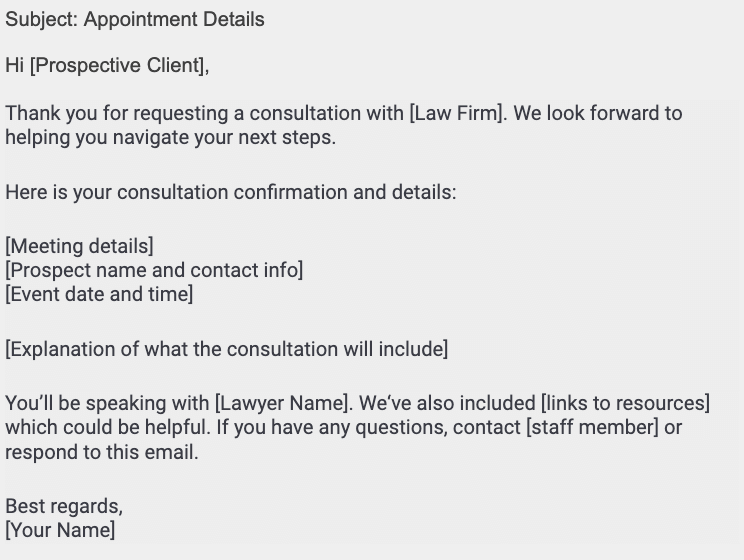
Image Source: Clio
Unlimited reschedules drain your law firm client intake process of accountability. When prospects can move appointments without penalty, 35% simply won't show up for consultations. That no-show rate represents lost revenue and wasted attorney preparation time.
Why This Mistake Happens
Rescheduling feels like an obstacle for clients who face last-minute conflicts. A kid gets sick, a work emergency hits, and calling the office to reschedule seems like a project. Consequently, they do nothing and the appointment passes. Your team fears losing potential clients by enforcing strict policies. The thought process becomes "better to accommodate than lose the case entirely." However, this approach backfires when prospects perceive your time as infinitely flexible and therefore less valuable.
The Real Cost: 40% Drop in Conversion Rates
No-show rates above 20% require immediate action. Firms charging consultation fees see 40-50% close rates, while those without commitment mechanisms struggle at 30% or below. Medical practices average 5% to 55% no-show rates, which limits efficient care delivery. The farther out appointments are scheduled, the more likely prospects will seek care elsewhere and fail to cancel.
The Fix: Implement Strict 48-Hour Reschedule Policy
Murthy Law requires one full business day advance notice for full credit, deducting a $100 administrative fee for late cancelations. If consultations are rescheduled more than once, the same $100 fee applies. Indiana Estate & Elder Law allows one emergency cancelation without penalty but charges $175 for subsequent cancelations with less than 72 hours notice. Sabrina Li Law requires 24 hours notice, charging the full consultation fee for late cancelations or no-shows.
Setting a 24- or 48-hour cancelation window in your confirmation email establishes expectations early. Clients who understand consequences will cancel in advance rather than ghost appointments.
Recommended Tool: Clio Grow Scheduling
Clio Grow reduces friction by letting clients reschedule directly from confirmation emails. Prospective clients book appointments through embedded website links, selecting times based on your availability. The system automatically sends up to five text reminders leading up to scheduled appointments. Firms using Clio Grow report no-show rates dropping from 20-25% to less than 5%. When appointment types require payment, consultations automatically unschedule if prospects don't provide payment information.
Mistake #4: No Daily 'Yesterday's News' Stand-Up Meeting
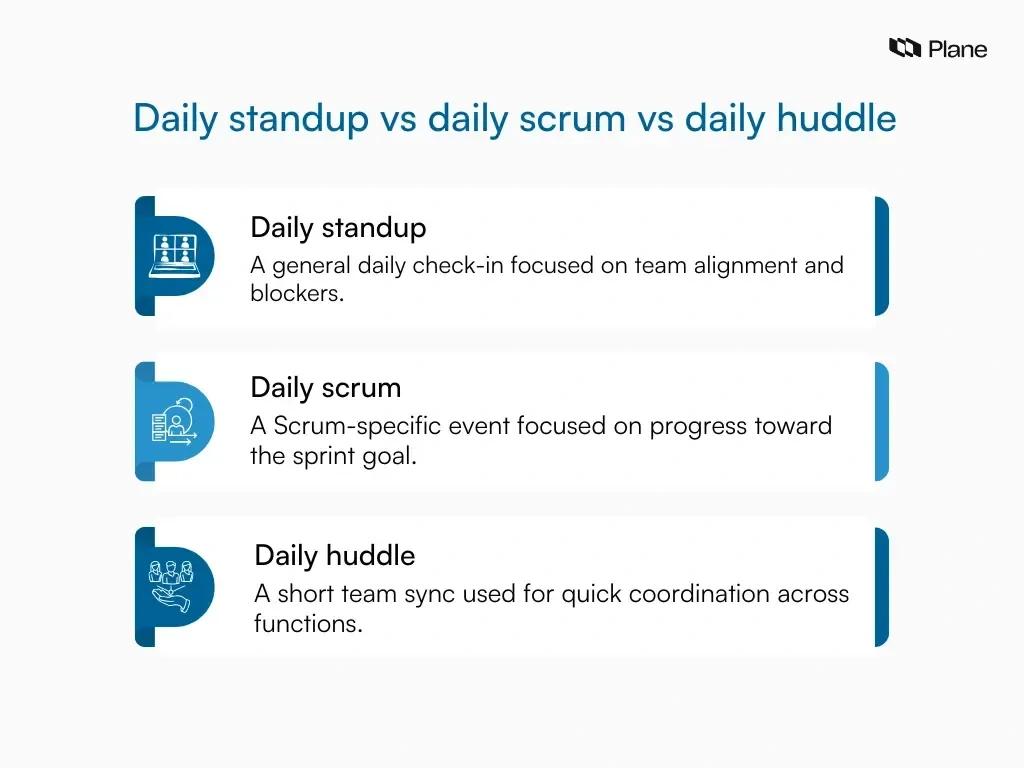
Image Source: Plane
One-third of law firms never follow up on phone messages, and half fail to send return emails within 24 hours. In reality, the pattern is not a lead generation issue but a follow-up visibility problem. Your team lacks clarity on who replied fast enough, who needs follow-up now, who missed a consultation, and which leads are blocked due to missing documents.
Why This Mistake Happens
Prospects contact your firm through multiple channels (website forms, direct calls, texts, referrals, social media messages). Without centralized tracking, no single person knows the complete status of yesterday's inquiries. Staff assume someone else handled follow-up. Collecting contact information in scattered locations prevents team-wide visibility into who has spoken to each prospect and where they sit in the client intake process law firm journey.
The Real Cost: Leads Slipping Through the Cracks Daily
Speed-to-lead remains the single biggest predictor of conversion. Inside sales representatives who contact leads within one minute close at five times the rate of those who wait ten minutes. After 30 minutes, the lead essentially goes cold even though CRMs still mark it as open. Due to slow follow-up systems, firms lose 30% to 50% of leads without realizing it. Research shows 49% of consumers expect attorney responses within 24 hours.
The Fix: 10-Minute Morning Huddle Protocol
Daily stand-up meetings reduce time spent in meetings by 34% while boosting group productivity. Schedule your huddle 30 minutes after core hours begin. Limit duration to 15 minutes maximum. Each team member answers three questions: What did I work on yesterday? What am I working on now? What issues are blocking me?. For instance, Sterling Lawyers runs a 30-minute daily huddle at 8:30 AM covering key performance indicators and intake-to-consult speed.
Recommended Tool: GavelGrow Dashboard Review
GavelGrow provides a full-funnel ROI dashboard with built-in call tracking and intake automation. The platform tracks every touchpoint from first click to signed case through pipeline tracking dashboards and call quality monitoring. Teams review the dashboard during morning huddles to identify leads requiring immediate follow-up.
Mistake #5: Only Tracking Lead-to-Hire Conversion (Missing Critical Metrics)
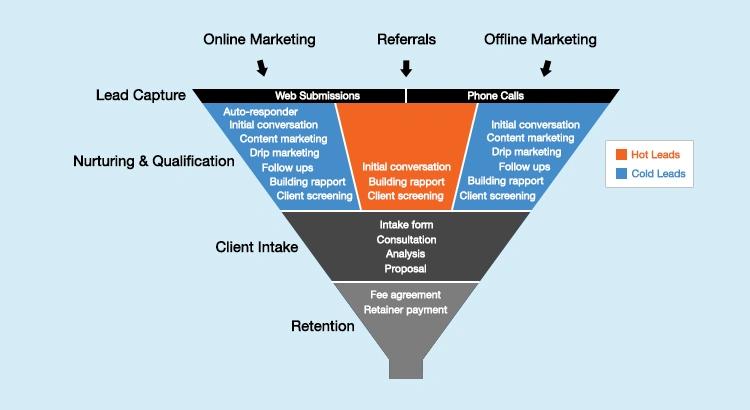
Image Source: Medium
Tracking only your overall conversion rate masks where prospects drop off in your law firm intake process. Your dashboard shows 25% of leads become clients, but that single percentage reveals nothing about which stage bleeds revenue or why good cases walk away.
Why This Mistake Happens
Firms measure intake success at the most macro level, viewing conversion rate as the sole health indicator. Basic phone systems provide no reporting capability for granular analysis. Manual tracking remains incomplete at best, leaving firms without visibility into missed calls that become invisible revenue leaks. Owing to lengthy revenue cycles in legal services, traditional ROI or ROAS metrics don't work fast enough for business decisions.
The Real Cost: Blind Spots Costing You 6 Figures
The average law firm loses 8% of potential revenue annually due to inefficient intake processes. If your average case fee reaches $10,000, losing eight leads equals $80,000 in vanished revenue. Without tracking why cases get turned down, you cannot identify whether clients choose competitors, lose contact, reject your services, or reflect broken marketing. Firms forfeit 5% to 10% of potential annual revenue each year through unaddressed calls, delayed responses, and inadequate follow-up.
The Fix: Track Every Stage of Your Intake Funnel
Monitor three core metrics: total number of leads, wanted leads that meet your criteria, and converted leads that sign retainers. The wanted leads to converted leads ratio determines intake department effectiveness. In particular, track cost per retainer sent rather than cost per lead because it accounts for quality. Measure response time, qualification rate by source, conversion rate by channel, and follow-up attempts before close.
Recommended Tool: MyCase Analytics + Custom Reporting
MyCase Lead Dashboard tracks lead conversions in current month versus all time, lead additions, top referral sources, and reasons leads fail to convert. The Case List Report filters cases by status, practice area, lead attorney, case stage, and date range. Custom field queries enable specific reporting, such as estate cases exceeding $50,000. MyCase Leads Referral Source report connects marketing efforts directly to revenue for ROI tracking.
Law Firm Intake Process Comparison: Paper vs. Digital Systems
Most law firms run a hybrid intake stack: a paper intake form on the desk, a calendar on the wall, and a CRM only the office manager logs into. The dimensions below are where that hybrid setup leaks revenue, and where a fully digital intake closes the gap. Numbers reflect modelled mid-market personal-injury and family-law benchmarks.
- Initial response time — Paper-based: 4 to 24+ hours, gated by manual transcription. Digital / CRM: Under 60 seconds via automated SMS plus email.
- Lead loss rate — Paper-based: 23 to 40 percent — lost forms, missed callbacks, unreturned voicemails. Digital / CRM: 3 to 8 percent because every touchpoint is logged to a per-lead timeline.
- Conflict check turnaround — Paper-based: 1 to 3 business days, dependent on a paralegal cross-referencing files. Digital / CRM: Real-time against the integrated case database, before the intake form submits.
- TCPA consent capture — Paper-based: Verbal or paper signature, frequently undated, rarely audit-ready. Digital / CRM: Append-only audit log with timestamp, IP, and the exact consent language served.
- Two-party consent recording — Paper-based: Compliance depends on the intake coordinator remembering to state the recording disclosure. Digital / CRM: Automatic state-specific disclosure on call connect, configurable per number.
- Intake-to-consultation conversion — Paper-based: 12 to 22 percent industry average. Digital / CRM: 31 to 48 percent for top-quartile firms running automated reminders and pre-qualification.
- Cost per signed case (mid-market PI) — Paper-based: $800 to $2,200 because attribution is reconstructed monthly. Digital / CRM: $400 to $950 because every signed case ties back to the originating keyword, ad, or referrer.
- Staff hours per 100 leads processed — Paper-based: 22 to 30 hours of intake coordinator time. Digital / CRM: 4 to 8 hours; the rest is sequence-driven.
- Marketing attribution — Paper-based: Manual reconciliation between CallRail, the CRM, and the case management system — usually wrong. Digital / CRM: Native: keyword → call → consultation → signed case in a single pipeline.
- Bar advertising rule compliance audit — Paper-based: Quarterly manual review of SMS templates, call scripts, and consent forms. Digital / CRM: Continuous: every template versioned, every send logged, every consent retrievable.
- Scalability past 200 leads per month — Paper-based: Requires linear staff hiring; quality drops without it. Digital / CRM: Adds operational headroom; the same coordinator handles 3x the volume.
Net: the dimensions above are why moving from a hybrid intake stack to a digital one tends to pay for itself within the first 60 days. The cost is not the software — it is the ongoing leak from every dimension above multiplied by your monthly lead volume.

Image Source: Eve Legal
Large volumes of leads captured and a strong share converted into clients. Those numbers came from law firms using embedded customized intake forms rather than clipboards and paper. The gap between paper-based and digital client intake process law firm systems determines whether your marketing investment converts or evaporates.
Paper intake forms require staff to collect handwritten information, then manually enter details into your system, doubling the workload. Time wasted on paperwork could be spent on revenue-driving activities. Handwritten forms generate notorious mistakes due to illegible handwriting, missing fields, or typos during manual data entry. Even small errors affect billing, scheduling, or compliance.
Storage creates additional problems. Stacks of paper take up physical space and are easy to misplace. Hunting for a client's form in a filing cabinet during time-sensitive situations wastes billable hours. Paper presents security risks as forms can be left out, misplaced, or stolen. For firms handling sensitive information, this creates real compliance and privacy concerns.
In contrast, digital intake forms let clients fill out information before they arrive from their phone or computer. No clipboards, no transcription, no delays. Everything flows directly into your system. Required fields and clear formatting reduce the likelihood clients skip questions or write illegibly. Data is captured cleanly, reducing mistakes and ensuring accurate information.
Digital forms are automatically stored and searchable. Need a client's history before their appointment? Pull it up in seconds. By eliminating recurring costs of paper, printing, storage, and physical filing, cost savings add up over time. Client information shared in online intake forms can be stored securely with access limited to staff with proper permissions.
Integration with practice management software streamlines your law firm client intake process and eliminates duplicate data entry. This integration simplifies information input, improves accuracy, and enhances efficiency. Automation helps recover billable time as lawyers spend less than three hours on average on billable work.
Mistake #6: No Dialing-for-Dollars Follow-Up Quota

Image Source: Koncert
Most law firms call a lead once, leave a voicemail, and mark it "attempted contact" in their CRM. In reality, 80% of sales require at least five follow-up calls after the initial meeting. Your law firm intake process stops at one attempt while competitors who persist capture the cases you abandoned.
Why This Mistake Happens
Firms avoid structured outbound calling quotas because the activity triggers discomfort. Nobody wants to appear pushy or desperate. Without assigned daily targets, intake staff prioritize incoming calls over follow-up attempts. Owing to the lack of accountability systems, warm leads who requested consultations but didn't book sit untouched in your database. Research shows 44% of salespeople give up after just one follow-up attempt, yet only 2% of sales occur on the first contact.
The Real Cost: 80% of Revenue Left on the Table
Many people prefer to reach their firm by phone. When you fail to call them back, they hire the attorney who does. Clio's 2024 Legal Trends Report secret-shopper study found that nearly half of firms (48%) were unreachable by phone. Firms that implement persistent outbound calling often see higher call volume and more new clients without adding staff. Plan for several call attempts per lead, not one or two.
The Fix: Set Daily Outbound Call Quotas
Assign each intake team member a minimum of 30 outbound calls daily targeting warm leads who didn't convert. Track completion rates and conversion outcomes weekly. By the same token, create call cadences requiring multiple touchpoints across different times and days to maximize contact rates.
Recommended Tool: Lawmatics Call Tracking
Lawmatics integrates with RingCentral to log outbound calls automatically in matter timelines. The click-to-dial feature initiates calls directly from matters while tracking call dispositions for every conversation. Assigned and unassigned calls appear in a dedicated panel, allowing staff to create new matters instantly from incoming leads.
Mistake #7: Inadequate Lead Qualification Wasting Attorney Time
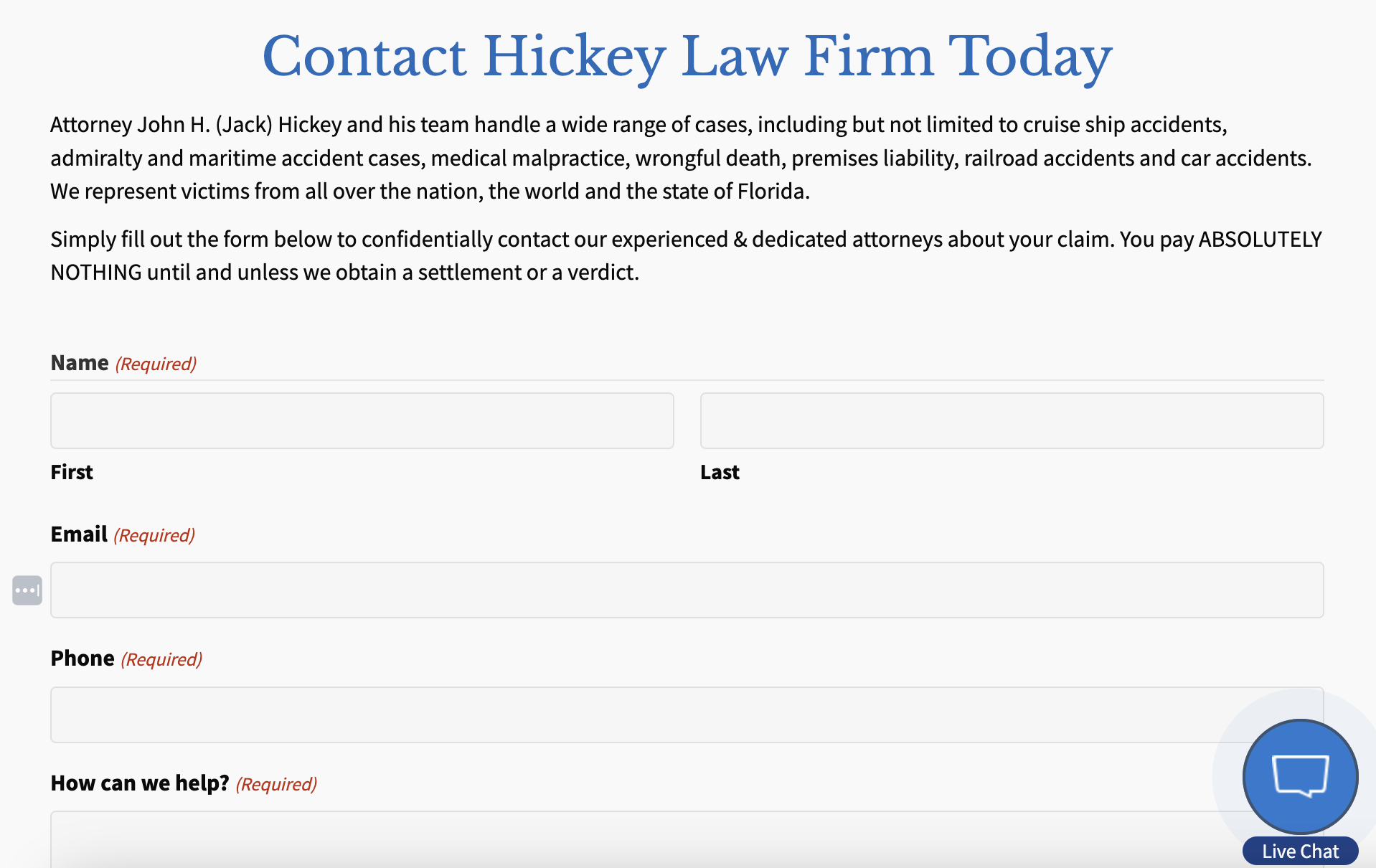
Image Source: WEBRIS
Attorneys bill by the hour but spend significant time on consultations that never convert, losing billable value on every unqualified prospect. Multiply several dead-end consultations a week across the year, and your firm surrenders a substantial amount annually to poor lead qualification.
Why This Mistake Happens
Law firms chase lead volume over lead quality. Without pre-screening mechanisms, every inquiry appears equally promising regardless of case viability, budget alignment, or hiring intent. Your intake team books appointments with price shoppers, information gatherers, and prospects lacking funds for representation. Accordingly, attorneys prepare for consultations only to discover misaligned expectations or nonviable matters.
The Real Cost: Billable Hours Drained on Bad-Fit Consultations
Firms relying on unfiltered scheduling convert at 10-15%, while those implementing structured qualification achieve 25-40% case acceptance. Specifically, structured intake systems deliver 20-40% higher acceptance rates compared to form-fill approaches. Calendars fill with unqualified conversations, blocking availability for case-ready clients who move to faster competitors.
The Fix: Create Practice-Area-Specific Intake Questionnaires
Practice-area-specific forms assess case type, jurisdiction, timeline, and client readiness before scheduling. Pre-screening questionnaires filter prospects by case criteria, reducing wasted attorney time.
Recommended Tool: Clio Grow Intake Forms
Clio Grow intake forms collect personal and case-specific information through customizable templates. The platform supports multiple form templates for different scenarios with required fields preventing incomplete submissions.
Mistake #8: Relying on Manual Paper-Based Intake Processes
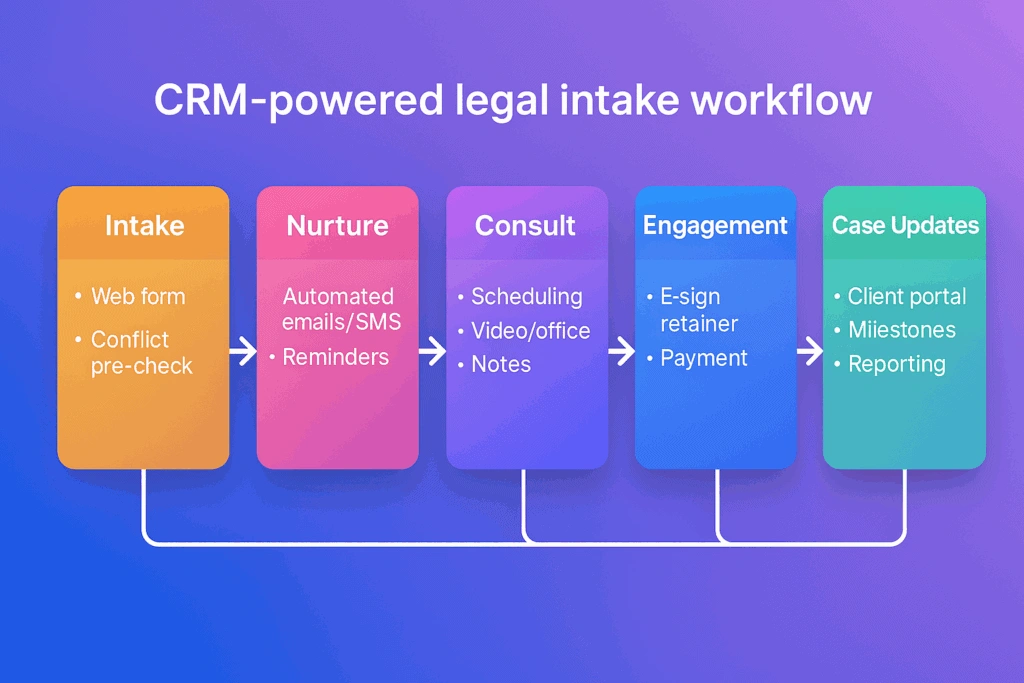
Image Source: EngageBay CRM
Three-and-a-half hours daily. That's how long employees spend on repetitive manual tasks that could be automated. For law firms, this translates to intake staff manually entering client information, chasing down unsigned documents, and toggling between disconnected systems while cases slip away to competitors with streamlined processes.
Why This Mistake Happens
Manual client intake processes persist because they require no upfront technology investment. Firms avoid change due to perceived complexity of new systems. Staff members resist learning unfamiliar software. On account of immediate costs appearing more visible than long-term inefficiency losses, firms postpone digitization. Manual processes requiring staff to review form submissions, call leads for missing information, and re-enter data into practice management systems consume 6-8 hours weekly per team member.
The Real Cost: 30+ Hours Monthly on Administrative Tasks
Forty percent of workers spend at least a quarter of their work week on manual, repetitive tasks. In fact, 90% of respondents report these tasks directly contribute to low morale and attrition. Manual data entry increases error risk and frustration for staff and clients. A manual client intake process law firm wastes time on administrative work rather than revenue-generating legal services.
The Fix: Migrate to CRM-Based Digital Intake
Automation reduces intake-related administrative work from 6-8 hours weekly to 1-2 hours of review, freeing up 20+ hours monthly. Digital systems eliminate duplicate data entry, improve accuracy, and enhance efficiency. Automated data capture extracts information from intake forms and populates appropriate fields, reducing errors and saving time.
Recommended Tool: MyCase or Lawmatics CRM
MyCase offers document assembly, task management, trust accounting, case management, document management, time tracking, billing and invoicing, and client portal features. Lawmatics provides client intake automation, CRM integration, document management, and email marketing. Lawmatics automates lead management from acquisition through intake to nurturing and follow-up. The MyCase and Lawmatics integration eliminates redundant data entry with seamless CRM and case management sync.
Mistake #9: Poor Mobile Experience Losing Urgent Leads
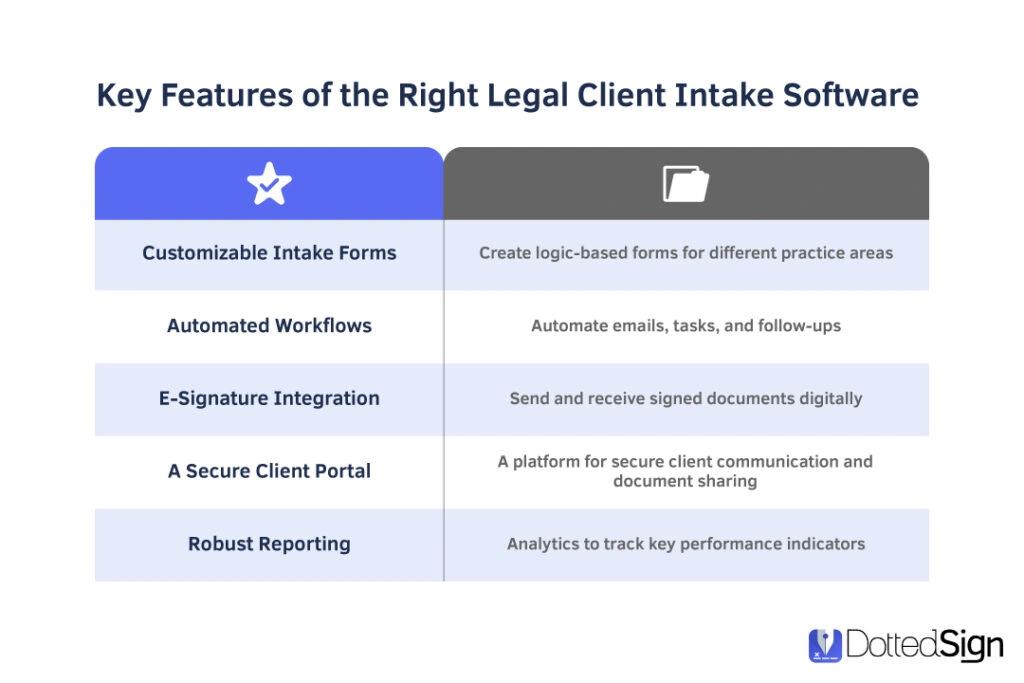
Image Source: DottedSign
Sixty percent of Google searches now happen on mobile devices, yet mobile campaigns convert at significantly lower rates than desktop across all practice areas. When potential clients visit your law firm client intake process from their phones, poor mobile experiences cause them to abandon and hire competitors with streamlined mobile functionality.
Why This Mistake Happens
Your firm optimized the desktop website but treated mobile as an afterthought. Most clients browse for legal services on their phones while multitasking during bus commutes, waiting in lines, or ending their day in bed. Desktop-focused designs fail on smaller screens where users scroll rapidly like browsing social feeds rather than settling into extended reading. Consequently, your intake forms built for desktop create friction on mobile devices.
The Real Cost: 60% of Leads Abandoning on Mobile
Poor mobile optimization loses potential clients and weakens your online presence. Mobile users abandon sites after bad experiences and rarely return or recommend them. Only 3% of people prefer filling out forms on mobile devices compared to 84% on desktop. Form abandonment stems primarily from poor responsive design, excessive fields, and slow load times.
The Fix: Optimize Click-to-Call and Mobile Forms
Prominently display clickable phone numbers at the top and bottom of mobile pages. Sites using click-to-call often see meaningful conversion rate increases on mobile. Implement single-column form layouts, minimize required fields, and ensure buttons are large enough to tap comfortably. Remove heavy site elements like background videos that slow mobile loading.
Recommended Tool: Twilio SMS + CallRail
CallRail messaging capabilities let users view and send text messages from tracking numbers with 25 messages included in base plans. Twilio SMS integration with CallRail enables click-to-call functionality and automated text follow-up for prospects preferring texting over calls.
Mistake #10: Lack of Empathy Training for Intake Staff
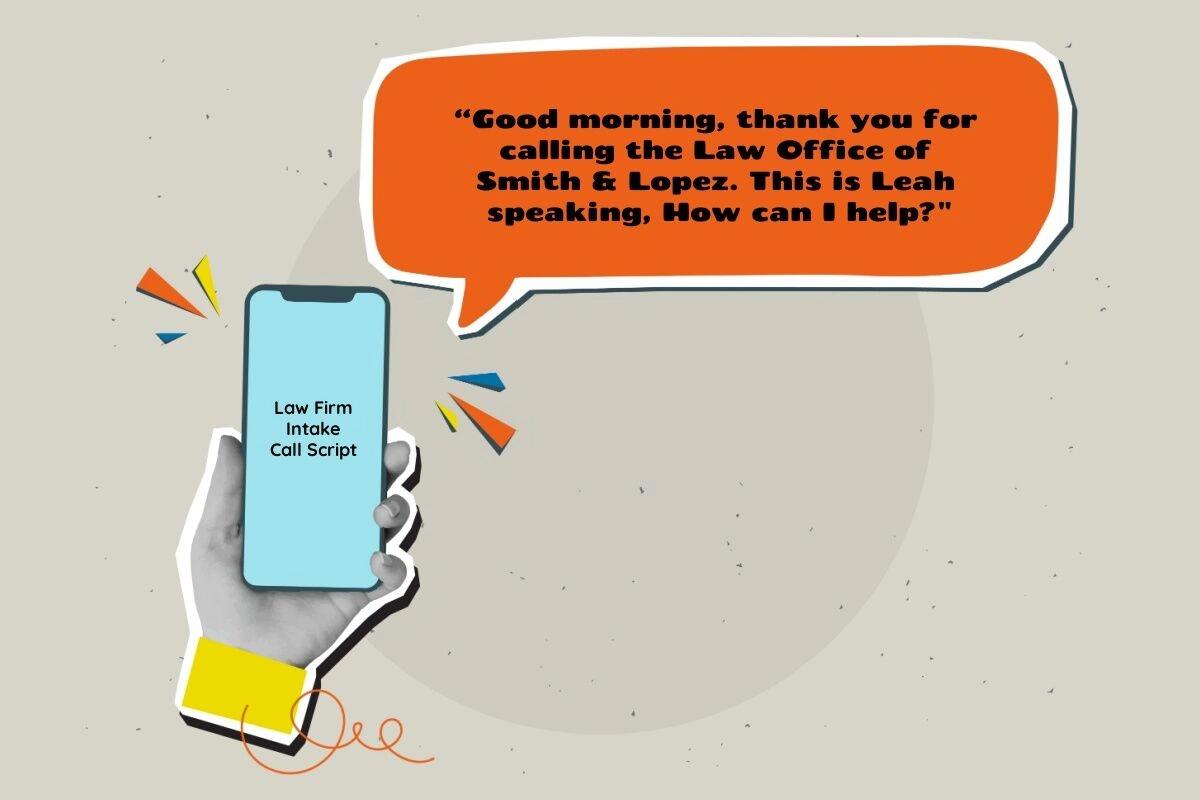
Image Source: Talkroute
Firms implementing trauma-informed communication training increase client retention by 15-20% because clients feel genuinely understood and supported. In contrast, most law firms treat intake as purely administrative, overlooking the emotional dimension that determines whether scared, overwhelmed prospects trust your firm enough to hire you.
Why This Mistake Happens
Training intake staff on empathy feels soft compared to teaching CRM navigation or conflict check procedures. Firms assume empathy is innate rather than trainable. Consequently, staff rely on scripts that prioritize information gathering over emotional connection. Clients reach out during challenging life circumstances involving heightened emotions or stress, yet intake teams receive no formal training on managing these emotional conversations.
The Real Cost: Trust Erosion and Competitor Advantage
Regular workshops focused on active listening and de-escalation reduce formal client complaints by up to 40%. Trust is built before credentials are evaluated. When callers feel unheard, they hang up and call the next firm without explanation. Your competitor who trained intake staff on empathy techniques captures cases you lose without realizing it.
The Fix: Implement Monthly Role-Playing and Call Reviews
Conduct scenario-based role-playing for challenging situations like delivering bad news, handling angry clients, or explaining legal delays. Review real calls weekly, evaluating whether staff acknowledged emotional states or rushed through checklists. Teach active listening techniques including paraphrasing, asking clarifying questions, and summarizing client concerns.
Recommended Tool: GavelGrow Training Modules
GavelGrow provides call quality monitoring and pipeline tracking dashboards for reviewing intake conversations and identifying empathy gaps requiring coaching interventions.
Mistake #11: No Automated Confirmation and Reminder System
Image Source: Attorney at Law Magazine
Treatment facilities experienced 37.4% no-show rates when they sent no appointment reminders. Your law firm client intake process faces identical abandonment without automated confirmation systems reminding prospects of scheduled consultations.
Why This Mistake Happens
Handling numerous cases prevents attorneys from creating follow-up emails, resulting in clients feeling undervalued and disconnected. Manual reminder calls burden staff who already juggle intake phones, conflict checks, and data entry. Consequently, reminders get skipped during busy periods when consultations are booked days or weeks ahead. The farther out appointments are scheduled, the more likely prospects will seek services elsewhere and fail to cancel.
The Real Cost: 35% No-Show Rate on Consultations
Missed appointments cost attorneys thousands of dollars per lost client. In fact, ten hospitals calculated patient no-shows totaled $16.65 million annually. The average missed appointment costs $200. For law firms charging $5,000 average case fees, a 35% no-show rate on 20 monthly consultations represents $35,000 in vanished monthly revenue.
The Fix: Set Up Multi-Channel Appointment Reminders
Configure reminders through email, text messaging, and in-app notifications. Send up to five automated reminders leading up to consultations. Assign reminders at 48 hours before, 6 p.m. the day before, and one hour before appointments. Two-way messaging lets clients confirm, decline, or reschedule directly from reminder texts.
Recommended Tool: Clio Grow + Lawmatics Automation
Clio Grow automatically sends text reminders for scheduled appointments with customizable timing. Lawmatics adds multi-step drip campaigns and automated SMS sequences. Both integrate to sync contacts, matters, and intake data between systems.
Frequently Asked Questions About Law Firm Intake Process Mistakes
Image Source: CasePeer
What is the most expensive intake mistake law firms make?
Delayed response time tops the list. Firms not responding within five minutes see conversion rates drop 72%. Particularly in personal injury and family law, prospects hire the first firm that answers.
How much revenue do law firms lose from poor intake processes?
The average firm loses 8% of potential revenue annually due to inefficient intake. If your average case fee reaches $10,000, eight lost leads equals $80,000 in vanished revenue.
What tools should I use to fix my law firm client intake process?
Intake software should integrate with case management systems to prevent duplicate data entry. Conflict checking, e-signature capabilities, and CRM functionality are non-negotiable features. Dynamic questionnaires guide staff through data collection efficiently.
How long should it take to respond to a new lead?
Under five minutes. Firms responding within this window are 21 times more likely to qualify leads compared to 30-minute delays. In fact, 79% of potential clients sign with the first firm that picks up the phone.
What conversion rate should my law firm intake process achieve?
A healthy benchmark ranges from 25% to 35% for most practice areas. Firms receiving referrals can achieve rates up to 95%, while online leads typically convert around 35%. Industry standards suggest 30% or higher once consultations are performed.
Should I outsource my law firm intake or keep it in-house?
The decision depends on lead volume, response time expectations, internal capacity, and oversight preferences. Outsourcing works particularly well for after-hours coverage when 42% of legal inquiries arrive. Some firms use hybrid models where internal staff handles core hours while outsourced support manages overflow and evening calls.
How do I measure if my intake process is actually improving?
Track response times, consultation scheduling rates, and overall client conversion. Monitor three core metrics: total leads, wanted leads meeting your criteria, and converted leads that sign retainers. The wanted leads to converted leads ratio determines intake effectiveness.
Law Firm Intake Process Mistakes Comparison Table
Use the quick reference below to triage which intake fixes pay back fastest. The cost column reflects mid-market personal-injury and family-law benchmark data; your own numbers will vary by practice area and market size.
- Mistake 1: Delayed response time. Cost: 72 percent drop in conversion when response exceeds 5 minutes. Fix: round-the-clock call routing with sub-60-second SMS auto-reply. Recommended tool: CallRail with Twilio integration.
- Mistake 2: No standardized intake flow. Cost: inconsistent data, missed qualifying questions, untrackable funnel. Fix: documented practice-area-specific intake checklist with branching logic. Recommended tool: Lawmatics intake automation.
- Mistake 3: Allowing reschedules without consequences. Cost: up to 40 percent drop in consult-to-signed conversion on rescheduled appointments. Fix: 48-hour reschedule policy with automated reminders. Recommended tool: Clio Grow scheduling.
- Mistake 4: No daily stand-up meeting. Cost: leads slip through the cracks because nobody owns yesterday's queue. Fix: 10-minute morning huddle 30 minutes after core hours start. Recommended tool: GavelGrow dashboard review as the single source of truth.
- Mistake 5: Only tracking lead-to-hire conversion. Cost: six-figure annual blind spots because the funnel is reported as one number instead of five stages. Fix: track lead, contact, qualified, consult, signed independently. Recommended tool: MyCase analytics combined with custom reporting.
- Mistake 6: No follow-up quota. Cost: 80 percent of recoverable revenue stays on the table because nobody dials back. Fix: set daily outbound call quotas per coordinator and review at the huddle. Recommended tool: Lawmatics call tracking with quota dashboards.
- Mistake 7: Inadequate lead qualification. Cost: billable hours drained on bad-fit consultations that never convert. Fix: practice-area-specific qualification questionnaires before the consult is booked. Recommended tool: Clio Grow intake forms.
- Mistake 8: Manual paper-based intake. Cost: 30-plus hours per month on administrative tasks that should be automated. Fix: migrate to a digital CRM-based intake with electronic signatures. Recommended tool: MyCase or Lawmatics as the CRM, Clio Grow for the intake forms.
- Mistake 9: Poor mobile experience. Cost: urgent leads (DUI, criminal, after-hours injury) bounce on a desktop-only intake form. Fix: mobile-first intake design with tap-to-call and pre-filled fields. Recommended tool: GavelGrow platform mobile intake.
- Mistake 10: Lack of empathy training for intake staff. Cost: high-LTV family-law and personal-injury leads choose the firm that listened. Fix: scripted opening, mandatory pause-and-paraphrase, weekly call reviews. Recommended tool: internal SOPs and call recording via CallRail.
- Mistake 11: No automated confirmation and reminder system. Cost: consultation no-show rate of 25 to 40 percent on appointments booked more than 72 hours out. Fix: SMS plus email reminders at 24 hours and 1 hour before the consult. Recommended tool: GavelGrow intake automation or Lawmatics reminders.
If you only have time to fix two mistakes this quarter, pick the speed-to-lead fix (Mistake 1) and the follow-up quota fix (Mistake 6). Together those two close the largest revenue leak in most firms, and they unlock the metrics you need to prioritize the remaining nine.
Conclusion
Fixing your law firm intake process might seem overwhelming, but the data shows where to start. Begin with speed-to-lead. If you can respond within five minutes consistently, you'll capture cases currently going to competitors. Next, standardize your intake flow and implement accountability through daily huddles. Track metrics beyond overall conversion rate to identify exactly where leads drop off.
The stakes are clear. The average firm loses 8% of potential revenue annually through broken intake processes. For most practices, that translates to six figures in vanished cases. Pick three mistakes from this list, implement the recommended fixes over the next 30 days, and measure the results.
Frequently Asked Questions
What is the most expensive intake mistake law firms make?
Delayed response time tops the list. Firms not responding within five minutes see conversion rates drop 72%. Particularly in personal injury and family law, prospects hire the first firm that answers.
How much revenue do law firms lose from poor intake processes?
The average firm loses 8% of potential revenue annually due to inefficient intake. If your average case fee reaches $10,000, eight lost leads equals $80,000 in vanished revenue.
What tools should I use to fix my law firm client intake process?
Intake software should integrate with case management systems to prevent duplicate data entry. Conflict checking, e-signature capabilities, and CRM functionality are non-negotiable features. Dynamic questionnaires guide staff through data collection efficiently.
How long should it take to respond to a new lead?
Under five minutes. Firms responding within this window are 21 times more likely to qualify leads compared to 30-minute delays. In fact, 79% of potential clients sign with the first firm that picks up the phone.
What conversion rate should my law firm intake process achieve?
A healthy benchmark ranges from 25% to 35% for most practice areas. Firms receiving referrals can achieve rates up to 95%, while online leads typically convert around 35%. Industry standards suggest 30% or higher once consultations are performed.
Should I outsource my law firm intake or keep it in-house?
The decision depends on lead volume, response time expectations, internal capacity, and oversight preferences. Outsourcing works particularly well for after-hours coverage when 42% of legal inquiries arrive. Some firms use hybrid models where internal staff handles core hours while outsourced support manages overflow and evening calls.
How do I measure if my intake process is actually improving?
Track response times, consultation scheduling rates, and overall client conversion. Monitor three core metrics: total leads, wanted leads meeting your criteria, and converted leads that sign retainers. The wanted leads to converted leads ratio determines intake effectiveness.