How Google Ads Works: Bidding, Targeting & Setup Explained
Categories: Legal Marketing Strategies
 Abram Ninoyan
Founder & Senior Performance Marketer
Credentials: Google Partner, Google Ads Search Certified, Google Ads Display Certified, Google Ads Measurement Certified, Google Analytics (IQ) Certified, HubSpot Inbound Certified, HubSpot Social Media Marketing Certified, Conversion Optimization Certified
Expertise: Google Ads, Meta Ads, Conversion Rate Optimization, GA4 & Google Tag Manager, Lead Generation, Marketing Funnel Optimization, PPC Management
LinkedIn Profile
How Google Ads works comes down to one mechanism: an automated auction that runs every time someone searches, where you bid on keywords and Google scores your ad on bid amount plus quality to decide w...
Key Takeaways
- How Google Ads Works: Bidding, Targeting & Setup Explained
- Why understanding Google Ads matters for your firm
- How the Google Ads auction and bidding actually work
- How to set up a Google Ads campaign step by step
How Google Ads Works: Bidding, Targeting & Setup Explained
How Google Ads works comes down to one mechanism: an automated auction that runs every time someone searches, where you bid on keywords and Google scores your ad on bid amount plus quality to decide who shows up and what they pay per click. There's no fixed price list. A car accident search in Chicago might cost $45 a click while a small-town estate planning search costs $6, and the auction recalculates in real time for every query.
If you're a managing partner trying to decide whether to run campaigns yourself or hand them to an agency, you need to understand three moving parts before you spend a dollar: bidding strategy, audience targeting, and campaign structure. Get the setup wrong and you'll pay for clicks that never turn into signed cases, which is the exact problem most law firms run into.
This article breaks down how the auction actually picks a winner, how Google decides which searchers see your ads, and how to structure campaigns so spend maps to case value rather than raw click volume. We'll also cover where legal advertising differs from typical e-commerce accounts, and where a platform like GavelGrow's marketing dashboard helps you track cost-per-signed-case instead of just cost-per-lead once your campaigns go live.
Why understanding Google Ads matters for your firm
Google Ads controls the fastest lever most firms have to fill the pipeline, but it's also the fastest way to burn six figures if you don't know how the mechanics work. A managing partner who understands the auction can spot a wasted budget in a monthly report. One who doesn't will keep signing agency invoices without knowing whether the numbers reflect skill or luck.
Legal keywords are some of the most expensive clicks online
Competition for legal search terms is brutal because the lifetime value of a signed case dwarfs what most other industries pay per click. A single mass tort or catastrophic injury case can be worth tens of thousands of dollars in fees, so firms bid accordingly. WordStream's 2024 industry benchmark report lists "lawyer" and "attorney" among the highest average cost-per-click categories tracked across any vertical, often landing between $6 and $90 depending on the practice area and market.
Those ranges shift weekly based on who else is bidding, so a firm that doesn't monitor auction dynamics in real time is guessing at its own budget.
Not understanding the auction wastes real money
Firms that treat Google Ads like a set-it-and-forget-it tool routinely overpay for clicks that never convert, because they never adjust bids, negative keywords, or ad schedules as competitors move. The auction rewards firms that actively manage quality score and bid strategy, not firms that just throw money at the highest-volume keywords.
A firm that doesn't understand the auction is paying agency-grade prices for guesswork-grade results.
This is where speed and structure compound. The Lead Response Management Study found that leads contacted within five minutes were 21 times more likely to qualify than those first reached at thirty minutes, which means even a well-run ad campaign fails if the intake process behind it is slow. Ads and intake are two halves of the same system.
Deciding whether to run campaigns yourself or hand them off
Once you understand how bidding and targeting actually work, the decision between managing campaigns in-house or outsourcing gets a lot clearer. Firms with a marketing manager who can watch daily spend often do well on GavelGrow's self-serve platform, where campaign-level cost-per-signed-case is visible next to the ad data itself. Firms without that bandwidth usually get more consistent results from GavelGrow's managed services, where a dedicated strategist handles bidding and optimization daily. Either path works, but only if you know what you're paying for and why the auction priced it that way.
How the Google Ads auction and bidding actually work
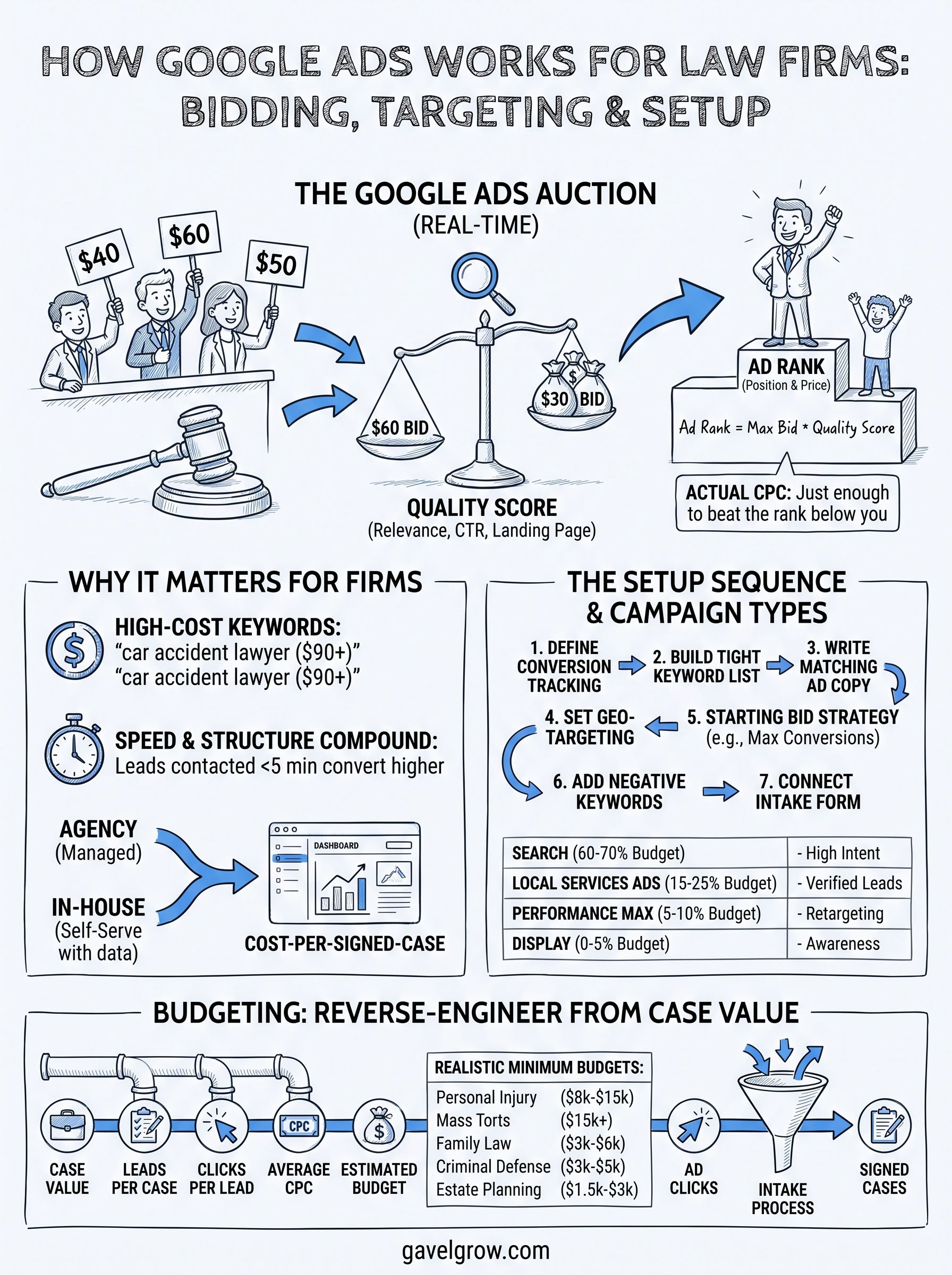
Every time someone searches, Google runs a fresh auction among every advertiser bidding on that keyword. Your maximum bid matters, but it's multiplied by a Quality Score that Google calculates from expected click-through rate, ad relevance, and landing page experience. Google calls the combined result Ad Rank, and it decides both your position and your actual price. You can read Google's own explanation of the mechanics in its How the Google Ads auction works guide.
Ad Rank decides who wins, not just who bids highest
A firm bidding $30 with a strong Quality Score can outrank a competitor bidding $50 with a sloppy landing page and a generic ad. This is why two firms bidding on "car accident lawyer near me" in the same city can pay wildly different amounts for the same position. Google rewards relevance because it keeps searchers clicking ads that actually answer their query, which keeps advertisers coming back.
The firm with the best ad and landing page often pays less than the firm with the biggest budget.
What actually determines your cost per click
You never pay your maximum bid. Google charges just enough to beat the advertiser ranked below you, a mechanic borrowed from the classic second-price auction model. That means small improvements in ad relevance and landing-page speed lower your cost per click without touching your bid at all.
- Quality Score (1-10): built from expected CTR, ad relevance, landing page experience
- Maximum bid: the ceiling you set per click or per conversion goal
- Ad Rank: bid multiplied by Quality Score plus expected impact of ad extensions
- Actual CPC: just enough to beat the next-ranked competitor, rarely your full bid
Automated bidding versus manual control
Google's automated strategies like Target CPA and Maximize Conversions use machine learning to adjust bids in real time based on signals like device, time of day, and location. Manual bidding gives you more control but requires daily attention most firms don't have. Most law firms running lean marketing teams do better letting automation handle bid adjustments while a human manages budget caps, negative keywords, and campaign structure, which is exactly where a dashboard tracking cost-per-signed-case earns its keep.
How to set up a Google Ads campaign step by step
Setting up a Google Ads account takes ten minutes. Setting it up so it doesn't waste your monthly budget takes real planning, and that's where most solo and small-firm setups go wrong. Skipping structure now means paying for it later in the form of clicks that never turn into cases.
The setup sequence that actually protects your budget
Follow this order, not the order Google's wizard nudges you toward. The default setup pushes you toward broad targeting and automated everything before you've built the guardrails to control spend.
- Define the conversion you're tracking. Set up conversion tracking for phone calls, form submissions, and chat before you launch anything. Without this, Google's automated bidding has nothing to optimize toward.
- Build a tight keyword list. Group keywords by practice area and intent ("divorce lawyer" versus "how to file for divorce") rather than dumping everything into one campaign.
- Write ad copy that matches the search. Each ad group needs its own headlines referencing the exact service someone searched for.
- Set geographic targeting to your actual service area. Statewide targeting for a single-office firm burns budget on clicks you can't service.
- Choose a starting bid strategy. Start with Maximize Conversions with a budget cap, then move to Target CPA once you have 15-20 conversions logged.
- Add negative keywords immediately. Block terms like "free," "jobs," and "paralegal" before your first dollar spends.
- Connect your landing page and intake form. A slow or generic contact form undoes everything the auction rewarded you for.
A campaign structure built around case types converts better than one built around keyword volume.
Why the intake connection matters as much as the ad
Google rewards ad relevance, but the auction has no idea what happens after the click. If your landing page uses a generic contact form instead of a mobile-first intake form with instant auto-reply, you'll lose leads the auction already paid to deliver. This is exactly the gap GavelGrow's platform closes, with hosted intake forms and call tracking built to sit directly underneath your campaigns, so the click and the case share the same data trail from day one.
Which Google Ads campaign types fit law firms best
Google offers seven campaign types, but only two or three earn a place in a law firm's budget. Picking the wrong type wastes spend on impressions that never reach someone actively searching for legal help, so match the campaign type to the intent behind the search, not to whatever format Google's dashboard recommends first.
Search campaigns should get the majority of your budget
Search campaigns show text ads to people typing an actual query, which means you're catching someone at the exact moment they need a lawyer. This is where high-intent keywords like "car accident lawyer" or "file for divorce near me" convert best, because the searcher is already problem-aware. Most firms should put 60-70% of their monthly spend here before touching anything else.
Local Services Ads work alongside, not instead of, Search
Local Services Ads (LSAs) sit above regular search results and charge per lead instead of per click, with Google verifying your license and insurance first. Google's own Local Services Ads overview explains the screening process firms go through before ads go live. LSAs pair well with Search campaigns because they capture a different slice of mobile searchers who tap directly into a call.
Search and Local Services Ads together cover intent that neither one catches alone.
Display and Performance Max need a smaller, cautious role
Display and Performance Max campaigns show ads across websites, YouTube, and Gmail rather than search results, and they're built for brand awareness, not bottom-of-funnel intent. A firm running these at full budget will generate cheap clicks that rarely turn into signed cases.
Start with Search and Local Services Ads, then add Performance Max only after you can track which campaign type actually drives signed cases through GavelGrow's marketing dashboard.
How much should your firm budget for Google Ads
Budget depends on your practice area's cost per click, not on a generic "spend $5,000 and see what happens" rule. A personal injury firm bidding $60 per click needs a fundamentally different budget than an estate planning firm bidding $10 per click, even if both want the same 30 monthly cases. Work backward from your case value and current close rate, not forward from whatever number feels comfortable.
Reverse-engineer your budget from case value
Start with what a signed case is worth to your firm, then figure out how many leads it takes to get one, and how many clicks it takes to get a lead. If your average case fee is $4,000 and you close 1 in 8 leads, and 1 in 15 clicks becomes a lead, you need roughly 120 clicks per signed case. At a $30 average CPC, that's $3,600 in ad spend per case, which only works if the case is worth more than that after costs.
- Estimate your close rate from the last 90 days of signed cases, not a guess
- Pull your actual CPC from a live campaign or Google's Keyword Planner
- Multiply clicks-per-lead by leads-per-case to get clicks-per-case
- Compare cost-per-signed-case against average case value, not cost-per-click alone
Budgeting by cost-per-signed-case beats budgeting by cost-per-click every time.
Minimum viable budgets by practice area
Below $2,000 a month, most practice areas can't generate enough clicks for Google's algorithm to learn which searches convert, so campaigns stay stuck in an inefficient learning phase indefinitely.
Underfunding a competitive practice area is worse than not running ads at all, because you spend just enough to feed the auction data without ever reaching a stable cost-per-signed-case. GavelGrow's modelled practice-area benchmarks help here, giving you a reference range for spend and close rate in your practice area before you commit to a number that sounds right but isn't.
From ad clicks to signed cases
Google Ads works because it's an auction, not a price list. Your Quality Score, campaign structure, and bid strategy decide what you pay, and your intake process decides whether that spend turns into revenue. None of the mechanics matter if a lead sits in a generic contact form for six hours before anyone calls back.
The firms that win with paid search treat the auction and the intake funnel as one system, not two separate line items on an invoice. That means tracking cost-per-signed-case from the first click, not just counting leads at the top.
If you want help mapping your ad spend to actual signed cases instead of raw click volume, book a free 45-minute strategy call with GavelGrow. We'll walk through your current numbers and show you exactly where the budget is leaking.
Frequently Asked Questions
How does Google Ads work?
Google Ads runs an automated auction every time someone searches. You bid on keywords, and Google ranks ads by Ad Rank — a combination of your bid and your Quality Score (ad relevance, expected click-through, and landing-page experience). The winning ad shows first, and you pay only when someone clicks, at a price set by the competition below you.
What determines my cost per click on Google Ads?
Your cost per click is set by the auction, not a fixed price. It depends on how many advertisers compete for the keyword, their bids, and your Quality Score — a higher Quality Score can lower your cost while improving your position. Legal keywords are among the most expensive because case values are high and competition is fierce.
How is Ad Rank calculated?
Ad Rank decides whether your ad shows and in what position. Google calculates it from your bid, your Quality Score, the search context, and the expected impact of your ad extensions and formats. That means the highest bidder does not always win — a lower bid with a more relevant, higher-quality ad can outrank it.
Should a law firm use automated or manual bidding?
Manual bidding gives you control but demands constant attention; automated strategies like Maximize Conversions or Target CPA let Google optimize bids toward your goal. Most firms do best starting with tight manual control or a conversion-focused automated strategy once enough conversion data exists — always paired with signed-case tracking, so Google optimizes toward cases, not just clicks.
Which Google Ads campaign type is best for a law firm?
Search campaigns should get the majority of a law firm budget — they capture people actively looking for legal help. Local Services Ads work alongside Search with a pay-per-lead model and a Google Screened badge. Display and Performance Max deserve a smaller, cautious role, since broad targeting can waste budget on unqualified clicks.
How much should a law firm budget for Google Ads?
Reverse-engineer it from case value: estimate what a signed case is worth, your conversion rate from click to signed client, and your cost per click, then work backward to a budget that produces cases profitably. Minimum viable budgets vary by practice area — high-value fields like personal injury need more per month to compete than lower-cost niches.
How do I know if Google Ads is producing signed cases, not just clicks?
Track the full path from ad click through intake to a signed retainer, not just clicks or form fills. Connect call tracking and your intake system to the campaign so you can report cost per signed case by keyword and campaign — the only number that tells you whether the spend is actually profitable.
Frequently Asked Questions
How does Google Ads work?
Google Ads runs an automated auction every time someone searches. You bid on keywords, and Google ranks ads by Ad Rank — a combination of your bid and your Quality Score (ad relevance, expected click-through, and landing-page experience). The winning ad shows first, and you pay only when someone clicks, at a price set by the competition below you.
What determines my cost per click on Google Ads?
Your cost per click is set by the auction, not a fixed price. It depends on how many advertisers compete for the keyword, their bids, and your Quality Score — a higher Quality Score can lower your cost while improving your position. Legal keywords are among the most expensive because case values are high and competition is fierce.
How is Ad Rank calculated?
Ad Rank decides whether your ad shows and in what position. Google calculates it from your bid, your Quality Score, the search context, and the expected impact of your ad extensions and formats. That means the highest bidder does not always win — a lower bid with a more relevant, higher-quality ad can outrank it.
Should a law firm use automated or manual bidding?
Manual bidding gives you control but demands constant attention; automated strategies like Maximize Conversions or Target CPA let Google optimize bids toward your goal. Most firms do best starting with tight manual control or a conversion-focused automated strategy once enough conversion data exists — always paired with signed-case tracking, so Google optimizes toward cases, not just clicks.
Which Google Ads campaign type is best for a law firm?
Search campaigns should get the majority of a law firm budget — they capture people actively looking for legal help. Local Services Ads work alongside Search with a pay-per-lead model and a Google Screened badge. Display and Performance Max deserve a smaller, cautious role, since broad targeting can waste budget on unqualified clicks.
How much should a law firm budget for Google Ads?
Reverse-engineer it from case value: estimate what a signed case is worth, your conversion rate from click to signed client, and your cost per click, then work backward to a budget that produces cases profitably. Minimum viable budgets vary by practice area — high-value fields like personal injury need more per month to compete than lower-cost niches.
How do I know if Google Ads is producing signed cases, not just clicks?
Track the full path from ad click through intake to a signed retainer, not just clicks or form fills. Connect call tracking and your intake system to the campaign so you can report cost per signed case by keyword and campaign — the only number that tells you whether the spend is actually profitable.