Local Service Ads for Lawyers: Setup and How They Work
Categories: Legal Marketing Strategies
 Abram Ninoyan
Founder & Senior Performance Marketer
Credentials: Google Partner, Google Ads Search Certified, Google Ads Display Certified, Google Ads Measurement Certified, Google Analytics (IQ) Certified, HubSpot Inbound Certified, HubSpot Social Media Marketing Certified, Conversion Optimization Certified
Expertise: Google Ads, Meta Ads, Conversion Rate Optimization, GA4 & Google Tag Manager, Lead Generation, Marketing Funnel Optimization, PPC Management
LinkedIn Profile
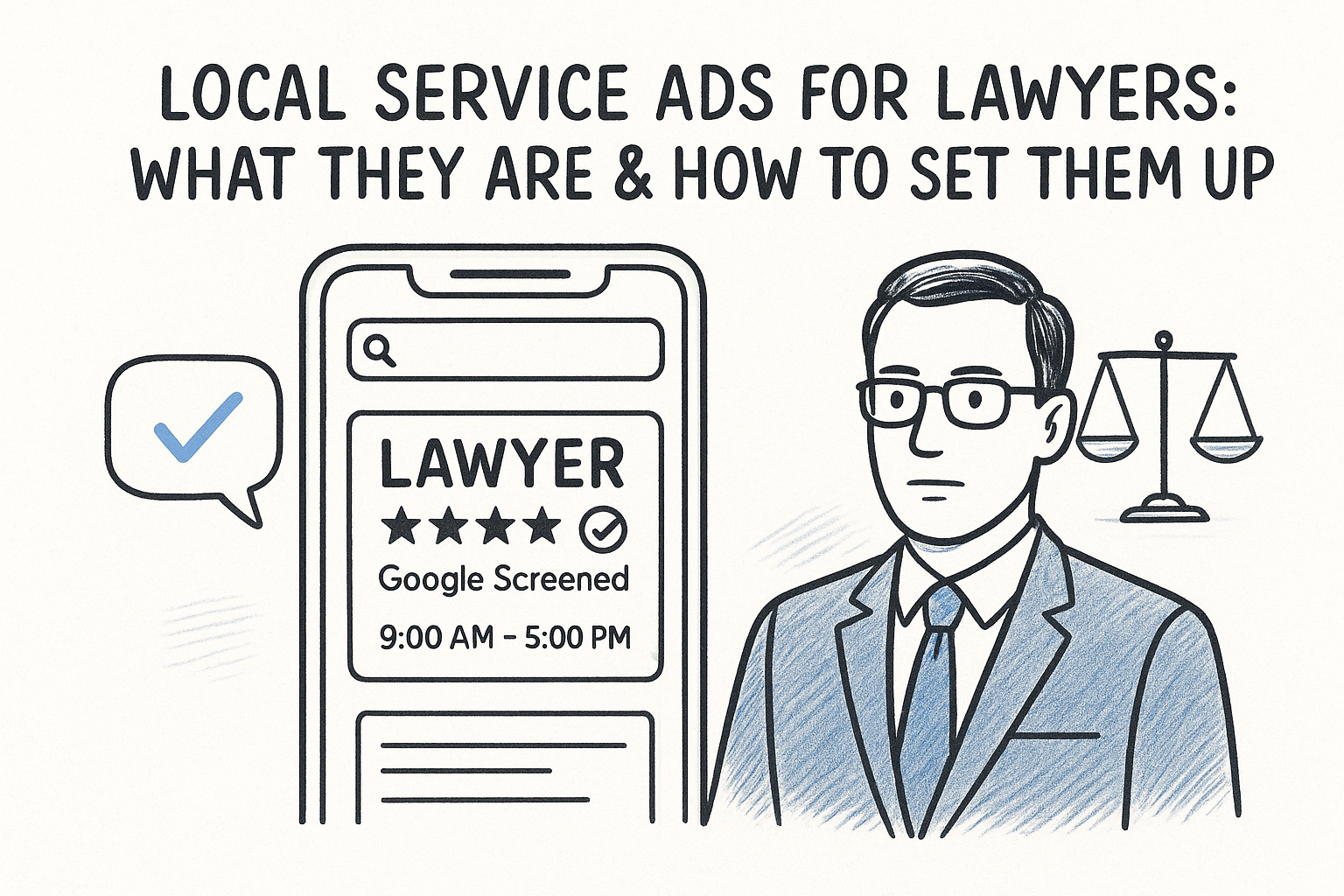
Local Service Ads for lawyers are pay-per-lead listings that appear above regular Google Ads and organic results, tagged with a "Google Screened" badge, your review rating, and business hour...
Key Takeaways
- Local Service Ads for Lawyers: Setup and How They Work
- Why local service ads matter for law firms
- How to set up local service ads for your firm
- How to pass Google Screened and Google Guaranteed checks
Local Service Ads for Lawyers: Setup and How They Work
Local Service Ads for lawyers are pay-per-lead listings that appear above regular Google Ads and organic results, tagged with a "Google Screened" badge, your review rating, and business hours. Unlike standard search campaigns, you pay per qualified lead instead of per click, and Google verifies your bar license and background before you ever run an ad.
If you're comparing LSAs to your current Google Ads or Local Services setup, here's the direct answer: LSAs work best as a lead-volume channel for practice areas with high search intent, like personal injury, DUI defense, or family law, but they require tight lead screening and fast follow-up to avoid paying for tire-kickers. Setup involves verifying your firm's license, choosing service categories and coverage area, passing a background check, and connecting a budget and bid strategy that Google manages for you inside a weekly lead cap.
This article walks through what LSAs actually are, how the Google Screened process works for law firms, what a realistic budget looks like by practice area, and how to set up your first campaign without wasting spend on leads that never convert. We'll also cover how to route those leads into an intake system fast enough to actually sign them.
Why local service ads matter for law firms
Local Service Ads matter because they occupy the top slot on Google, above the paid search ads your competitors are already bidding on and well above organic listings. For a high-intent search like "personal injury lawyer near me," that top-of-page real estate is worth more than any keyword bid you could place in a standard campaign. Google's own Local Services Ads guidance confirms the ads sit above both the map pack and traditional PPC results on mobile and desktop searches (Google Ads Help, accessed 2026). If you're only running Google Ads and hoping for organic rankings, you're competing for a spot that LSAs already own by default.
The trust signal that changes click behavior
A "Google Screened" badge next to your firm name does something a regular ad can't: it tells the searcher Google already vetted you. That badge, paired with your star rating and visible business hours, reduces the friction a potential client feels before calling a stranger about a DUI or a custody dispute. Prospective clients researching a lawyer are often anxious and pressed for time, and a verified badge shortens the trust-building step that usually happens over several site visits.
A verified badge shortens the trust-building step that usually takes a nervous client several site visits to work through.
Pay-per-lead changes your risk exposure
Unlike standard search campaigns where you pay for every click regardless of outcome, LSAs charge you only when a call or message qualifies as a lead. That shifts your budget risk away from clicks that never convert and toward leads you can actually screen. Compare the two models directly:
Where LSAs perform best by practice area
Not every practice area gets equal value from LSAs. Search intent and case value both matter, and some categories see far higher lead volume than others:
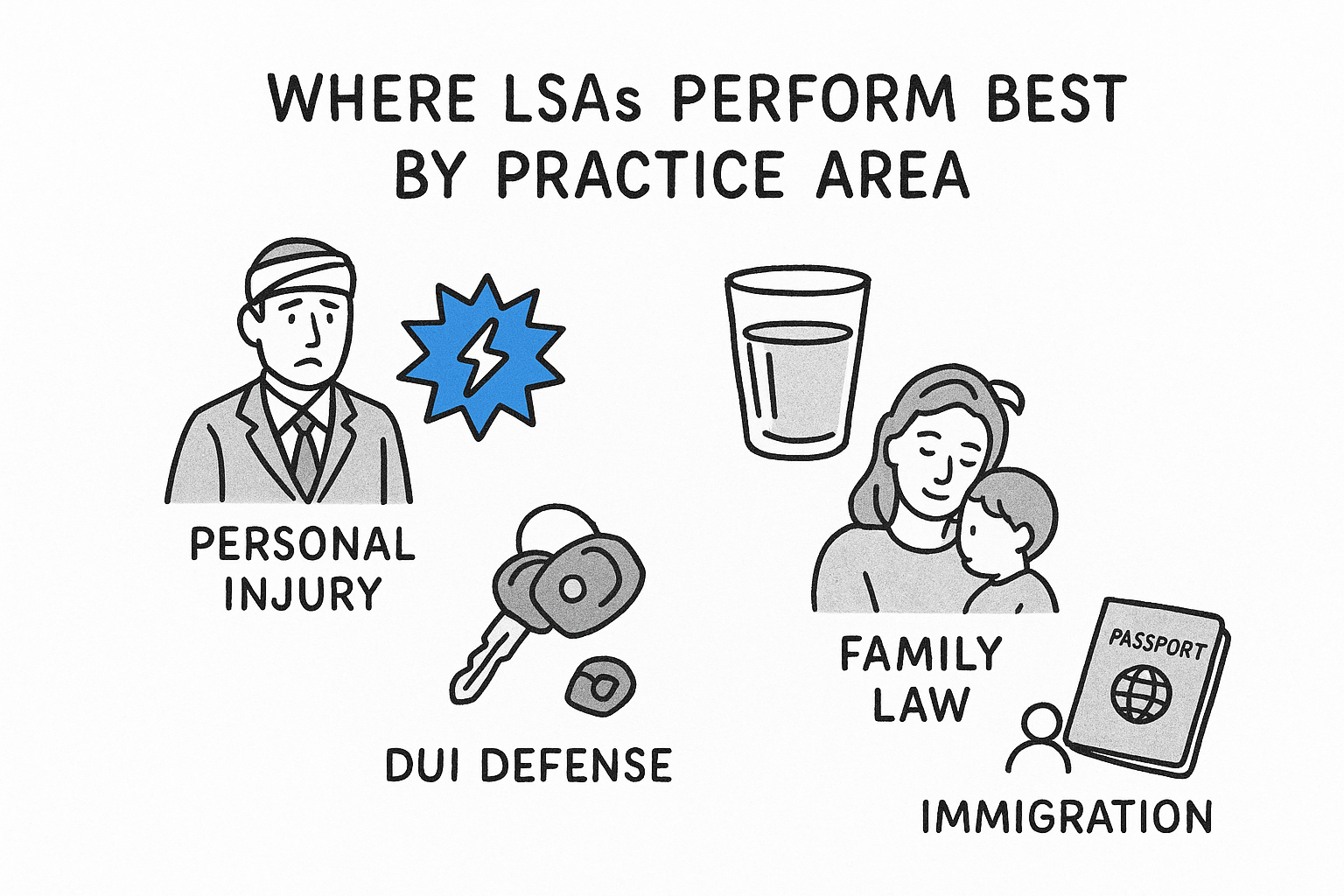
- Personal injury and DUI defense: high search volume, urgent intent, strong LSA fit
- Family law: consistent volume, moderate competition
- Immigration: growing volume, lower cost-per-lead in most markets
- Estate planning: lower urgency, so LSAs work better as a supplement to SEO
Firms running mass-tort campaigns tend to get less mileage from LSAs since Google's category list skews toward local, individual-client work rather than class-action intake. If your firm covers multiple practice areas, check our practice-area solutions to see which channels typically outperform LSAs for your specific case type before you commit budget.
How to set up local service ads for your firm
Setting up Local Service Ads starts at a different URL than regular Google Ads, and skipping straight to the Local Services Ads dashboard saves you from configuring the wrong account type entirely. You'll create a profile through Google's dedicated portal (not Google Ads Manager), and the whole process takes anywhere from a few days to a few weeks depending on how fast your background check clears.
Build your profile before you touch budget
Google needs specific business details before it will show your ad to anyone, and getting these right the first time avoids delays in review. Work through this list in order:
- Confirm your service categories - select every practice area you actually handle, since Google matches searches to categories, not keywords.
- Set your coverage area - choose zip codes or a radius around your office; overreaching into markets you can't service wastes lead spend.
- List your hours - Google uses these to route calls, so outdated hours mean missed calls outside your listed window.
- Add your bar license number - this feeds directly into the verification step covered in the next section.
- Upload proof of insurance - required in most states before Google approves the listing.
Connect your lead cap and budget
Once your profile clears review, you'll set a weekly budget expressed as a lead cap rather than a daily spend limit. Google's own guidance on budgeting for Local Services Ads recommends starting with a lead cap based on how many leads your intake team can realistically screen and call back within minutes, not hours (Google Ads Help, accessed 2026). Setting the cap too high before you've tested response times just means you pay for leads that go cold waiting on a callback.
Set your lead cap to match your intake speed, not your ad budget.
Before you launch, connect your call tracking so every lead ties back to the ad that generated it. GavelGrow's built-in call tracking replaces a separate CallRail subscription and tags each LSA call with outcome data (qualified, callback, spam) automatically, so you're not guessing which leads actually justified the spend.
How to pass Google Screened and Google Guaranteed checks
Law firms get the Google Screened badge, not Google Guaranteed. Google reserves the Guaranteed badge and its money-back protection for home-service categories like plumbers and electricians, while legal, financial, and other licensed professional categories carry the Screened badge instead. Both badges rely on the same underlying verification: a background check on your firm and every attorney or intake staffer listed on the account, run through a third-party screening vendor Google contracts with (Google Ads Help, accessed 2026). Knowing which badge applies to your practice area keeps you from promising clients a guarantee your firm can't actually back.
What Google actually checks
The screening process pulls from a mix of public records and documents you submit. Expect Google to verify each of the following before approving your listing:
- Active bar license in every state you claim to serve
- Business registration matching the name on your Local Services profile
- Liability insurance proof, where your state requires it for advertising attorneys
- Individual background checks on named attorneys and any staff answering LSA calls
Why applications stall or get rejected
Most delays trace back to mismatched information rather than actual disqualifying findings. A bar number that doesn't match your firm's legal name, an expired insurance certificate, or a coverage area that includes a state where an attorney isn't licensed will all stop review cold.
A mismatched bar number stalls your Google Screened approval faster than any background-check finding.
Before you submit, pull your bar license, insurance certificate, and business registration into one folder and confirm every name matches exactly, down to punctuation. Firms that submit clean documentation on the first pass typically clear review inside a week; firms that don't often wait three to four weeks while Google's vendor requests corrected paperwork. If your firm operates in multiple states, submit separate verification for each attorney tied to that state's bar, since Google won't extend one attorney's clearance to cover a colleague licensed elsewhere.
How much do local service ads cost for lawyers?
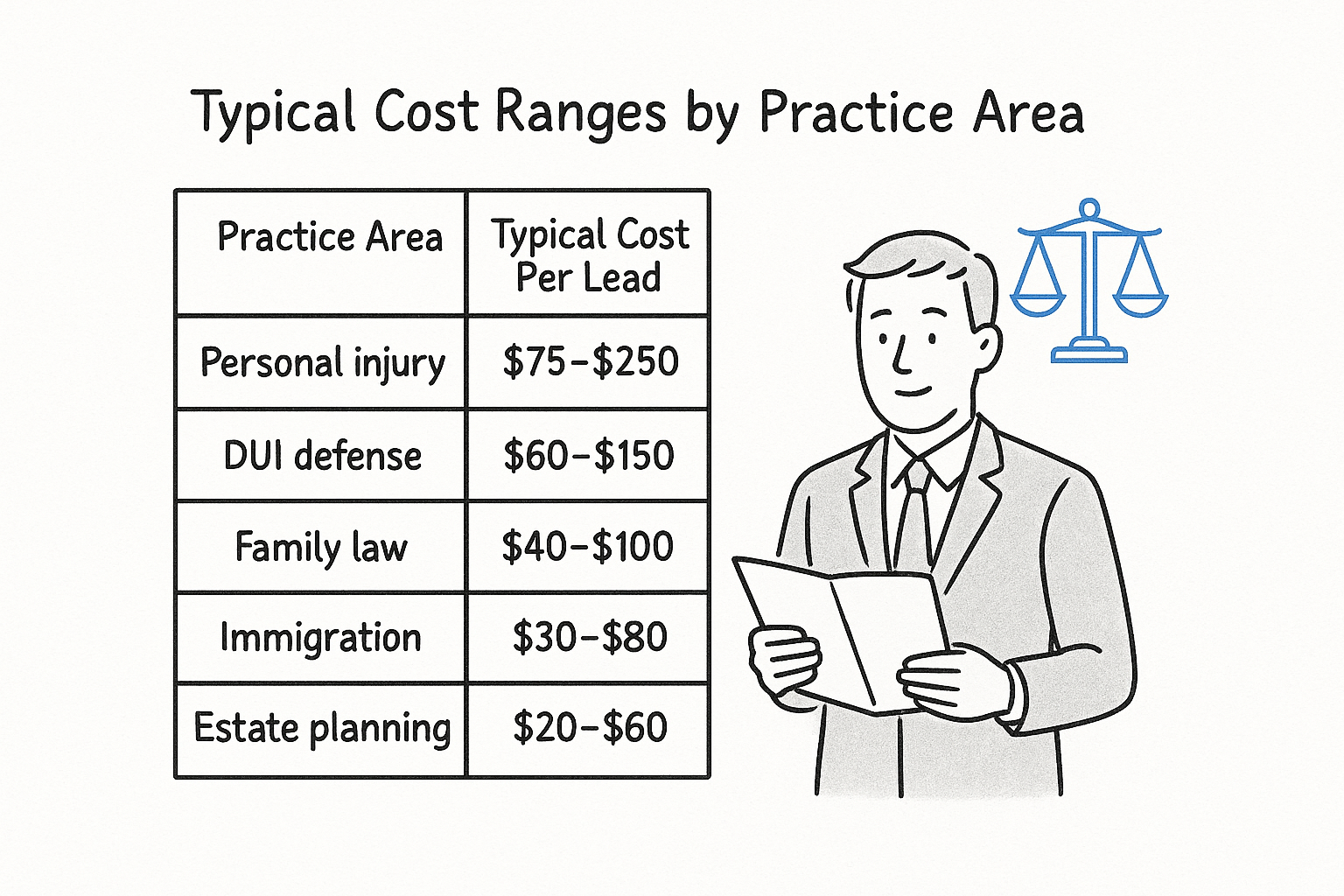
Local Service Ads charge you per qualified lead, and that price swings hard depending on your practice area, market, and how many other firms are bidding for the same categories. Google doesn't publish a flat rate card; instead, its algorithm sets a per-lead price in real time based on local competition and category demand (Google Ads Help, accessed 2026). Personal injury leads in a major metro can run $75-$250 each, while family law or estate planning leads in a smaller market might land closer to $20-$60.
What drives your cost per lead
Three factors move your price more than anything else: the practice area you select, the size of your coverage area, and how many competing firms already hold Google Screened status nearby. Widening your coverage area to chase more volume usually raises your average cost per lead rather than lowering it, since you start competing in denser markets.
Typical cost ranges by practice area
Use this as a planning baseline, not a guarantee, since Google adjusts pricing weekly based on live auction data:
Your cost per lead reflects category demand, not the quality of your ad.
Setting a realistic monthly budget
Google requires a weekly lead cap rather than a hard budget ceiling, so your actual monthly spend depends on how many leads come in before you hit that cap. Most firms starting out set a cap that covers 5-10 leads a week, watch conversion for a month, then adjust once they know their cost-per-signed-case, not just cost-per-lead. If you're weighing LSA spend against a platform subscription or a fully-managed retainer, our pricing breakdown shows how those numbers stack up against running LSAs alone.
How to track LSA leads and turn them into signed cases
Winning a Local Service Ads auction only matters if you can prove which leads turned into signed retainers, and Google's own dashboard stops at the call or message level. It won't tell you whether that DUI caller signed a fee agreement three weeks later. Without that link, you're stuck optimizing for lead volume instead of the number that actually pays your bills: cost-per-signed-case.
Close the loop between the ad click and the retainer
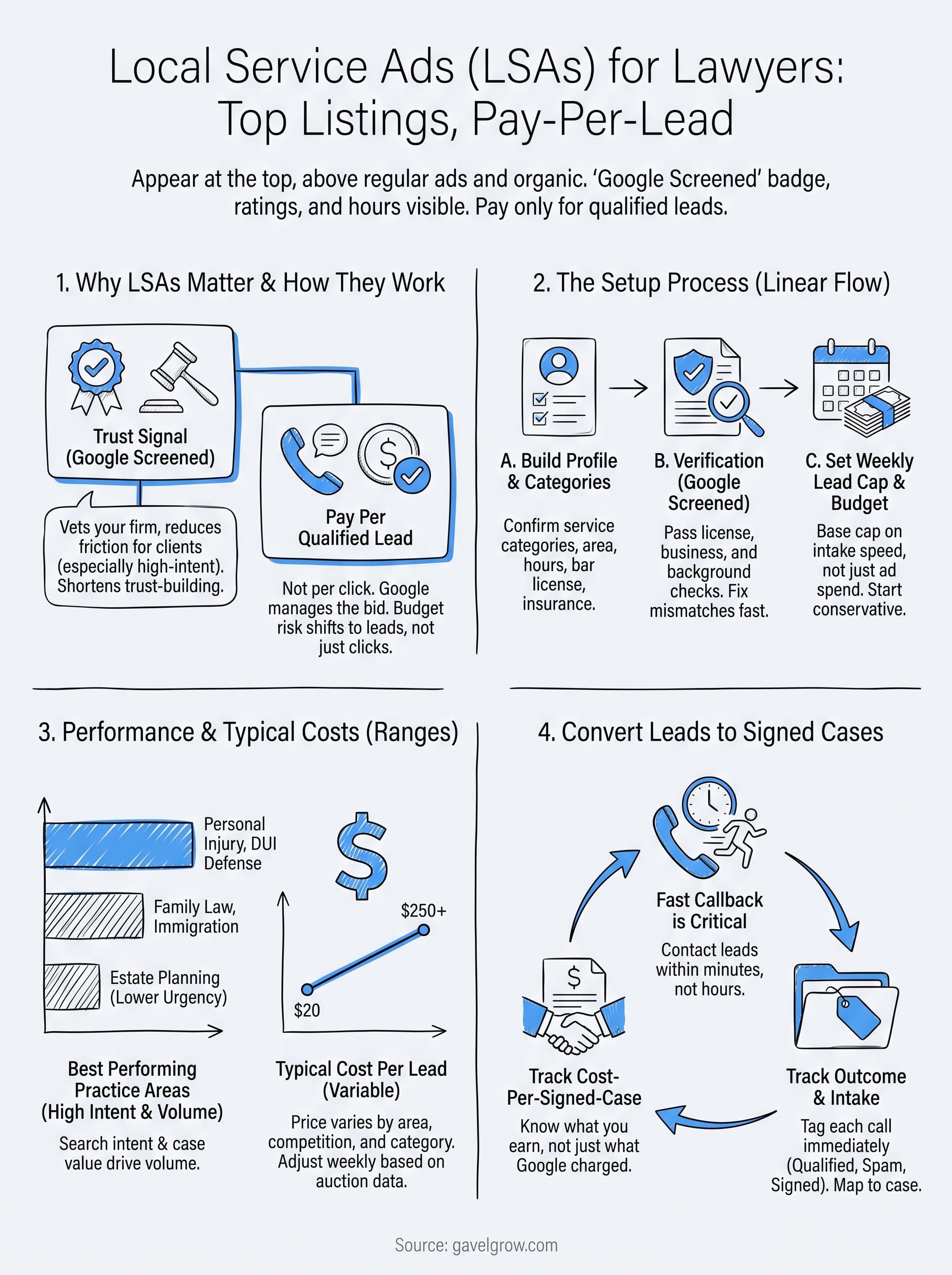
Every LSA lead arrives as a phone call or a message through Google's platform, and each one needs a fast, trackable path into your intake process. Route every LSA call through a dedicated tracking number so you can tag outcomes the moment the call ends, not days later when someone finally reviews a spreadsheet.
- Tag each call's outcome immediately - qualified, callback, unqualified, or spam, right after the call ends.
- Log the case status as it moves - lead, consultation scheduled, retainer signed, or declined.
- Match the signed case back to the original ad category - so you know which practice area actually converted.
- Review your cost-per-signed-case weekly, not monthly, while you're still tuning your lead cap.
Cost-per-lead tells you what Google charged; cost-per-signed-case tells you what you actually earned.
Why speed still decides most of this
Even a perfectly tagged lead goes cold if nobody calls back fast. Speed-to-lead research consistently shows contacting a lead within five minutes converts far better than waiting even 30 minutes, and LSA leads are no exception since the searcher is usually calling two or three firms in the same sitting. Firms that treat every LSA call like a scheduled callback lose cases to whoever answers first.
GavelGrow's marketing dashboard attributes each LSA lead from the original call through the signed retainer, tags outcomes automatically through built-in call tracking, and shows your cost-per-signed-case next to your cost-per-lead so you're not relying on two separate tools to see the full picture. Firms already running Clio or MyCase for case files still need this attribution layer, since neither tool was built to trace marketing spend back to a specific ad click.
Making local service ads work for your firm
Local Service Ads work when you treat them as a lead-screening system, not a set-it-and-forget-it ad campaign. Google Screened status gets you the top slot and the trust badge, but the badge alone won't sign a case. What signs a case is a fast callback, a clean handoff into your intake process, and a way to see which practice areas actually turn leads into retainers instead of just racking up cost-per-lead.
Getting your bar license, insurance, and coverage area right on the first submission saves you weeks of back-and-forth with Google's screening vendor. Getting your intake speed and attribution right saves you money every single week after that. If you're still tracking LSA leads in a spreadsheet or guessing at cost-per-signed-case, book a free strategy call and we'll walk through what a tighter setup looks like for your firm.
Frequently Asked Questions
What are Local Service Ads for lawyers?
Local Service Ads (LSAs) are pay-per-lead listings that appear at the very top of Google search results, above regular Google Ads and organic listings. They show a Google Screened badge, your review rating, and hours, and you pay per qualified lead rather than per click — so budget only goes to prospects who actually contact your firm.
How much do Local Service Ads cost for law firms?
LSAs are priced per lead, and legal is one of the most expensive categories — costs commonly run from around $30 to well over $200 per lead depending on practice area and market, with personal injury at the high end. You set a weekly budget and lead cap, and you can dispute leads that fall outside your practice area or service.
What is the difference between Local Service Ads and Google Ads?
Google Ads charges per click and places you in the sponsored search links; LSAs charge per qualified lead and place you above them with a Google Screened badge. LSAs are lower-risk on spend and carry a stronger trust signal, but they offer less targeting control, so most firms run both channels together.
What is Google Screened, and how does a law firm get it?
Google Screened is the badge on an LSA listing showing the firm passed Google’s background and license checks. To earn it, your firm submits business and attorney license verification, insurance, and background checks. Applications stall most often over mismatched business details or missing license or insurance documentation.
Are Local Service Ads worth it for law firms?
For many firms, yes — the top placement, Google Screened trust badge, and pay-per-lead model make LSAs one of the highest-intent channels available. The catch is lead quality and follow-up: LSAs only pay off if you answer fast, dispute leads that do not fit, and track which leads become signed cases.
How do you dispute a bad Local Service Ads lead?
Google lets you report leads that are outside your practice area, spam, or not a genuine service request, and credits qualifying disputes. Review leads promptly, flag the ones that do not fit, and keep notes — consistent disputing protects your budget and helps Google send better-matched leads over time.
How do you know if Local Service Ads are actually producing signed cases?
You have to close the loop between the LSA lead and the retainer. Track each lead through intake to a signed case and calculate cost per signed case, not just cost per lead — a channel with a higher cost per lead can still be cheaper per signed case if those leads convert better.
Frequently Asked Questions
What are Local Service Ads for lawyers?
Local Service Ads (LSAs) are pay-per-lead listings that appear at the very top of Google search results, above regular Google Ads and organic listings. They show a Google Screened badge, your review rating, and hours, and you pay per qualified lead rather than per click — so budget only goes to prospects who actually contact your firm.
How much do Local Service Ads cost for law firms?
LSAs are priced per lead, and legal is one of the most expensive categories — costs commonly run from around $30 to well over $200 per lead depending on practice area and market, with personal injury at the high end. You set a weekly budget and lead cap, and you can dispute leads that fall outside your practice area or service.
What is the difference between Local Service Ads and Google Ads?
Google Ads charges per click and places you in the sponsored search links; LSAs charge per qualified lead and place you above them with a Google Screened badge. LSAs are lower-risk on spend and carry a stronger trust signal, but they offer less targeting control, so most firms run both channels together.
What is Google Screened, and how does a law firm get it?
Google Screened is the badge on an LSA listing showing the firm passed Google’s background and license checks. To earn it, your firm submits business and attorney license verification, insurance, and background checks. Applications stall most often over mismatched business details or missing license or insurance documentation.
Are Local Service Ads worth it for law firms?
For many firms, yes — the top placement, Google Screened trust badge, and pay-per-lead model make LSAs one of the highest-intent channels available. The catch is lead quality and follow-up: LSAs only pay off if you answer fast, dispute leads that do not fit, and track which leads become signed cases.
How do you dispute a bad Local Service Ads lead?
Google lets you report leads that are outside your practice area, spam, or not a genuine service request, and credits qualifying disputes. Review leads promptly, flag the ones that do not fit, and keep notes — consistent disputing protects your budget and helps Google send better-matched leads over time.
How do you know if Local Service Ads are actually producing signed cases?
You have to close the loop between the LSA lead and the retainer. Track each lead through intake to a signed case and calculate cost per signed case, not just cost per lead — a channel with a higher cost per lead can still be cheaper per signed case if those leads convert better.