9 Marketing Automation Workflows Every Law Firm Should Use
Categories: Legal Marketing Strategies
 Abram Ninoyan
Founder & Senior Performance Marketer
Credentials: Google Partner, Google Ads Search Certified, Google Ads Display Certified, Google Ads Measurement Certified, Google Analytics (IQ) Certified, HubSpot Inbound Certified, HubSpot Social Media Marketing Certified, Conversion Optimization Certified
Expertise: Google Ads, Meta Ads, Conversion Rate Optimization, GA4 & Google Tag Manager, Lead Generation, Marketing Funnel Optimization, PPC Management
LinkedIn Profile
A lead fills out your contact form at 9 PM on a Friday. If nobody touches it until Monday morning, that person has likely already called two other firms. Marketing automation workflows fix this exact...
Key Takeaways
- 9 Marketing Automation Workflows Every Law Firm Should Use
- 1. Speed-to-lead intake automation for new leads
- 2. Welcome and onboarding sequence for new clients
- 3. Missed call and voicemail follow-up workflow
9 Marketing Automation Workflows Every Law Firm Should Use
A lead fills out your contact form at 9 PM on a Friday. If nobody touches it until Monday morning, that person has likely already called two other firms. Marketing automation workflows fix this exact problem by handling the response, follow-up, and nurturing that your staff can't do around the clock.
The fastest path to more signed cases isn't more leads, it's better handling of the leads you already have. A solid workflow sends the first text within seconds, routes hot leads to the right attorney, and keeps cold ones warm until they're ready to hire. A widely cited Lead Response Management study found that leads contacted within 5 minutes are 21 times more likely to qualify than those reached after 30 minutes, which is exactly the gap automation closes.
This list walks through nine workflows firms in personal injury, family law, and criminal defense actually use, from instant intake responses to court-reminder sequences. Each one includes the trigger, the timing, and what to automate first if you're building from scratch inside a platform like GavelGrow's intake automation tools.
1. Speed-to-lead intake automation for new leads
Speed-to-lead intake automation is the workflow that fires the second a new lead hits your system, whether that's a website form, a Google Ads call, or a chatbot conversation. It sends an automated text and email reply, checks the lead for duplicates and spam, and pushes a notification to the right staff member or attorney before that person has a chance to search for another firm. This is the workflow most firms should build first, since every other automation on this list depends on capturing the lead cleanly in the first place.
How it works
The trigger is simple: a lead submits a hosted intake form, calls a tracked number, or messages through an embedded widget. From there, the system runs a short chain of checks and actions before a human ever sees the lead.
- Bot and duplicate filtering, invisible bot protection and a 10-minute duplicate window stop spam and double-counted submissions from clogging the pipeline.
- Phone validation, carrier-level lookup flags disconnected or VOIP numbers before staff waste time calling them.
- Instant auto-reply, an SMS and email fire within 60 seconds, confirming the firm received the inquiry and setting expectations for a callback.
- Staff alert and routing, the assigned attorney or intake coordinator gets a notification tied to the lead's practice area and campaign source.
- Pipeline entry, the lead lands in a triage view with an aging timestamp, so nothing sits untouched overnight.
The firm that texts back in 60 seconds wins the case the firm that calls back tomorrow never gets a shot at.
Most firms layer a second-touch follow-up on top of the instant reply, a call attempt within 5 minutes and a second SMS if the lead doesn't pick up, which is where the lead-response gap the Lead Response Management study documented gets closed in practice.
Who it's for
Any firm fielding leads outside a receptionist's normal hours needs this workflow, but it matters most for personal injury, mass tort, and criminal defense practices where leads compare firms within the same hour and often the same phone call. Family law and immigration firms benefit too, since intake often happens during a crisis moment when the first firm to respond gets the consultation. Solo practitioners and small firms without a full-time intake team see the biggest lift, because automation covers the gaps a one- or two-person staff physically can't.
Tools and pricing
Building this natively avoids stitching together a form tool, a texting platform, and a spam filter separately.
Firms already comparing tools should look at GavelGrow's platform pricing before assembling a patchwork of point solutions, since the intake, validation, and auto-reply pieces ship together instead of requiring separate subscriptions and integrations.
2. Welcome and onboarding sequence for new clients
Once a lead signs a retainer, the welcome and onboarding sequence takes over from intake automation and starts managing expectations before the client's first anxious email arrives. This workflow sends a structured series of messages that explain what happens next, collect outstanding paperwork, and introduce the legal team, so the client isn't left wondering if anything happened after they signed. Firms that skip this step often see the same client call the office three times in the first week asking "what's going on with my case," which eats staff time that automation could have prevented.
How it works
The trigger fires when a lead's status changes to "signed" or "retained" in the case management pipeline, kicking off a scheduled sequence rather than a single message.
- Immediate confirmation, an email and text within minutes confirming the retainer is signed and naming the assigned attorney or paralegal.
- Day 1 document request, a follow-up asking for medical records, police reports, or financial documents specific to the practice area.
- Day 3 introduction, a short video or bio email introducing the case team so the client has a face attached to the file.
- Day 7 check-in, an automated text asking if the client has questions, with a direct reply option that routes into the unified inbox.
- Milestone updates, triggered messages tied to case status changes rather than a fixed calendar, so clients get news when there's actually news.
Clients who feel informed early rarely call the office asking if their case fell through the cracks.
Because every message lands in the same conversation thread as the original intake, staff never have to hunt across email, text, and voicemail to see the full history with a client.
Who it's for
This workflow suits any firm with a multi-week or multi-month case cycle, which covers personal injury, family law, immigration, and estate planning almost universally. Mass tort shops running high case volumes benefit even more, since onboarding hundreds of clients manually isn't realistic, and a missed welcome step often shows up later as a client who drops off before signing final documents.
Tools and pricing
A sequence like this requires a system that already knows the client's practice area and case status, not a generic email drip tool bolted on afterward. GavelGrow's Optimize plan ($599/mo) includes onboarding sequences as part of the intake automation suite, with triggers tied directly to case management status rather than a separate calendar. Standalone email marketing tools run $20–$100/mo but require manual syncing with your case management software, which reintroduces the exact gap this workflow is meant to close.
3. Missed call and voicemail follow-up workflow
A missed call and voicemail follow-up workflow catches the calls your front desk can't answer, whether that's during lunch, after hours, or when every line is already busy with an existing client. Instead of a caller hanging up and dialing the next firm on their search results page, the system fires an automatic text within seconds of the missed call, offering a callback window or a link to your intake form. This closes one of the most common leaks in legal marketing, since a missed call from a paid ad campaign is a wasted ad dollar if nobody follows up.
How it works
The trigger is a missed call or an unanswered voicemail on any tracked number, which routes into the same call tracking system firms use for campaign attribution.
- Instant SMS response, a text goes out within seconds acknowledging the missed call and inviting the caller to reply or book a time.
- Voicemail transcription and tagging, recordings get tagged qualified, callback, unqualified, or spam so staff know which voicemails need urgent attention first.
- Callback task creation, a task lands in the pipeline with the caller's number and campaign source attached, so nobody has to dig through call logs.
- Escalation after silence, if the caller doesn't respond within an hour, a second text or a call attempt fires automatically.
A missed call doesn't have to mean a missed case, it just means the next message has to land faster than the caller's patience runs out.
Who it's for
This workflow matters most for solo and small firms without a full-time receptionist, along with any practice running paid search or Local Services Ads, where every missed call represents real ad spend. Personal injury and criminal defense firms see the sharpest impact, since those calls often come from urgent, time-sensitive situations where the caller will simply try someone else within minutes.
Tools and pricing
Built-in call tracking replaces a separate CallRail subscription, which typically runs $45–$180/mo depending on number volume and minutes. GavelGrow includes per-campaign tracking numbers, recordings, and outcome tagging inside every platform tier starting at $199/mo, with miss-rate breakdowns per number so firms can see exactly where calls are falling through. Firms already running GavelGrow's marketing dashboard get this follow-up automation without adding another vendor or reconciling two separate call logs.
4. Consultation scheduling and reminder workflow
A consultation scheduling and reminder workflow takes over once a lead agrees to talk to an attorney, handling the back-and-forth of booking a time and then making sure the person actually shows up. No-shows waste attorney hours and marketing dollars alike, since a lead who ghosts a scheduled call is often a lead who signed with a competitor instead. This workflow closes that gap with automated booking links, calendar syncing, and a reminder sequence that fires without anyone on staff lifting a finger.
How it works
Once a lead expresses interest or an intake coordinator marks a consult as pending, the system generates a booking link tied to attorney availability and capacity signals already in the pipeline.
- Self-service booking, the lead picks a slot from real-time availability instead of playing phone tag with the front desk.
- Calendar sync, the event pushes to Google, Apple, and Outlook calendars via iCal subscription, so attorneys see it alongside court dates and internal meetings.
- Confirmation message, an SMS and email confirm the time immediately after booking, cutting down on double-bookings.
- 1-hour reminder, an automated text and email fire an hour before the consult, which is the single change most firms report cutting no-shows.
- Rescheduling option, a reply-to-reschedule link keeps the lead in the funnel instead of dropping off entirely if their plans change.
A consult that never happens is a lead you already paid for and never converted.
Who it's for
Any firm running paid consultations or free strategy calls needs this workflow, but it matters most for family law and estate planning practices, where consults often happen days or weeks after the initial inquiry and memories fade fast. Firms juggling multiple attorneys with different calendars also benefit, since manual scheduling across several people's availability is where human error creeps in.
Tools and pricing
GavelGrow's built-in tasks, calendar, and iCal subscription features handle this at every platform tier starting at $199/mo, with reminders firing automatically an hour before each event. Standalone scheduling tools like a generic booking app run $8–$25/mo per user but don't connect to your lead pipeline, meaning someone still has to manually log who booked and why. Firms comparing options can review the scheduling features on GavelGrow's platform page before adding a separate calendar tool to the stack.
5. Lead nurturing for personal injury and mass torts
A lead nurturing workflow for personal injury and mass tort cases keeps leads warm over the weeks or months it takes them to decide whether to hire a firm, sign a different one, or drop the claim entirely. Mass tort leads especially don't convert on the first call, since many are still waiting on medical records, deciding between firms, or unsure if they even qualify. This workflow sends a scheduled series of touches that answer common questions, build trust, and remind the lead your firm is still there without a paralegal manually tracking every name on a spreadsheet.
How it works
The trigger fires when a lead enters the pipeline but hasn't yet booked a consult or signed, keeping them in an active nurture track instead of going cold.
- Educational drip, emails and texts spaced over days explain the claims process, eligibility criteria, and typical timelines specific to the practice area.
- Case-status check-ins, automated messages ask if the lead has gathered records or spoken with a doctor, keeping the file moving forward.
- Social proof touches, settlement ranges, review snippets, or firm credentials get worked into the sequence to counter the "is this firm legit" hesitation.
- Re-engagement triggers, if a lead opens an email or clicks a link, the system flags it for a staff follow-up call instead of letting the signal go unnoticed.
A lead that goes quiet for three weeks isn't dead, it's just waiting for a reason to pick up the phone again.
Who it's for
This workflow is built for personal injury and mass tort firms running high lead volumes where a 6 to 12 month decision cycle is normal, not the exception. It also suits firms handling class-action-style intake, where hundreds of leads need consistent touchpoints that no intake team could manually replicate at scale, and where letting a lead go cold means losing them to a competitor's ad the following week.
Tools and pricing
Nurture sequences like this depend on knowing where a lead sits in the pipeline, not just firing generic drip emails on a timer. GavelGrow's Optimize plan ($599/mo) ties nurture messaging directly to lead status and campaign source, while generic email marketing platforms run $30 to $150/mo but require manual list segmentation to mimic the same targeting. Firms running mass tort campaigns can compare intake volume against the modelled practice-area benchmarks to see how their nurture-to-signed rate stacks up against comparable practices.
6. Post-case review and referral request workflow
The post-case review and referral request workflow kicks in the moment a case closes, catching the client while the relief and gratitude are still fresh instead of waiting weeks and hoping someone remembers to ask. This is one of the most overlooked marketing automation workflows in legal marketing, since firms spend thousands acquiring a lead but often skip the free step of turning a happy client into a five-star review or a warm referral. Automating the ask removes the awkwardness of a paralegal remembering to bring it up on a random Tuesday.
How it works
The trigger fires when a case status changes to closed or settled in the case management pipeline, launching a short sequence rather than a single one-off email.
- Same-week thank-you, a personalized email or text thanking the client and confirming the case outcome.
- Review request, a direct link to Google or Avvo sent 3 to 5 days after closing, timed to land after the initial excitement but before memory fades.
- Referral prompt, a follow-up message asking if the client knows anyone who could use the firm's help, often paired with a simple referral-program explanation.
- Escalation on silence, if the client hasn't clicked the review link within a week, a second, softer reminder goes out automatically.
A satisfied client who never leaves a review is a marketing asset your firm paid for and never collected.
Who it's for
Every practice area benefits here, but personal injury and family law firms see the fastest payoff, since word-of-mouth referrals in those areas carry more weight than paid ads. Firms trying to build review volume to compete on Google Business Profile rankings should treat this workflow as non-negotiable, not optional.
Tools and pricing
GavelGrow's case management ties status changes directly to review and referral triggers on every plan from $199/mo, so no one has to remember to flip a switch manually. Standalone reputation tools like reminder-based review software run $30 to $100/mo but require a separate integration to know when a case actually closed. Firms managing this manually often see review requests slip through entirely once caseloads climb past a dozen open files.
7. Win-back workflow for stalled or unresponsive leads
A win-back workflow targets leads that went quiet after initial contact, the person who filled out a form, took one call, and then stopped responding to texts and emails. Firms often write these leads off as dead, but a lead who went quiet three months ago may have simply gotten busy, hired nobody yet, or hit a wall with paperwork. This workflow re-opens the conversation on a schedule instead of leaving stalled leads to rot in a pipeline nobody checks anymore.
How it works
The trigger fires when a lead's last-activity timestamp crosses a set threshold, typically 14 or 30 days without a reply, moving them from active nurture into a dedicated re-engagement track.
- Re-engagement message, a fresh email or text checks in with a different angle than the original outreach, often referencing a deadline like a statute of limitations.
- Value-add content, a short piece of information relevant to their situation, like an FAQ on filing timelines, gives the lead a reason to respond beyond "just checking in."
- Channel switch, if email goes unanswered, the sequence shifts to SMS, and if SMS goes unanswered, it tries a phone call task for staff.
- Final attempt and archive, after a set number of touches with no response, the lead moves to a closed status automatically, keeping the active pipeline clean.
A stalled lead isn't gone, it's just sitting one well-timed message away from becoming a signed case.
Because every touch logs into the same aging view used for new intake, staff can see at a glance which stalled leads just got reactivated and need a human follow-up instead of another automated text.
Who it's for
This workflow suits personal injury and mass tort firms carrying large lead volumes where dozens of names inevitably slip through the cracks each month, along with any firm running paid ads where a stalled lead represents real spend already sunk. Family law firms benefit too, since life circumstances that stalled a decision, like a partner not yet ready to file, often resolve themselves within a few months if the firm stays visible.
Tools and pricing
GavelGrow's lead pipeline flags stalled leads automatically using last-activity aging, with re-engagement sequences available on the Optimize plan ($599/mo). Manually tracking stale leads in a spreadsheet costs nothing in tools but almost guarantees leads get missed once volume passes a few dozen open files a month.
8. Full-funnel ad spend and call attribution workflow
A full-funnel attribution workflow connects every dollar spent on Google Ads, Local Services Ads, or paid social to the actual outcome, a signed retainer, not just a form fill or a phone call. Most firms can tell you their cost per lead but not their cost per signed case, which means they're often scaling the wrong campaigns based on volume instead of revenue. This workflow closes that gap by tracking a lead from the first ad click through every call, text, and status change until the case either signs or closes dead.
How it works
The trigger is any paid click or campaign-tracked call, which pulls in a unique identifier that follows the lead through the entire pipeline rather than resetting at each touchpoint.
- Daily ad sync, campaigns, spend, and conversions from Google Ads pull in automatically instead of requiring a manual export every week.
- Call and form tagging, every tracked number and intake form carries a campaign source, so a call from a Local Services Ad never gets confused with organic traffic.
- Native conversion firing, GA4 and Meta Pixel events fire with real values and transaction IDs, so ad platforms see actual signed-case data instead of guessing from proxy signals.
- Cost-per-signed-case reporting, the dashboard rolls spend and outcomes up by campaign, showing which ads produce cases and which just produce cheap clicks.
Cost per lead tells you what you spent, cost per signed case tells you what you actually got for it.
Benchmarking this against modelled practice-area benchmarks show whether a firm's cost-per-signed-case is high because of weak ad targeting or weak intake follow-up, which is a distinction most standalone ad platforms can't make.
Who it's for
Any firm spending real money on paid search or paid social needs this, but it matters most for firms running multiple campaigns across practice areas, where budget decisions based on lead volume alone often misallocate spend toward the noisiest, not the most profitable, channel. Managed-services clients depend on this reporting to hold an agency accountable for outcomes rather than activity.
Tools and pricing
GavelGrow's marketing dashboard includes daily Google Ads sync, GA4 and Meta Pixel firing, and cost-per-signed-case reporting on every platform tier from $199/mo. Replicating this with separate tools, a call tracking platform plus a reporting dashboard like AgencyAnalytics, typically runs $150 to $400/mo combined and still requires manual work to tie ad spend back to signed cases instead of raw leads.
9. TCPA-compliant SMS campaign workflow
A TCPA-compliant SMS campaign workflow governs every text your firm sends after the initial consent moment, from appointment reminders to marketing blasts, so a well-meaning campaign never turns into a class-action liability. The Telephone Consumer Protection Act carries statutory damages of $500 to $1,500 per violating text, and plaintiffs' firms specifically target law firms for this because the irony writes itself. This workflow isn't optional polish on top of the other marketing automation workflows in this list, it's the compliance layer that has to run underneath all of them.
How it works
Every outbound text traces back to a documented consent event, captured the moment a lead checks a box or replies to an opt-in prompt, rather than assumed from a form submission alone.
- Consent capture and logging, an append-only audit log records the timestamp, source, and exact language the lead agreed to, so the firm can prove consent if it's ever challenged.
- Opt-out keyword handling, STOP and HELP replies process automatically per CTIA guidelines, removing the number from future sends without staff intervention.
- Quiet-hours enforcement, sends respect time-zone restrictions so texts never land before 8 AM or after 9 PM local time.
- Two-party consent flagging, states requiring recorded-call consent get a separate rule set so an SMS campaign doesn't accidentally cross into call-recording violations.
One undocumented consent record can cost more than a year of ad spend once a plaintiff's attorney gets involved.
Because the consent log, opt-out list, and send history live in one system, a compliance audit takes minutes instead of a week of pulling records from three separate vendors.
Who it's for
Every firm sending SMS needs this, but it matters most for mass tort and personal injury practices running high-volume campaigns, where a single batch send to an unscreened list creates exposure across hundreds of numbers at once. Firms operating in multiple states also need this more than single-location practices, since consent and quiet-hours rules shift by jurisdiction.
Tools and pricing
GavelGrow ships TCPA-compliant SMS, consent logging, and CTIA opt-out handling built into every platform tier from $199/mo, with AES-256 encryption at rest covering the stored consent records. Bolting compliance onto a generic texting tool usually means paying a separate compliance vendor $100 to $300/mo on top of the SMS platform itself, with no guarantee the two systems stay in sync.
What to automate first
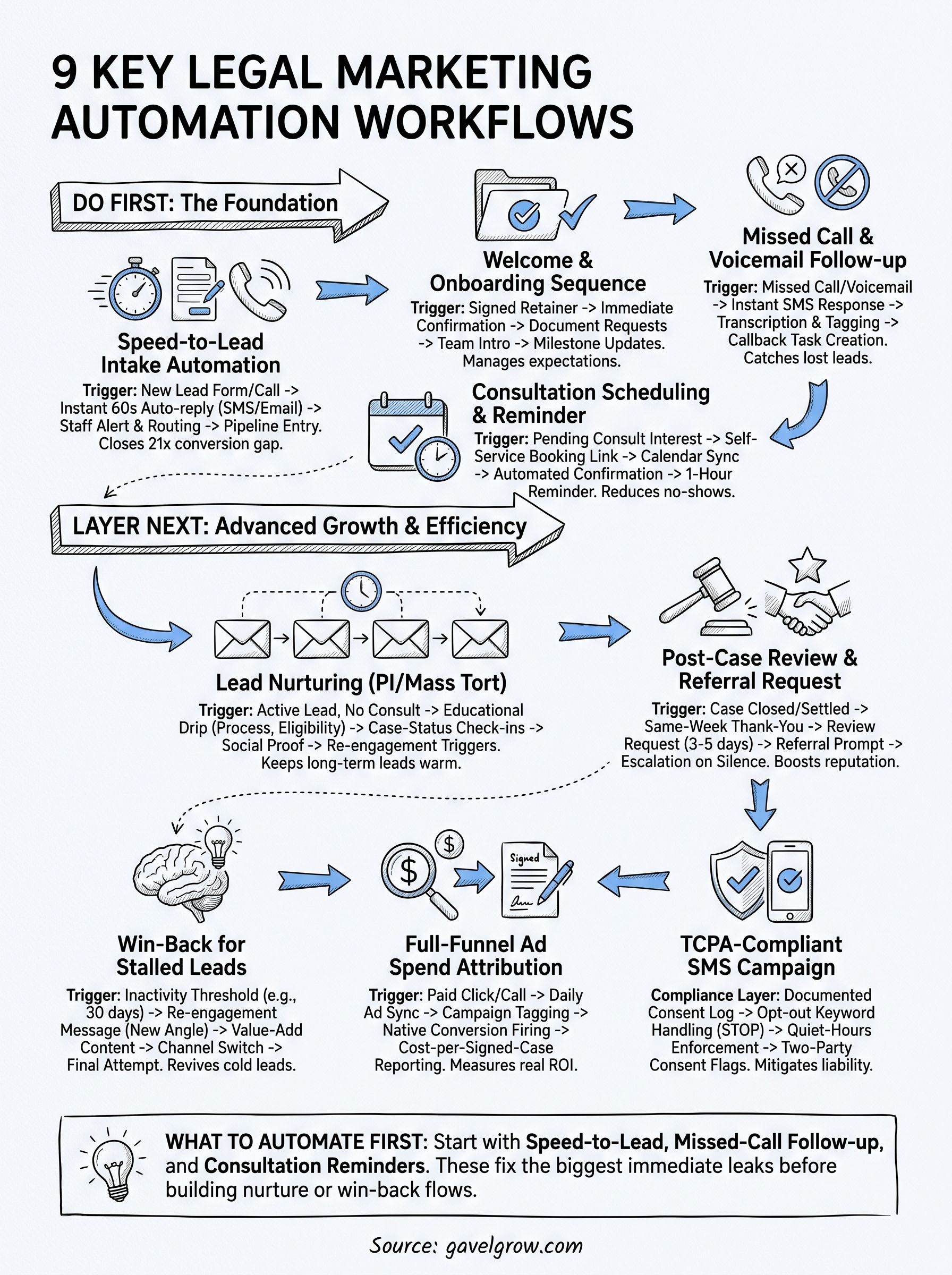
Don't try to build all nine workflows in one week. Start with speed-to-lead intake automation, since it protects every dollar you're already spending on ads and referrals, then add missed-call follow-up and consultation reminders once the first workflow is running clean. Those three alone fix the leaks that cost firms the most signed cases, long before nurture sequences or win-back campaigns matter.
Once intake is solid, layer in attribution so you know which campaigns actually produce cases, not just clicks. Marketing automation workflows compound: each one you add makes the next easier to justify and measure, because the data from one feeds the next.
If you're not sure which workflow to tackle first, book a free 45-minute strategy call and walk through your current intake process with someone who's built this for 500+ law firms already.
Frequently Asked Questions
What is a marketing automation workflow for a law firm?
A marketing automation workflow is a preset sequence of triggers and actions that runs without staff intervention, like firing an instant text the moment a lead submits a form, reminding a client before a consult, or requesting a review when a case closes. For law firms, the goal is to handle the leads and clients you already have faster and more consistently than a busy front desk can, so fewer cases slip through the cracks.
Is automated SMS to leads TCPA-compliant for law firms?
It can be, but only if the workflow captures and logs consent before the first message, honors STOP and HELP opt-out keywords per CTIA guidelines, and respects quiet-hours restrictions. Automation itself is not the risk; sending without a documented, auditable consent trail is. A single undocumented consent record can cost more than a year of ad spend once a plaintiff’s attorney is involved, so the consent log matters as much as the message.
Do law firms need separate tools for each automation workflow?
No, and stitching separate tools together is usually where firms lose money and visibility. A form builder, a texting app, a call-tracking service, a scheduler, and a reporting tool each carry their own subscription, and none of them share the lead’s history. A platform that runs intake, SMS, scheduling, call tracking, and attribution together keeps every touch in one thread and one report, instead of forcing staff to reconcile three or four logins.
How fast should a law firm's first automated response fire?
Within seconds, ideally under a minute. Injury and legal prospects often contact several firms at once, and the one that responds first usually wins the case. Widely cited lead-response research found that reaching a new lead within five minutes makes you far more likely to qualify it than waiting even half an hour, so an instant auto-reply that confirms the inquiry and sets a callback expectation protects the ad spend that produced the lead.
Can solo and small firms use marketing automation, or is it only for large firms?
Solo and small firms often benefit the most, because they lack a full-time receptionist to catch after-hours leads and missed calls. Speed-to-lead intake, missed-call follow-up, and consultation reminders replace work a small team cannot always cover, and they scale down to a single practice area as easily as up to a multi-office firm. The workflows matter more the fewer people you have to run them manually.
How do you measure whether marketing automation is actually working?
Track past activity metrics like opens and replies to outcomes: no-show rate, speed-to-first-response, lead-to-consultation and consultation-to-retainer conversion, and ultimately cost per signed case by campaign. Automation that fires messages but is not tied to signed-case reporting can look busy while producing nothing. The number that matters is whether the workflow lowered your cost per signed case or recovered cases that would otherwise have gone cold.
CallRail and all other product names and trademarks are the property of their respective owners, referenced here for identification only and not affiliated with or endorsing GavelGrow. Third-party pricing reflects published rates as of August 2026 and can change; verify current pricing directly with each vendor.
Frequently Asked Questions
What is a marketing automation workflow for a law firm?
A marketing automation workflow is a preset sequence of triggers and actions that runs without staff intervention, like firing an instant text the moment a lead submits a form, reminding a client before a consult, or requesting a review when a case closes. For law firms, the goal is to handle the leads and clients you already have faster and more consistently than a busy front desk can, so fewer cases slip through the cracks.
Is automated SMS to leads TCPA-compliant for law firms?
It can be, but only if the workflow captures and logs consent before the first message, honors STOP and HELP opt-out keywords per CTIA guidelines, and respects quiet-hours restrictions. Automation itself is not the risk; sending without a documented, auditable consent trail is. A single undocumented consent record can cost more than a year of ad spend once a plaintiff’s attorney is involved, so the consent log matters as much as the message.
Do law firms need separate tools for each automation workflow?
No, and stitching separate tools together is usually where firms lose money and visibility. A form builder, a texting app, a call-tracking service, a scheduler, and a reporting tool each carry their own subscription, and none of them share the lead’s history. A platform that runs intake, SMS, scheduling, call tracking, and attribution together keeps every touch in one thread and one report, instead of forcing staff to reconcile three or four logins.
How fast should a law firm's first automated response fire?
Within seconds, ideally under a minute. Injury and legal prospects often contact several firms at once, and the one that responds first usually wins the case. Widely cited lead-response research found that reaching a new lead within five minutes makes you far more likely to qualify it than waiting even half an hour, so an instant auto-reply that confirms the inquiry and sets a callback expectation protects the ad spend that produced the lead.
Can solo and small firms use marketing automation, or is it only for large firms?
Solo and small firms often benefit the most, because they lack a full-time receptionist to catch after-hours leads and missed calls. Speed-to-lead intake, missed-call follow-up, and consultation reminders replace work a small team cannot always cover, and they scale down to a single practice area as easily as up to a multi-office firm. The workflows matter more the fewer people you have to run them manually.
How do you measure whether marketing automation is actually working?
Track past activity metrics like opens and replies to outcomes: no-show rate, speed-to-first-response, lead-to-consultation and consultation-to-retainer conversion, and ultimately cost per signed case by campaign. Automation that fires messages but is not tied to signed-case reporting can look busy while producing nothing. The number that matters is whether the workflow lowered your cost per signed case or recovered cases that would otherwise have gone cold. CallRail and all other product names and trademarks are the property of their respective owners, referenced here for identification only and not affiliated with or endorsing GavelGrow. Third-party pricing reflects published rates as of August 2026 and can change; verify current pricing directly with each vendor.