Pipedrive Workflow Automation: How to Set It Up for Law Firms
Categories: Legal Marketing Strategies
 Abram Ninoyan
Founder & Senior Performance Marketer
Credentials: Google Partner, Google Ads Search Certified, Google Ads Display Certified, Google Ads Measurement Certified, Google Analytics (IQ) Certified, HubSpot Inbound Certified, HubSpot Social Media Marketing Certified, Conversion Optimization Certified
Expertise: Google Ads, Meta Ads, Conversion Rate Optimization, GA4 & Google Tag Manager, Lead Generation, Marketing Funnel Optimization, PPC Management
LinkedIn Profile
If you run a law firm on Pipedrive, you already know the CRM tracks deals well but does nothing on its own to chase leads, remind attorneys about follow-ups, or move a case through your pipeline. Pipe...
Key Takeaways
- Pipedrive Workflow Automation: How to Set It Up for Law Firms
- Why should law firms automate their Pipedrive workflows?
- Step 1. Map your firm's intake and case pipeline
- Step 2. Automate lead assignment and speed-to-lead
Pipedrive Workflow Automation: How to Set It Up for Law Firms
If you run a law firm on Pipedrive, you already know the CRM tracks deals well but does nothing on its own to chase leads, remind attorneys about follow-ups, or move a case through your pipeline. Pipedrive workflow automation fixes that by triggering actions automatically whenever a deal, contact, or activity meets a condition you set, no manual triggering required. The catch is that Pipedrive was built for general sales teams, not for TCPA rules, intake speed requirements, or the 6-12 month cycles typical of personal injury or family law cases.
Setting it up correctly means mapping your intake process to specific triggers first, then building conditions and actions inside Pipedrive's Automations tab rather than guessing at templates. Done right, you can automate follow-up sequences, assign leads by practice area, and flag stalled deals before they go cold.
This guide walks through the exact setup, step by step, plus where Pipedrive's automation falls short for legal intake and call tracking. If you outgrow Pipedrive's limits, GavelGrow's purpose-built platform handles the compliance and attribution gaps natively.
Why should law firms automate their Pipedrive workflows?
Manual data entry and delayed follow-up cost law firms cases, not just time. A paralegal who logs a lead at the end of the day instead of the moment it arrives has already lost the window that matters most. A 2011 lead response study out of MIT, later popularized by InsideSales.com, found that leads contacted within 5 minutes are 21 times more likely to qualify than leads reached after 30 minutes. That gap doesn't shrink for legal intake. It widens, because prospects calling three or four firms after a car accident or arrest pick whoever answers first.
The real cost of manual intake
Build your pipeline around automation triggers and that delay disappears. Every new deal, every stage change, every missed call becomes an event Pipedrive can act on the second it happens, whether that's firing off a task to the intake coordinator or texting the prospect a confirmation. Firms running personal injury or mass tort intake see the difference immediately, since those leads often shop three or four firms before choosing one.
The firm that responds in minutes wins the case the firm that responds in hours never gets.
Where automation actually moves the needle
Compare what a firm handles by hand against what Pipedrive's automation engine can take over once it's configured:
Once these run on autopilot, your team spends time talking to prospects and building cases instead of updating spreadsheets. Deal rotting rules alone catch the leads that would otherwise sit untouched for a week, flagging them before a competitor firm scoops up the client.
The limits of generic CRM automation for legal
Generic doesn't mean useless, but it does mean gaps. Pipedrive has no concept of TCPA consent, no audit trail for SMS opt-outs, and no built-in call tracking, so firms end up duct-taping together Zapier, a texting app, and a separate tracking number provider just to stay compliant. Every extra tool is another point of failure and another monthly bill.
None of that makes Pipedrive automation a bad starting point. It's a strong one, especially for solo practitioners or small firms not yet ready for a legal-specific platform. But if your firm handles high lead volume across multiple practice areas, or you're already juggling CallRail, Clio Grow, and a separate reporting tool, you'll hit the ceiling faster than you expect. GavelGrow's solutions for different practice areas show what a legal-built system looks like once you outgrow general-purpose automation, with TCPA consent logging and call tracking built in rather than bolted on.
Starting with what Pipedrive already offers still makes sense for most firms. The steps below show exactly how to map your intake process and build the automations that matter most before you decide whether you need something purpose-built.
Step 1. Map your firm's intake and case pipeline
Before you touch the Automations tab, write down every stage a lead moves through, from first contact to signed retainer. Skipping this step is the fastest way to end up with automations that fire at the wrong time or duplicate work your staff already does by hand. Pipedrive workflow automation only works as well as the pipeline it's built on, so a messy or outdated pipeline setup guarantees messy automation results.

List every stage your leads actually pass through
Grab a whiteboard or a blank doc and map the real path, not the idealized one. For most personal injury and family law intakes, that looks something like:
- New lead captured (web form, phone call, referral)
- Initial contact attempted
- Consultation scheduled
- Consultation completed, case evaluated
- Retainer sent
- Retainer signed, case opened
- Case handed to litigation or case management team
Don't guess at this list. Pull it from your last 20 closed deals in Pipedrive and check what stages they actually moved through, including the ones staff skip or backfill later.
Match each stage to a trigger and an owner
Once the stages are locked, assign a trigger and a responsible person to each one. This is the map your automations will follow later.
A pipeline you haven't mapped on paper is a pipeline you can't automate correctly.
This mapping exercise also exposes where firms lose leads today, usually between "initial contact attempted" and "consultation scheduled," where a prospect goes quiet and nobody follows up. GavelGrow's case management tools track that same handoff automatically once a lead converts, but even inside Pipedrive alone, naming the gap is the first step toward closing it. With stages, triggers, and owners defined, you're ready to build the automations in Step 2.
Step 2. Automate lead assignment and speed-to-lead
Speed-to-lead is where most firms bleed cases before intake even starts. Every minute a new deal sits unassigned is a minute a prospect spends dialing the next firm on their list. Pipedrive's Automations tab lets you build this without a developer, but you need to set the trigger and action correctly the first time, since a misconfigured rule can assign leads to the wrong attorney or fire an SMS before consent is captured.
Build the automation inside Pipedrive
Open Automations from the left sidebar, click "New automation," and set it up like this:
Trigger: Deal created
Condition: Practice area (custom field) = "Personal Injury"
Action 1: Assign deal owner to "PI Intake Team"
Action 2: Create activity "Call new lead" due immediately
Action 3: Send email template "New lead confirmation" to deal contact
Duplicate this automation for each practice area your firm handles, swapping the condition and the assigned owner each time. If your firm runs mass tort and family law out of the same pipeline, you'll need a separate branch for each so leads don't land on the wrong desk.
Route by capacity, not just practice area
Practice area alone isn't enough once an attorney's caseload fills up. Add a round-robin condition or a secondary custom field for "current capacity" so leads rotate between available staff instead of piling on whoever happens to be first alphabetically. Firms that skip this step often find one attorney buried in leads while another sits idle, which slows down response time for everyone.
Assigning a lead in seconds means nothing if the person it lands on can't respond for hours.
Where Pipedrive's speed-to-lead automation stops short
Pipedrive can create the activity and fire the email, but it has no native SMS trigger, no carrier-level phone validation, and no way to log TCPA consent for that outreach. Most firms bolt on Zapier plus a texting app to close the gap, which adds latency and another compliance blind spot. GavelGrow's intake automation fires SMS (once US carriers approve your number) and email within minutes of lead capture with consent logging built into the same event, so you're not stitching together three tools to hit the response window that actually converts. If your firm handles high lead volume, that 60-second window matters more than any pipeline stage you'll map in Pipedrive.
Step 3. Build automated follow-up and nurture sequences
Most leads don't sign a retainer after one call. Personal injury cases especially drag through weeks of "still deciding" before a prospect commits, and if nobody follows up on a schedule, that prospect quietly signs with a competitor instead. Nurture sequences solve this by keeping a deal warm automatically, without a paralegal remembering to check in on day 3, day 7, and day 14.
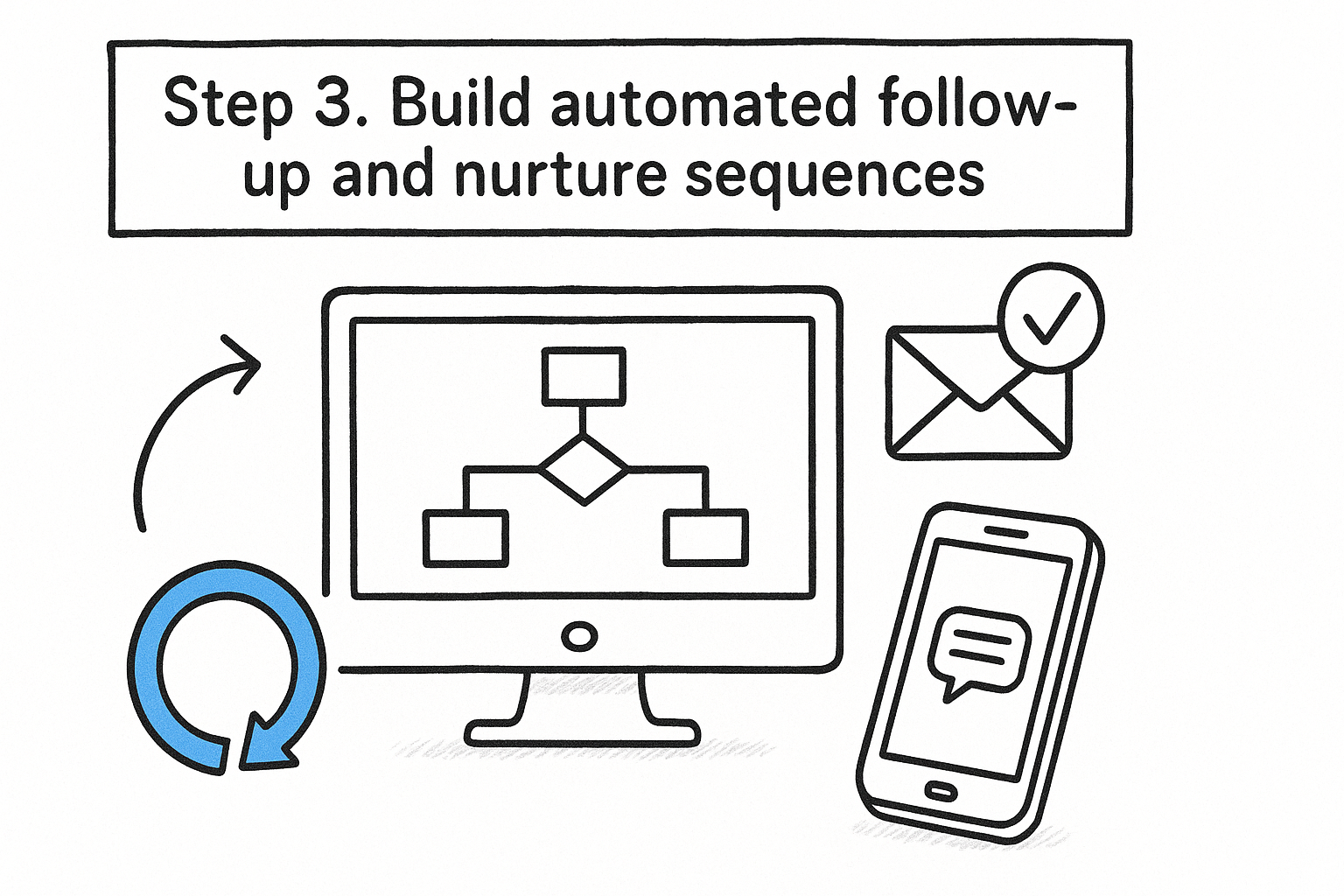
Set up a multi-touch follow-up sequence
Build this as a chain of automations tied to time delays rather than a single trigger. Inside Automations, create separate rules keyed off "time since deal entered stage" so each touch fires only if the lead hasn't moved forward.
Automation 1:
Trigger: Deal enters stage "Initial contact attempted"
Condition: No activity marked complete within 24 hours
Action: Create task "Follow-up call" assigned to intake coordinator
Automation 2:
Trigger: Deal remains in stage "Consultation scheduled"
Condition: 3 days elapsed, no stage change
Action: Send email template "Checking in" + create reminder task
Automation 3:
Trigger: Deal remains in stage "Retainer sent"
Condition: 7 days elapsed, deal not marked won
Action: Send email "Retainer follow-up" + notify attorney
Stack these three and you've covered the three points where leads typically go cold: after first contact, after the consultation, and after the retainer goes out but before it comes back signed.
Use deal rotting to catch what the sequence misses
Pipedrive's deal rotting feature marks a deal as "rotten" once it sits in a stage past a time limit you set, and you can trigger an automation off that status instead of a fixed delay. This catches edge cases your scheduled follow-ups miss, like a lead that goes quiet mid-sequence for reasons outside the script.
A sequence that runs on a fixed schedule misses more leads than one that reacts to actual inactivity.
The gap: email-only nurture underperforms in legal intake
Here's the problem. Pipedrive's native automation sends email, not SMS, and legal prospects respond to texts far faster than emails, especially right after an accident or arrest when they're checking their phone constantly. Building SMS nurture inside Pipedrive means adding Zapier and a texting tool, then manually tracking opt-outs yourself since Pipedrive has no CTIA STOP/HELP handling. GavelGrow's intake automation runs SMS and email sequences together with opt-out keywords handled automatically, closing the exact gap firms hit once they try to nurture leads by text inside Pipedrive alone.
Step 4. Automate case handovers and status updates
Once a retainer comes back signed, the handoff from intake to case management is where firms drop the ball most often. A deal sits marked "won" in Pipedrive while the actual case file, client documents, and court deadlines live somewhere else entirely, forcing case managers to chase down details that should have transferred automatically. Building this handover into your workflow automation setup means the moment a deal changes status, the right person gets notified and the right task gets created, without anyone sending a "hey, did you see this" message.
Trigger the handover the moment a deal closes
Set this up as its own automation, separate from your nurture sequences, since it only needs to fire once per deal:
Trigger: Deal marked "Won"
Condition: Practice area (custom field) is set
Action 1: Create task "Open case file" assigned to case manager
Action 2: Send internal notification to litigation team channel
Action 3: Update custom field "Case status" to "Active - Pending Documents"
Duplicate this for lost deals too, routing them to a "closed, no case" status so your pipeline stays accurate instead of cluttered with stale won deals that never actually converted to open files.
Keep status updates visible without manual entry
Case managers shouldn't have to log into Pipedrive daily just to check if anything moved. Add a second automation that fires whenever the "Case status" field changes, sending a summary email to the attorney of record so status updates happen as a byproduct of the workflow, not a separate task someone remembers to do.
A handover that depends on someone remembering to send an email isn't automated, it's just delayed.
Where Pipedrive handovers fall short for case management
Pipedrive can trigger tasks and notifications, but it has no native concept of court dates, statute-of-limitations deadlines, or attorney capacity once a case moves past intake. Firms end up tracking those details in Clio Grow or a separate calendar, which breaks the attribution chain right when it matters most, from the original ad click to the signed case. GavelGrow's case management tools carry that attribution through automatically, linking court dates and capacity signals to the same record that started as a lead, so nothing gets re-entered by hand once the case opens.
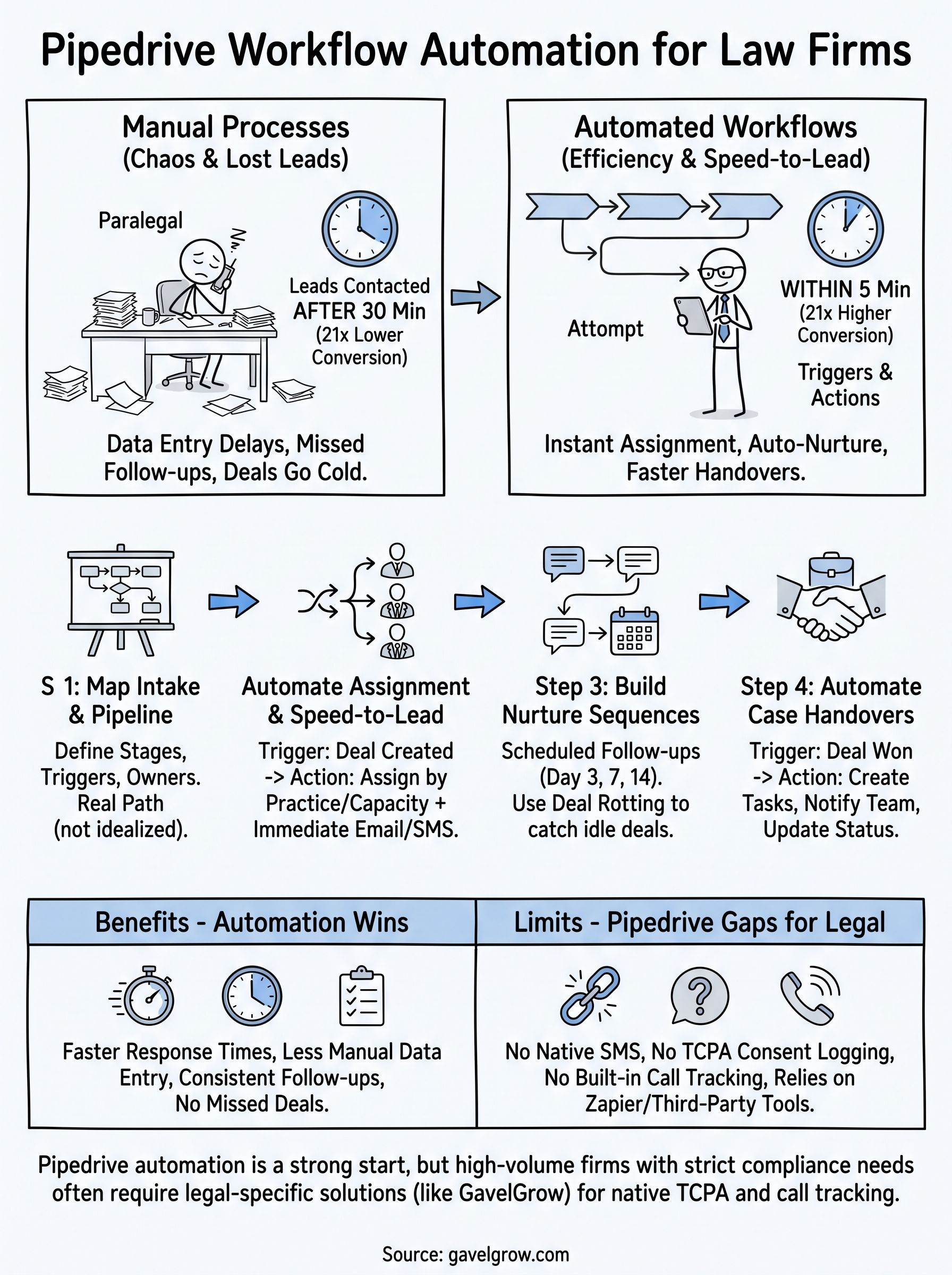
Keeping your pipeline moving without the manual work
Four steps get you most of the way there: map your stages, automate assignment, build nurture sequences, and trigger handovers automatically. Get those right inside Pipedrive and you'll cut the manual busywork that lets leads go cold between intake and signed retainer. Pipedrive workflow automation handles the pipeline logic well, but it stops at email and tasks. It has no SMS, no TCPA consent logging, and no call tracking built in.
Growing firms eventually hit that ceiling, usually right when lead volume climbs across multiple practice areas and the Zapier-plus-texting-app patchwork starts failing. Speed-to-lead and consent tracking aren't optional extras once you're running paid campaigns at scale.
If you're ready to see what a legal-built system handles natively instead of bolted on, book a free strategy call and we'll walk through what fits your firm's intake volume and practice areas.
Frequently Asked Questions
Does Pipedrive have built-in workflow automation?
Yes. Pipedrive includes an Automations tab where you set a trigger (like a deal being created or changing stage), conditions, and actions such as assigning an owner, creating a task, or sending an email, all without a developer. It handles pipeline logic well. What it does not include natively is SMS, TCPA consent logging, or call tracking, which is where law firms usually add other tools or move to a legal-specific platform.
Can Pipedrive send automated SMS texts to leads?
Not on its own. Pipedrive’s native automations send email and create tasks, but there is no built-in SMS trigger, so firms typically bolt on Zapier plus a separate texting app. That patchwork adds latency and leaves opt-out (STOP/HELP) handling to you, which is a compliance risk under TCPA and CTIA guidelines. Since legal prospects often respond to texts faster than email, that gap matters most right after an accident or arrest.
Is Pipedrive TCPA compliant for law firm intake?
Pipedrive itself has no concept of TCPA consent or an audit trail for SMS opt-outs, so compliance depends entirely on the process and tools you build around it. If you automate outreach, you are responsible for capturing consent before the first message and honoring opt-outs. Firms running paid campaigns at scale often outgrow that manual approach and move to a platform that logs consent as part of the same event that fires the message.
When should a law firm move from Pipedrive to a legal-specific platform?
Pipedrive is a solid starting point, especially for solo and small firms. Most firms outgrow it when lead volume climbs across multiple practice areas and the Zapier-plus-texting-app patchwork starts failing, or when TCPA consent, SMS opt-outs, and call-tracking attribution stop being optional, usually once they are running paid campaigns at scale. The tell is when you are paying for and maintaining several bolt-on tools just to do what a legal-built system does natively.
What is deal rotting in Pipedrive, and how does it help law firms?
Deal rotting flags a deal as "rotten" once it sits in a stage longer than a limit you set, and you can trigger an automation off that rotten status. For law firms it catches leads that go quiet mid-sequence, the ones a fixed follow-up schedule would miss, so an intake coordinator gets alerted before a prospect signs with a competitor. It reacts to actual inactivity rather than a preset delay.
Do I need Zapier to automate Pipedrive for a law firm?
For core pipeline automation, no, Pipedrive’s built-in Automations tab handles triggers, conditions, and actions without Zapier. You typically only reach for Zapier, plus a texting app, when you need something Pipedrive lacks natively, like SMS or consent logging. That is exactly the point where the extra tools, monthly bills, and compliance blind spots start to add up, and where a legal-specific platform can replace the patchwork.
Pipedrive, Zapier, Clio Grow, CallRail, and all other product names and trademarks are the property of their respective owners, referenced here for identification and comparison only and not affiliated with or endorsing GavelGrow. Feature comparisons reflect each product’s generally available functionality as of August 2026 and can change; verify current capabilities directly with each vendor.
Frequently Asked Questions
Does Pipedrive have built-in workflow automation?
Yes. Pipedrive includes an Automations tab where you set a trigger (like a deal being created or changing stage), conditions, and actions such as assigning an owner, creating a task, or sending an email, all without a developer. It handles pipeline logic well. What it does not include natively is SMS, TCPA consent logging, or call tracking, which is where law firms usually add other tools or move to a legal-specific platform.
Can Pipedrive send automated SMS texts to leads?
Not on its own. Pipedrive’s native automations send email and create tasks, but there is no built-in SMS trigger, so firms typically bolt on Zapier plus a separate texting app. That patchwork adds latency and leaves opt-out (STOP/HELP) handling to you, which is a compliance risk under TCPA and CTIA guidelines. Since legal prospects often respond to texts faster than email, that gap matters most right after an accident or arrest.
Is Pipedrive TCPA compliant for law firm intake?
Pipedrive itself has no concept of TCPA consent or an audit trail for SMS opt-outs, so compliance depends entirely on the process and tools you build around it. If you automate outreach, you are responsible for capturing consent before the first message and honoring opt-outs. Firms running paid campaigns at scale often outgrow that manual approach and move to a platform that logs consent as part of the same event that fires the message.
When should a law firm move from Pipedrive to a legal-specific platform?
Pipedrive is a solid starting point, especially for solo and small firms. Most firms outgrow it when lead volume climbs across multiple practice areas and the Zapier-plus-texting-app patchwork starts failing, or when TCPA consent, SMS opt-outs, and call-tracking attribution stop being optional, usually once they are running paid campaigns at scale. The tell is when you are paying for and maintaining several bolt-on tools just to do what a legal-built system does natively.
What is deal rotting in Pipedrive, and how does it help law firms?
Deal rotting flags a deal as "rotten" once it sits in a stage longer than a limit you set, and you can trigger an automation off that rotten status. For law firms it catches leads that go quiet mid-sequence, the ones a fixed follow-up schedule would miss, so an intake coordinator gets alerted before a prospect signs with a competitor. It reacts to actual inactivity rather than a preset delay.
Do I need Zapier to automate Pipedrive for a law firm?
For core pipeline automation, no, Pipedrive’s built-in Automations tab handles triggers, conditions, and actions without Zapier. You typically only reach for Zapier, plus a texting app, when you need something Pipedrive lacks natively, like SMS or consent logging. That is exactly the point where the extra tools, monthly bills, and compliance blind spots start to add up, and where a legal-specific platform can replace the patchwork. Pipedrive, Zapier, Clio Grow, CallRail, and all other product names and trademarks are the property of their respective owners, referenced here for identification and comparison only and not affiliated with or endorsing GavelGrow. Feature comparisons reflect each product’s generally available functionality as of August 2026 and can change; verify current capabilities directly with each vendor.