Instapage Landing Page Builder: Features and Pricing
Categories: Legal Marketing Strategies
 Abram Ninoyan
Founder & Senior Performance Marketer
Credentials: Google Partner, Google Ads Search Certified, Google Ads Display Certified, Google Ads Measurement Certified, Google Analytics (IQ) Certified, HubSpot Inbound Certified, HubSpot Social Media Marketing Certified, Conversion Optimization Certified
Expertise: Google Ads, Meta Ads, Conversion Rate Optimization, GA4 & Google Tag Manager, Lead Generation, Marketing Funnel Optimization, PPC Management
LinkedIn Profile
Instapage landing page builder is a dedicated platform for creating, testing, and optimizing post-click landing pages, and it's one of the more established options on the market with pricing that star...
Key Takeaways
- Instapage Landing Page Builder: Features and Pricing
- What is Instapage and how does it work?
- Which Instapage features matter most for marketers?
- How much does Instapage cost in 2026?
Instapage Landing Page Builder: Features and Pricing
Instapage landing page builder is a dedicated platform for creating, testing, and optimizing post-click landing pages, and it's one of the more established options on the market with pricing that starts at $199/month. Whether it's the right fit depends on what you're building landing pages for, how much testing you need, and whether your tech stack already covers conversion tracking and lead capture without bolting on another tool.
For law firms spending $2K–$100K+ per month on Google Ads or paid social, the landing page is where the math either works or falls apart. A generic contact form with a 1–2% mobile conversion rate burns ad budget fast. Instapage promises to fix that with drag-and-drop design, A/B testing, and dynamic text replacement, features that sound compelling on paper. But legal has specific requirements most landing page builders ignore: TCPA consent logging, state-bar disclosures, and attribution that tracks a lead from first click through signed retainer, not just form submission.
This article breaks down Instapage's features, current pricing tiers, and real pros and cons so you can decide whether it belongs in your marketing stack. We'll also cover where it overlaps (and where it gaps) compared to legal-specific tools like GavelGrow's built-in intake forms, which ship with compliance defaults and full-funnel attribution out of the box. If you're evaluating landing page options for your firm, this is the honest comparison you need before committing to a monthly subscription.
What is Instapage and how does it work?
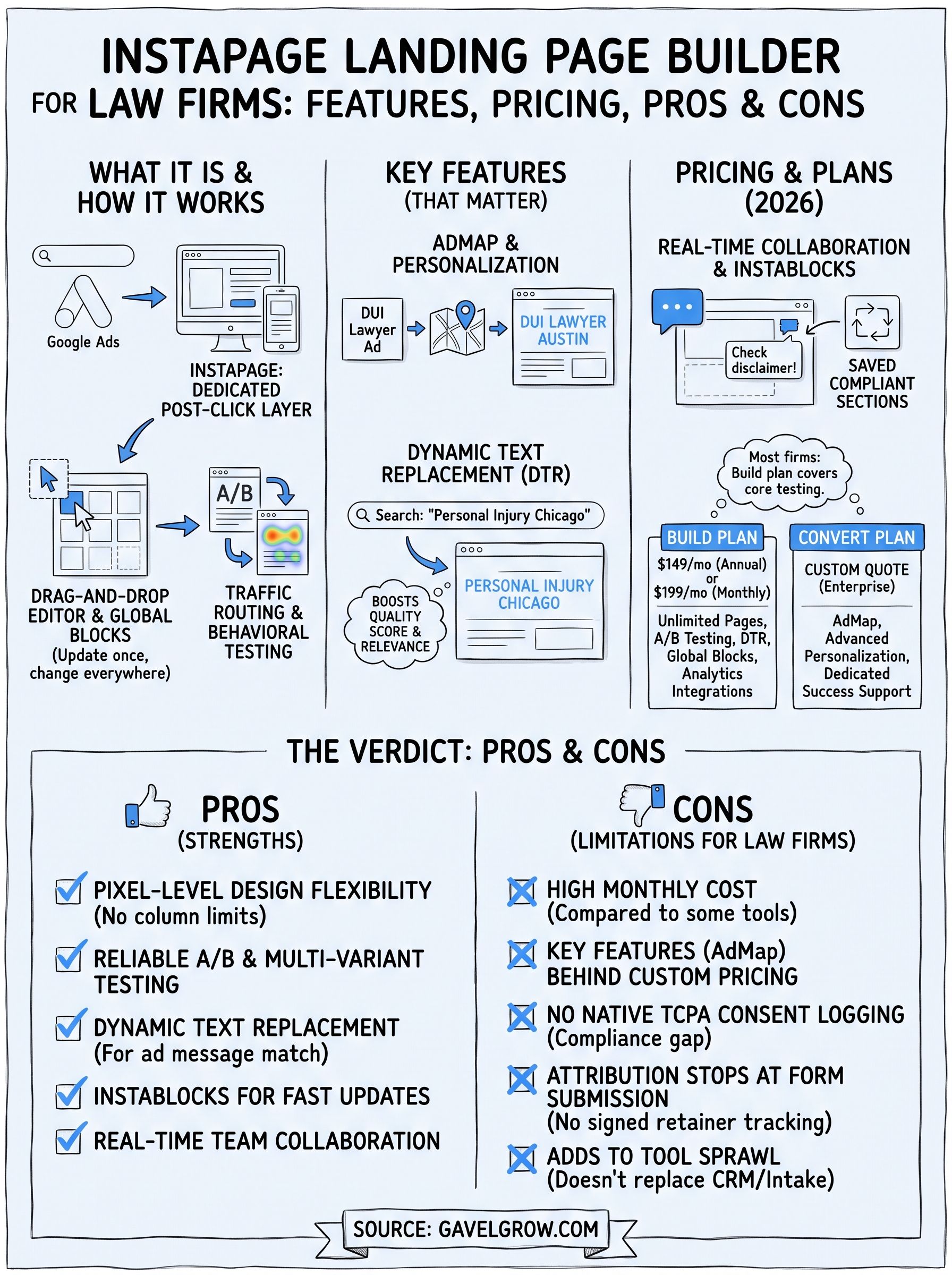
Instapage is a cloud-based landing page platform founded in 2012 and currently used by more than 15,000 brands worldwide. It sits between your ad campaigns and your CRM, serving as the dedicated post-click layer where visitors land after clicking a paid ad. Unlike general website builders such as WordPress or Squarespace, Instapage is built specifically for conversion: every feature, from A/B testing to heatmaps, is aimed at turning clicks into leads or customers rather than building a full website presence.
How Instapage builds and publishes pages
The platform gives you a drag-and-drop editor that works on a pixel-level grid, meaning you can place elements anywhere on the canvas without being constrained by column-based layouts. You start from one of over 200 pre-built templates, each organized by campaign type (webinar, product launch, lead gen), or you build from a blank canvas. Once you finish, Instapage publishes pages to its own subdomain, a custom domain you control, or via a WordPress plugin if your site runs on WordPress.
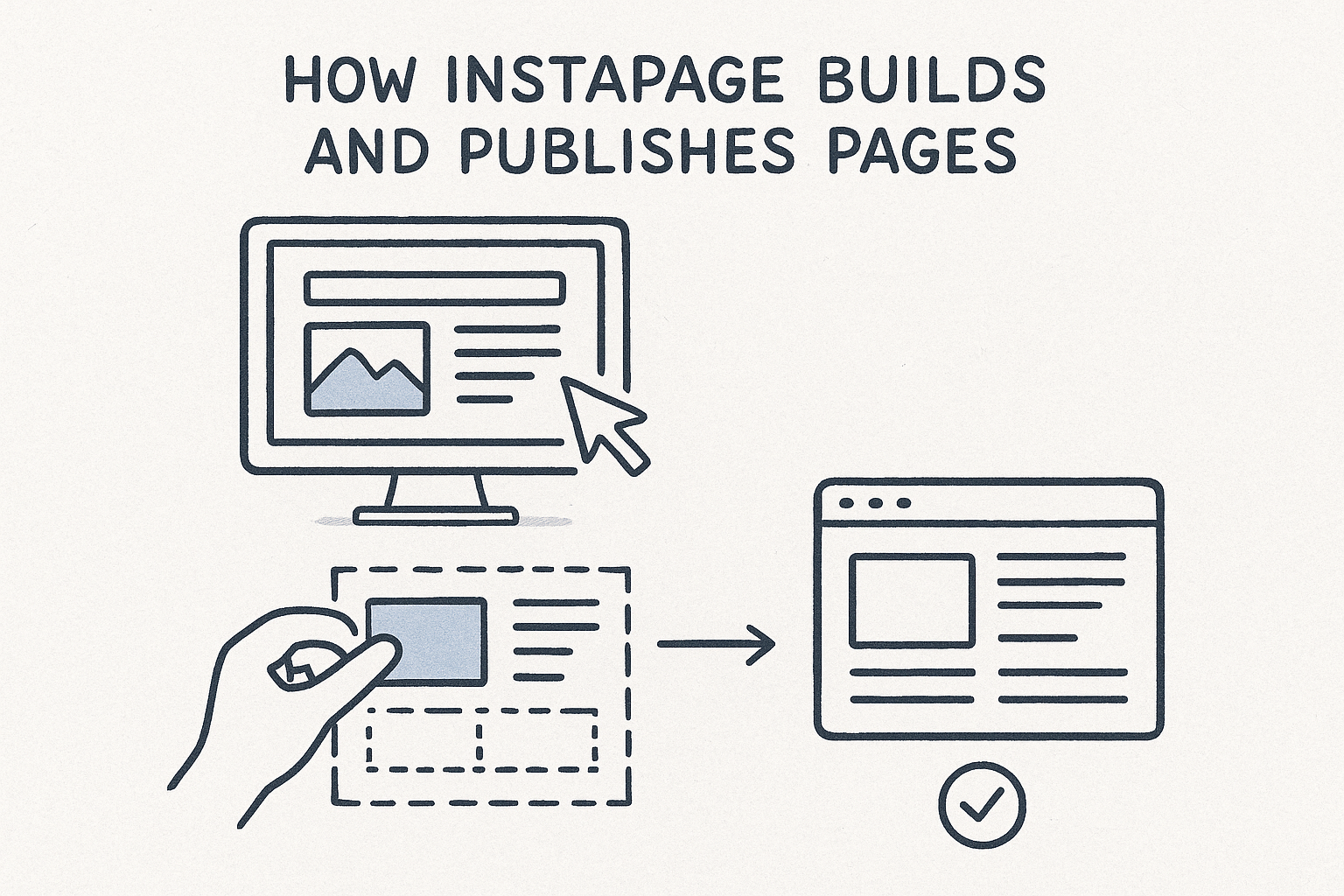
Every page you build in the Instapage landing page builder runs through the platform's Global Blocks system, which lets you update a shared element (say, a header or disclaimer) across dozens of pages simultaneously. For firms managing multiple practice-area campaigns, that saves significant time when contact information or brand guidelines change without requiring you to edit each page individually.
The distinction between a landing page platform and a full website builder matters: Instapage is not designed to replace your website. It is designed to replace the weak handoff between your ad click and your intake form.
How Instapage handles traffic and testing
Once your page is live, Instapage routes incoming traffic through its experimentation engine. You can split visitors between two or more page variants using A/B testing, or run multi-variant testing on higher-tier plans to test combinations of headlines, images, and calls to action simultaneously. The platform records heatmaps and click data so you can see where visitors scroll and where they drop off, helping you make decisions based on actual behavior rather than assumptions.
Instapage also supports dynamic text replacement (DTR), which automatically swaps headline copy to match the keyword a visitor searched before clicking your ad. If someone searched "personal injury attorney Chicago," your landing page headline can read "Personal Injury Attorney Chicago" without you building a separate page for every keyword variation. Google's documentation on Quality Score confirms that ad-to-page message match directly affects your cost-per-click, so DTR carries a measurable financial impact beyond conversion rate lift alone.
Attribution works through UTM parameter passthrough and native integrations with Google Analytics 4, HubSpot, Salesforce, and roughly 100 other tools via Zapier or direct connectors. You set up conversion goals inside Instapage, and the platform fires tracking pixels when a visitor completes an action. What it does not do natively is track that lead from form submission through a signed contract or retainer, which matters considerably if your firm needs to know which campaign produced actual cases rather than just form fills.
Which Instapage features matter most for marketers?
Not every feature on the Instapage landing page builder will move your conversion rate. A handful of tools do the heavy lifting, and knowing which ones matter before you build your first campaign saves you from spending hours in settings that add no measurable value. The features below appear consistently in performance reviews and are the ones most tied to actual lead volume outcomes.
AdMap and Dynamic Personalization
AdMap is Instapage's visual tool for connecting individual ads to individual landing pages inside a single dashboard. You upload your Google Ads campaign structure, and AdMap displays each ad group alongside its paired page, making it easier to spot gaps where ads are routing to generic pages instead of matched post-click experiences. For firms running 10 or more ad groups across multiple practice areas, this visual layer prevents the common mistake of sending every click to the same page regardless of search intent.

Dynamic text replacement pairs tightly with AdMap. When a visitor clicks your ad, DTR reads the URL parameters you've passed from Google Ads and rewrites on-page headlines to reflect the keyword they searched. A visitor searching "DUI lawyer Austin" sees "DUI Lawyer Austin" as your headline rather than a generic phrase, which raises the perceived relevance of the page and typically improves both conversion rate and Quality Score.
Message match between your ad and your landing page is one of the highest-leverage changes you can make to reduce cost-per-click, according to Google's own Quality Score documentation.
Collaboration Tools and Instablocks
Instablocks (Instapage's term for reusable, saved sections) let your team build a compliant disclaimer block, a trust-badge row, or a testimonial section once and reuse it across every page without copying and pasting HTML. Any edit to the source block propagates across every page that references it, which matters when your state-bar disclaimer language changes mid-campaign and you need the update live in minutes, not hours.
The platform's real-time collaboration feature lets multiple team members leave comments directly on the canvas, similar to how designers work in Figma. For firms that route pages through a marketing director and outside counsel before launch, this reduces the email back-and-forth that typically delays campaign start dates by days or even weeks.
How much does Instapage cost in 2026?
Instapage runs on two primary pricing tiers as of 2026: a self-serve Build plan starting at $199 per month billed monthly, or $149 per month billed annually, and a Convert plan with custom pricing aimed at enterprise teams. The gap between the two tiers is significant, and what you receive for each price point matters considerably before you commit your marketing budget to a monthly subscription.
What does each Instapage plan include?
The Build plan gives you access to the drag-and-drop editor, unlimited landing pages, A/B testing, dynamic text replacement, and integrations with Google Analytics and your CRM. Collaboration tools, Instablocks, and heatmaps are included at this tier. What you do not get on the Build plan is AdMap and advanced 1:1 personalization, both of which are reserved for the Convert tier and represent some of the platform's most compelling differentiation from cheaper alternatives.
Convert unlocks real-time visual collaboration at scale, ad-to-page personalization through AdMap, and dedicated customer success support. Instapage does not publish a fixed price for Convert; you request a quote through their sales team. For most mid-size law firms, the Build plan covers the core testing and personalization features they realistically need day to day.
If your firm runs fewer than 20 active ad groups, the Build plan's feature set likely covers your full testing workflow without requiring an enterprise contract.
How does the price stack up against what you actually get?
At $149 to $199 per month, the Instapage landing page builder sits at the premium end of dedicated landing page tools. Comparable platforms with similar A/B testing and template libraries typically cost less, though they also offer fewer enterprise-grade collaboration features. The real question is whether post-click optimization alone justifies the monthly fee, or whether that budget works harder inside a platform that also handles intake automation, call tracking, and full-funnel attribution natively.
For law firms already paying separately for call tracking software, intake forms, and a CRM, Instapage adds to existing tool sprawl rather than replacing it. Consolidating those functions into a single platform, like GavelGrow's built-in intake and attribution dashboard, can reduce total monthly spend while covering significantly more of the conversion funnel than a standalone landing page tool reaches.
What are the pros and cons of Instapage?
The Instapage landing page builder earns strong marks in some areas and falls noticeably short in others. Understanding both sides before you sign up prevents the common outcome of paying for a tool that only solves part of your conversion problem while creating new gaps elsewhere in your marketing stack.
Where Instapage performs well
Instapage's strongest advantages cluster around design flexibility and testing depth. The pixel-level editor removes the layout constraints that frustrate marketers using template-locked builders, and the A/B testing engine gives you statistically valid results faster than most platforms at a comparable price point. For teams running multiple campaigns simultaneously, Instablocks and Global Blocks reduce page production time significantly by letting you update shared elements across every page in one action rather than hunting through individual pages.
Dynamic text replacement is one of the highest-leverage features in the platform, and Instapage executes it reliably, directly affecting your Google Ads Quality Score and cost-per-click.
The collaboration tools also stand out for agencies or firms with multiple stakeholders reviewing pages before launch. Real-time canvas commenting shortens review cycles in a way that email threads and shared Google Docs cannot match.
Pros at a glance:
- Pixel-level editor with 200+ templates
- Reliable A/B and multi-variant testing
- Dynamic text replacement for keyword-level personalization
- Instablocks for fast, consistent page updates
- Real-time collaboration for multi-stakeholder review
Where Instapage falls short
The pricing structure is the most common complaint among smaller teams. At $149 to $199 per month for the Build plan, the platform costs more than several competitors that cover the same core testing and personalization features. The most compelling capabilities, including AdMap and advanced personalization, sit behind the Convert tier's custom pricing, which moves the real cost well above what the published rate suggests.
For law firms specifically, Instapage has a more significant limitation: it does not track leads past the form submission. TCPA consent logging, call recording attribution, and retainer-level conversion tracking require separate tools, which means Instapage adds to your monthly tool stack rather than consolidating it. If your firm already pays for call tracking software and a CRM separately, layering a dedicated landing page platform on top pushes your total marketing technology spend higher without necessarily producing more signed cases.
Cons at a glance:
- High monthly price relative to comparable tools
- Key features locked behind enterprise-tier pricing
- No native TCPA consent audit logging
- Attribution stops at form submission, not signed retainer
- Adds to tool sprawl rather than replacing existing software
Frequently Asked Questions
The questions below reflect what managing partners and marketing directors ask most when evaluating the Instapage landing page builder for their paid search and intake workflows. Each answer reflects Instapage's current platform as of mid-2026.
How much does Instapage cost per month in 2026?
Instapage's Build plan starts at $149 per month billed annually, or $199 per month on a month-to-month basis. The Convert plan requires a custom quote from the Instapage sales team and carries higher pricing for enterprise features like AdMap and advanced ad-to-page personalization. Both tiers include unlimited landing pages and A/B testing, so the Build plan covers the core testing workflow your firm needs without committing to an enterprise contract.
Does Instapage support dynamic text replacement?
Dynamic text replacement (DTR) automatically updates your landing page headline to match the keyword a visitor searched before clicking your ad. Instapage reads UTM parameters passed through from your Google Ads URLs and rewrites on-page copy in real time. For example, a visitor who searched "immigration lawyer Houston" sees that exact phrase in your headline. This typically raises both your conversion rate and your Google Ads Quality Score, which lowers your cost-per-click directly.
Message match between your ad and your landing page headline is one of the highest-leverage optimizations you can make for paid search performance, according to Google's Quality Score documentation.
Can Instapage track leads from click to signed retainer?
No. The Instapage platform stops tracking at form submission. It fires conversion pixels and passes lead data to tools like Google Analytics 4 or your CRM, but it does not follow that lead through intake, consultation, or signed retainer. Law firms that need campaign-level case attribution, rather than just contact volume, require a separate platform or CRM capable of tracking leads across the full client acquisition cycle.
Does Instapage handle TCPA compliance for law firm forms?
Instapage does not include a TCPA consent audit log or append-only consent record natively. You can add compliant checkbox language to your forms, but the platform does not log consent timestamps or carrier-validated phone numbers in a way that satisfies TCPA documentation requirements during a dispute. If your firm collects SMS consent through paid traffic, you'll need a supplementary compliance layer beyond what Instapage provides out of the box.
How many templates does Instapage offer?
Instapage includes over 200 pre-built templates organized by campaign type, including lead generation and event registration. Every template is mobile-responsive by default and fully editable in the drag-and-drop editor, so your firm can adjust layouts without a developer. You can also build from a blank canvas if none of the existing templates match your practice area's visual requirements without significant modification.
Make the right call for your firm
The Instapage landing page builder solves a real problem: weak message match between your ads and your post-click experience. If your firm runs high-volume paid search campaigns and your current pages aren't converting at 3% or better on mobile, Instapage's A/B testing and dynamic text replacement give you a structured path to fix that. For teams with a dedicated marketing director and an existing CRM, it fits cleanly into an established stack.
For most law firms, though, the bigger problem isn't the landing page. It's what happens after the form submits: slow follow-up, no TCPA audit trail, and attribution that stops before a retainer is signed. If that's your gap, a tool built specifically for legal intake closes it faster than any standalone page builder will. See how GavelGrow's platform handles intake, call tracking, and full-funnel attribution, or book a free strategy call to talk through your current setup.
Frequently Asked Questions
How much does Instapage cost per month in 2026?
Instapage's Build plan starts at $149 per month billed annually, or $199 per month on a month-to-month basis. The Convert plan requires a custom quote from the Instapage sales team and carries higher pricing for enterprise features like AdMap and advanced ad-to-page personalization. Both tiers include unlimited landing pages and A/B testing, so the Build plan covers the core testing workflow your firm needs without committing to an enterprise contract.
Does Instapage support dynamic text replacement?
Dynamic text replacement (DTR) automatically updates your landing page headline to match the keyword a visitor searched before clicking your ad. Instapage reads UTM parameters passed through from your Google Ads URLs and rewrites on-page copy in real time. For example, a visitor who searched "immigration lawyer Houston" sees that exact phrase in your headline. This typically raises both your conversion rate and your Google Ads Quality Score, which lowers your cost-per-click directly. Message match between your ad and your landing page headline is one of the highest-leverage optimizations you can make for paid search performance, according to Google's Quality Score documentation.
Can Instapage track leads from click to signed retainer?
No. The Instapage platform stops tracking at form submission . It fires conversion pixels and passes lead data to tools like Google Analytics 4 or your CRM, but it does not follow that lead through intake, consultation, or signed retainer . Law firms that need campaign-level case attribution, rather than just contact volume, require a separate platform or CRM capable of tracking leads across the full client acquisition cycle.
Does Instapage handle TCPA compliance for law firm forms?
Instapage does not include a TCPA consent audit log or append-only consent record natively. You can add compliant checkbox language to your forms, but the platform does not log consent timestamps or carrier-validated phone numbers in a way that satisfies TCPA documentation requirements during a dispute. If your firm collects SMS consent through paid traffic, you'll need a supplementary compliance layer beyond what Instapage provides out of the box.
How many templates does Instapage offer?
Instapage includes over 200 pre-built templates organized by campaign type, including lead generation and event registration. Every template is mobile-responsive by default and fully editable in the drag-and-drop editor, so your firm can adjust layouts without a developer. You can also build from a blank canvas if none of the existing templates match your practice area's visual requirements without significant modification.