Facebook Marketing for Law Firms: How to Get Signed Cases
Categories: Legal Marketing Strategies
 Abram Ninoyan
Founder & Senior Performance Marketer
Credentials: Google Partner, Google Ads Search Certified, Google Ads Display Certified, Google Ads Measurement Certified, Google Analytics (IQ) Certified, HubSpot Inbound Certified, HubSpot Social Media Marketing Certified, Conversion Optimization Certified
Expertise: Google Ads, Meta Ads, Conversion Rate Optimization, GA4 & Google Tag Manager, Lead Generation, Marketing Funnel Optimization, PPC Management
LinkedIn Profile
Facebook marketing for law firms works when you build a compliant Page, post useful answers to client questions, run lead ads to a small local audience, and track every lead through to a signed retain...
Key Takeaways
- Facebook Marketing for Law Firms: How to Get Signed Cases
- Can lawyers advertise on Facebook within bar rules?
- Step 1. Set up your Page and tracking
- Step 2. Post content that earns trust
Facebook Marketing for Law Firms: How to Get Signed Cases
Facebook marketing for law firms works when you build a compliant Page, post useful answers to client questions, run lead ads to a small local audience, and track every lead through to a signed retainer. Follow your state bar's advertising rules at each step, and judge results by cost per signed case, not clicks.
Most firms try Facebook once. They boost a post about an award or a "20 years of experience" graphic, see no calls, and decide the platform does not work for lawyers. The post failed, not the platform. People on Facebook are not shopping for attorneys. They are dealing with a car crash, a custody fight or a deportation notice. Add bar-rule worries and the fact that few firms trace a lead to a retainer, and spend disappears with nothing to show for it.
This guide walks through the rules to know first, then four steps: set up your Page and tracking, post content that earns trust, launch lead ads on a realistic budget, and measure what the leads become. GavelGrow has marketed only for law firms since 2015, and tying ad spend to signed retainers is the core of what we build.
Can lawyers advertise on Facebook within bar rules?
Yes. Lawyers can advertise on Facebook, but every Page post, ad and public reply counts as attorney advertising under your state's rules. Facebook is not a loophole, and it is not off limits.
What the rules usually require
The ABA Model Rules 7.1 through 7.3 are the starting point. They bar false or misleading statements about your services, expect a responsible lawyer or firm to be identified, and limit solicitation. States adopt their own versions, so check the rules in every state where you are licensed before an ad goes live. These points come up often, but none replaces reading your own bar's rules:
- Do not promise or imply outcomes. "We will win your case" is a problem in any state.
- Avoid "best" and "top" claims about your firm.
- Name the firm or responsible attorney on your Page and in ads.
- Add the disclaimers your state expects. Some require labels such as "Attorney Advertising," and many expect a note that past results do not guarantee similar outcomes.
- Handle testimonials and client stories carefully. Client confidentiality and state limits on testimonials apply even when the story is public.
- Do not give legal advice in comments or Messenger. Move the conversation to your intake form or phone line.
Treat every ad and post like a billboard that your state bar will read.
What to line up before step 1
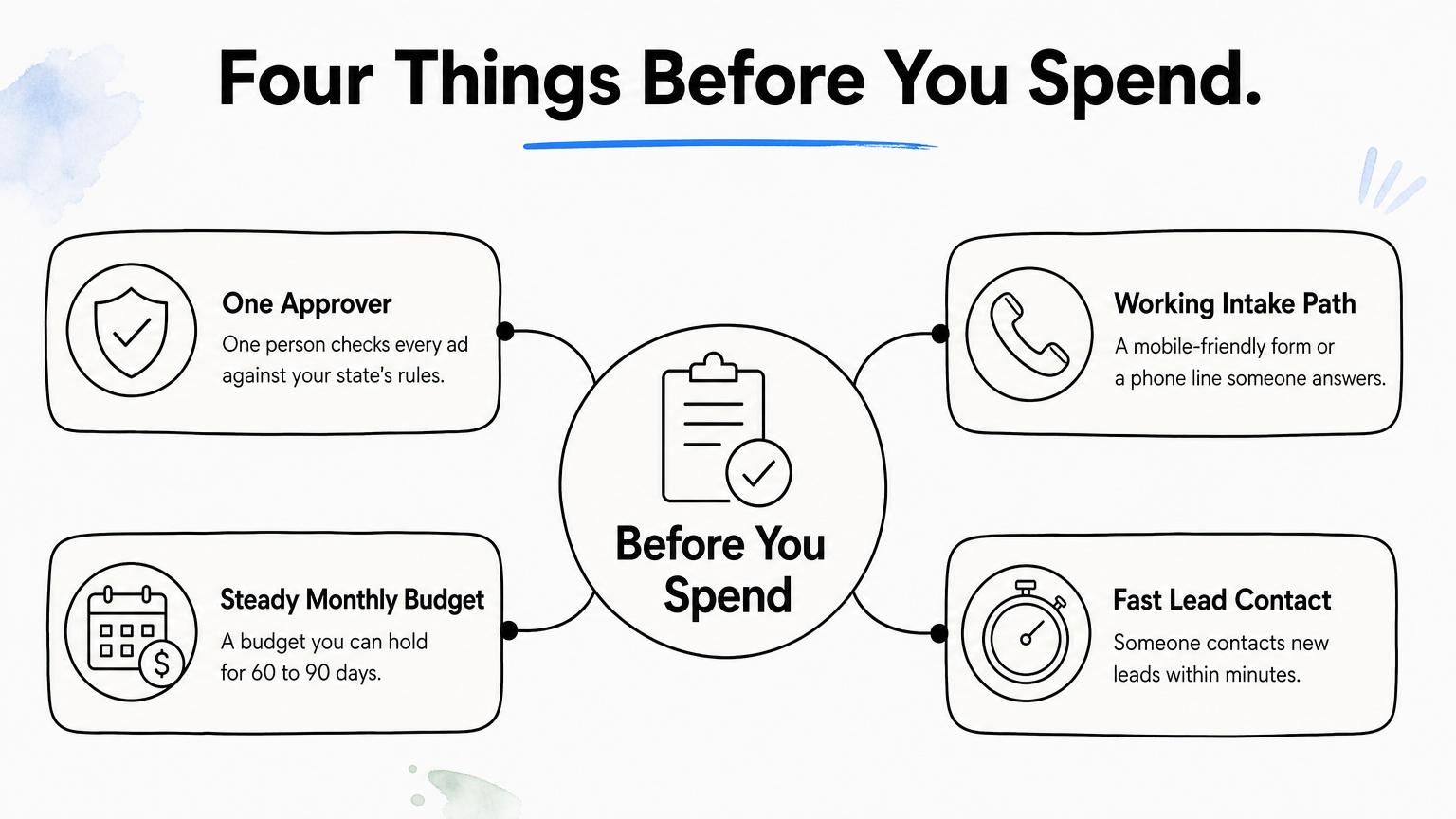
Four things should exist before you spend a dollar. First, name one person who approves every ad against your state's rules. Second, have an intake path that works, meaning a mobile-friendly form or a phone line someone answers. Third, set a monthly budget you can hold for 60 to 90 days. Fourth, assign someone to contact new leads within minutes. A Facebook lead that waits a day is usually a wasted lead.
Step 1. Set up your Page and tracking
Your Page is the first thing a prospect checks after seeing an ad, so it must look like a firm that is open and answering. Tracking comes next, because spend without tracking cannot be judged later.
Build a Page that holds up to scrutiny
Use your exact firm name and a real logo, not a gavel stock photo. Fill in every field in About, hours and contact details, and describe your practice areas the way a client would, such as "car accident injuries" rather than "tort litigation." Pin one post that explains how a first call works. Put your required disclaimer in the About section, and keep the Page active with posts so it does not look abandoned.
Install tracking before you spend
Create your ad account in Meta Business Suite and Ads Manager, then install the Meta Pixel on your website. Set a conversion event on your form's thank-you page. Give each campaign its own call tracking number, because many people who see a Facebook ad pick up the phone instead of filling in a form. Keep case details out of anything you pass to the pixel. Event names should say "form submitted," never a client's situation.
GavelGrow's hosted intake form fires conversion events to your own Meta Pixel, and its built-in tracking numbers credit each call to a campaign. You can build the same setup with separate tools.
Install tracking first, because a lead you cannot trace is a lead you cannot judge.
Step 2. Post content that earns trust
Educational posts that answer a client's question outperform posts about your firm. Aim for roughly 80% useful content and 20% promotion. That 80/20 split is an editorial rule of thumb, not a Facebook rule, but it keeps your feed from reading like a sales pitch.
Post two or three times a week
You do not need daily posts. Two or three posts a week keeps the Page current without eating a week of your staff's time. Mix short videos of an attorney answering one question, a text post that explains a common legal term, and a link to a blog article on your site. Answer every comment publicly with general information, then invite the person to call or use your form.

Ideas by practice area
Answer the question your client is already asking, and the credentials will follow.
Step 3. Launch lead ads on a realistic budget
Run a small test campaign with the Leads objective, a tight local audience and two or three ad variations. Expect to learn something in the first two weeks, not to scale.
Pick the objective and audience
Choose the Leads objective unless you have no website or form at all. Target a radius around your office or the counties where you are licensed, and add age or occupation only when the case type points to it, such as construction trades for workplace injuries. Retarget people who visited your site. Be careful with customer lists. Uploading client emails to match them on Facebook can reveal who your clients are, so skip it unless your bar's guidance and client consent clearly allow it.
Write the ad and set the budget
Open with the client's problem, give one call to action, and keep text on images short. An old Facebook guideline capped image text at 20%, and Meta no longer enforces it strictly, but less text still reads better on a phone. Here is a template to adapt:
Headline: Injured at work? Learn what happens next
Primary text: A workplace injury raises questions about medical bills,
lost pay and deadlines. Our short guide explains the usual steps.
Call [Firm Name] for a consultation.
[Firm Name] | Attorney Advertising | Past results do not guarantee a similar outcome.
Button: Learn More
Is $10 a day enough? It buys local awareness, but it rarely produces enough leads to learn from. A workable test is $20 to $50 a day. At $30 a day for 30 days, you spend $900. Prefer sending clicks to your own intake form over Meta's in-app form, because in-app leads tend to be lower intent and carry weaker consent records. If you want a second pair of eyes on copy, GavelGrow's managed service drafts ads against ABA Model Rules 7.1 to 7.3 and state analogues, and holds each asset for your review.
Test small, learn in two weeks, and scale only what produces signed cases.
Step 4. Track leads through to signed cases
Judge Facebook by cost per signed case, not cost per lead. Cheap leads that never sign cost more than expensive leads that do.
Call every lead within minutes
Speed decides how many of your leads are usable. The Lead Response Management Study found that leads contacted within five minutes are far more likely to be qualified than those first reached at thirty minutes. That measures qualification, not signed cases, but the direction is clear. Send an instant email reply, call right away, and text only people who gave written consent on your form.

Do the cost-per-signed-case math
Divide total ad spend by retainers signed in the same date range. This illustrative month shows why cost per lead misleads:
A $30 lead looks cheap until you see it takes $750 to sign a case. Legal matters close slowly, so wait 60 to 90 days before reading a reliable number. Use the free cost-per-acquisition calculator to run your own figures. If you need click-to-retainer attribution that includes calls, the GavelGrow platform puts tracking numbers, intake and case outcomes in one dashboard, and its Track and Optimize plans include a 7-day free trial with no card required.
A lead is a cost until it becomes a signed case, so measure the signature.
Start small, then measure signed cases
Facebook marketing for law firms comes down to four moves. Know your bar's rules, set up a Page and tracking you can trust, post useful answers more than self-promotion, and run a small lead campaign measured by cost per signed case. Skip any one of them and the results turn murky.
Start this week with the rules and the Page. Put a person in charge of speed to lead. Then spend a modest test budget for 60 to 90 days before deciding whether Facebook earns a larger share of your marketing. If you would rather have a legal-only team look at your numbers and plan the first campaign, book a free 45-minute strategy call with GavelGrow.