30 Second Law Firm Intake Form Template: 5 Versions to Copy
Categories: Legal Marketing Strategies
 Abram Ninoyan
Founder & Senior Performance Marketer
Credentials: Google Partner, Google Ads Search Certified, Google Ads Display Certified, Google Ads Measurement Certified, Google Analytics (IQ) Certified, HubSpot Inbound Certified, HubSpot Social Media Marketing Certified, Conversion Optimization Certified
Expertise: Google Ads, Meta Ads, Conversion Rate Optimization, GA4 & Google Tag Manager, Lead Generation, Marketing Funnel Optimization, PPC Management
LinkedIn Profile
A 30 second law firm intake form template has seven to nine short fields: name, phone, email, matter type, a one-line description, other parties for the conflict check, and a consent line. Everything...
Key Takeaways
- 30 Second Law Firm Intake Form Template: 5 Versions to Copy
- 1. What goes on a general 30-second intake form?
- 2. Personal injury intake form template
- 3. How short can a family law intake form be?
30 Second Law Firm Intake Form Template: 5 Versions to Copy
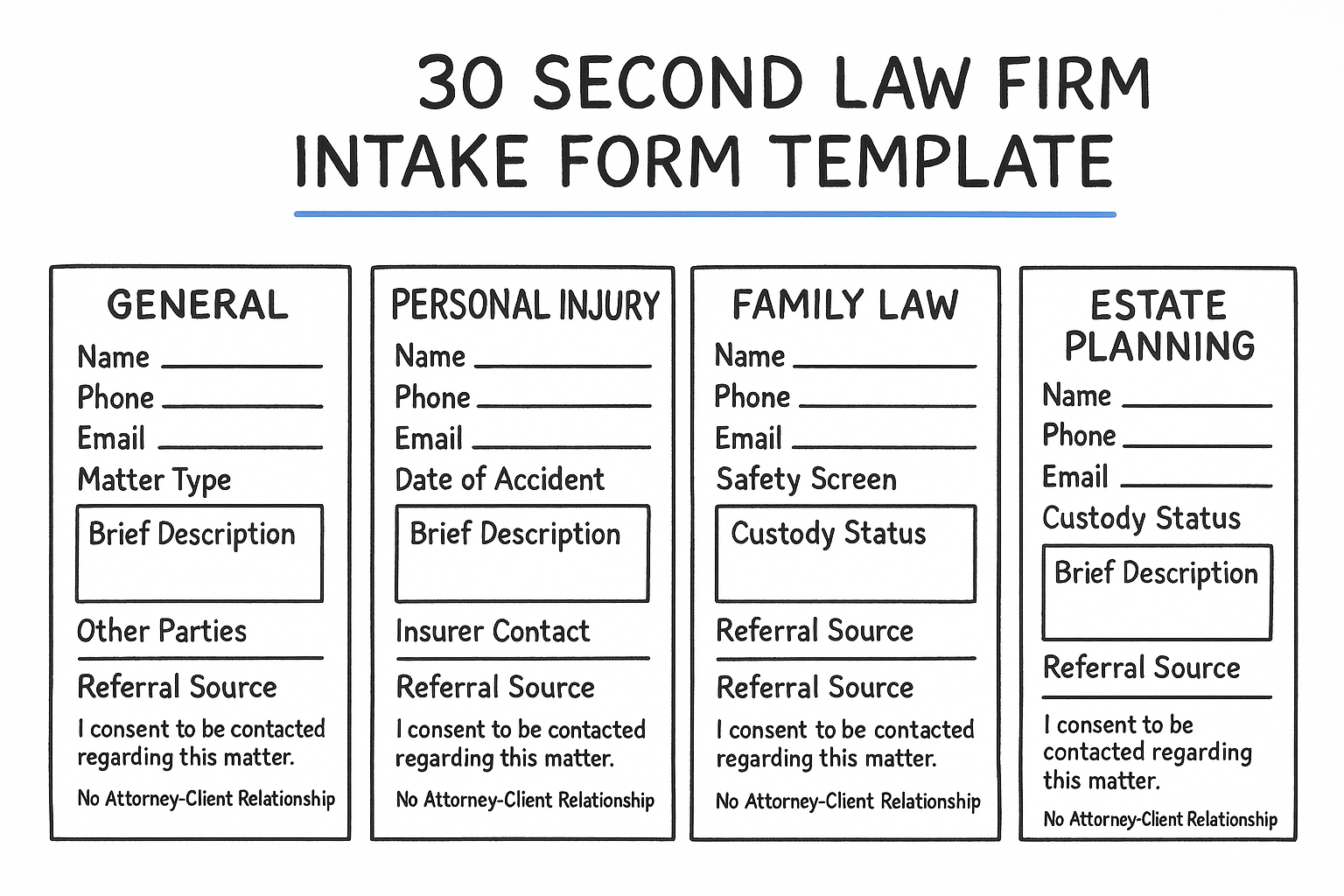
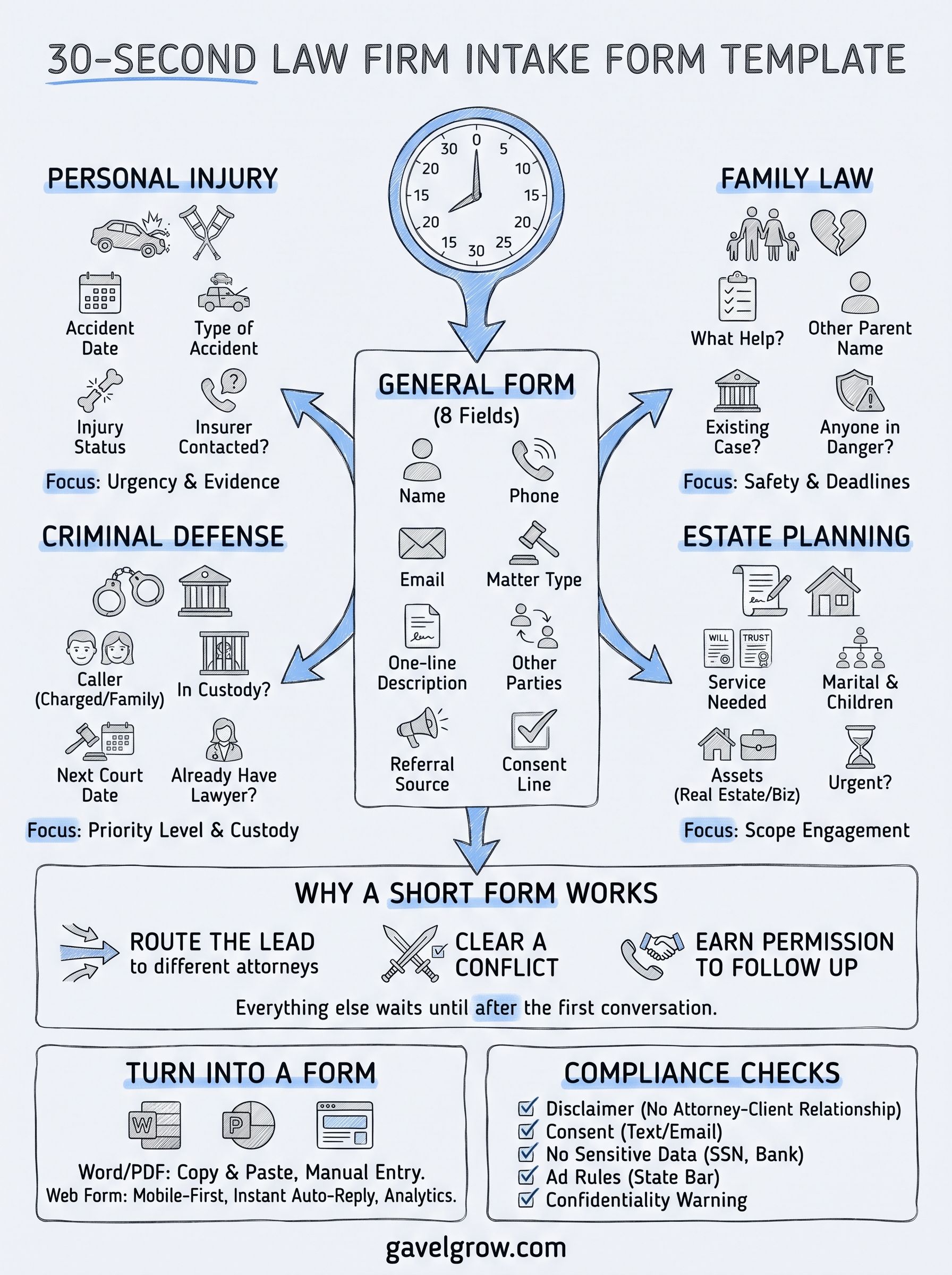
A 30 second law firm intake form template has seven to nine short fields: name, phone, email, matter type, a one-line description, other parties for the conflict check, and a consent line. Everything else waits until after the first conversation. The general version below suits any firm. The personal injury, family law, criminal defense and estate planning versions each swap in a handful of matter fields, so you pick the one that matches the calls you actually get.
The problem with most intake forms is length. A prospective client who is hurt, arrested or going through a divorce will not answer 30 questions on a phone. They will close the page and call the next firm. A short form gets you the minimum you need to call back, check for conflicts and book a consultation. Long questionnaires belong after the client has decided to talk to you.
This article gives you five copy-ready templates, plus a section on turning them into a Word file, a PDF or a web form, and the compliance checks to run before you publish. GavelGrow has worked only with law firms since 2015, and its hosted intake forms are firm-branded and mobile-first.
1. What goes on a general 30-second intake form?
A general form needs eight fields: contact details, matter type, a short description, other parties, referral source and a consent line. That is enough to schedule a consultation and start a conflict check without a phone call. Use it as the base for every practice area.
The template
Replace the matter-type checkboxes with the areas your firm handles. Paste the block into Word, Google Docs or a form builder.
QUICK CONTACT FORM
Full name:
Best phone number:
Email:
Best time to reach you: [ ] Morning [ ] Afternoon [ ] Evening
Type of matter: [ ] Personal injury [ ] Family [ ] Criminal [ ] Estate planning [ ] Other
What happened, in one or two sentences:
Other people or companies involved:
How did you hear about us:
[ ] I agree to be contacted by phone, email or text about my inquiry. Message and data rates may apply. Reply STOP to opt out.
Submitting this form does not create an attorney-client relationship. Please do not send confidential details until we confirm in writing that we represent you.
Why these fields
Each field does one job, and any field without a job should go. Here is what the eight earn you:
- Phone and email: your callback channels. Ask for the best time so the first call connects.
- Matter type: routes the inquiry to the right attorney or intake person.
- One or two sentences: gives enough context to qualify the inquiry. A longer box invites rambling.
- Other people or companies involved: the conflict check starts here. ABA Model Rule 1.18 sets duties to prospective clients, and state rules vary.
- How did you hear about us: the only way to credit calls and walk-ins to a source.
- Consent line and disclaimer: records permission to text and signals that no representation exists yet.
A short form works when every field either routes the lead, clears a conflict or earns permission to follow up.
2. Personal injury intake form template
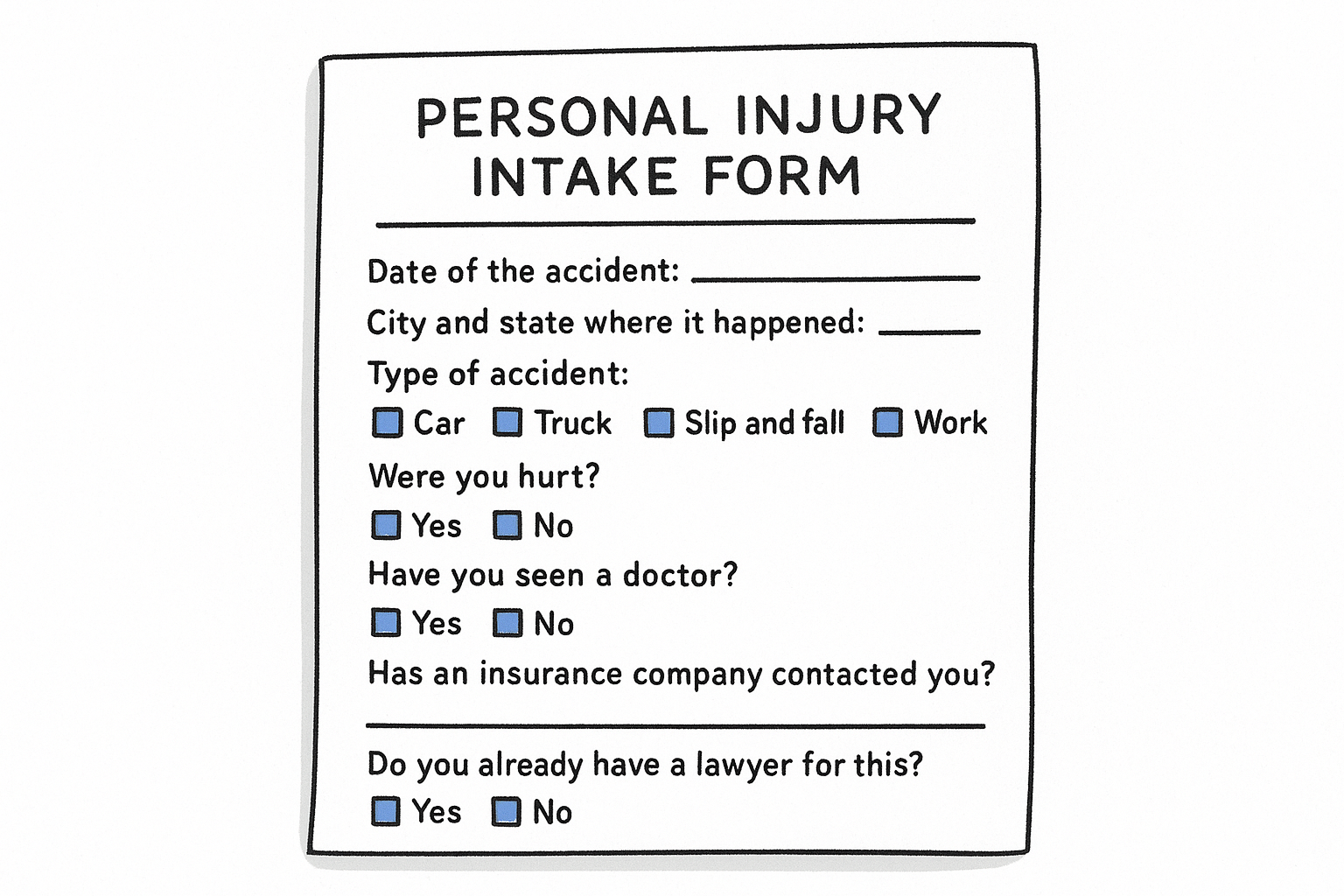
A personal injury form should capture the accident date, the type of accident and the injury status, then stop. Keep the general form's contact fields and consent line, and swap the matter section for the block below. It suits plaintiff firms where urgency and evidence both fade quickly.
The template
Date of the accident:
City and state where it happened:
Type of accident: [ ] Car [ ] Truck [ ] Slip and fall [ ] Work [ ] Other
Were you hurt? [ ] Yes [ ] No Have you seen a doctor? [ ] Yes [ ] No
Has an insurance company contacted you? [ ] Yes [ ] No
Other driver or property owner's name, if known:
Do you already have a lawyer for this? [ ] Yes [ ] No
Why these fields
The accident date matters most. Filing deadlines differ by state and can be short, so a date lets your team spot urgency on the first read. The insurance question tells you whether the client has already spoken to an adjuster, which changes your first call. The "already have a lawyer" question prevents awkward conflicts later.
Hold back medical history, policy numbers, wage records and prior claims until the client signs an engagement agreement. Many injury leads phone instead of filling out a form, so give your intake staff these same seven fields as a call script. Then phone leads and form leads land in your system with identical data.
In injury work, the date and the insurer tell you how fast to move, and everything else can wait.
3. How short can a family law intake form be?
A family law form can run six matter fields and still work, as long as one of them screens for safety. Keep the general contact fields and consent line, then add the block below. It fits divorce, custody and support practices, where callers are often stressed and a long form feels invasive.
The template
What do you need help with? [ ] Divorce [ ] Custody or visitation [ ] Child support [ ] Changing an existing order [ ] Other
Spouse or other parent's full name:
Any children under 18? [ ] Yes [ ] No
Is there already a court case or hearing? [ ] Yes [ ] No Next date:
Is anyone in danger right now? [ ] Yes [ ] No
Safest way to reach you: [ ] Text [ ] Call [ ] Email OK to leave a voicemail? [ ] Yes [ ] No
Why these fields
The other parent's name is your conflict check, and in family law conflicts are common because spouses often consult several firms. The existing case and next date fields flag deadlines that need a same-day call. The contact-safety question protects the client, because a text or voicemail may be seen by someone they live with.
Treat a "yes" on the danger question as a trigger for a person to call immediately, not an automatic email reply. Hold back asset lists, income figures, marriage dates and custody history. Financial disclosure comes after the client has retained you, and asking early makes callers abandon the form.
Ask about safety and deadlines first, because those are the two answers that cannot wait for a consultation.
4. Criminal defense intake form template
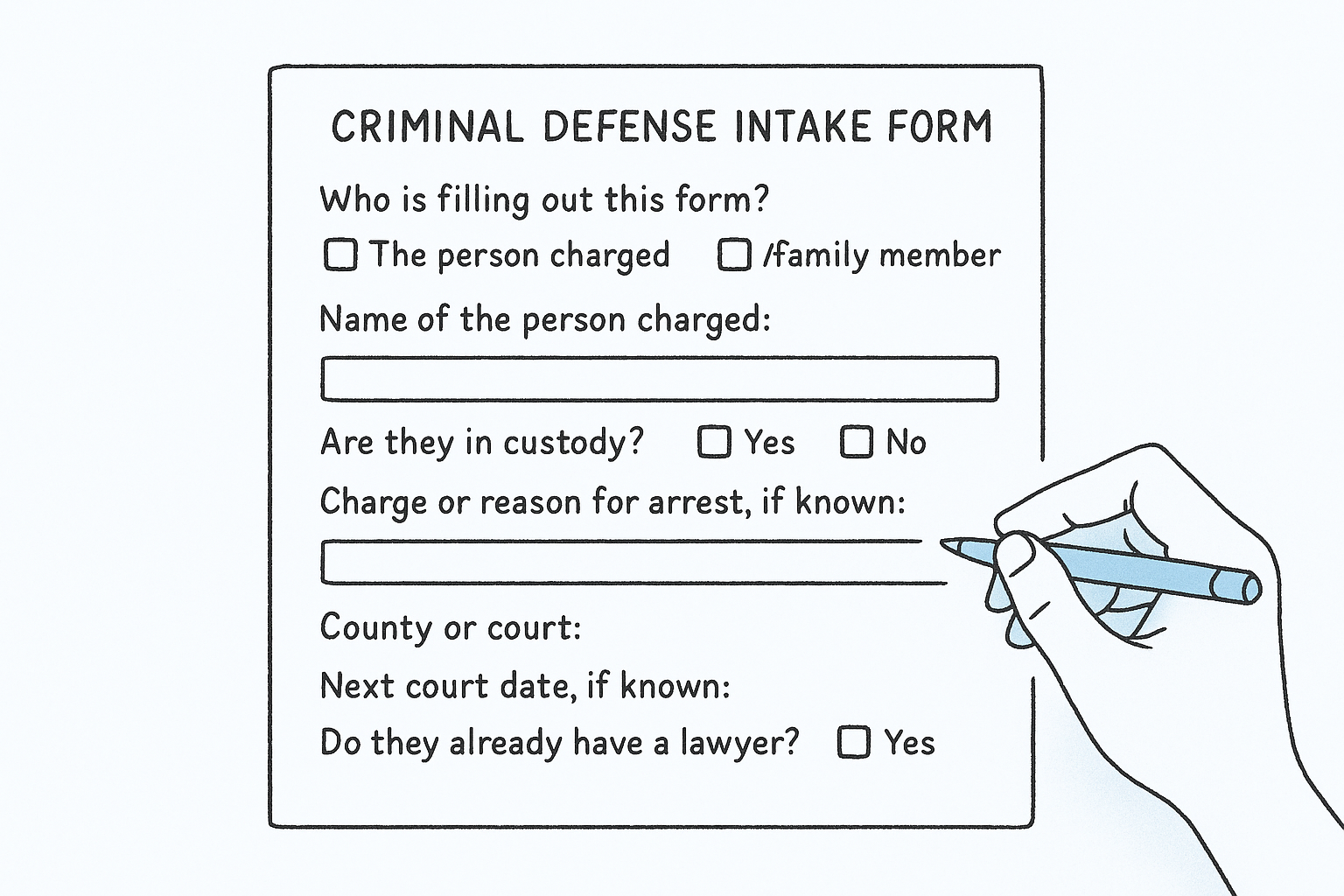
A criminal defense form must work for the family member who fills it out at midnight, not only the person charged. Keep the contact fields and consent line, then add the block below. Its job is to tell your team within seconds whether someone is in custody and when the next court date falls.
The template
Who is filling out this form? [ ] The person charged [ ] A family member or friend
Name of the person charged:
Are they in custody? [ ] Yes [ ] No Where:
Charge or reason for arrest, if known:
County or court:
Next court date, if known:
Do they already have a lawyer? [ ] Yes [ ] No
Why these fields
The first question separates the third-party caller from the client. That matters for confidentiality and for who you may speak to about the case. Custody status and the next court date set your priority. A person in jail needs a call within minutes, while a person with a court date three weeks out can wait for the next business morning.
Do not ask what happened on a web form. Facts belong in a privileged conversation, and an online text box is not one. Leave out prior record details, bail amounts and co-defendants until a lawyer is speaking with the client. If you want to cover after-hours inquiries, route "in custody: yes" submissions to an on-call phone alert.
In criminal defense, a short form's real output is a priority level, not a case file.
5. Estate planning intake form template
An estate planning form should separate planning clients from probate clients and flag anything urgent. Keep the contact fields and consent line, then add the block below. It suits firms that book consultations for wills, trusts and powers of attorney, where inquiries are less urgent but more detail-heavy.
The template
What do you need? [ ] Will [ ] Trust [ ] Power of attorney [ ] Healthcare directive [ ] Probate or estate administration [ ] Not sure
State where you live:
Marital status: [ ] Single [ ] Married [ ] Divorced [ ] Widowed
Do you have children or grandchildren? [ ] Yes [ ] No
Do you own real estate or a business? [ ] Yes [ ] No
Do you have an existing will or trust? [ ] Yes [ ] No
Is this urgent (hospital stay, recent death, upcoming surgery or travel)? [ ] Yes [ ] No
Why these fields
The service checklist tells you whether you are quoting a simple will, a funded trust or a probate matter, which are very different engagements. Real estate and business ownership flag complexity, so you can book the right amount of consultation time. The urgency question catches the caller who needs a power of attorney signed before surgery.
For probate inquiries, add the name of the deceased and the date of death. Hold back account balances, beneficiary details, asset values and health information. Clients in this practice area often bring a spouse or adult child to the first meeting, so ask about that on the callback rather than on the form.
Estate planning intake is about scoping the engagement correctly, so ask what you need to quote and nothing more.
How do you turn the template into a Word, PDF or web form?
Paste the template into the format that fits how your leads arrive. These templates are plain text, so you copy them rather than download them, and you can restyle them with your firm's name and logo. Most firms end up using a web form for new inquiries and a Word or PDF version for walk-ins and email.
Word, Google Docs and PDF
In Word, paste the block, then use the Developer tab to insert check box content controls in place of the [ ] marks. In Google Docs, replace them with the checkbox symbol or a checklist. Save as PDF to share a read-only copy. A PDF exported from Word is not fillable by default, so use a tool such as Adobe Acrobat's Prepare a Form feature if you want clients to type into it.
Web form
A web form is the right default for leads that come from your website or ads. Mobile-first layout matters because many prospects fill the form on a phone, and long documents perform worse there. A web form also lets you send an instant auto-reply. The Lead Response Management Study found that leads contacted within five minutes are far more likely to be qualified than those first reached at thirty minutes.
GavelGrow's platform includes hosted and embeddable intake forms that are firm-branded and multi-step. They include invisible bot protection, duplicate detection, carrier-level phone validation, an instant email auto-reply and an append-only TCPA consent audit log. You embed them on any site with an iframe or script snippet. If you want help designing the form and the follow-up around it, look at GavelGrow's conversion optimization service.
Compliance checks before you publish
Run through this list before the form goes live:
- Disclaimer: state clearly that submitting the form creates no attorney-client relationship.
- Consent: use an unchecked consent box for calls and texts, and keep a record of each agreement. Have your counsel confirm the wording.
- Sensitive data: do not ask for Social Security numbers, bank details or medical records at first contact.
- Advertising rules: check your state bar's rules on solicitation and advertising, since they vary by state.
- Confidentiality: tell people not to send privileged details through the form.
Publish the form only after your disclaimer, consent wording and state bar rules have been checked by someone at your firm.
Frequently asked questions
How many fields should a 30-second intake form have?
Aim for seven to nine short fields, mostly checkboxes. The general template above has eight, including the consent line. Count only fields the client must fill: a one-line description and a few taps fit in roughly half a minute for most people on a phone. Mark only name, phone and consent as required, and make everything else optional. Every extra required field gives a prospect another reason to leave before they submit.
Is an intake form the same as a retainer agreement?
No. An intake form collects contact details and basic facts from a prospective client, while a retainer or engagement agreement is the contract that creates the attorney-client relationship and sets fees and scope. ABA Model Rule 1.18 covers duties owed to prospective clients even when no representation follows, so your form should carry a non-engagement disclaimer. Your state's version of the rule may differ, so check it.
What is an intake memo, and how is it different?
An intake memo is an internal summary that an attorney or paralegal writes after speaking with the client. It usually runs about one page and records the facts, the legal issues, the conflict check result, key deadlines and next steps. The form is the client's input, and the memo is your firm's analysis. Use the form's answers to fill the memo's first section, so nobody asks the same questions twice.
Do you need consent to text people who fill out the form?
Treat consent as required. The Telephone Consumer Protection Act regulates automated calls and texts, so add an unchecked consent box and store a timestamped record of each agreement. Handle STOP and HELP replies automatically. GavelGrow's intake forms keep an append-only consent audit log for this reason. Wording requirements can depend on how you send messages, so have your counsel review the exact language.
How fast should you respond to a submitted form?
Respond within minutes. The Lead Response Management Study found that leads contacted within five minutes are far more likely to be qualified than those first reached at thirty minutes. That finding measures the odds of qualifying a lead, not signed cases. Send an automatic acknowledgment at once, then have a person call back, even if your office is closed when the form arrives.
A short form only pays off when someone calls back before the prospect contacts another firm.
Start with the short form
The best intake form is the shortest one that lets you call back, clear conflicts and book a consultation. Start with the general template, add the matter fields for your practice area, and hold everything else until the client has signed. Keep a disclaimer and a consent line on every version, and check your state bar's rules before you publish.
Once the form is live, the work shifts to what happens after submission: how fast someone responds, which source sent the lead and whether it became a signed case. If you want the form, call tracking and attribution in one place, start a 7-day free trial of the GavelGrow platform. No credit card is required.
Frequently Asked Questions
How many fields should a 30-second intake form have?
Aim for seven to nine short fields, mostly checkboxes. The general template above has eight, including the consent line. Count only fields the client must fill: a one-line description and a few taps fit in roughly half a minute for most people on a phone. Mark only name, phone and consent as required, and make everything else optional. Every extra required field gives a prospect another reason to leave before they submit.
Is an intake form the same as a retainer agreement?
No. An intake form collects contact details and basic facts from a prospective client, while a retainer or engagement agreement is the contract that creates the attorney-client relationship and sets fees and scope. ABA Model Rule 1.18 covers duties owed to prospective clients even when no representation follows, so your form should carry a non-engagement disclaimer. Your state's version of the rule may differ, so check it.
What is an intake memo, and how is it different?
An intake memo is an internal summary that an attorney or paralegal writes after speaking with the client. It usually runs about one page and records the facts, the legal issues, the conflict check result, key deadlines and next steps. The form is the client's input, and the memo is your firm's analysis. Use the form's answers to fill the memo's first section, so nobody asks the same questions twice.
Do you need consent to text people who fill out the form?
Treat consent as required. The Telephone Consumer Protection Act regulates automated calls and texts, so add an unchecked consent box and store a timestamped record of each agreement. Handle STOP and HELP replies automatically. GavelGrow's intake forms keep an append-only consent audit log for this reason. Wording requirements can depend on how you send messages, so have your counsel review the exact language.
How fast should you respond to a submitted form?
Respond within minutes. The Lead Response Management Study found that leads contacted within five minutes are far more likely to be qualified than those first reached at thirty minutes. That finding measures the odds of qualifying a lead, not signed cases. Send an automatic acknowledgment at once, then have a person call back, even if your office is closed when the form arrives. A short form only pays off when someone calls back before the prospect contacts another firm.