Solo Law Firm Website Design: 7 Rules That Convert Visitors
Categories: Legal Marketing Strategies
 Abram Ninoyan
Founder & Senior Performance Marketer
Credentials: Google Partner, Google Ads Search Certified, Google Ads Display Certified, Google Ads Measurement Certified, Google Analytics (IQ) Certified, HubSpot Inbound Certified, HubSpot Social Media Marketing Certified, Conversion Optimization Certified
Expertise: Google Ads, Meta Ads, Conversion Rate Optimization, GA4 & Google Tag Manager, Lead Generation, Marketing Funnel Optimization, PPC Management
LinkedIn Profile
Solo law firm website design works when a stranger can tell within seconds what you handle, where you practice, and how to reach you, on a phone, through a contact path that never breaks. If you are l...
Key Takeaways
- Solo Law Firm Website Design: 7 Rules That Convert Visitors
- 1. Lead with one practice area and one place
- 2. Why should you be the face of your site?
- 3. Design for the phone and for speed first
Solo Law Firm Website Design: 7 Rules That Convert Visitors
Solo law firm website design works when a stranger can tell within seconds what you handle, where you practice, and how to reach you, on a phone, through a contact path that never breaks. If you are launching a new firm, start with rules 1, 2 and 7. If your site gets traffic but few calls, start with rules 3 and 5. If advertising rules make you nervous, start with rule 6.
You are the lawyer, the intake desk and the marketing department, so the website usually gets built in a rush and then left alone. Meanwhile the prospect is anxious, holding a phone, and comparing you with the next lawyer in the results. This article gives you seven rules for solo attorney website design. Each one covers what to do, why it matters when you practice alone, and the mistake to avoid.
GavelGrow has marketed only for law firms since 2015, so we judge a website by signed cases, not pageviews. That lens shapes every rule below, especially where a rule touches intake, tracking or bar advertising.
Key Takeaways
- Lead with one practice area and one location, not everything you handle.
- Mobile speed and a tap-to-call button beat visual flourishes.
- Five core page types are enough for most solo practices.
- Track every form and call back to a signed case.
- A template builder suits most solos if you own the domain.
1. Lead with one practice area and one place
Your first screen should name what you handle and where you practice, with your phone number and one contact button beside it. Positioning is the first decision in solo law firm website design, and it is the cheapest one to get right.
What to do
Write the headline as a plain statement, such as "Divorce and custody lawyer in [your city]." Put your practice area and location in that line, then place your phone number and a single contact button in the header. Paceline Law shows how far narrow positioning can go. It is a bike-accident firm, and the whole brand speaks to cyclists. You do not need a niche that tight, but you do need a clear first line.
If a stranger cannot say what you handle and where after one look, rewrite the headline.
Why it matters for a solo
Nobody knows your firm name yet. Prospects search for a problem plus a place, like "DUI lawyer near me", so your pages must match that language. Build one page per practice area, and add a city page only when you serve that city and can write something true and useful about it. Google's guidance on people-first content is a good filter: write each page for the person reading it, not for a keyword.
Mistake to avoid
Do not list eleven practice areas under a line like "all your legal needs." That reads as a generalist with no focus. If you do handle several areas, lead with the one that brings most of your cases and group the rest below it. Skip the gavel and scales stock photos too. They say "lawyer" and nothing about you.
2. Why should you be the face of your site?
Because clients hire a person, and as a solo you are the only person on offer. Your face, voice and story are the one thing a larger firm's site cannot copy.
What to do
Use a professional headshot on the homepage and write the About page in your own voice. Add a short intro video, a minute or two, where you explain who you help and what happens after they call. The Brilliant Brawler, a solo attorney's site, pairs real photos with an introduction video of the attorney, and it reads as a person rather than a brand. Bloom Family Law takes another route. Its homepage opens with "Breathe, Release, RECLAIM." before it mentions a single service.
Clients hire a person, so show the person before you list a single service.
Why it matters for a solo
Prospects are often scared, embarrassed or angry when they arrive. A visitor who has seen your face and heard your voice is less nervous on the first call. Empathy-led copy does the same job: speak to their situation first, then explain your services. Larger firms rotate people through intake, but you can offer one lawyer from first call to resolution, and your site is where that promise starts.
Mistake to avoid
Do not write your bio as a list of awards and Latin. Write it for the client: who you help, why you do this work, and what it is like to work with you. And do not hide a one-lawyer practice behind "our team" and stock photos of models in suits. In many states that can read as misleading advertising, and it throws away the one advantage a solo has.
3. Design for the phone and for speed first
Design the mobile layout first, keep pages light, and put a tap-to-call button within reach on every screen. A solo attorney website design that looks polished on a large monitor but stalls on a phone loses the prospect who needed you today.
What to do
Start from the phone and scale up to the desktop. Use this checklist before launch:
- Fix a tap-to-call button to the header or bottom of the screen on phones.
- Use large buttons and form fields that work with a thumb.
- Compress every image and skip heavy autoplay video.
- Run each key page through Google PageSpeed Insights and fix what it flags.
- Check text contrast and add alt text to images.
- Load the site on a real phone, on cellular data, not only in a resized desktop window.
Why it matters for a solo
Many of your prospects search at the worst moment of their week: after an arrest, a crash, or a hard conversation at home. They want to call or submit something in under a minute. Contact forms generally perform worse on phones than on desktop, and long forms widen the gap. Google also indexes the mobile version of your pages, so a weak mobile page costs you visibility as well as calls.
On a phone, the tap-to-call button is the most valuable spot on your site.
Mistake to avoid
The classic error is previewing a template on a desktop and calling it done. Also avoid pop-ups that cover the screen on load, chat widgets that sit on top of your call button, and a hero video that needs several seconds to start. Each one trades a prospect's patience for decoration.
4. Which pages does a solo law firm website need?
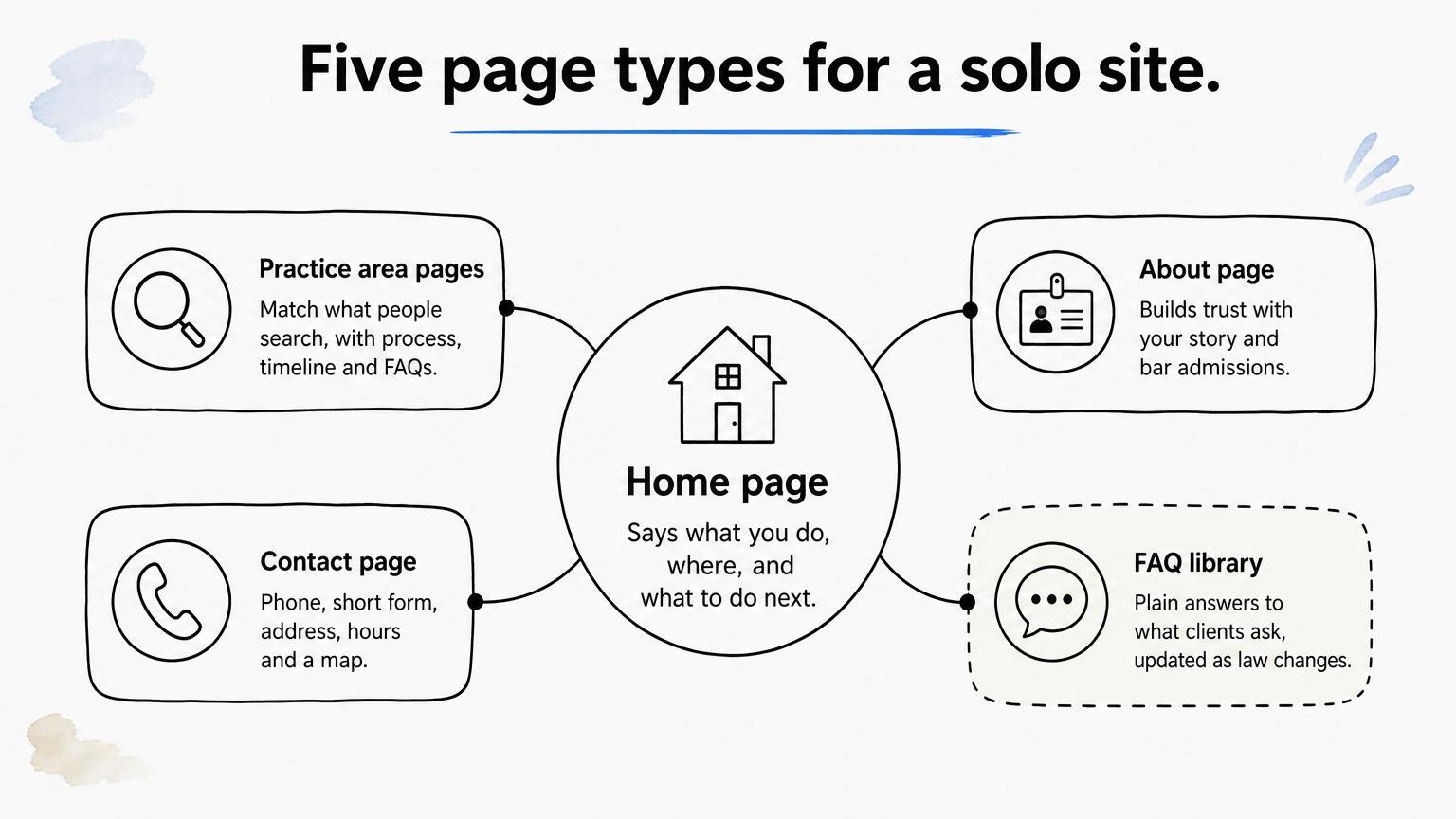
Five page types cover most solo practices: home, practice area pages, About, Contact, and a small library of answers to client questions. Add more only when you can keep them accurate.
What to do
Build the set below, and keep the main menu to five to seven items with your contact button in the top right corner. Fewer pages means fewer things to go stale.
Five pages you keep current beat twenty you abandon.
Why it matters for a solo
Every practice area page is a landing page for a search, and your FAQ library is where you show what you know. AF Family Law, for example, publishes posts that answer questions like "How much is it to file for divorce?" Pair the site with a complete Google Business Profile that matches your site's name, address and phone number. Ask every client for a review, respond to each review professionally, and never offer an incentive, because Google's policies prohibit it. For done-for-you organic work, GavelGrow's local SEO service for law firms covers it.
Mistake to avoid
Cloning one page across ten cities with only the city name swapped is thin, readers notice, and it adds maintenance. A blog with one post from three years ago signals an abandoned practice. Publish fewer posts, write each from a real client question, and end each one with your contact path.
5. How do you make contacting you effortless?
Offer a tap-to-call number and a short form on every page, confirm each inquiry instantly, and track which page or campaign produced it. Solo attorney website design succeeds or fails at this moment.
What to do
Keep the form to name, phone, email and a short description of the matter, and split anything longer into steps. Add a consent checkbox that covers texting if you plan to text leads, and a line stating that submitting the form does not create an attorney-client relationship. Make your phone number a tappable link, never an image.
A hosted option can carry the load. GavelGrow's platform provides firm-branded, mobile-first, multi-step intake forms that embed on any site through an iframe or script snippet. They keep a consent audit log, flag duplicates, validate phone numbers, and send an instant email auto-reply. Track starts at $199 a month with a 7-day free trial and no credit card.
Fast answers win leads that a polished page alone cannot.
Why it matters for a solo
You cannot answer the phone while you are in court. The Lead Response Management Study found that leads contacted within five minutes are far more likely to be qualified than those first reached at thirty minutes. That measures the odds of qualifying a lead, not signed cases, but it shows why an instant auto-reply and a callback plan matter.
Tracking matters just as much. Per-campaign tracking numbers credit each call to the campaign that rang it. The hosted form can also fire conversion events into your own GA4, Meta Pixel or Google Tag Manager, so you see results in your own accounts.
Mistake to avoid
Twelve-field forms drive people away. So do forms that send no confirmation, and forms that land on a thank-you page with no tracking, so you cannot tell which source produced the case. Another quiet failure is a contact page promising a reply "within 24 hours" to someone whose problem is due tomorrow. Pick a response time you can keep, and test the form and the number monthly.
6. Show proof without breaking bar rules
Use real credentials, client voices and process detail, and check your state bar's advertising rules before you publish testimonials, case results or labels like "specialist." Rules vary by state, so confirm yours.
What to do
List your bar admissions, years in practice and memberships, and explain what happens after a prospect calls, step by step. Show reviews from your own Google profile, and get client consent before any video testimonial. This table lists what to check before each kind of proof goes live.
Proof that breaks your bar's rules is a liability, not an asset.
Why it matters for a solo
There is no firm name between you and the bar. One careless claim sits on your license, and you approve every word yourself. Done well, proof also calms a nervous visitor faster than any design flourish in a solo law firm website design. Never publish client details without informed consent, and never imply a guaranteed outcome.
Mistake to avoid
The obvious errors are calling yourself the "best lawyer in [city]," promising to "win your case," or posting a result without the disclaimer your state requires. A quieter one is copying a competitor's disclaimer language, because their state's rules may not be yours. Have every page of proof checked against your own bar's rules, and ask your bar's ethics resource if it has one.
7. How do you choose a builder or a designer?
A hosted template builder suits most new solos, a freelance designer suits a distinct brand, and a legal marketing agency suits a competitive market where the site must work with ads and SEO. Choose by who will maintain the site, not by the demo.
What to do
Compare the three paths, then put the same questions to every provider.
Ask every provider:
- Will the domain, hosting account and content be registered in my name?
- Can I export everything if I leave?
- Who makes updates, and how fast?
- Is the build mobile-first and accessible?
- How will forms and calls be tracked back to signed cases?
Own your domain, hosting account and content, whoever builds the site.
Why it matters for a solo
You will live with this choice. A website is more than the build, because hosting, updates, new pages and intake continue long after launch, and switching later costs time you do not have. A builder also only gets you a site. It does not show which clicks and calls became signed retainers, so make sure your forms can be embedded and tracked, as described in rule 5.
Mistake to avoid
Do not choose from template screenshots alone, sign a contract in which the agency holds your domain, or buy thirty pages when you can maintain five. Ask to see live sites built for lawyers, and check their contact paths on your own phone before you commit.
Frequently asked questions
Short answers to questions that come up once the design basics are settled.
Does a solo attorney website need to be accessible?
Yes, treat accessibility as part of the build. No single technical standard applies to every private business site, but WCAG 2.1 Level AA is the benchmark most often cited, and accessibility demand letters and lawsuits have targeted businesses of every size. Ask your builder or designer to meet it: enough color contrast, alt text on images, keyboard navigation and labeled form fields. Those same fixes help visitors on phones in bright light, so you gain more than legal cover.
How do you know whether your website is working?
Count signed cases, not visits. Track form submissions and calls separately, tag each call's outcome, and tie both back to the page or campaign that produced them. Then divide your marketing spend by signed cases to get your cost per signed case. Test your form and phone number every month, because a broken form looks exactly like a slow month. If you only watch pageviews, you will miss the leak.
How often should you update your website?
Review it quarterly and test it monthly. Each quarter, confirm your bio, bar admissions, hours and practice pages are accurate, and refresh any page that cites law that has changed. Each month, submit a test form, call your tracking number, and check that the auto-reply arrives. Publish new content only when a real client question justifies it. One accurate page per quarter beats a burst of posts followed by silence.
Should your website show your fees?
You are usually not required to publish a fee schedule, but you should explain how fees work. Say whether you offer a free consultation, whether you work on contingency or flat fees, and what costs a client may owe. Fee and contingency advertising often carries specific disclosure rules, so check your state bar before posting percentages or amounts. Clear fee language filters out mismatched callers and calms the ones who stay.
When is it time to redesign instead of patching?
Redesign when the site fails on a phone, when you cannot edit it yourself, when it still describes a practice you no longer run, or when forms and calls cannot be traced to cases. Patch when the structure is sound and only copy or photos are stale. Before any rebuild, keep your domain, set up 301 redirects from old URLs to their new equivalents, and save the pages that already rank.
Where to start with your site
Good solo law firm website design comes down to a few decisions. Say what you handle and where. Show the person behind the practice. Make the phone experience fast. Keep the pages few and current. Answer every inquiry quickly. Prove your credibility inside your bar's rules. Own whatever you build.
Start with the rule that matches your biggest gap. If the site gets visits but too few signed cases, look first at your intake path: the form, the phone number and what happens in the first five minutes. GavelGrow's conversion optimization service for law firms works on intake forms, landing pages and call handling, so you can see where leads drop off before they sign.
Frequently Asked Questions
Does a solo attorney website need to be accessible?
Yes, treat accessibility as part of the build. No single technical standard applies to every private business site, but WCAG 2.1 Level AA is the benchmark most often cited, and accessibility demand letters and lawsuits have targeted businesses of every size. Ask your builder or designer to meet it: enough color contrast, alt text on images, keyboard navigation and labeled form fields. Those same fixes help visitors on phones in bright light, so you gain more than legal cover.
How do you know whether your website is working?
Count signed cases, not visits. Track form submissions and calls separately, tag each call's outcome, and tie both back to the page or campaign that produced them. Then divide your marketing spend by signed cases to get your cost per signed case . Test your form and phone number every month, because a broken form looks exactly like a slow month. If you only watch pageviews, you will miss the leak.
How often should you update your website?
Review it quarterly and test it monthly. Each quarter, confirm your bio, bar admissions, hours and practice pages are accurate, and refresh any page that cites law that has changed. Each month, submit a test form, call your tracking number, and check that the auto-reply arrives. Publish new content only when a real client question justifies it. One accurate page per quarter beats a burst of posts followed by silence.
Should your website show your fees?
You are usually not required to publish a fee schedule, but you should explain how fees work. Say whether you offer a free consultation, whether you work on contingency or flat fees, and what costs a client may owe. Fee and contingency advertising often carries specific disclosure rules, so check your state bar before posting percentages or amounts. Clear fee language filters out mismatched callers and calms the ones who stay.
When is it time to redesign instead of patching?
Redesign when the site fails on a phone, when you cannot edit it yourself, when it still describes a practice you no longer run, or when forms and calls cannot be traced to cases. Patch when the structure is sound and only copy or photos are stale. Before any rebuild, keep your domain, set up 301 redirects from old URLs to their new equivalents, and save the pages that already rank.