Speed to Lead for Law Firms: How to Reply Within 5 Minutes
Categories: Legal Marketing Strategies
 Abram Ninoyan
Founder & Senior Performance Marketer
Credentials: Google Partner, Google Ads Search Certified, Google Ads Display Certified, Google Ads Measurement Certified, Google Analytics (IQ) Certified, HubSpot Inbound Certified, HubSpot Social Media Marketing Certified, Conversion Optimization Certified
Expertise: Google Ads, Meta Ads, Conversion Rate Optimization, GA4 & Google Tag Manager, Lead Generation, Marketing Funnel Optimization, PPC Management
LinkedIn Profile
Reply to every new inquiry within five minutes by doing three things: send an automated reply the moment a form or call comes in, assign a named person to follow up by phone, and track your time to fi...
Key Takeaways
- Speed to Lead for Law Firms: How to Reply Within 5 Minutes
- Why does response time decide who wins the client?
- Step 1. Set a response-time standard
- Step 2. Automate the first reply
Speed to Lead for Law Firms: How to Reply Within 5 Minutes
Reply to every new inquiry within five minutes by doing three things: send an automated reply the moment a form or call comes in, assign a named person to follow up by phone, and track your time to first contact every week. That is speed to lead for law firms in practice. You do not need a night-shift intake team to get there. You need a written standard, a few automations, and one person accountable for each lead.
Here is the problem. A prospect who was just rear-ended or served with papers rarely contacts one firm. They fill out two or three forms in a single sitting, often in the evening. The firm that calls back first gets the conversation. The firm that opens the form at 9 a.m. the next day often reaches a voicemail. Your ad spend produced that lead, and a slow reply throws it away.
This guide covers why response time matters in legal intake, then four steps: set a response-time standard, automate the first reply, assign every lead an owner, and measure first contact. GavelGrow has worked only with law firms since 2015, so the examples reflect how legal intake actually runs.
Why does response time decide who wins the client?
Response time decides who wins because legal inquiries are urgent and prospects contact several firms at once. The first firm to make a human connection usually frames the rest of the decision. Before you build anything, it helps to know what the benchmark says and what you need in place.
What the five-minute benchmark measures
The Lead Response Management study found that leads contacted within five minutes were about 21 times more likely to be qualified than leads first reached at thirty minutes. It measures the odds of qualifying a lead. It does not measure signed cases, so do not promise yourself a 21x jump in retainers.

The direction is what matters. A prospect's urgency fades fast, and every minute you wait gives another firm room to call first. Five minutes is the target for human contact during business hours, and an instant automated reply covers the gap when no one is at a desk.
The odds of qualifying a lead fall the longer a prospect waits, so your goal is to be first, not perfect.
What you need before you start
You can set this up in an afternoon if the basics exist. Check that you have each of these:
- An intake form that captures name, phone number, practice area, and text consent
- A phone line or tracking number that shows you missed calls
- One place where every lead lands, such as a CRM or lead pipeline
- A named intake owner and a backup
- Written reply templates that your state bar rules allow
Advertising rules differ by state, so have your reply templates checked against your own state bar's rules before they go live.
Step 1. Set a response-time standard
Write down exactly how fast each type of lead gets a reply, and who owns it. A standard that lives only in your head disappears the first busy Monday.
Define what counts as a response
An automated acknowledgment counts as the first touch. It does not replace a human conversation. A voicemail left for the prospect is not a response either, because it hands the next move back to them. Count a lead as reached only when a person has spoken or texted back and forth with them.
This table gives a workable starting standard for your speed to lead targets:
Decide your after-hours rule
Look at your form timestamps for the last 30 days. Many consumer practice areas see a steady flow of evening and weekend inquiries, and your own data will show your share. If it is meaningful, name who makes first-hour calls on Monday mornings, or who covers an on-call phone on weekends.
Make that Monday review the first task of the day for your intake team, before email and before meetings. The automated reply buys you time, but it only works if a human follows through early.
A response standard only works when it names who acts, how fast, and what counts as done.
Step 2. Automate the first reply
The automated reply is what makes sub-five-minute response possible at any hour. It tells the prospect you received their request and that a real person is about to call.
Write a message that sounds human
Keep it short, use the prospect's first name, and name their practice area. Do not give legal advice, promise outcomes, or imply that an attorney-client relationship exists. Use this template as a starting point:
Hi {first_name}, this is {firm_name}. We received your message about {practice_area}, and a member of our team will call you shortly from {phone_number}. If you would rather pick a time, you can book here: {scheduling_link}. This message is not legal advice and does not create an attorney-client relationship. Reply STOP to opt out of texts.
Read it on your own phone before you ship it. If it sounds like a form letter, rewrite it until it does not.
Connect it to your form and phone
Trigger the reply the second a form is submitted, and add a text version if you have consent. GavelGrow's intake automation and unified inbox send an instant email auto-reply on form submit and start follow-up sequences within minutes. Texts go out once US carriers approve your number.

Only text people who agreed to texts on your form, and keep a record of that consent. GavelGrow's hosted forms keep an append-only consent audit log and handle STOP and HELP keywords automatically. Whatever tool you use, test it end to end by submitting your own form from a phone and timing what arrives.
Automate the acknowledgment so that a human can spend the first five minutes on the call.
Step 3. Assign every lead to a named owner
A lead that belongs to "the intake team" belongs to no one. Give each new lead one owner and one backup, and make the handoff automatic.
Give each lead an owner and an escalation
Route leads by practice area, by round-robin, or to a single intake role. Send the owner a notification on their phone, not just a line in a shared inbox. If the lead is still untouched after 10 minutes in business hours, push it to the backup and flag the supervisor.
A task like "Call {name}, {practice area}, {source}" gives the owner context without opening a record. Keep the instruction short so it gets done.
Treat phone calls as leads
Many prospects skip your form and just call. A missed call is a lost lead if no one notices it. Use tracking numbers per campaign so every call is recorded, credited to its source, and visible in the same pipeline as your form leads. GavelGrow's built-in call tracking does this, including missed-call reporting and outcome tags for qualified, callback, unqualified, and spam.
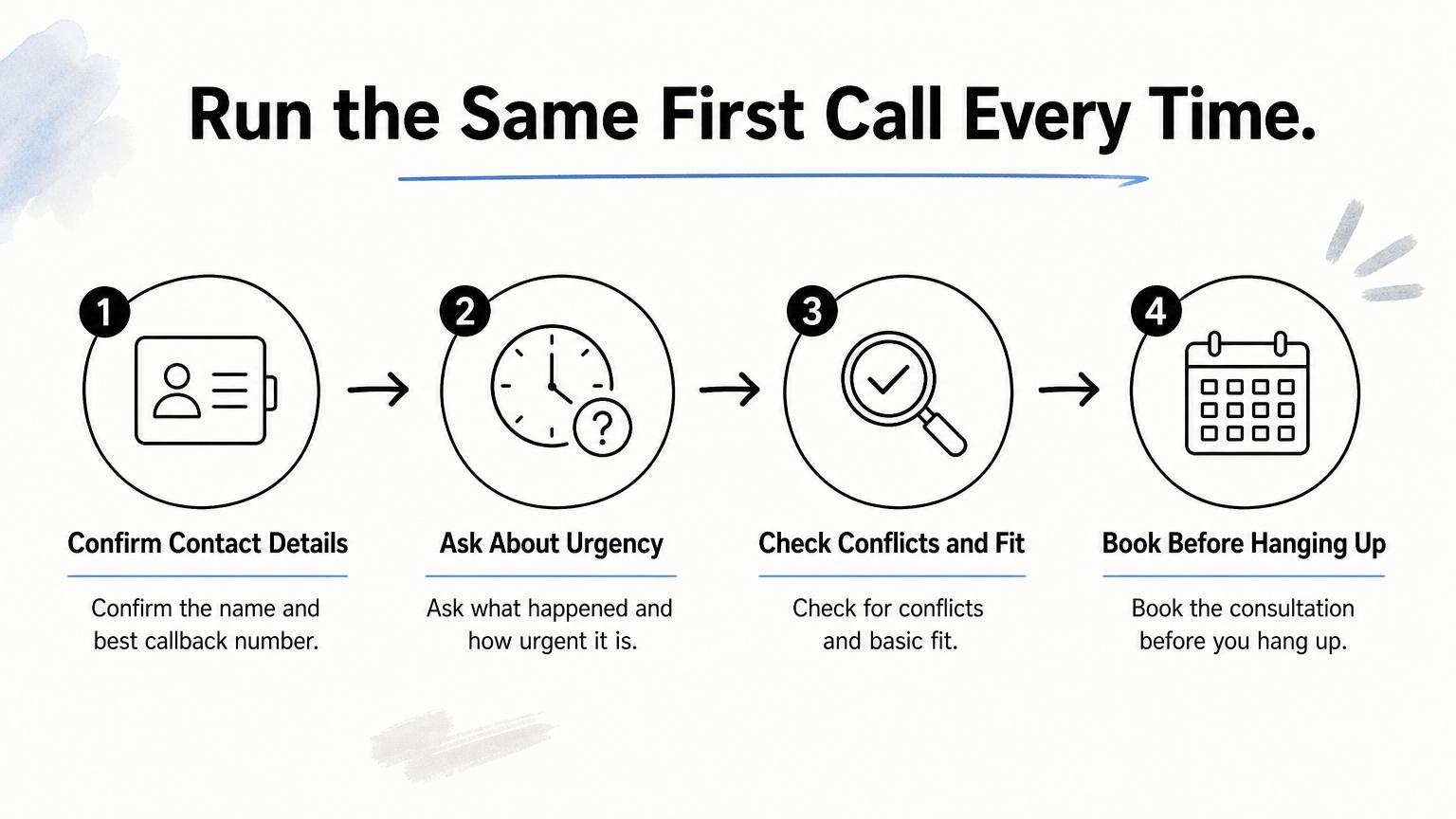
When someone answers, run the same first call every time:
- Confirm name and best callback number.
- Ask what happened and how urgent it is.
- Check for conflicts and basic fit.
- Book the consultation before you hang up.
Every lead needs one named owner, because shared responsibility means no one calls.
Step 4. Measure first-contact time and fix the gaps
You cannot improve what you do not time. Review three numbers each week, then fix the step where leads leak.
Track three numbers weekly
Track the time to automated reply, the time to first human contact, and the contact rate, which is leads reached divided by leads received. The first should be near instant. The second should match your Step 1 table. A falling contact rate tells you prospects are not picking up or your team is not calling back.
A lead pipeline that shows last-activity aging makes stale leads obvious. Pair these numbers with your cost per signed case, so you can see whether faster reply is moving real results and not only activity. Our CPA calculator helps with that math.
Work one example
These figures are illustrative, not benchmarks. Say you spend $6,000 a month on ads at $100 per lead. That is 60 leads. If 24 of them arrive on evenings and weekends and wait until late the next morning, you paid $2,400 for leads that went cold before anyone called. Closing that gap costs you a template and a Monday-morning rule, not more ad spend.
If your reply is fast and leads still do not book, the form or call handling may be the leak. Our conversion optimization service covers intake forms, landing pages, and call handling.
Time to first contact is the one intake number you can improve this week at almost no cost.
Start with the first five minutes
Speed to lead comes down to one standard: a reply within five minutes, a human follow-up in the first hour, and one named owner for every lead. Automation handles the first touch at any hour. Your team handles the conversation. A weekly look at first-contact time keeps the system honest and shows you where the leaks are.
You do not need to overhaul your intake to start. Write your response table, load the reply template, assign owners, and time your own form tonight. Then check your numbers on Monday.
If you want these pieces in one place, you can start a 7-day free trial of the GavelGrow platform with no credit card. It combines intake forms, call tracking, and instant replies in one dashboard.