6 Best Attorney Website Design Templates for Law Firms
Categories: Legal Marketing Strategies
 Abram Ninoyan
Founder & Senior Performance Marketer
Credentials: Google Partner, Google Ads Search Certified, Google Ads Display Certified, Google Ads Measurement Certified, Google Analytics (IQ) Certified, HubSpot Inbound Certified, HubSpot Social Media Marketing Certified, Conversion Optimization Certified
Expertise: Google Ads, Meta Ads, Conversion Rate Optimization, GA4 & Google Tag Manager, Lead Generation, Marketing Funnel Optimization, PPC Management
LinkedIn Profile
Your website is often the first impression a potential client gets of your firm, and a clunky, dated template can cost you a case before the phone ever rings. If you're searching for attorney website...
Key Takeaways
- 6 Best Attorney Website Design Templates for Law Firms
- 1. Clio Grow website builder
- 2. WordPress Astra law firm theme
- 3. Squarespace Hayden template
6 Best Attorney Website Design Templates for Law Firms
Your website is often the first impression a potential client gets of your firm, and a clunky, dated template can cost you a case before the phone ever rings. If you're searching for attorney website design templates, you want designs built for how legal clients actually search and decide, not generic small-business themes repurposed for a law office.
The best law firm website template design options share a few traits, the same website design secrets that sign clients: mobile-first layouts, clear calls to action above the fold, and practice-area pages that speak directly to what a visitor is worried about. A template that looks polished but buries your phone number or intake form three scrolls down will bleed leads no matter how much you spend on ads.
This roundup covers six templates worth considering, why each fits certain practice areas and firm sizes, and what to check before you commit. We'll also flag where a pretty template still needs proper intake tracking behind it, since a site that captures leads without measuring which pages convert can't show you which pages actually turn visitors into signed cases.
1. Clio Grow website builder
Clio Grow packages a basic website builder inside its legal intake CRM, one of many legal CRM options for law firms, so your site and your lead-capture tools come from the same vendor instead of stitched together after the fact. It's less a design platform and more an intake-first website that happens to have pages around it, which makes sense given Clio's roots in practice management rather than web design.
Best for
This option suits solo attorneys and small firms already running Clio Grow or Clio Manage who want one login instead of three. If your firm handles a single practice area and doesn't need heavy content marketing, the simplicity works in your favor rather than against it.
Key features
- Website builder tied directly to Clio Grow's intake pipeline
- Built-in scheduling, e-signature and document requests on the same forms
- Lead capture that flows straight into Clio's client intake workflow
- A handful of prebuilt legal page templates (contact, practice area, about)
A template is only as good as the intake system feeding it, and Clio Grow ties the two together from day one.
Customization and SEO
Don't expect a full content management system here. Page layouts are limited, blogging tools are thin, and there's little control over metadata, site structure or schema markup compared to a dedicated CMS. That's a real tradeoff: you get tighter intake integration but give up flexibility on on-page SEO, which matters if organic search is part of your growth plan rather than just paid ads.
Pricing
Clio Grow's website builder isn't sold as a standalone product. It's bundled into Clio Grow's CRM plans, and pricing depends on seat count and which tier you choose, so check Clio's own site for current numbers rather than relying on a quoted figure here. Firms comparing total cost should also weigh what a bundled builder saves against what a purpose-built site plus a dedicated platform like GavelGrow's click-to-signed-case attribution platform can do for attribution once leads start arriving.
2. WordPress Astra law firm theme
Astra is a lightweight WordPress theme with dedicated law firm starter templates, and it's the closest thing on this list to a true content management system built for attorneys who want to own their site outright. Instead of a locked-down builder, you get the full WordPress ecosystem underneath a clean, fast-loading legal design.
Best for
This fits firms that publish regularly, whether that's practice-area guides, case results, or a blog built on a content plan designed to rank. If you or your marketing manager are comfortable in WordPress, or you work with a developer who is, Astra gives you room to grow without rebuilding the site later.
Key features
- Prebuilt law firm page layouts (homepage, attorney bios, practice areas, contact)
- Fast load times, which matters for both rankings and mobile visitors
- Compatible with popular form plugins and booking tools
- Works with WordPress's full plugin library for schema, analytics, and SEO
A theme you can grow into beats one you'll outgrow in a year.
Customization and SEO
Astra pairs well with SEO plugins that handle metadata, sitemaps, and structured data for legal services, giving you far more on-page control than a closed builder. That flexibility comes with a tradeoff: you're responsible for updates, hosting, and security yourself.
Pricing
The Astra theme itself is free, with a paid Pro version running under $100/year depending on the bundle. Hosting and any premium plugins are separate costs, so budget accordingly beyond the theme price.
3. Squarespace Hayden template
Squarespace's Hayden template is a portfolio-style design that firms have repurposed for legal sites because of its clean typography and generous white space. It's built for firms that want a polished, image-forward site without touching code, and it works especially well for boutique or solo practices where the attorney's photo and credibility matter as much as the copy.

Best for
Hayden suits solo attorneys and boutique firms in practice areas like estate planning or family law, where a warm, personal presentation helps put a nervous visitor at ease. It's not the right pick for a firm running dozens of practice-area pages, since the template's structure favors a handful of polished sections over deep content hierarchies.
Key features
- Drag-and-drop section editor with legal-friendly layout blocks
- Built-in scheduling and contact form tools
- Mobile-responsive design out of the box
- Squarespace's native analytics dashboard
A beautiful template still needs a fast, obvious path to your phone number and intake form.
Customization and SEO
Squarespace has improved its on-page SEO controls over the years, with editable meta titles, alt text, and basic schema support, though it still trails a full CMS like WordPress on structured data flexibility. Editing stays simple, which is the tradeoff: less power, less risk of breaking something.
Pricing
Squarespace's Business plan runs roughly $23 to $25/month billed annually, with e-commerce tiers priced higher and unnecessary for most law firm sites.
4. Wix law firm template
Wix offers a set of dedicated law firm templates inside its wider template library, built with a drag-and-drop editor that doesn't require touching code. It's aimed at firms that want more visual control than Squarespace offers but still want a guided design process rather than a blank canvas.
Best for
This fits firms without in-house design help who still want to tweak layouts, colors, and section order themselves. Solo practitioners and small partnerships that want to launch fast, then adjust the site over time without hiring a developer, tend to get the most value here.
Key features
- Dozens of law firm template variations by practice area
- Wix ADI, an AI-assisted setup that builds a starter site from a short questionnaire
- Built-in contact forms, chat widgets, and appointment booking
- App marketplace for adding reviews, live chat, or scheduling tools
Fast setup matters less than what happens after launch, when leads actually start coming in.
Customization and SEO
Wix has closed much of its old SEO gap, with editable meta tags, an SEO setup wizard, and mobile optimization tools built into the editor, the same toolkit behind a step-by-step Wix landing page setup. Switching templates later is harder than on WordPress, so pick your starting design carefully since Wix locks you into a site structure once you've built it out.
Pricing
Wix's business plans for a professional site typically run in the $20 to $40/month range, depending on the tier and whether you need e-commerce features most law firms won't use.
5. Webflow law firm templates
Webflow sits between a drag-and-drop builder and full custom code, giving designers a visual canvas that still outputs clean, semantic markup. Its law firm templates lean toward the modern, editorial look you'd see from a boutique design agency rather than a generic legal starter kit, which is why so many marketing-savvy firms and agencies build on it.
Best for
Webflow suits firms working with a designer or agency rather than doing it themselves, since the visual editor still has a learning curve steeper than Wix or Squarespace. Larger firms with multiple practice areas and a real content strategy get the most out of the platform's flexibility.
Key features
- Visual CMS for practice-area pages, attorney bios, and blog posts
- Custom animations and interactions without writing JavaScript
- Clean exported code that loads fast on mobile
- Reusable design components across a large site
The more pages your firm plans to publish, the more a flexible CMS like Webflow pays off.
Customization and SEO
Webflow gives granular control over metadata, redirects, sitemaps, and schema markup, putting it closer to WordPress than to Wix or Squarespace on raw SEO power, which matters if you're building around a law firm SEO strategy. That control comes at the cost of a real setup investment, either your time or a developer's.
Pricing
Webflow's site plans for a business-level law firm site typically run in the $20 to $40/month range, with CMS-heavier plans priced higher depending on page and collection limits.
6. Framer law firm templates
Framer built its reputation on marketing sites for startups, but its law firm templates have caught on with firms that want a design-forward homepage without hiring an agency for every tweak. It works as a visual builder with real animation and interaction tools baked in, so a site can feel alive on scroll instead of static, which stands out when most legal sites still look like they were built in 2015.

Best for
Firms that care as much about brand presentation as intake, particularly those in competitive urban markets where every firm's site looks the same, get the most out of Framer. It suits marketing directors comfortable experimenting with layout rather than attorneys who just want a form and a phone number.
Key features
- Practice-area and attorney-bio template sections built for quick customization
- Built-in animations and scroll interactions with no code required
- Fast-loading, mobile-first output by default
- Component-based editing for consistent design across pages
A site that looks different from every competitor's template is worth something in a crowded legal market.
Customization and SEO
Framer includes editable meta tags, clean URL structures, and solid Core Web Vitals scores out of the box, though its content management tools are lighter than Webflow's for firms publishing dozens of articles.
Pricing
Framer's paid plans for a small business site generally start in the $15 to $30/month range, with higher tiers unlocking more CMS collections and pages.
Finding the right template for your firm
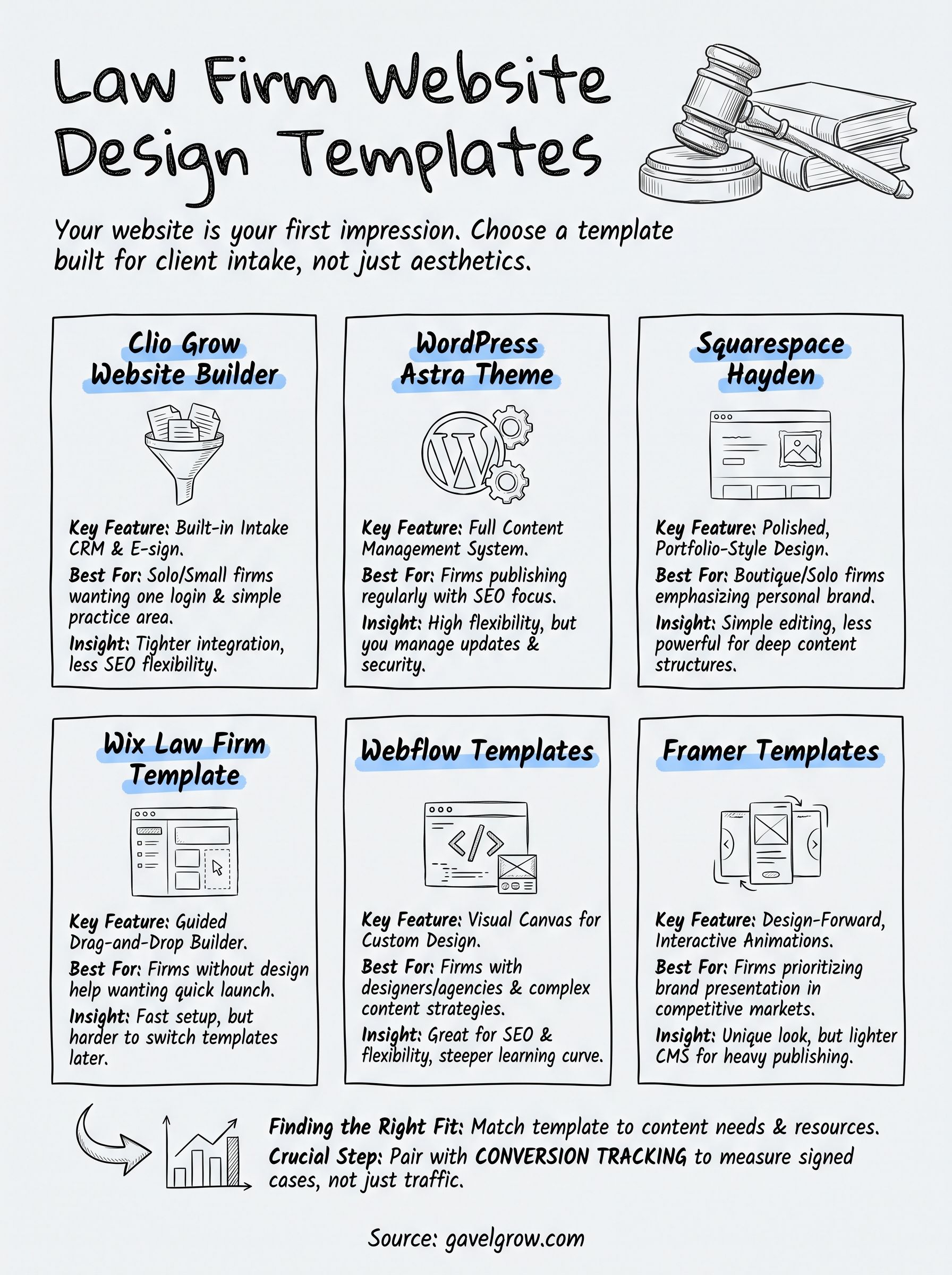
None of these six options wins on design alone. The right pick depends on whether you're publishing content weekly, running a single practice area, or handing the whole build to a designer. WordPress and Webflow reward firms that plan to invest in SEO and content over years. Squarespace and Wix get a clean site live fast for solo attorneys who'd rather practice law than manage a CMS. Whatever you choose, the template is only half the job, and it's worth running the finished site through a 10-point law firm website audit.
A gorgeous homepage still needs proof it's working: which pages bring in calls, which forms actually convert, and what a signed case really costs you. That's where conversion tracking matters more than font choice or animation. Once your site is live, pair it with GavelGrow's conversion optimization for law firms, built to turn traffic into signed cases rather than guesswork, and book a free strategy call to walk through what that looks like for your firm.
Frequently Asked Questions
Is a template good enough, or does a law firm need a custom website?
For most solo and small firms, a well-chosen template is enough. Modern templates handle the things that actually matter, mobile responsiveness, fast load times, and clean page structure, and they cost a fraction of custom design. Custom work earns its price when you need unusual functionality, a distinctive brand in a crowded market, or a site structure that spans many practice areas and locations. Starting on a template and investing the savings in content and intake usually beats a bespoke site with nothing behind it.
Are website templates bad for SEO?
No, the template itself rarely decides rankings. What matters is what the template makes easy or hard: page speed, clean heading structure, editable title tags and meta descriptions, the ability to create separate practice-area and location pages, and schema markup. A bloated template stuffed with animations can hurt load times, and a rigid one can stop you building the pages you need, so judge templates on those constraints rather than on being a template.
What does a law firm website actually cost beyond the template fee?
The subscription or theme price is usually the smallest line. Budget for hosting if it is not bundled, a domain, any premium plugins, professional photography, and the content itself, which is often the largest cost since practice-area pages and attorney bios need to be written accurately. If you hire out design or migration, that is a separate one-time cost. Firms are frequently surprised that the build is cheap and the content is not.
What should every attorney website include?
At minimum: a dedicated page per practice area, attorney bios with real credentials, a phone number that is tappable on mobile, a short intake form that works on a phone, and clear location information for local search. Beyond that, reviews or case results where your state bar permits them, and content answering the questions prospects actually ask. Anything that adds friction between a worried visitor and contacting you is working against the site.
Do bar advertising rules apply to your law firm website?
Yes. Most state bars treat a firm website as attorney advertising, which means the same restrictions apply: no guaranteeing outcomes, disclaimers on case results and testimonials in many states, accurate listing of jurisdictions where each attorney is licensed, and often a responsible-attorney identification. Check your state bar’s advertising rules before launch, since a template designed for a general business will not prompt you for any of this.
What actually makes a law firm website convert visitors into clients?
Less than most redesigns assume. The recurring drivers are speed, a form short enough that a stressed person finishes it on a phone, an obvious way to call, and proof the firm handles cases like theirs. Design quality matters for trust, but a beautiful site with a ten-field form and a slow load will underperform a plainer one built around contacting you. The only way to know which changes worked is to track pages and forms through to signed cases rather than judging by look.
Clio Grow, WordPress, Astra, Squarespace, Wix, Webflow, Framer, and all other product names and trademarks are the property of their respective owners, referenced here for identification and comparison only and not affiliated with or endorsing GavelGrow. Pricing reflects publicly listed rates accurate as of August 2026 and changes frequently; verify current pricing and plan limits directly with each vendor.
Frequently Asked Questions
Is a template good enough, or does a law firm need a custom website?
For most solo and small firms, a well-chosen template is enough. Modern templates handle the things that actually matter, mobile responsiveness, fast load times, and clean page structure, and they cost a fraction of custom design. Custom work earns its price when you need unusual functionality, a distinctive brand in a crowded market, or a site structure that spans many practice areas and locations. Starting on a template and investing the savings in content and intake usually beats a bespoke site with nothing behind it.
Are website templates bad for SEO?
No, the template itself rarely decides rankings. What matters is what the template makes easy or hard: page speed, clean heading structure, editable title tags and meta descriptions, the ability to create separate practice-area and location pages, and schema markup. A bloated template stuffed with animations can hurt load times, and a rigid one can stop you building the pages you need, so judge templates on those constraints rather than on being a template.
What does a law firm website actually cost beyond the template fee?
The subscription or theme price is usually the smallest line. Budget for hosting if it is not bundled, a domain, any premium plugins, professional photography, and the content itself, which is often the largest cost since practice-area pages and attorney bios need to be written accurately. If you hire out design or migration, that is a separate one-time cost. Firms are frequently surprised that the build is cheap and the content is not.
What should every attorney website include?
At minimum: a dedicated page per practice area, attorney bios with real credentials, a phone number that is tappable on mobile, a short intake form that works on a phone, and clear location information for local search. Beyond that, reviews or case results where your state bar permits them, and content answering the questions prospects actually ask. Anything that adds friction between a worried visitor and contacting you is working against the site.
Do bar advertising rules apply to your law firm website?
Yes. Most state bars treat a firm website as attorney advertising, which means the same restrictions apply: no guaranteeing outcomes, disclaimers on case results and testimonials in many states, accurate listing of jurisdictions where each attorney is licensed, and often a responsible-attorney identification. Check your state bar’s advertising rules before launch, since a template designed for a general business will not prompt you for any of this.
What actually makes a law firm website convert visitors into clients?
Less than most redesigns assume. The recurring drivers are speed, a form short enough that a stressed person finishes it on a phone, an obvious way to call, and proof the firm handles cases like theirs. Design quality matters for trust, but a beautiful site with a ten-field form and a slow load will underperform a plainer one built around contacting you. The only way to know which changes worked is to track pages and forms through to signed cases rather than judging by look. Clio Grow, WordPress, Astra, Squarespace, Wix, Webflow, Framer, and all other product names and trademarks are the property of their respective owners, referenced here for identification and comparison only and not affiliated with or endorsing GavelGrow. Pricing reflects publicly listed rates accurate as of August 2026 and changes frequently; verify current pricing and plan limits directly with each vendor.