Google Ads Auction Insights Report: What It Is and How to Read It
Categories: Legal Marketing Strategies
 Abram Ninoyan
Founder & Senior Performance Marketer
Credentials: Google Partner, Google Ads Search Certified, Google Ads Display Certified, Google Ads Measurement Certified, Google Analytics (IQ) Certified, HubSpot Inbound Certified, HubSpot Social Media Marketing Certified, Conversion Optimization Certified
Expertise: Google Ads, Meta Ads, Conversion Rate Optimization, GA4 & Google Tag Manager, Lead Generation, Marketing Funnel Optimization, PPC Management
LinkedIn Profile
The Google Ads Auction Insights report shows you exactly who else is bidding on the same searches you are, and whether you're winning or losing those auctions against them. It's built into every Googl...
Key Takeaways
- Google Ads Auction Insights Report: What It Is and How to Read It
- Why the auction insights report matters for your firm
- How to access your auction insights report
- How to read the key metrics in the report
Google Ads Auction Insights Report: What It Is and How to Read It
The Google Ads Auction Insights report shows you exactly who else is bidding on the same searches you are, and whether you're winning or losing those auctions against them. It's built into every Google Ads account, but most law firm marketers never open it, or they open it once and don't know what the columns mean. That's a missed opportunity, especially in competitive practice areas like personal injury or family law, where three or four firms in the same city are often chasing the exact same keywords.
This report answers a specific question: how does your ad actually perform next to the competitors bidding alongside you, not just in isolation. You'll see metrics like impression share, overlap rate, and position above rate broken down by competitor domain, which tells you whether you're getting outbid, losing on quality score, or simply not showing up often enough.
Below, we'll walk through where to find the report for search and shopping campaigns, what each metric actually measures, and how to turn those numbers into decisions about bids, budget, and ad copy. We'll also cover how this connects to case-level attribution that runs from the auction click to the signed case, since knowing you're winning an auction means little if those clicks aren't turning into signed cases.
Why the auction insights report matters for your firm
Most firms judge their Google Ads setup, costs, and lead quality by cost per click and lead volume, but that view is incomplete. You can hit every internal benchmark and still lose ground if a competitor down the street is outbidding you on the exact terms that matter most, like "personal injury lawyer [city]" or "divorce attorney near me." The auction insights report is the only place in Google Ads that shows you this head-to-head picture, broken out by the actual domains you're competing against.
The stakes in competitive practice areas
Personal injury, mass torts, and family law are some of the most contested verticals in paid search, and personal injury PPC budgets and lead strategy have to account for a cost per click that can run into the hundreds of dollars for a single term. When you're spending that much per click, and legal keywords are among the priciest on Google, auction dynamics stop being a technical detail and start being a budget decision. A firm that doesn't check its auction insights report is essentially flying blind on where its ad dollars are actually landing relative to the firms it's trying to beat for the same client.
If you don't know who you're losing auctions to, you can't fix the campaign that's losing them.
Where wasted spend hides
Here's what the report typically surfaces once a firm starts reviewing it regularly:
- Overlap with a specific competitor on 60% or more of your auctions, showing they're targeting the same keyword list you are.
- Position above rate that's consistently below 50%, meaning a rival's ad shows above yours more often than not, even when you both appear.
- Impression share losses tied specifically to rank, not budget, pointing to a quality score or ad relevance problem rather than a bidding problem.
Each of these findings points to a different fix, and none of them are visible from your standard campaign dashboard.
This matters even more once you connect auction performance to what happens after the click. Winning more auctions is only useful if those extra impressions turn into signed retainers, not just more traffic. That's where software that ties ad spend to signed cases earns its keep, tying auction-level wins back to cost per signed case rather than stopping the analysis at cost per click. Without that link, a firm can "win" the auction insights report and still lose money on the campaign.
How to access your auction insights report
Finding the report takes under a minute once you know where Google Ads hides it. Auction insights lives at the campaign, ad group, or even keyword level, which means you can zoom in on exactly the search terms that matter most to your firm instead of drowning in account-wide averages.
Pulling the report for search campaigns
Start at the campaign level, then narrow down once you spot a pattern worth investigating.
- Log into your Google Ads account and open the campaign, ad group, or keyword you want to check.
- Click into the relevant tab on the left-hand menu, then select Auction insights.
- Choose your date range. A 30-day window usually shows enough auction volume to spot real trends, especially for local practice-area terms.
- Export the table if you want to track competitor overlap over time, since Google Ads doesn't keep historical auction insights snapshots for you.
Checking auction insights for Shopping and Performance Max
If your firm also runs Shopping campaigns for merchandise or informational products, the report sits in a similar spot but pulls different comparison data, since it benchmarks against other advertisers competing for the same product searches rather than search terms. Performance Max campaigns show a more limited version of this data, so if competitive analysis matters to your strategy, keep a standard Search campaign running alongside it purely for the auction visibility.
One practical note: the competitor domains listed in this report are anonymized in aggregate views but shown by name at the keyword level, so if you want firm-specific detail for a broader competitive analysis of rival firms, always drill down rather than reading the campaign-wide summary alone.
How to read the key metrics in the report
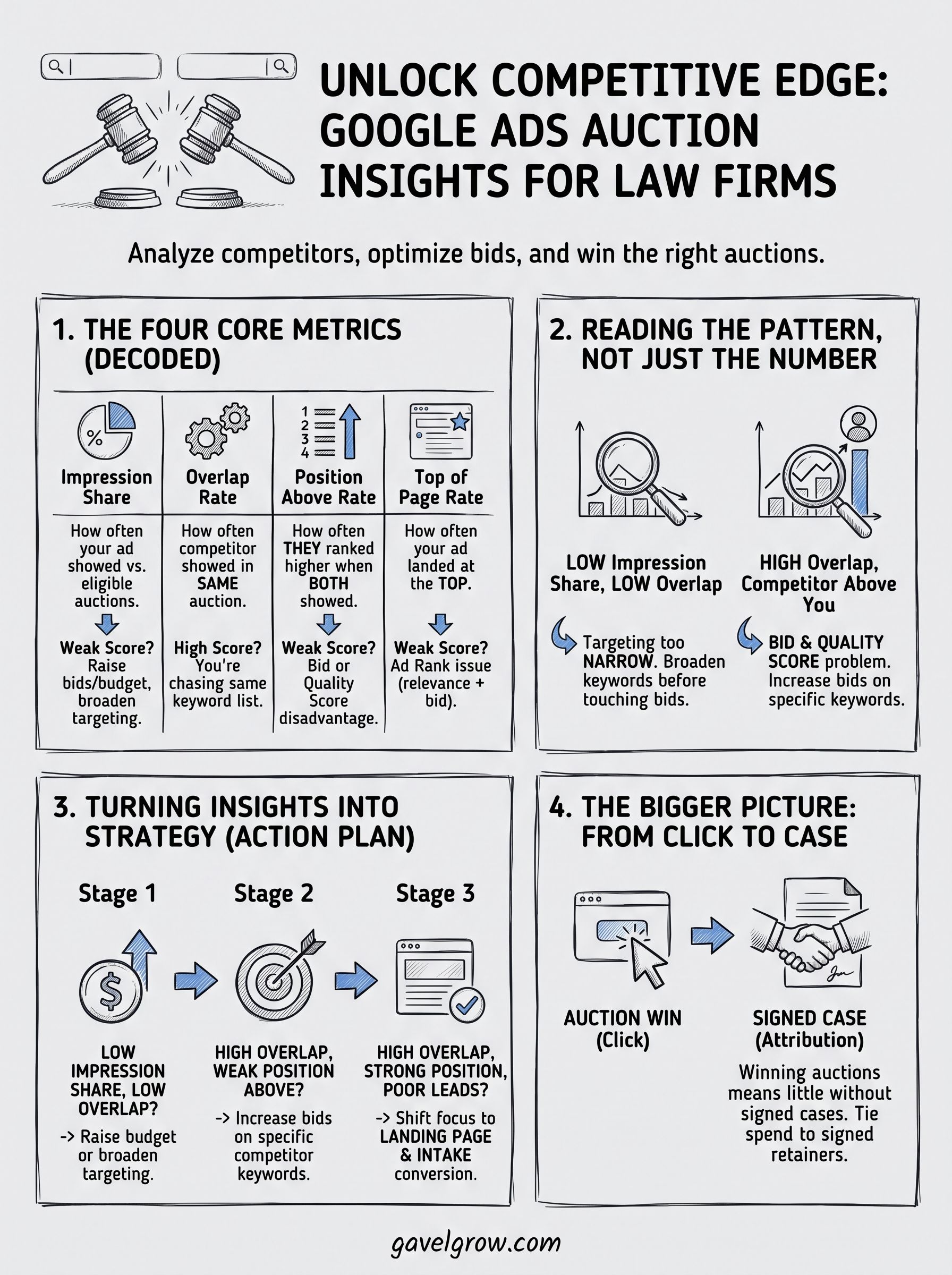
Once you pull up the report, you'll see four columns next to each competitor domain, and each one tells a different part of the story. Impression share shows the percentage of eligible auctions where your ad actually appeared, so a low number here means you're simply not showing up often enough, regardless of how you rank when you do. Reading these numbers together, rather than one at a time, is what separates a useful audit from a confusing spreadsheet.
The four core metrics
Here's what each column actually measures and what a weak score usually points to:
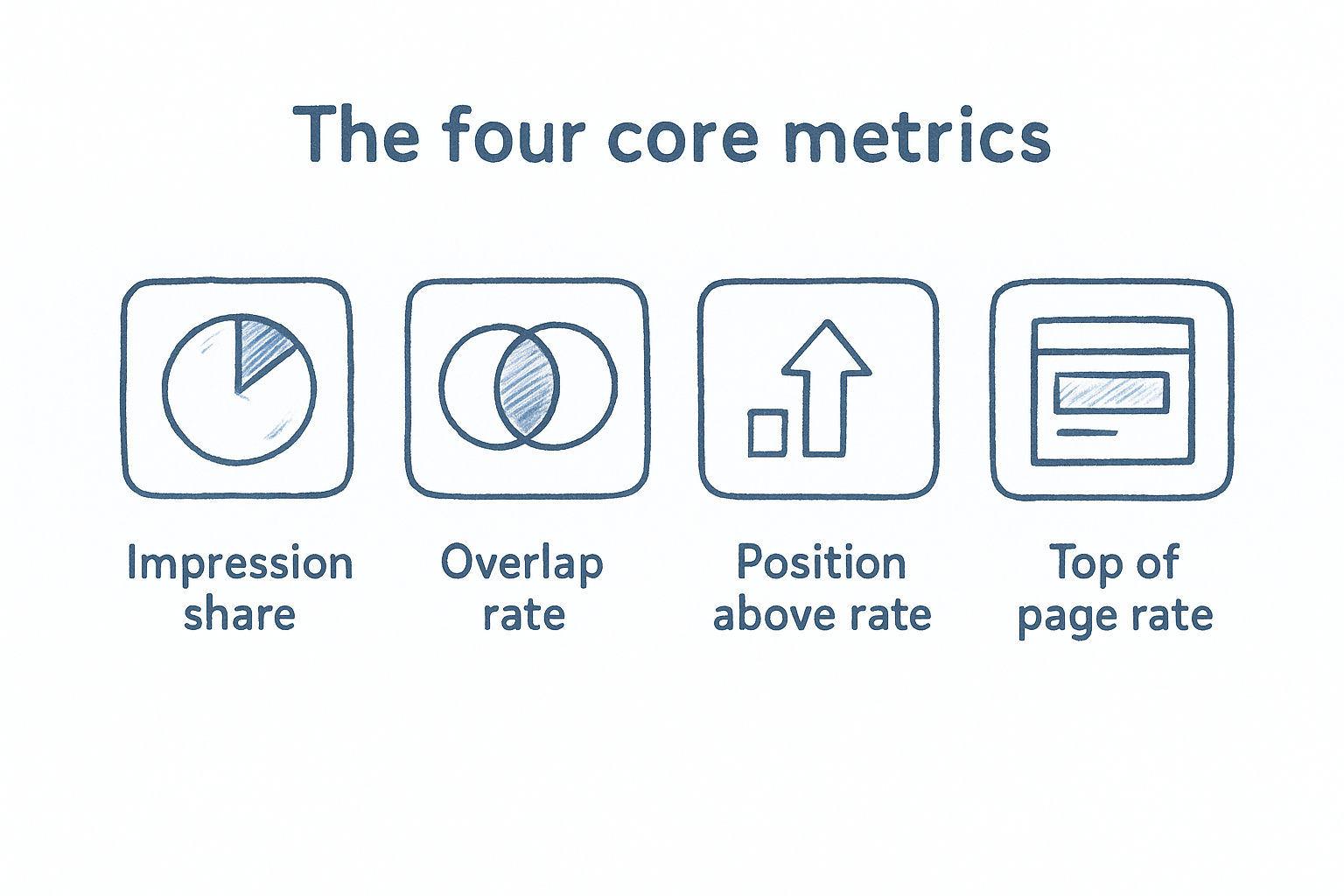
A high overlap rate paired with a high position above rate is the clearest sign you're losing a specific competitor, not just the auction in general.
Reading the pattern, not just the number
Context matters more than any single figure. If impression share is low but overlap rate is also low, you're probably targeting too narrow a keyword list rather than losing head-to-head fights. If overlap is high and position above rate favors the competitor, that's a bid and quality score problem worth fixing directly.
How to turn auction insights into a stronger ad strategy
Data without action is just a spreadsheet, so the real value of the auction insights report shows up once you translate each metric into a specific campaign change. Treat the report as a monthly checkup rather than a one-time audit, ideally alongside a wider Google Ads optimization routine, since competitor bidding patterns in personal injury and family law shift constantly as firms adjust their own budgets.
Matching the fix to the problem
Start by grouping your findings into three buckets, then work through them in order of cost impact:
- Low impression share, low overlap: raise budget or broaden keyword targeting before touching bids.
- High overlap, weak position above rate: increase bids on the specific keywords where a named competitor consistently outranks you.
- High overlap, strong position above rate but poor lead quality: the auction is fine, so shift focus to landing page and intake conversion work instead.
Fixing the wrong problem, like raising bids when the real issue is quality score, wastes budget without closing the gap.
Building the review into your routine
Quarterly reviews work well for most solo and small firm accounts, while firms spending heavily in mass torts or other high-CPC verticals should check monthly. Reviewing alongside an agency partner, such as done-for-you Google Ads management for law firms, gives you a second set of eyes on whether a bid increase actually makes sense given your case value and close rate, rather than chasing impression share for its own sake. Ultimately, the goal isn't winning every auction. It's winning the auctions that lead to signed cases at a cost your firm can sustain.
Frequently Asked Questions
What counts as a good impression share in Google Ads auction insights?
There's no universal benchmark, since impression share depends on budget, market size, and how many firms compete for the same terms. A personal injury firm in a mid-size city might see 60-70% as strong, while a solo practitioner in a saturated metro area might realistically top out near 40%. Compare your own number over time rather than chasing an arbitrary industry figure.
Why do different competitors show up each time I check the report?
Auction insights only shows firms that actually bid on the same keywords during your selected date range, so the list shifts as competitors pause campaigns, adjust budgets, or launch new ones. A firm that dominated last quarter might disappear entirely if it cut spend, while a new entrant can show up overnight once it starts bidding on your terms.
Does auction insights work for Local Services Ads?
No. Local Services Ads run through a separate bidding system and don't generate an auction insights report the way standard Search campaigns do. If your firm relies heavily on Local Services Ads, you'll need to judge competitive position through lead volume and rank position instead.
Auction insights only covers Search and Shopping campaigns, so don't expect the same visibility from Local Services Ads or Performance Max.
How often should I actually pull this report?
Monthly works for most firms, though high-spend mass tort or immigration campaigns benefit from a weekly glance since competitor bidding in those verticals shifts fast enough to make a monthly check outdated.
Keeping your campaigns competitive
The Google Ads auction insights report only helps if you actually open it. Pull the numbers monthly, match each weak metric to the right fix, and treat impression share, overlap rate, and position above rate as a diagnostic tool rather than a vanity scoreboard. Firms that skip this step often chase bid increases when the real problem is quality score, or blame competitors when their own keyword list is simply too narrow.
Remember that winning the auction is only step one. A campaign that dominates its competitors on paper but sends clicks to a slow intake process still loses cases to a firm with a weaker ad and a faster follow-up. Pair your auction insights review with real attribution data, so you know which wins actually turn into signed retainers.
If you'd rather have someone manage that whole loop for you, from bid strategy through case tracking, book a free 45-minute Google Ads review and we'll walk through what your account is actually up against.
Frequently Asked Questions
What counts as a good impression share in Google Ads auction insights?
There's no universal benchmark, since impression share depends on budget, market size, and how many firms compete for the same terms. A personal injury firm in a mid-size city might see 60-70% as strong, while a solo practitioner in a saturated metro area might realistically top out near 40%. Compare your own number over time rather than chasing an arbitrary industry figure.
Why do different competitors show up each time I check the report?
Auction insights only shows firms that actually bid on the same keywords during your selected date range, so the list shifts as competitors pause campaigns, adjust budgets, or launch new ones. A firm that dominated last quarter might disappear entirely if it cut spend, while a new entrant can show up overnight once it starts bidding on your terms.
Does auction insights work for Local Services Ads?
No. Local Services Ads run through a separate bidding system and don't generate an auction insights report the way standard Search campaigns do. If your firm relies heavily on Local Services Ads, you'll need to judge competitive position through lead volume and rank position instead. Auction insights only covers Search and Shopping campaigns, so don't expect the same visibility from Local Services Ads or Performance Max.
How often should I actually pull this report?
Monthly works for most firms, though high-spend mass tort or immigration campaigns benefit from a weekly glance since competitor bidding in those verticals shifts fast enough to make a monthly check outdated.