7 Google Ads Conversion Rate Optimization Tips for Law Firms
Categories: Legal Marketing Strategies
 Abram Ninoyan
Founder & Senior Performance Marketer
Credentials: Google Partner, Google Ads Search Certified, Google Ads Display Certified, Google Ads Measurement Certified, Google Analytics (IQ) Certified, HubSpot Inbound Certified, HubSpot Social Media Marketing Certified, Conversion Optimization Certified
Expertise: Google Ads, Meta Ads, Conversion Rate Optimization, GA4 & Google Tag Manager, Lead Generation, Marketing Funnel Optimization, PPC Management
LinkedIn Profile
Your firm's Google Ads spend is climbing, but the number of signed cases coming out the other end hasn't moved. That gap is exactly what google ads conversion rate optimization fixes, and for law firm...
Key Takeaways
- 7 Google Ads Conversion Rate Optimization Tips for Law Firms
- 1. Feed signed cases back into your bidding strategy
- 2. Match ad copy and landing pages to each practice area
- 3. Respond to new leads within minutes, not hours
7 Google Ads Conversion Rate Optimization Tips for Law Firms
Your firm's Google Ads spend is climbing, but the number of signed cases coming out the other end hasn't moved. That gap is exactly what google ads conversion rate optimization fixes, and for law firms it means something different than it does for an e-commerce store. You're not optimizing for a checkout. You're optimizing for a phone call that turns into a retainer, weeks or months later.
Most conversion rate advice online was written for online retailers, and it shows: talk of cart abandonment and product-page tests doesn't translate to a personal injury or family law intake process. The real levers for legal ads are your call handling, your intake form, and whether you're bidding toward leads or toward signed cases.
This list covers seven changes you can make this month, from fixing mobile form friction to feeding case outcomes back into your bidding strategy. Some you can do inside Google Ads directly. Others depend on what your call tracking and intake setup actually shows you, which is where a lot of firms discover their real problem isn't the ads at all.
1. Feed signed cases back into your bidding strategy
What it means
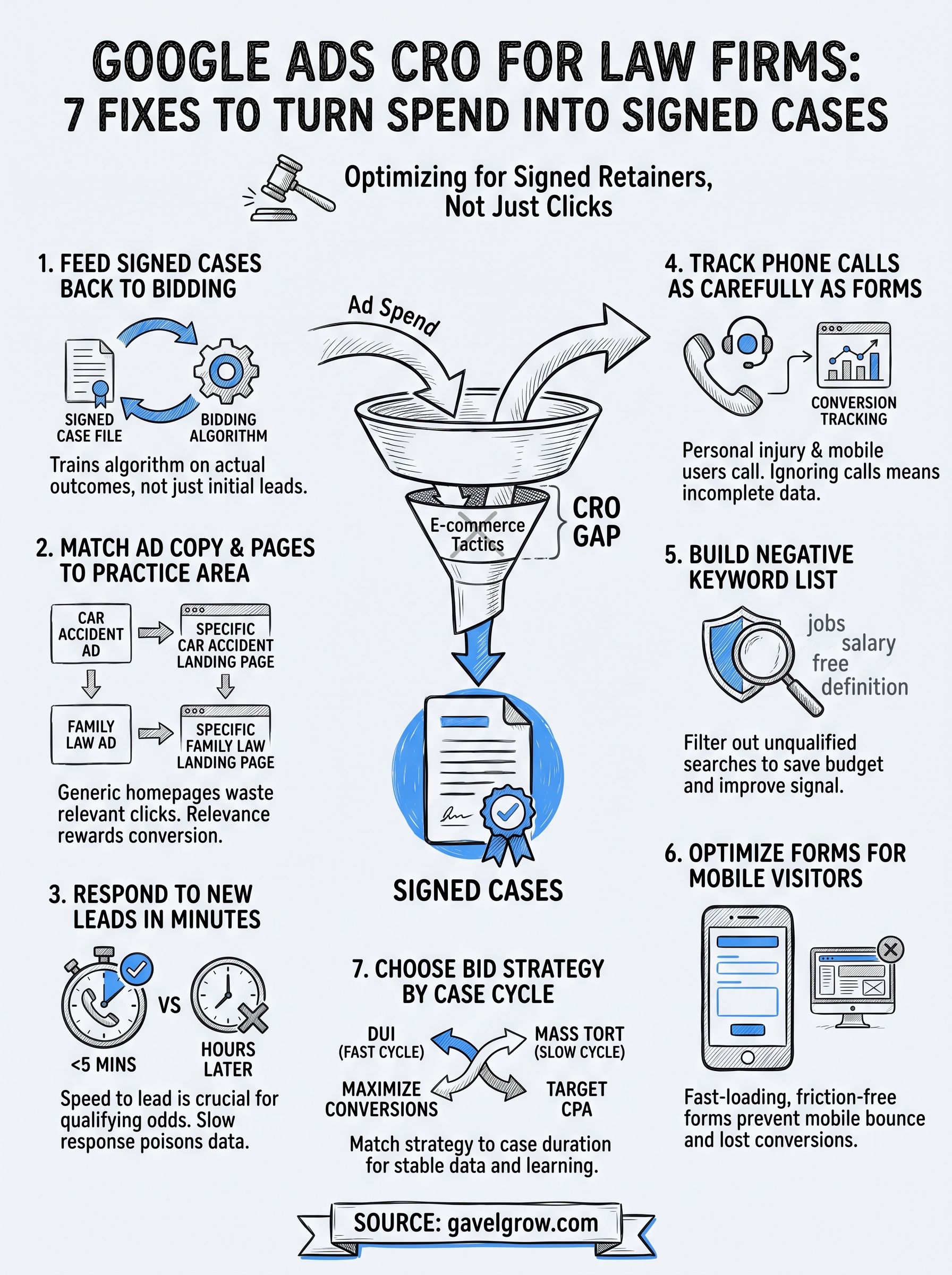
Google Ads' automated bidding is only as smart as the data you feed it. Most law firms set up a conversion action for form submissions or calls, and that's the entire signal Google gets. The algorithm has no idea whether that lead ever became a signed case. Feeding signed cases back into bidding means passing that later-stage outcome, not just the initial click, into the same system deciding who to bid on tomorrow.
Why it matters for law firms
A form fill from someone searching "free legal advice" looks identical to Google Ads as a form fill from a car accident victim with a clear liability case. Without a signed-case signal, your bidding algorithm keeps chasing more of both. It optimizes toward volume, not value, which is exactly backwards for a firm paying by the click.
If Google Ads never learns which leads became cases, it will keep buying you more leads that don't.
This is the single highest-leverage fix on this list, because it changes what the algorithm itself is trying to do, rather than tweaking settings around the edges.
How to implement it in Google Ads
Google Ads supports offline conversion imports, but most firms never use them because matching a signed retainer back to the original click requires connecting your case management data to your ad account, which usually means custom exports and manual uploads.
This is the exact gap GavelGrow's Smart Conversions feature closes. When a case gets marked signed inside the platform, that outcome feeds back into your Google Ads bidding in real time on the Optimize and Managed plans, so the algorithm learns from actual signed cases, not just leads. On the Track plan, you get a preview of what that signal would look like before turning it on.
If you're not ready for automated feedback loops yet, start smaller: tag your highest-value practice areas as separate conversion actions so at least your budget allocation reflects which cases are worth more, even before you close the full loop back to signed retainers.
2. Match ad copy and landing pages to each practice area
What it means
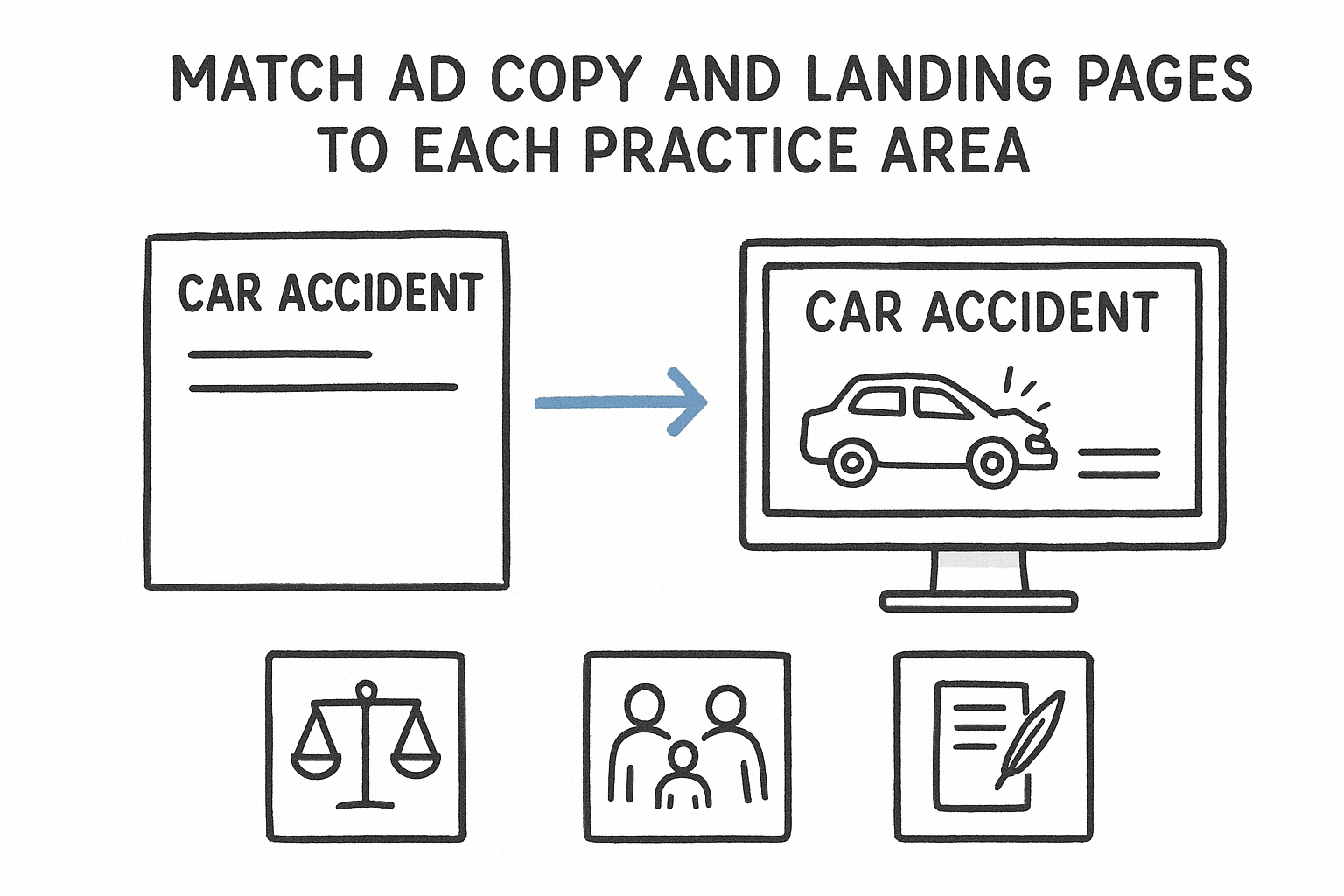
Running one generic "personal injury lawyer" campaign that sends every click to your homepage wastes clicks that Google already told you were valuable. Practice-area matching means a car accident search leads to car accident ad copy and a car accident landing page, not a page listing eight unrelated services. Same for family law, immigration, or workers comp. Each intent gets its own path.
Why it matters for law firms
Quality Score and conversion rate both reward relevance. A visitor searching "truck accident lawyer near me" who lands on a generic homepage has to hunt for proof you handle truck cases at all, and most won't bother.
A landing page that matches the search is the cheapest conversion lift you'll ever get.
Firms running mass torts alongside personal injury or family law see the biggest gap here, since each practice area attracts a completely different searcher with different urgency and different questions.
How to implement it in Google Ads
Structure your account by practice area, not by keyword theme alone:
- One campaign or ad group per practice area
- A dedicated landing page built to convert per group, with headlines that echo the ad copy
- Case-specific trust signals (settlements, case types handled, attorney bios relevant to that area)
GavelGrow's hosted intake forms make this easy to test, since you can spin up a firm-branded page per practice area without touching your main site's CMS.
3. Respond to new leads within minutes, not hours
What it means
Speed to lead is how fast someone from your firm actually contacts a new lead after they submit a form or hang up from a missed call. Response time isn't a Google Ads setting, but it directly shapes your conversion data, because a lead who never hears back never becomes a signed case, no matter how well-targeted the click was.
Why it matters for law firms
The Lead Response Management Study found that leads contacted within five minutes are far more likely to be qualified than those first reached at thirty minutes. That's a gap in qualifying odds, not a guaranteed conversion, but it still means every hour your intake team waits costs you leads Google Ads already paid for, and a surprising share of leads never get called back at all.
The ad already did its job. A slow callback is what actually loses the case.
Slow response also poisons your bidding data indirectly: leads that go cold get marked unqualified for reasons that have nothing to do with lead quality.
How to implement it in Google Ads
Pair Google Ads with automated legal intake sequences that fire within seconds of a form submission or missed call, not hours later. GavelGrow's unified inbox and email sequences trigger automatically on capture, so your attorneys see every new lead the moment it lands. Text sequences, with STOP and HELP opt-outs handled for you, switch on once your firm's texting clears carrier approval, which usually takes two to three weeks.
4. Track phone calls as carefully as form fills
What it means
Many law firms treat phone calls as an afterthought in Google Ads, tracking form fills as conversions while calls get logged manually, if at all. Call tracking software for legal intake means every ad-driven phone call gets its own tracking number, recording, and outcome tag, so Google Ads sees calls the same way it sees form submissions: as a conversion with a source, a keyword, and eventually a case value attached.
Why it matters for law firms
Personal injury, family law, and criminal defense searchers call far more often than they fill out forms, especially from mobile. If your account only counts form fills, you're optimizing bidding on a fraction of your actual conversions, and the algorithm never learns which keywords drive your highest-value calls.
A campaign that ignores phone calls is optimizing on incomplete data, no matter how good the click-through rate looks.
Calls that never get logged also make your cost per signed case math wrong in both directions, hiding winners and losers alike.
How to implement it in Google Ads
Set up call conversion tracking with dynamic number insertion so each ad and keyword gets credit correctly. GavelGrow's built-in call tracking assigns per-campaign numbers, records and transcribes calls, and tags outcomes as qualified, callback, unqualified, or spam, feeding that detail straight back into your reporting without a separate call-tracking subscription.
5. Build a negative keyword list for unqualified searches
What it means
A negative keyword list tells Google Ads which searches to keep your ads away from, even when those searches contain your target terms. "Personal injury lawyer salary," "free legal advice," and "paralegal jobs" all match broad match variations of the keywords you're bidding on, but none of them come from someone who needs to hire you.
Why it matters for law firms
Every click from an unqualified search drains budget that could have gone toward a real prospect, and it also feeds junk data into your conversion tracking. If someone clicks through, fills a form out of curiosity, and never responds to follow-up, that lead quietly drags down your conversion rate and confuses any bidding algorithm trying to learn from it.
Filtering out searches that were never going to convert is cheaper than trying to convert them.
Firms that skip this step often blame their landing page or intake team for a conversion rate problem that's really a targeting problem.
How to implement it in Google Ads
Pull your search terms report monthly, as part of a wider monthly Google Ads audit routine, and add obvious non-buyers: "jobs," "salary," "how to become," "free," "definition," and competitor firm names if you don't want that traffic. GavelGrow's marketing dashboard shows cost per lead by campaign, making it easy to spot which search themes are burning spend without producing signed cases.
6. Optimize your intake forms for mobile visitors
What it means
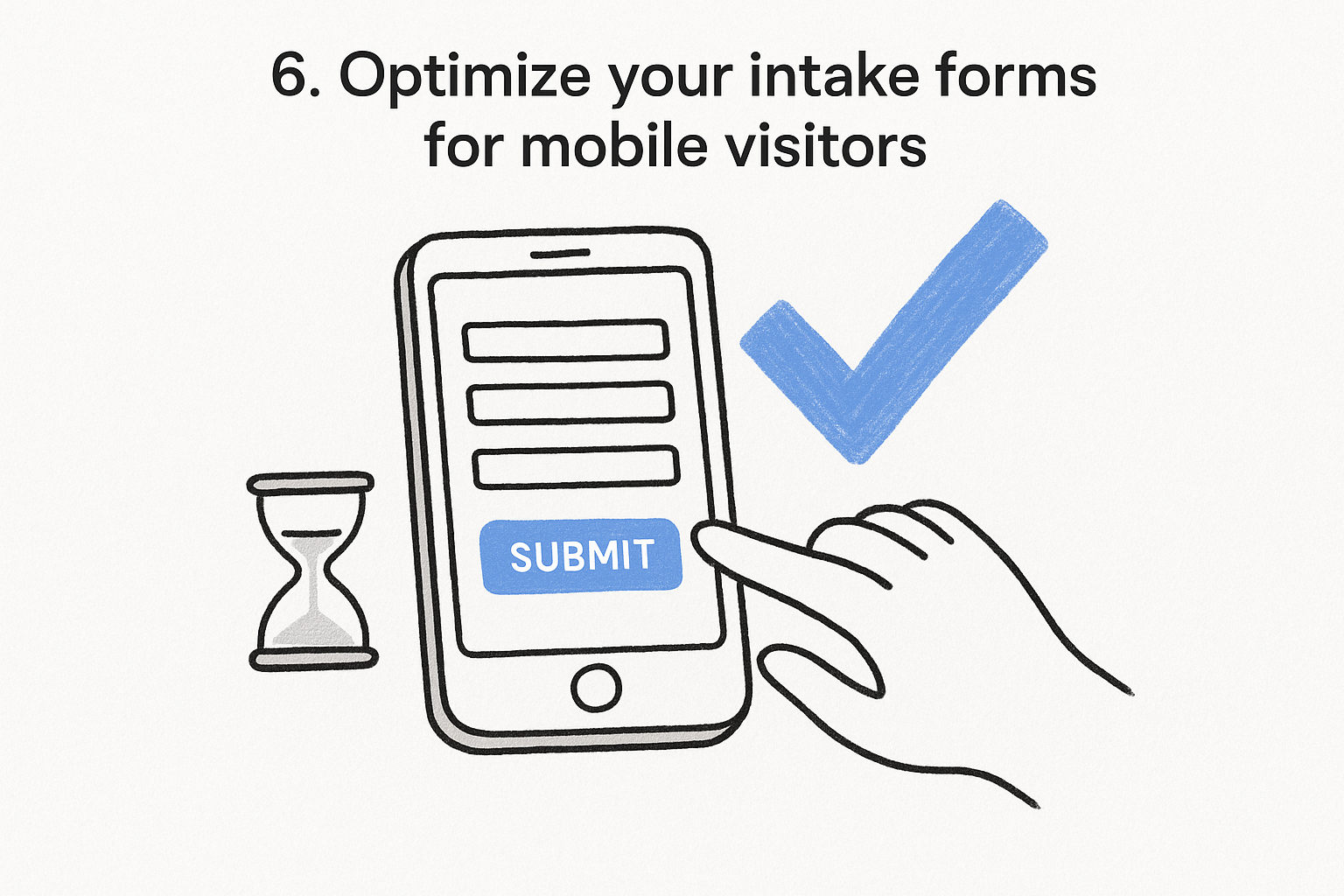
Most of your Google Ads traffic now arrives on a phone, especially from personal injury, DUI, and family law searches where someone is looking for help right after an accident or an arrest. Mobile intake forms need to load fast, fit a small screen without pinching and zooming, and ask for the fewest fields possible before a lead will bother finishing them.
Why it matters for law firms
Desktop forms dropped onto a mobile page tend to underperform, since long dropdown menus, tiny tap targets, and multi-page layouts built for a mouse and keyboard frustrate someone thumb-typing on a cracked screen in a parking lot. Mobile form friction shows up in Google Ads as clicks that never convert, even when the keyword, ad copy, and landing page all did their job correctly.
A form that's hard to finish on a phone throws away clicks you already paid for.
That lost conversion also skews your bidding data, since Google Ads can't tell the difference between a bad keyword and a form nobody could complete.
How to implement it in Google Ads
Test your own forms on a phone before blaming your traffic, and work through the intake fixes that stop losing signed cases. GavelGrow's hosted and embeddable intake forms are built mobile-first, with multi-step layouts, carrier-level phone validation and an instant email auto-reply (text replies follow once your firm's texting clears carrier approval), so a lead who starts on their phone actually finishes.
7. Choose a bid strategy that fits your case cycle
What it means
Google Ads offers several automated bid strategies, and picking the wrong one for how long your cases take to close can quietly undo everything else on this list, so it helps to understand how Google Ads bidding actually works. Maximize conversions chases volume immediately, while target CPA and target ROAS need enough conversion history to calibrate correctly. A mass tort campaign with a six-month intake cycle needs different pacing than a DUI campaign where leads call within the hour.
Why it matters for law firms
Switching bid strategies too often, or picking one built for fast-turnaround leads when your practice area takes months to sign a case, starves the algorithm of the stable data it needs to learn. Family law and mass tort firms especially get burned here, since their case cycles run long enough that a strategy optimized for quick wins ends up bidding on the wrong signals entirely.
The bid strategy that works for a DUI firm can quietly sabotage a mass tort campaign.
How to implement it in Google Ads
Start new campaigns on maximize conversions to build volume, then shift to target CPA once you have enough signed-case data to set a realistic target. Firms deciding between self-serve control and a fully managed approach can compare the plans before committing budget to either path.
Next steps for your firm's ad spend
None of these seven fixes require a bigger budget. Feeding signed cases back into bidding, fixing mobile forms, and building out negative keyword lists all cost time, not ad dollars, and they compound. A firm that closes the loop between clicks and signed retainers gets more out of the same spend every month after that, instead of chasing volume that never turns into cases.
Start with whichever gap is costing you the most right now. If you're not sure where that is, that's a diagnosis problem before it's a tactics problem. Google Ads conversion rate optimization works best when you can actually see cost per signed case by campaign, not just cost per click. GavelGrow's legal-only team builds and runs that kind of attribution daily through its conversion optimization service for law firms, covering intake forms, landing pages, and call handling. Book a free strategy call and walk through your account with someone who's only ever worked on legal ads.
Frequently asked questions about Google Ads conversion rate optimization
What is a good Google Ads conversion rate for a law firm?
LocaliQ's 2026 search advertising benchmarks put the average conversion rate for attorneys and legal services at 5.55%, but that figure counts any contact after a click, whether a call, form, chat or email, across every practice area. Your own rate will swing with how you define a conversion and which practice areas you run. The more useful comparison is your rate against your own history, campaign by campaign, alongside how many of those conversions become signed cases. A campaign converting at 8% that never signs anyone is worse than one converting at 4% that does.
How does a higher conversion rate lower my cost per lead?
Cost per lead is your cost per click divided by your conversion rate, so every lift in conversion rate cuts what you pay for each lead at the same bid. At LocaliQ's 2026 average legal cost per click of $9.87, a 5% conversion rate works out to about $197 per lead, and a 10% rate to about $99. Doubling the rate halves your cost per lead without touching your budget or your bids, which is why fixing landing pages, forms and call handling can pay off before you add a single keyword.
Should phone calls count as conversions in Google Ads?
Yes. Many legal searchers call rather than fill out a form, so leaving calls out means your bidding learns from partial data. Google Ads can track calls from your ads and calls to a tracked number on your website, and it counts a call as a conversion only when it lasts longer than a minimum length you set. Set that threshold long enough to screen out wrong numbers and hang-ups, and use call recordings or outcome tags to confirm which calls were real inquiries before you trust the numbers.
What should a law firm count as a primary conversion in Google Ads?
Google Ads separates primary conversion actions, which are used for bidding, from secondary actions, which are for observation only and appear in the All conversions column. Make your primary actions the ones that signal a real prospect: qualified calls, completed intake forms and, once you can import them, qualified consultations or signed cases. Keep page views, chat opens and clicks on your email address as secondary, so you can still watch them without teaching automated bidding to chase them.
Can I send signed cases to Google Ads if they sign months after the click?
Only within Google's import window. Google keeps the click ID (GCLID) for 90 days, and offline conversions uploaded more than 90 days after the click are not imported. Cases that sign inside that window can be uploaded against the original click. For matters that routinely take longer than that to sign, import an earlier milestone that happens within 90 days, such as a qualified consultation, as your offline conversion, and keep tracking the signed case in your own reporting.
Frequently Asked Questions
What is a good Google Ads conversion rate for a law firm?
LocaliQ's 2026 search advertising benchmarks put the average conversion rate for attorneys and legal services at 5.55%, but that figure counts any contact after a click, whether a call, form, chat or email, across every practice area. Your own rate will swing with how you define a conversion and which practice areas you run. The more useful comparison is your rate against your own history, campaign by campaign, alongside how many of those conversions become signed cases. A campaign converting at 8% that never signs anyone is worse than one converting at 4% that does.
How does a higher conversion rate lower my cost per lead?
Cost per lead is your cost per click divided by your conversion rate, so every lift in conversion rate cuts what you pay for each lead at the same bid. At LocaliQ's 2026 average legal cost per click of $9.87, a 5% conversion rate works out to about $197 per lead, and a 10% rate to about $99. Doubling the rate halves your cost per lead without touching your budget or your bids, which is why fixing landing pages, forms and call handling can pay off before you add a single keyword.
Should phone calls count as conversions in Google Ads?
Yes. Many legal searchers call rather than fill out a form, so leaving calls out means your bidding learns from partial data. Google Ads can track calls from your ads and calls to a tracked number on your website, and it counts a call as a conversion only when it lasts longer than a minimum length you set. Set that threshold long enough to screen out wrong numbers and hang-ups, and use call recordings or outcome tags to confirm which calls were real inquiries before you trust the numbers.
What should a law firm count as a primary conversion in Google Ads?
Google Ads separates primary conversion actions, which are used for bidding, from secondary actions, which are for observation only and appear in the All conversions column. Make your primary actions the ones that signal a real prospect: qualified calls, completed intake forms and, once you can import them, qualified consultations or signed cases. Keep page views, chat opens and clicks on your email address as secondary, so you can still watch them without teaching automated bidding to chase them.
Can I send signed cases to Google Ads if they sign months after the click?
Only within Google's import window. Google keeps the click ID (GCLID) for 90 days, and offline conversions uploaded more than 90 days after the click are not imported. Cases that sign inside that window can be uploaded against the original click. For matters that routinely take longer than that to sign, import an earlier milestone that happens within 90 days, such as a qualified consultation, as your offline conversion, and keep tracking the signed case in your own reporting.