6 Best Notion Content Calendar Templates for Law Firms
Categories: Legal Marketing Strategies
 Abram Ninoyan
Founder & Senior Performance Marketer
Credentials: Google Partner, Google Ads Search Certified, Google Ads Display Certified, Google Ads Measurement Certified, Google Analytics (IQ) Certified, HubSpot Inbound Certified, HubSpot Social Media Marketing Certified, Conversion Optimization Certified
Expertise: Google Ads, Meta Ads, Conversion Rate Optimization, GA4 & Google Tag Manager, Lead Generation, Marketing Funnel Optimization, PPC Management
LinkedIn Profile
Your firm's content calendar is scattered across three group chats, a shared spreadsheet, and one paralegal's memory. If you've searched for a notion content calendar template, you're probably trying...
Key Takeaways
- 6 Best Notion Content Calendar Templates for Law Firms
- 1. Notion's basic content calendar template
- 2. Notion's social media calendar template
- 3. Notion's marketing team content calendar system
6 Best Notion Content Calendar Templates for Law Firms
Your firm's content calendar is scattered across three group chats, a shared spreadsheet, and one paralegal's memory. If you've searched for a notion content calendar template, you're probably trying to get your blog posts, social captions, and email newsletters onto one page before another deadline slips. Law firm marketing runs on a slower cycle than most industries, six to twelve months from first touch to signed case, so a calendar that tracks publish dates and practice-area topics in one view matters more here than in most niches.
This list covers six Notion templates built or adapted for legal marketing teams, ranked by how well they handle multi-practice-area planning and content status tracking from draft to published.
Content planning is only half the job, though. Once a blog post or ad brings in a lead, you need to know it actually converted into a signed retainer, not just a click. That's where a dedicated law firm marketing dashboard that tracks signed cases, like the one built into GavelGrow's platform, picks up where a Notion calendar leaves off.
1. Notion's basic content calendar template
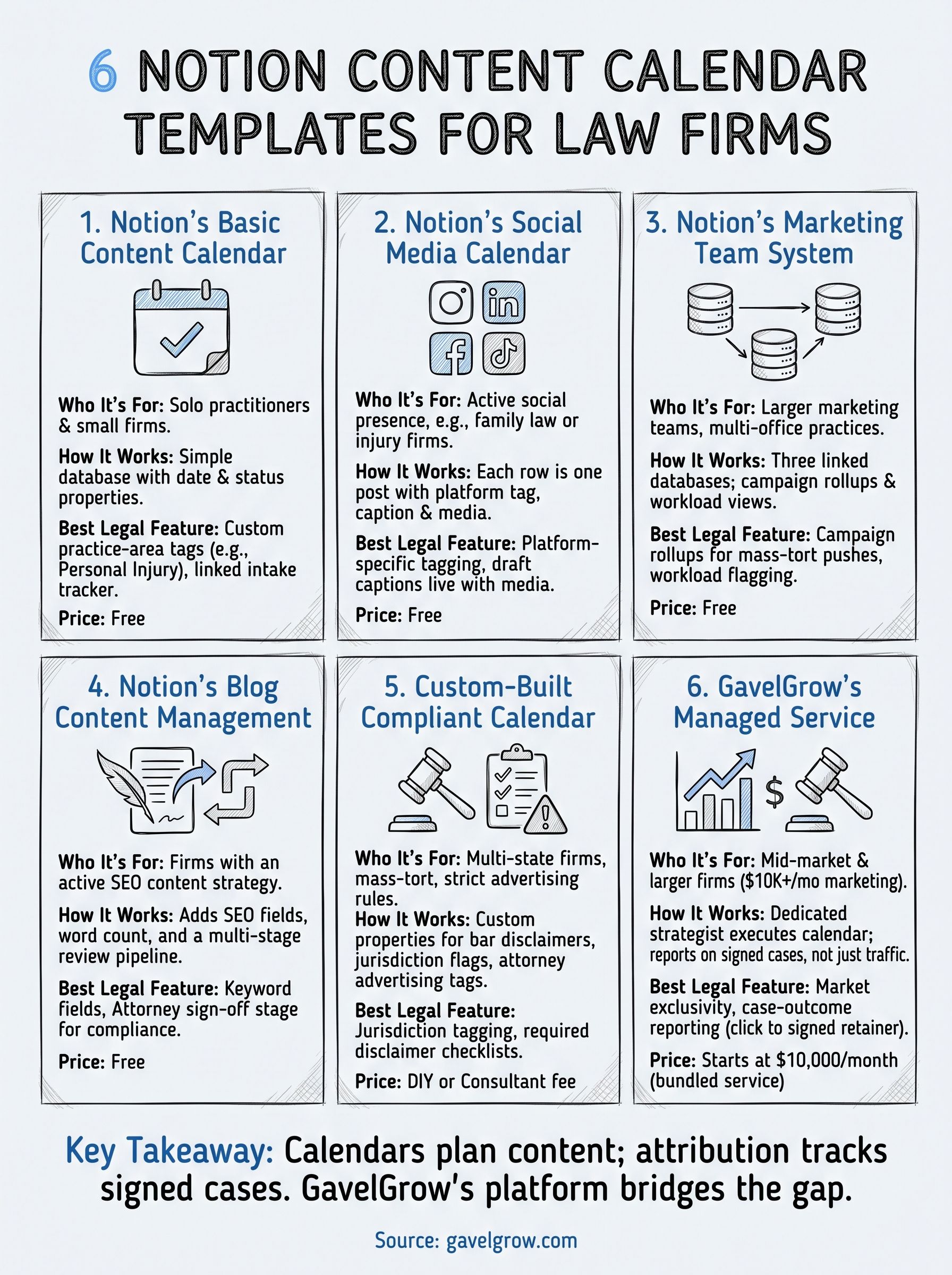
Notion's own content calendar template, free in the template gallery, is the default starting point for most firms typing "notion content calendar template" into Google. It's a simple database view with date, status, and content-type properties, built for generic marketing teams rather than legal specifically, but it's flexible enough to bend into a legal workflow with an afternoon of setup.
How it works
Underneath the calendar view sits a database where each entry represents one piece of content: a blog post, a newsletter, a social caption. You add properties for status (idea, drafting, review, scheduled, published), assign an owner, and tag a publish date that populates the calendar automatically. Switch between calendar, board, and table views without touching the underlying data.
Who it's for
Solo practitioners and small firms with one or two people handling marketing fit this template best. If you're a managing partner who writes your own blog posts between depositions, or a single marketing coordinator juggling five practice areas, the low setup cost outweighs the missing legal-specific fields.
A free calendar template only saves time if your team actually updates it every week.
Pricing
The template itself is free. Notion's paid plans start at $10/user/month for the Plus tier if you need more than the free tier's block limits, but a two-person marketing team can run this template entirely on Notion's free plan.
Best features for law firms
- Custom properties let you add a "practice area" tag (personal injury, family law, immigration) so you can filter the calendar by case type before a campaign push.
- Linked databases connect content entries to a separate client-intake tracker, useful for firms that already keep case notes in Notion.
- Status automation via Notion's board view gives you a visual pipeline from idea to published, which beats a spreadsheet column nobody remembers to update.
What it won't do is tell you whether that published blog post actually generated a signed case. For that, you need attribution from ad click to signed retainer, something GavelGrow's marketing dashboard handles natively.
2. Notion's social media calendar template
Notion also ships a dedicated social media calendar template built for teams posting across multiple platforms rather than long-form content. It swaps the blog-centric fields of the basic calendar for platform tags, caption drafts, and image placeholders, which fits firms leaning harder into Instagram reels and LinkedIn posts than blog output.
How it works
Each row in the database represents one social post, tagged by platform (Instagram, LinkedIn, Facebook, TikTok), with a caption field, a media attachment slot, and a publish-date property that feeds the calendar view. A board view groups posts by status so your team sees what's scheduled versus what's still a draft caption sitting in someone's notes app.
Who it's for
Firms running an active social presence, particularly personal injury and family law practices posting client testimonials and community content, get the most value here, especially if you've already planned your social media by practice area and posting cadence. A single marketing coordinator managing three or four platforms will find the platform-tagging far more useful than a generic content calendar.
A calendar built for Instagram captions won't track whether that post ever turned into a phone call.
Pricing
Free in the template gallery, same as the basic version, with Notion's $10/user/month Plus tier only necessary once your archive of past posts grows large.
Best features for law firms
- Platform-specific tagging keeps Instagram and LinkedIn content visually separate.
- Caption drafts live next to the media file, cutting down on version confusion before a post goes live, and they pair well with Canva social media templates for law firms.
3. Notion's marketing team content calendar system
Bigger marketing teams outgrow a single database fast, which is why Notion built a full marketing team content calendar system that links campaigns, content, and team workload into one connected workspace rather than one flat table. It's the closest Notion gets to a project-management tool without leaving the app, and it suits firms with a marketing director overseeing multiple writers or contractors.

How it works
Three linked databases sit behind the calendar: campaigns, content pieces, and team members. Each content entry rolls up to a parent campaign, so a personal injury awareness push shows every blog post, email, and social caption tied to it in one rollup view. A workload view sorts by assignee, showing who's overloaded before a deadline hits.
Who it's for
Firms with three or more people touching marketing, especially multi-office practices coordinating campaigns across locations, get the most out of the linked structure.
A calendar that shows workload by person prevents the one-paralegal bottleneck that kills publishing schedules.
Pricing
Free to duplicate, though the linked-database structure runs smoother on Notion's $10/user/month Plus tier once your team passes five members.
Best features for law firms
- Campaign rollups group every asset under one practice-area push, useful during mass-tort intake surges.
- Workload views flag which writer is buried before deadlines slip.
4. Notion's blog content management template
Firms publishing long-form blog content week after week eventually need more than a calendar view, they need a full editorial workflow built on a documented content strategy framework. Notion's blog content management template adds SEO fields, word-count targets, and a multi-stage review pipeline on top of the standard database, making it the better pick once your firm treats blogging as a real lead-generation channel rather than an occasional afterthought.
How it works
Beyond the usual status and date properties, this template adds a target keyword field, meta-description box, and internal-linking checklist to each entry. A review pipeline moves drafts through writer, editor, and attorney-review stages before publishing, which matters for firms that need a licensed attorney to sign off on legal accuracy before anything goes live.
Who it's for
Firms running an active content strategy for SEO, particularly personal injury and estate planning practices competing for high-value organic keywords, get the most value from the built-in SEO fields.
A blog calendar without an attorney-review stage is a malpractice risk waiting to publish itself.
Pricing
Free to duplicate. The attorney-review workflow works fine on Notion's free plan for teams under ten members.
Best features for law firms
- Keyword and meta fields keep SEO targeting visible alongside the writing itself.
- Attorney sign-off stage adds a compliance checkpoint most generic templates skip entirely.
5. A custom-built compliant calendar for law firms
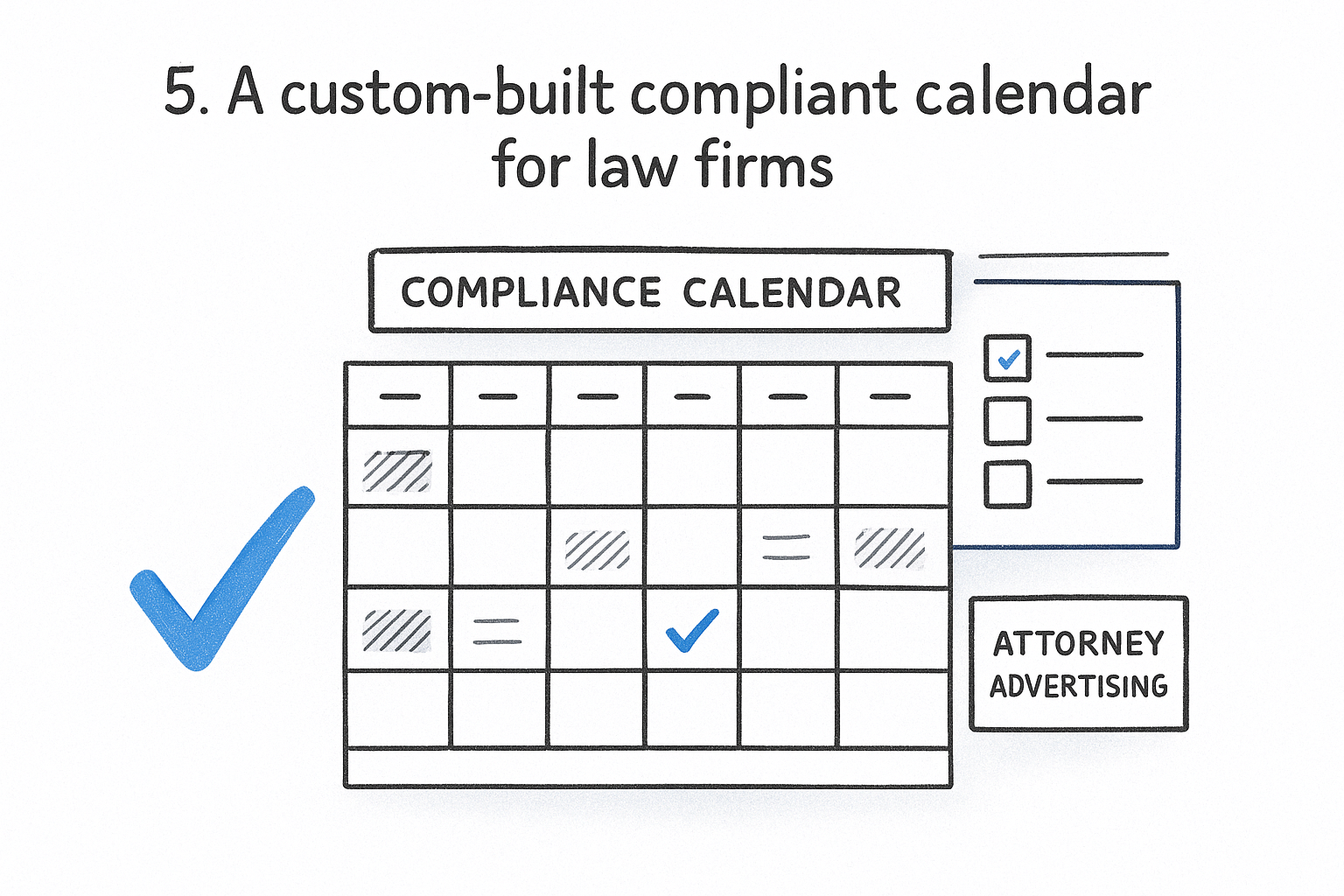
None of Notion's stock templates were built with the advertising rules law firms have to follow in mind, which is why some firms hire a Notion consultant or an in-house admin to build a compliance-first content calendar from scratch. This version adds custom properties for bar-rule disclaimers, attorney-advertising labels, and jurisdiction-specific review flags that no off-the-shelf template ships with.
How it works
Building one starts with the basic content calendar database, then layers on a compliance checklist property for each entry: required disclaimers, "attorney advertising" tags, and a jurisdiction field for firms licensed in multiple states. A locked template button generates new entries with those fields pre-filled, so nobody forgets the disclaimer on a testimonial post.
Who it's for
Multi-state firms and mass-tort practices juggling different bar rules per jurisdiction benefit most, since a generic calendar has no way to flag which disclaimer applies where.
A calendar built without bar-compliance fields puts the burden of catching violations on memory alone.
Pricing
Building it yourself costs nothing beyond time. Hiring a Notion consultant to build one typically runs $500 to $2,500 depending on complexity, on top of your existing Notion plan.
Best features for law firms
- Jurisdiction tagging flags which state-bar rules apply to each piece of content.
- Disclaimer checklists stop a testimonial or results-based post from publishing without the required language.
6. GavelGrow's managed content marketing service
Some firms don't want another Notion database to babysit. They want the content calendar filled, executed, and tied to signed cases without hiring an in-house writer. GavelGrow's managed content marketing service for law firms replaces the DIY calendar entirely, pairing a dedicated strategist with the same case-centric measurement philosophy that runs through GavelGrow's platform.
How it works
A strategist builds and executes your editorial calendar across blog posts, email newsletters, and social captions using a proven content marketing playbook for law firms, then reports results inside the same dashboard that tracks your paid campaigns. Content isn't judged on traffic or likes, it's judged on whether it produced a signed retainer, using the full-funnel attribution GavelGrow already applies to Google Ads and Local Services Ads spend.
Who it's for
Mid-market and larger firms that have already moved to managed services, particularly mass-tort and multi-office practices without bandwidth for an in-house content team, fit this option best.
A content calendar only matters if someone reports back on which posts turned into signed cases.
Pricing
Content marketing is bundled into GavelGrow's managed-services engagements, which are scoped on a strategy call and also cover paid acquisition, SEO, and reputation management. GavelGrow offers a free 45-minute strategy consultation before any commitment.
Best features for law firms
- Market exclusivity on managed engagements: GavelGrow does not run marketing for two direct competitors in the same market.
- Case-outcome reporting ties every published piece back to signed retainers, not vanity metrics.
Picking the calendar that fits your firm
Solo practitioners should start with Notion's free basic template and add a practice-area property before lunch. Multi-office firms need the linked campaign system or a custom-built compliant calendar with jurisdiction tagging built in. Either way, a Notion database only tracks what you plan to publish, not what that content actually earned you.
Once you're producing content consistently, the real question shifts from "is it scheduled" to "did it convert." A blog post ranking for a personal injury keyword means nothing if you can't trace the reader from click to signed retainer. That's the gap between a planning tool and a revenue-tracking system, and it's why most firms eventually pair their calendar with something built specifically for legal marketing attribution.
If you're ready to see whether your published content is actually producing signed cases instead of just page views, book a free 45-minute content and attribution strategy call and we'll walk through your current setup together.
Frequently Asked Questions
Is Notion a good fit for a law firm content calendar?
For planning, yes. Notion handles the editorial side well: what is being written, who owns it, what stage it is in, and when it publishes, all in one view a small team can actually maintain. Where it stops is measurement. Notion has no idea whether a published post generated a consultation or a signed case, so most firms end up pairing it with analytics or a platform that closes that loop.
Is the free Notion plan enough for a law firm?
For most solo and small firms, yes. The free tier comfortably handles a single content calendar, a handful of collaborators, and months of scheduled posts. Firms usually hit the limits only when the archive of past content grows large or the marketing team passes a few members, at which point the paid tier becomes worth it. Start free and upgrade when you actually feel the constraint, not before.
What should a law firm content calendar track beyond publish dates?
The fields that matter most are the ones a generic template omits: the practice area each piece targets, the attorney or staffer responsible for review, approval status before anything goes live, and the target keyword or client question the piece answers. Adding a field for where the piece sits in the funnel, whether it is educational or conversion-focused, keeps a calendar from filling up with content that never asks anyone to call.
How do you keep a content calendar bar-compliant?
Build the review step into the calendar itself rather than trusting memory. Give every item an approval status that must be set by a licensed attorney before publishing, and add fields flagging whether the piece references case results or testimonials, which typically require disclaimers under state bar advertising rules. A calendar that records who approved what and when is also the audit trail you would want if a bar complaint ever arrived.
Notion, a spreadsheet, or a marketing platform — which does a law firm need?
A spreadsheet is fine for one person publishing occasionally. Notion earns its place once several people collaborate and status tracking starts to matter. A marketing platform becomes necessary at the point you need to know which content produced clients, since neither a spreadsheet nor Notion connects a published post to intake and signed cases. Many firms run a calendar for planning and a platform for measurement.
How do you connect a content calendar to signed cases?
The calendar is where you plan; attribution is where you learn. Connecting the two means tracking each published page through to the leads and phone calls it generated, then following those through intake to a retained client, and reporting cost per signed case by page. Without that link, a content calendar measures activity, and a full calendar with no attribution can look productive for months while producing nothing.
Notion is a trademark of Notion Labs, Inc., referenced here for identification and comparison only and not affiliated with or endorsing GavelGrow, which is included among the options above. Notion pricing reflects publicly listed rates as of August 2026 and can change; verify current pricing and plan limits directly with Notion.
Frequently Asked Questions
Is Notion a good fit for a law firm content calendar?
For planning, yes. Notion handles the editorial side well: what is being written, who owns it, what stage it is in, and when it publishes, all in one view a small team can actually maintain. Where it stops is measurement. Notion has no idea whether a published post generated a consultation or a signed case, so most firms end up pairing it with analytics or a platform that closes that loop.
Is the free Notion plan enough for a law firm?
For most solo and small firms, yes. The free tier comfortably handles a single content calendar, a handful of collaborators, and months of scheduled posts. Firms usually hit the limits only when the archive of past content grows large or the marketing team passes a few members, at which point the paid tier becomes worth it. Start free and upgrade when you actually feel the constraint, not before.
What should a law firm content calendar track beyond publish dates?
The fields that matter most are the ones a generic template omits: the practice area each piece targets, the attorney or staffer responsible for review, approval status before anything goes live, and the target keyword or client question the piece answers. Adding a field for where the piece sits in the funnel, whether it is educational or conversion-focused, keeps a calendar from filling up with content that never asks anyone to call.
How do you keep a content calendar bar-compliant?
Build the review step into the calendar itself rather than trusting memory. Give every item an approval status that must be set by a licensed attorney before publishing, and add fields flagging whether the piece references case results or testimonials, which typically require disclaimers under state bar advertising rules. A calendar that records who approved what and when is also the audit trail you would want if a bar complaint ever arrived.
Notion, a spreadsheet, or a marketing platform — which does a law firm need?
A spreadsheet is fine for one person publishing occasionally. Notion earns its place once several people collaborate and status tracking starts to matter. A marketing platform becomes necessary at the point you need to know which content produced clients, since neither a spreadsheet nor Notion connects a published post to intake and signed cases. Many firms run a calendar for planning and a platform for measurement.
How do you connect a content calendar to signed cases?
The calendar is where you plan; attribution is where you learn. Connecting the two means tracking each published page through to the leads and phone calls it generated, then following those through intake to a retained client, and reporting cost per signed case by page. Without that link, a content calendar measures activity, and a full calendar with no attribution can look productive for months while producing nothing. Notion is a trademark of Notion Labs, Inc., referenced here for identification and comparison only and not affiliated with or endorsing GavelGrow, which is included among the options above. Notion pricing reflects publicly listed rates as of August 2026 and can change; verify current pricing and plan limits directly with Notion.